


Response time testing helps review and evaluate the system. From there, the organization will come up with reasonable methods to improve system quality. Let’s learn more about what response time is and how to evaluate response time in the article below.
What is Response Time?
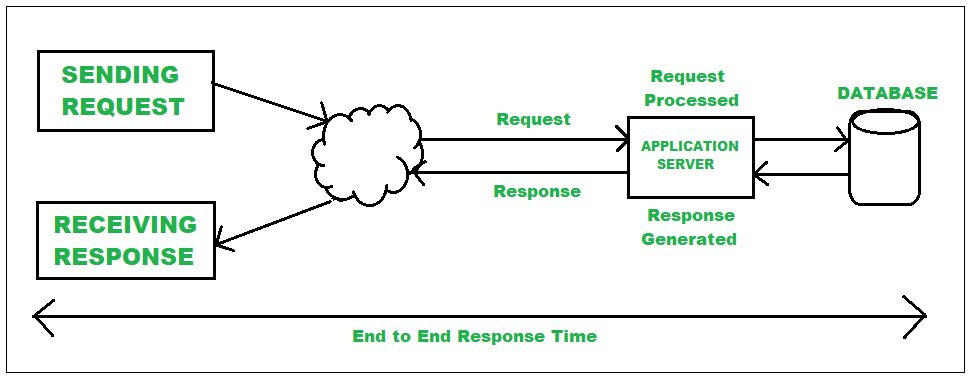
For websites, applications or software, every user interaction triggers an action with an expected response time. Response time is the time it takes to respond to those requests and it determines the site or application’s efficiency and satisfaction of its users.

What is Response Time Testing? An example of Response Time Testing
Respond time testing measures the amount of time that elapses between a user’s request and the server, application, website, or device’s response. It evaluates the system’s responsiveness to changes in loads and conditions in order to determine how well it performs. This kind of testing makes it easy to find obstacles that increase load times and decrease customer happiness.

The response time is the amount of time it takes for an application to respond to a user’s request, for example, to load a particular web page. By testing the system, we can make sure it performs as expected and is efficient.
Sending requests and getting responses on websites or applications can be used in a variety of scenarios. For example, sending a request to a website to retrieve search results is equivalent to receiving a response. Response time is how long it takes for the results to appear after clicking. In addition, the home page that displays when you click the link is also a picture of reaction time.
Why is Response Time Important?
Quality evaluation of software system: People who create websites and apps may gain from response time testing as it provides information about how quickly their software operates and identifies areas for improvement. It assists developers in determining whether their websites and software satisfy the fundamental requirements of users and are sufficiently responsive to be delivered as a finished product.
Boost customer engagement: Businesses prefer quick response times since they keep their customer bases happy and satisfied. Organizations can innovate their business strategy and maintain client satisfaction by keeping an eye on response times. This is a great method to get clients to come back and to help you get great evaluations.
Therefore, slower response time makes users disinterested and switch to other, better systems. All of this helps to accomplish the stated business objectives and results, ideally on schedule and within budget.

Some types of response time evaluation
As Google’s PageSpeed Insights, we should reduce server response time to under 200ms. There are some types of assessments we may conduct to determine the system response time:
Requests per second: This method measures how many requests an application, website, or software program receives each second. Throughput measurements help teams determine an application or server’s maximum load per second before failure or reduced response times.
Average response time: A measurement that represents the amount of time the website requires to complete any requests or queries by the system. The lower average response time shows the system is performing more efficiently.
Peak response time: Peak response time shows the irregular performance of the system. It focuses on high traffic times only and it is suggested that measuring peak response time works best when starting at the same time as measuring average response time.
Maximum response time: Tracking the slowest response time helps the owner identify what causes the worst scenario. It is known as some kind of limited time for a response. Any response that takes more time than the maximum response time could be a warning to the system.

Error rate: It is the number of requests that don’t receive any response from the system for many reasons. Developers can look at error rates to determine whether they should improve the system.
Data in and out: To check how much data the system is handling, developers look at how big each request is and how many replies the system comes up with in return. The most typical way to express this data is by using a ratio between requests and responses. Developers may wish to enhance server capacity if they observe a server receiving a significantly higher ratio of requests than responses.
Hardware performance: The hardware that carries out the evaluations suffers as a result of processing requests and answers. Measuring the hardware allows you to determine whether it has the required memory storage and processors to run the system correctly, as well as how much RAM the system needs compared to how much is available.
How to Measure Response Time?
There are reference processes for measuring an application’s or website’s response time.
Determine your criteria
Setting up the criteria for response time testing can help you understand what you’re measuring before you start. You can recognize whether you’re measuring a website’s reaction time, verify web connectivity parameters, download or upload speeds, and determine the average response time of web pages on the same or different networks.
A well-defined set of parameters may assist in directing the testing and facilitate the analysis of the findings after the tests are finished. Having precise standards helps you better assess any issues with your software system.
Perform a response time test
You can determine the criteria and then start your initial testing. To find the website’s average response time and response times, you could test its response times across various networks. Execute your test in accordance with each requirement, then assess the test’s success or failure.
Performance testers evaluate timing discrepancies between input and output requests by measuring reaction times for systems under realistic and greater load circumstances. In order to explore more diverse scenarios of how a product functions, you may also test the system at periods of high and low traffic. You may more readily evaluate how the system performs during peak hours and periods of low interaction. Results from numerous data rounds may be more trustworthy.
Tools for automated testing can also be helpful in this process. They record the amount of time that passes between the user’s request and the application’s answer, and they monitor the response time to its precise value. You can evaluate your system’s response time by averaging all of the data, though various tools could yield different results.
Record all results
To keep track of your work, it’s important to record your test results both during and after you finish the test.
All test results can be recorded, as this serves as a control for the tests and can be useful for making decisions about how to improve the system or do routine maintenance.
In this case, your record results will give any project managers or supervisors a record of your effort and validation of your testing. Additionally, if the system improves its response time, you can use the results from previous tests as the control in your experiment.
Analyze the results
Following a test that is successful, conclusions must be formed by analyzing and assessing the results that were collected. This might be a report that summarizes response times and evaluates if the system has fulfilled the initial requirements or not. If the system fails to satisfy the requirements, then choose how to improve it better.
Identify successes or any problems that need to develop
If the system is not performing as planned, the team must identify the problem and come up with a workable solution before reporting it to the manager for approval or the client directly.
Slow response times can be caused by a variety of factors, including lack of storage, resource CPU, frameworks, libraries, slow database queries, and code logic not optimized enough. Whether the causes are from hardware or programming, you need to make an investment.
If hardware is the cause, the team should think about the expense of the update or if it is due to coding, the team get their code reviewed to ensure optimization.
Some tools for response time testing
There are a number of solutions that can automate your response time testing efforts. Some are gaining popularity at the moment since they take less time to create and run tests.
- Apache JMeter: An open-source utility for performance evaluation and load testing that is particularly helpful for testing web applications and APIs response time. Users sometimes need to script or code JMeter’s proprietary language to create complex test scenarios, despite the GUI being user-friendly. Although it requires coding abilities, this supports extremely flexible response time testing.
- Postman: An API testing tool with performance testing and comprehensive response time metrics. Still, it was limited to full-stack monitoring and mostly concentrated on API testing.
- WebPageTest: Comprehensive performance test for websites that includes visual progress, resource loading times, and responding times. Many test sites, browser compatibility, informative results, and free access to various features.
- PageSpeed Insights: This Google tool is useful for testing response times and for attempting to improve the usability and performance of websites, evaluates page content, offers performance rankings for a website’s desktop and mobile versions, and makes performance improvement recommendations.
- Testsigma: Testsigma is a cloud-based platform for test automation that facilitates end-to-end testing of mobile apps, web apps, and APIs. The technology can check and measure response times as performance indicators. Without requiring any scripting, it evaluates response times for particular functional tests as part of your overall testing approach.
Conclusion
You should measure response time in seconds, not minutes. Response Time Testing assists in evaluating our system to satisfy customer expectations. If we want more and more users to be happy with our system, the response time must be in milliseconds or so.
Reference
Improve Server Response Time | PageSpeed Insights | Google for Developers