


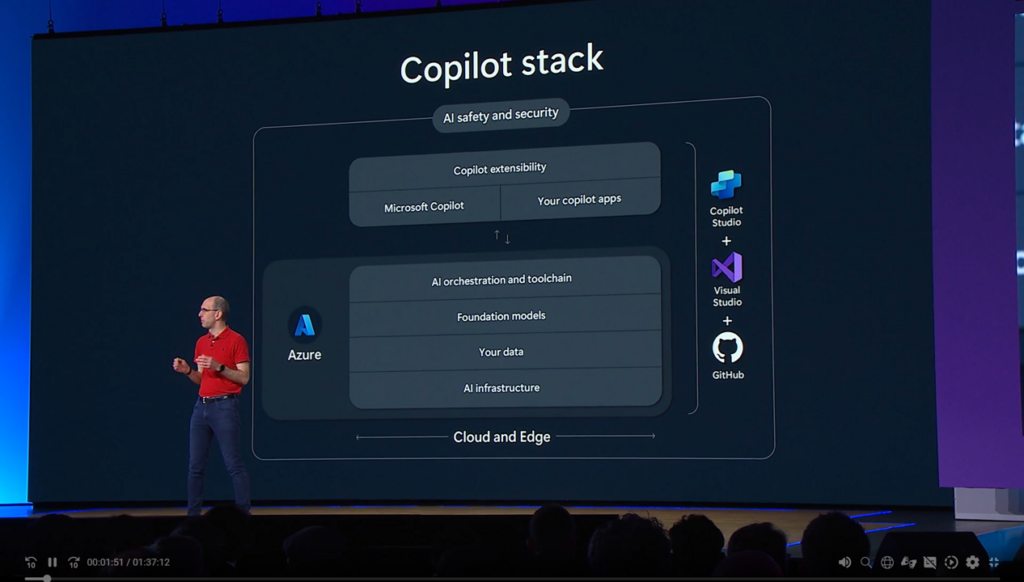
Microsoft Build 2024 event has announced a series of groundbreaking advancements across AI, data, cloud, and developer experiences. Here is a detailed summary of the significant announcements, new features, and achievements highlighted during the event:
AI updates
- Copilot+ PCs are advanced personal computers equipped with at least 16GB RAM and Neural Processing Units (NPUs, curious about NPU?). These devices feature AI-driven functionalities such as Recall and Cocreator in Paint, which use AI to enhance search and creative processes. Recall allows users to perform semantic searches through their data, while Cocreator applies AI-generated artistic styles to user drawings based on textual descriptions.
- Windows Copilot integrates AI assistance directly into Windows 11, centralizing tools like Bing Chat and various plugins to streamline tasks and boost productivity. This feature aims to provide users with a cohesive AI experience that enhances their workflow within the Windows environment.
- Copilot Studio is a new tool that allows developers to create custom copilots integrated with APIs, data sources, and other tools. This platform enhances productivity by streamlining development workflows and providing a customizable AI assistant experience. Developers can tailor their copilots to specific tasks, leveraging Azure’s extensive AI capabilities.
- Azure AI Studio and New Models:
- Azure AI Studio introduces GPT-4o, a new AI model supporting multimodal capabilities for text, image, and audio processing. This model enables developers to build more advanced generative and conversational AI applications. With Model catalog, we can now access Meta Llama 3, Mistral, Cohere models with ease. Additionally, Phi-3 Vision, another new model from Microsoft, supports visual reasoning and integrates with charts, graphs, and tables, enhancing the analytical capabilities of AI applications.
- LLM vs SLM: Beside LLM which is extremely popular these days, Microsoft introduced significant improvements in Small Language Models (SLMs) such as Phi-3-small-8k-Instruct (wanna try this model?), and optimizing them for different use cases. LLMs are designed for complex, resource-intensive tasks, while SLMs are optimized for efficiency and speed, making them suitable for applications with limited computational resources (even in mobile devices).
- Azure AI Studio Assistants, currently in preview, offer a robust platform for building custom AI assistants. These assistants maintain persistent conversation threads, ensuring seamless long interactions. They integrate various tools, including code interpreters and function calling, enabling complex task performance. Developers can adjust model parameters like temperature and response format to tailor the assistants’ outputs. Enhanced security features, such as prompt shields, protect against cross-prompt injection attacks, ensuring safe and reliable interactions.
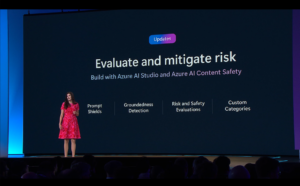
- Responsible AI: Microsoft announced new tools and frameworks to enhance the responsible use of AI in Azure AI Studio. Prompt Shields and Groundedness Detection are designed to detect and mitigate harmful content and hallucinations in AI outputs. These features help ensure the safety and reliability of AI models. Additionally, Microsoft emphasizes transparency, fairness, and accountability by providing model cards, bias detection tools, fairness metrics, audit logs, and ethical guidelines within Azure AI Studio. These resources aid developers in building ethical AI systems that are trustworthy and equitable.

Responsible AI updates
Data platform
- Microsoft Fabric, a unified analytics platform that integrates data engineering, data science, real-time analytics, and business intelligence into a single repository called OneLake. This platform supports AI-driven insights and simplifies data management, providing businesses with a cohesive solution for their analytics needs.
- Real-Time Intelligence in Microsoft Fabric provides an end-to-end solution for processing and analyzing high-volume, time-sensitive data. It enables businesses to make faster and more informed decisions by acting on data in real-time, leveraging AI-driven analytics to gain deeper insights into their operations.
Cloud
- AKS automatic is a new experience that simplifies the creation and management of production-ready for AKS clusters with minimal effort. It includes features such as automated scaling, node management, and security enhancements. AKS Automatic aims to reduce the complexity of managing Kubernetes clusters, making it accessible for users of all skill levels.
- Azure Arc: enhanced support for Azure Arc enables better management of hybrid and multi-cloud environments. This includes improved capabilities for managing Kubernetes clusters and databases across different environments, providing a unified management experience for cloud and on-premises resources.
- Azure Cobalt VMs: the introduction of Azure Cobalt VMs optimized for cloud-native workloads features the new Cobalt 100 processor built on Arm architecture. These VMs offer consistent performance and scalability for web applications, microservices, and open-source databases.
- Azure Compute Fleet: is a new service that simplifies the provisioning and management of compute capacity across different virtual machines, availability zones, and pricing models. This service helps customers achieve the required scale, performance, and cost efficiency for their cloud-native applications.
Developer Experiences
- Microsoft Dev Box Enhancements: enhancements to Microsoft Dev Box include preconfigured, project-specific development environments with new customization and management capabilities. These enhancements are aimed at improving developer productivity and reducing setup times for development environments.
- GitHub Copilot Extensions: new extensions for GitHub Copilot include integrations with Azure, Docker, and Sentry. These extensions enhance the development workflow by providing contextual code suggestions and automating tasks, making it easier for developers to build and deploy applications.
- Azure Deployment Environments: now support configuration-as-code, preconfigured starter images in Azure Marketplace, and a centralized management portal. These features enhance the consistency and efficiency of deployment processes, providing developers with robust tools for managing their environments.
For more information on these updates, please refer to Microsoft’s official blog and TechRepublic.