



In today’s fast-paced cloud-native landscape, Kubernetes has Become the standard for container orchestration. Managing Kubernetes clusters efficiently is crucial for organizations embracing modern application development practices. Azure Kubernetes Service (AKS) offers a managed Kubernetes service that simplifies the deployment, management, and scaling of containerized applications using Kubernetes on Azure.
In this blog post, we’ll explore how to streamline the deployment of an AKS cluster using Terraform, a popular infrastructure-as-code tool, while integrating it seamlessly with Azure Monitor for enhanced monitoring capabilities.
Why Terraform?
Terraform enables infrastructure to be defined as code, allowing for repeatable, version-controlled, and automated deployments. With Terraform, you can provision and manage resources across various cloud providers, including Azure, in a declarative manner.
Getting Started with AKS and Terraform
To begin, ensure you have the Azure CLI and Terraform installed on your local machine. Then, create a Terraform configuration file (typically aks.tf) where you define the AKS cluster configuration using Terraform’s Azure provider.
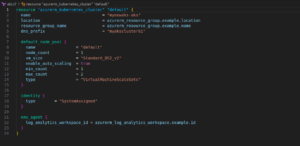
Integrating Azure Monitor
Monitoring your AKS cluster is essential for ensuring its health, performance, and security. Azure Monitor provides comprehensive monitoring capabilities for AKS clusters, including metrics, logs, and alerts. Let’s integrate Azure Monitor with our AKS cluster using Terraform.
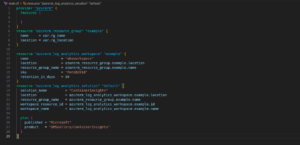
Deploying AKS with Terraform
Once you have defined your AKS and Azure Monitor configurations in Terraform, you can initialize and apply the Terraform configuration to deploy the AKS cluster.
- terraform init
- terraform apply
Conclusion
In this blog post, we’ve demonstrated how to streamline the deployment of an Azure Kubernetes Service (AKS) cluster using Terraform while seamlessly integrating it with Azure Monitor for comprehensive monitoring capabilities. By leveraging Terraform’s infrastructure-as-code approach, you can automate and manage your AKS infrastructure efficiently, ensuring reliability and scalability for your containerized applications.
To further enhance your AKS deployment, consider incorporating additional Terraform modules or custom configurations to meet your specific requirements. Additionally, explore advanced Azure Monitor features such as alerts, dashboards, and custom log queries to gain deeper insights into your AKS environment’s performance and health.