



Introduction
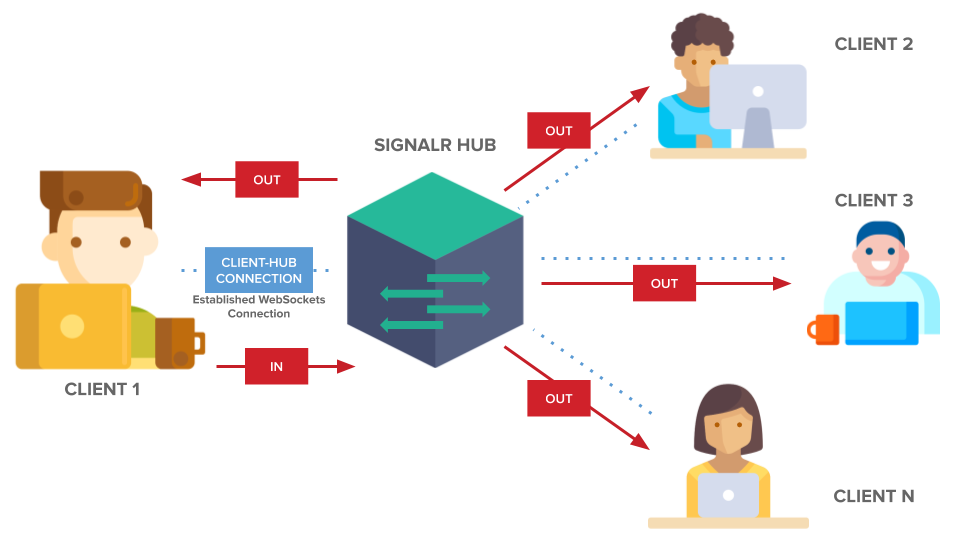
SignalR simplifies the process of adding real-time web functionality to applications. It enables server-side code to push content to connected clients instantly. It abstracts away the complexities of managing connections and communication between the server and clients. SignalR supports several transport methods, including WebSockets, Server-Sent Events, and Long Polling.
As your application grows, handling
- scalability
- performance
- custom protocols
becomes crucial. This blog delves into advanced SignalR techniques focusing on these aspects.
Example – click on below title and refer my blog.
Scalability
Scalability ensures your application can handle increased loads by efficiently distributing requests across multiple servers and maintaining consistent state among clients. SignalR supports various scaling techniques:
Scaling Out with Backplane
SignalR uses a backplane to distribute messages across multiple servers. A backplane is a shared resource that all servers use to send and receive messages. Common backplane solutions include:
- SQL Server
- Redis
- Azure Service Bus
Redis Backplane Example
Install Packages:
dotnet add package Microsoft.AspNetCore.SignalR.StackExchangeRedis
Configure SignalR to use Redis:
using Microsoft.AspNetCore.Builder;
using Microsoft.Extensions.DependencyInjection;
using StackExchange.Redis;

var builder = WebApplication.CreateBuilder(args);
builder.Services.AddSignalR().AddStackExchangeRedis("localhost:6379");
var app = builder.Build();
app.MapHub<ChatHub>("/chat");
app.Run();
Update Configuration:
Ensure your Redis server is running and update the connection string as necessary.
Azure SignalR Service
Azure SignalR Service is a fully managed service that handles the scalability for you. It offloads the real-time connections, message distribution, and scaling from your application.
Install Package:
dotnet add package Microsoft.Azure.SignalR
Configure Azure SignalR:
using Microsoft.AspNetCore.Builder;
using Microsoft.Extensions.DependencyInjection;

var builder = WebApplication.CreateBuilder(args);
builder.Services.AddSignalR().AddAzureSignalR("<Your Connection String>");

var app = builder.Build();
app.MapHub<ChatHub>("/chat");
app.Run();
Deploy to Azure:
Deploy your application to Azure, and Azure SignalR Service will handle the scaling.
Performance Optimization
Optimizing performance ensures that your real-time application responds swiftly under various loads. Consider the following techniques:
Use WebSockets
WebSockets is the most efficient transport method SignalR supports. Ensure your environment supports WebSockets and configure your server accordingly.
Enable WebSocket compression to reduce the size of messages sent over the network.
using Microsoft.AspNetCore.Builder;
using Microsoft.Extensions.DependencyInjection;

var builder = WebApplication.CreateBuilder(args);
builder.Services.AddSignalR().AddMessagePackProtocol();

var app = builder.Build();
app.MapHub<ChatHub>("/chat");
app.Run();
Minimize Payload
Minimize the amount of data sent over the network by reducing the payload size. This can be achieved through data compression or sending only necessary information.
Reduce Hub Method Complexity
Keep hub methods simple and fast by offloading complex operations to background services or queues.
public class ChatHub : Hub
{
    private readonly IMessageService _messageService;
    public ChatHub(IMessageService messageService)
    {
        _messageService = messageService;
    }
    public async Task SendMessage(string user, string message)
    {
        await Clients.All.SendAsync("ReceiveMessage", user, message);
        _messageService.SaveMessage(user, message); // Offload to service
    }
}
Use Connection Pooling
Reuse connections instead of establishing new ones for every request to reduce overhead.
Connection Management
Efficiently manage connections and disconnections to avoid memory leaks. Override OnConnectedAsync and OnDisconnectedAsync in your Hub to handle connection lifecycle events.
public class ChatHub : Hub
{
    public override async Task OnConnectedAsync()
    {
        // Handle new connection
        await base.OnConnectedAsync();
    }
    public override async Task OnDisconnectedAsync(Exception exception)
    {
        // Handle disconnection
        await base.OnDisconnectedAsync(exception);
    }
}
Custom Protocols
SignalR supports custom protocols, allowing you to define how data is transmitted between the client and server. You can create a custom protocol by implementing the IHubProtocol interface.
Implement a Custom Protocol
Define the Protocol:
using Microsoft.AspNetCore.SignalR.Protocol;
using System.Buffers;

public class CustomProtocol : IHubProtocol
{
    public string Name => "custom";
    public int Version => 1;
    public TransferFormat TransferFormat => TransferFormat.Text;
    public bool IsVersionSupported(int version) => version == 1;

    public ReadOnlyMemory<byte> GetMessageBytes(HubMessage message)
    {
        // Serialize message to byte array
        // Implementation depends on your custom protocol
    }

    public bool TryParseMessage(ref ReadOnlySequence<byte> input, IInvocationBinder binder, out HubMessage message)
    {
        // Deserialize message from byte array
        // Implementation depends on your custom protocol
    }
}
Register the Protocol:
using Microsoft.AspNetCore.Builder;
using Microsoft.Extensions.DependencyInjection;

var builder = WebApplication.CreateBuilder(args);
builder.Services.AddSignalR()
.AddHubProtocol<CustomProtocol>(); // Register custom protocol

var app = builder.Build();
app.MapHub<ChatHub>("/chat");
app.Run();
Client Implementation:
Ensure the client-side is compatible with your custom protocol.
const connection = new signalR.HubConnectionBuilder()
.withUrl("/chat")
.withHubProtocol(new CustomProtocol())
.build();
Conclusion
By implementing these advanced SignalR techniques, you can significantly enhance the scalability, performance, and flexibility of your real-time applications. Whether you’re using a backplane for scaling out, optimizing performance with efficient coding practices, or developing custom protocols, these strategies will help you build robust and responsive real-time web applications.
For more information you can refer my below blog