



1. Introduction
In this article, we will provide an overview of what Turborepo is and the benefits of using Turborepo. We’ll then initialize a simple full-stack application using Turborepo with NestJS (backend) and ReactJS + Vite (frontend) with PNPM package management.
2. What is Turborepo?

Firstly, let’s recall something about monorepos. A monorepo is a single repository that contains multiple applications and libraries. It facilitates project management, code sharing, cross-repo changes with instant type checking, validation, and building.
Turborepo is an intelligent build system optimized for JavaScript and TypeScript codebases. It uses caching and advanced build system techniques to speed up development on your local machine and CI/CD.
Turborepo is fast, easy to use, and easy to configure. It serves as a lightweight layer that can be easily added and replaced. Once it has been configured to your monorepo, it will understand how the applications and libraries depend on each other, maximizing the running and building speed of your scripts.
3. Why is Turborepo?
Monorepos have many advantages, but they struggle to scale. A single monorepo might have hundreds of tasks to execute, making the building process take a lot of time.
Turborepo is designed to make it easier and faster to deal with large JavaScript and TypeScript codebases. It solves the monorepo scaling problem. Below are some of its main strengths:
- Performance: It parallelizes the tasks across your CPU cores and caches the results to make the build faster.
- Integrated Tooling: Turborepo works out of the box with tools such as TypeScript, ESLint,…and has built-in support for SWC and ESBuild.
- Dependency Management: It understands the dependencies between your packages so it can build your code in the right order and only rebuild the packages that are affected by a change. That will help to speed up the build times.
4. Some use cases for usage
If your project has any of the following factors, consider using Turborepo to manage your codebases and builds:
- Large codebases: If you’re working with a large codebase that contains many packages inside. It can help you build your packages in the right order.
- Frequent builds: By caching the previous results and parallelizing tasks that help speed up build time as well.
- Continuous Integration: Turborepo can significantly speed up your CI pipelines by only rebuilding the part of your codebases that have changed.
5. Initialize a full stack application with NestJS and ReactJS
Install pnpm and turbo in your development environment
>> npm install -g pnpm
>> pnpm install -g turbo
Init a repos named “turborepo-demo” using create-turbo package
>> mkdir turborepo-demo
>> cd turborepo-demo
>> npx create-turbo@latest
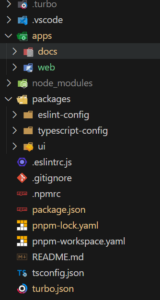
After the repositories are initialized, the structure of your repository will be as follows: (reference: https://turbo.build/repo/docs):
Init BE app using @nestjs/cli
>> pnpm install -g @nestjs/cli
>> mkdir apps/server
>> cd apps/server
>> nest new .
Init FE app using @vite
>> mkdir apps/web
>> cd apps/web
>> pnpm create vite@latest
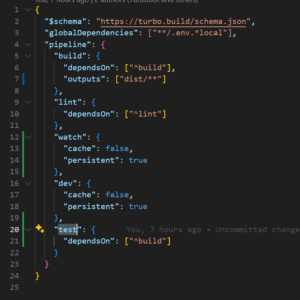
Update configuration
update your turbo.json at root folder
Build and start the application
>> pnpm install (go to your root folder of the repo)
>> pnpm run build (build all applications: serrver, web and packages in this case)
>> pnpm dev (start all applications)
Thanks for reading and Happy coding!