


Introduction
Test automation frameworks play a crucial role in upholding software quality and expediting release cycles. Insomnia, an influential API client, provides a sturdy platform for the creation, administration, and testing of APIs. This article briefs the implementation of test automation frameworks utilising Insomnia, enabling us to streamline our API testing procedure and seamlessly integrate it into the CI/CD pipeline.
Understanding Test Automation Frameworks
An automation framework for testing is a collection of standards, recommendations, and resources created to facilitate automated software testing. It offers a systematic method for building, running, and overseeing test cases. An automation framework’s main objectives are to enhance testing effectiveness, broaden test coverage, and minimize maintenance requirements.
Various Types Of Test Automation Frameworks
The Linear Scripting Framework: It represents the most basic type of test automation framework. Test scripts are created in a step-by-step fashion, resembling a traditional manual test case. While this framework is straightforward to set up, it falls short in terms of reusability and scalability.
The Modular Testing Framework: In this methodology, the application is partitioned into smaller, autonomous modules, and individual test scripts are developed for each module. These scripts can be utilised repeatedly in various tests, enhancing the ease of maintenance and minimising duplication.
The Data-Driven Framework: The framework segregates test data from scripts by housing it in external files such as Excel, CSV, or databases. Test scripts retrieve information from these repositories, streamlining data organisation and expanding coverage by testing various data sets using a single script.
The Keyword-Driven Framework: This framework, commonly referred to as table-driven testing, effectively separates the test logic from scripts by employing keywords to represent specific actions. As a result, individuals without programming expertise can effortlessly generate test cases using pre-established keywords.
The Hybrid Framework: It combines multiple frameworks to capitalize on their individual strengths, resulting in a powerful test automation solution.
The Impact of Insomnia on API Testing
Insomnia is a robust, freely available software for examining and troubleshooting APIs. It offers an intuitive platform for sending HTTP requests and analysing responses. Insomnia is compatible with multiple authentication techniques such as OAuth, JWT, and API keys, enhancing its flexibility for API testing.
Characteristics of Insomnia
- Request of Grouping: Arrange requests systematically by creating folders and subfolders.
- Environment variables: Efficiently handle development, staging, and production environments by utilising environment variables.
- Response History: Access the record of previous responses for every request.
- Export, Import & Environments: It can be utilised to distribute and exchange information with other team members.
- Plugins: Enhance Insomnia’s capabilities by utilising plugins.
Configuring Insomnia for Test Automation
Before starting test automation, it is essential to configure Insomnia and understand its fundamental functionalities comprehensively.
Step 1: Install Insomnia
Download and install Insomnia from their official website.
Step 2: Select the Appropriate Framework
Choose a test automation framework that aligns with the requirements of the project. Regarding API testing, opting for a data-driven or hybrid framework is usually ideal as it allows for testing various data sets and handling the intricacies of API interactions.
Step 3: Create a Request
Upon installation of Insomnia, we can generate a fresh request:
- Launch Insomnia and select the + icon to initiate a new request.
- Specify the name of the request and select the appropriate type (GET, POST, PUT, DELETE, etc.).
- Add the URL for the request and adjust the headers, query parameters, and body accordingly.
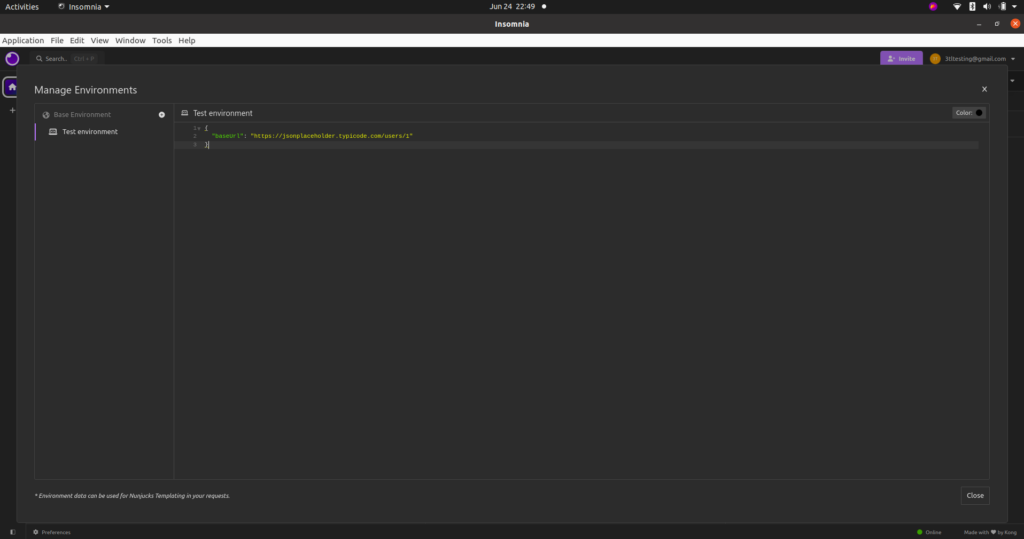
Step 4: Establish a New Environment
To oversee various environments, including development, staging, and production:
- To access the ‘Manage Environments‘ feature, locate and click the button in the upper right corner of the screen.
- Establish a fresh environment and incorporate variables like base URLs and authentication tokens.
- To switch between environments, simply choose the desired one from the dropdown menu.
Step 5: Building a Test Automation Framework
Developing a test automation framework requires various stages, starting from configuring the setup to scripting and executing tests. Here is a detailed walkthrough to assist in commencing the process.
Step 6: Defining the Scope and Objectives
It is crucial to define the extent and objectives of test automation initiatives. Determine the specific areas within our application that we plan to automate, the categories of tests.
Step 7: Organise Test
Logically arrange tests to guarantee clarity and ease of maintenance. Categorise similar tests into directories and employ descriptive titles for requests and environments.
Step 8: Write the Test
Insomnia enables the use of JavaScript for creating test scripts. With this feature, we can develop tests to verify responses, assess response durations, and perform other functionalities.
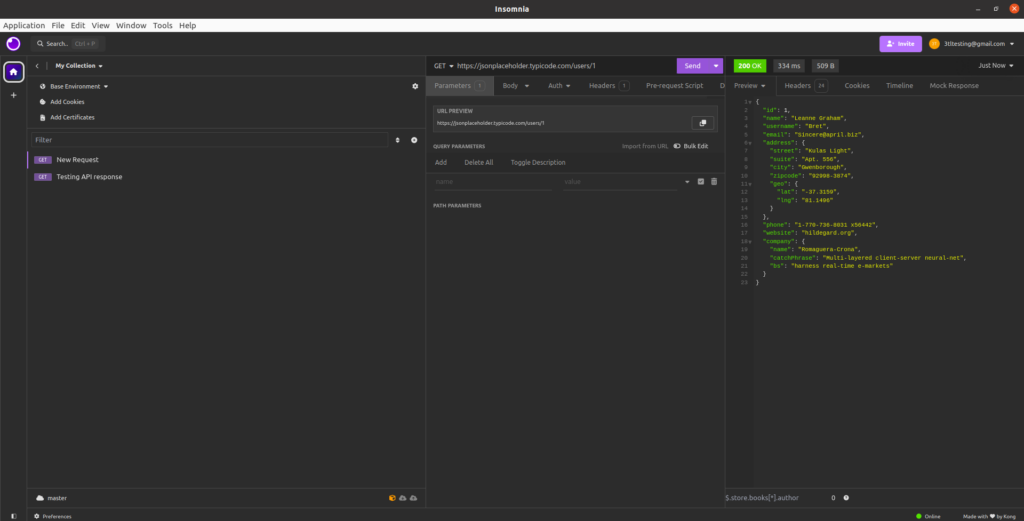
Example: Test with Basic GET Request
Generate a GET request to retrieve information.
GET https://jsonplaceholder.typicode.com/users/1Creating a testing script
const response = pm.response.json();
pm.test("Status code is 200", () => {
  pm.response.to.have.status(200);
});
pm.test("User ID is 1", () => {
  pm.expect(response.id).to.eql(1);
});
Step 9: Managing Various HTTP Requests
Insomnia enables the testing of different HTTP methods, including POST, PUT, and DELETE. Below are instructions on how to manage a POST request.
Step 10: Integrating CI/CD Pipeline
Insomnia allows us to export requests and environments in JSON format, enabling seamless integration with popular CI tools. Utilise Insomnia’s CLI tool, ‘inso’, for executing tests within the CI/CD pipeline.
Start by installing the ‘inso’ CLI tool
npm install -g insomnia-insoGenerate a JSON file
inso export insomnia.jsonExecute tests utilizing the ‘inso’ CLI.
inso run test insomnia.jsonInclude the ‘inso’ CLI command to configure the CI/CD pipeline
Step 11: Observe and Preserve
It is essential to consistently monitor the test automation framework to ensure that it aligns with the objectives. As our application progresses, make sure to update our test cases and data sets accordingly.
Optimal Techniques for Automating Tests Using Insomnia
Ensure Tests Are Independent: To prevent dependencies and enhance the reliability of the testing process.
Apply Focused Labels: Assign names to the requests, environments, and variables to enhance their comprehensibility.
Consistently assess and optimise: Revisit test cases and make necessary adjustments to enhance their clarity, ease of maintenance, and effectiveness.
Utilise Plugins: Discover and utilise Insomnia plugins to expand its capabilities.
Record the details of tests: Test automation efforts can be contributed by team members through the documentation of test cases, frameworks, and processes.
Conclusion
By utilising Insomnia, we can improve our API testing through the implementation of a test automation framework that is efficient, reliable, and easy to maintain. Setting clear goals, selecting the appropriate framework, structuring tests logically, and connecting with our CI/CD pipeline for ongoing testing are essential steps to guarantee a strong and successful test automation setup. Adhering to these recommended methods will result in a resilient and efficient test automation system.