



Understanding Group Chat in AutoGen with .NET
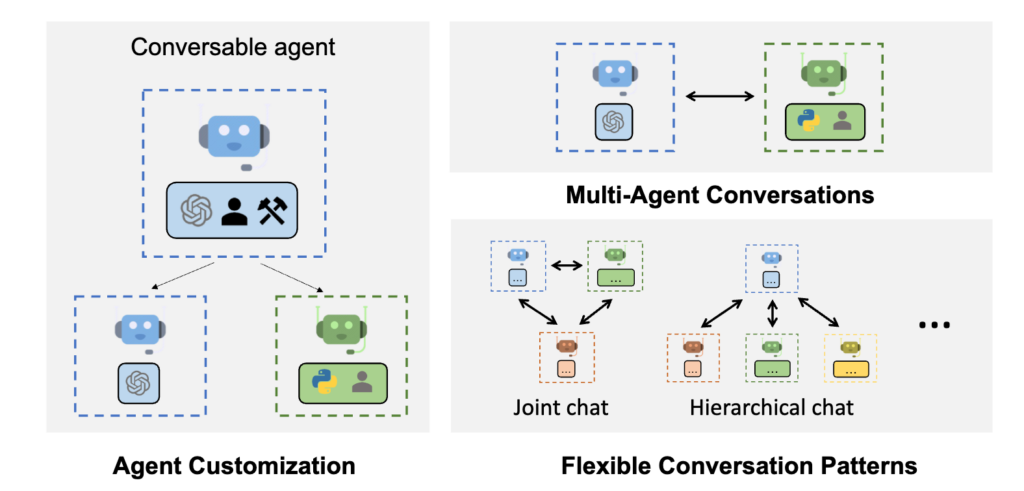
In the ever-evolving world of AI, collaboration among intelligent agents has become a cornerstone for tackling complex tasks. AutoGen introduces Group Chat (`IGroupChat`) as a fundamental feature to organize and coordinate multiple agents under a shared context. This feature is essential for tasks that require a blend of different skills and knowledge bases to achieve an optimal solution.
Types of Group Chat in AutoGen
AutoGen provides two primary types of group chat, each serving a unique purpose and offering different levels of control and flexibility:
1. RoundRobinGroupChat: This type of group chat follows a round-robin sequence, where each agent takes its turn based on a fixed order. The chat history, along with the most recent reply from the previous agent, is passed to the next agent. This method is straightforward and ensures that every agent gets an equal opportunity to contribute.
2. GroupChat: This more dynamic and flexible type of group chat allows for a controlled determination of the next speaking agent. You can use a language model (LLM) agent as a group admin, a Graph structure (introduced in a recent PR), or both to decide the next speaker. When relying solely on the group admin to choose the next speaker, it is recommended to use a powerful LLM model, such as GPT-4, to ensure the best experience.
GroupChat Features
– Dynamic Invocation: GroupChat dynamically selects the next speaking agent based on the conversation context. This flexibility is achieved through the admin agent’s intelligent decision-making and the optional use of a Graph to guide the conversation flow.
– Control and Flexibility: By combining the admin agent’s capabilities with a Graph, GroupChat offers a balance between dynamic interaction and controlled conversation flow. This makes it ideal for scenarios where multiple agents need to collaborate seamlessly to solve complex tasks.
Example: EasyGroupChat in AutoGen
To illustrate the capabilities of `GroupChat`, let’s walk through a simple example in C#. This example sets up a group chat with three agents: a coder, a commenter, and a user proxy. The admin agent orchestrates the conversation flow, ensuring that each agent contributes appropriately.
using AutoGen.Core;
using AutoGen.OpenAI;
using AutoGen.OpenAI.Extension;
using AutoGen.SemanticKernel;
using AutoGen.SemanticKernel.Extension;
using Azure.AI.OpenAI;
using Microsoft.SemanticKernel;

namespace AutoGen.BasicSample;

public class EasyGroupChatExample
{
    public static async Task RunAsync()
    {
        var apiKey = Environment.GetEnvironmentVariable("OPENAI_API_KEY") ?? throw new Exception("Please set OPENAI_API_KEY environment variable.");
        var model = "gpt-3.5-turbo";

        // Create Coder Agent
        var openaiClient = new OpenAIClient(apiKey);
        var coder = new OpenAIChatAgent(
            openAIClient: openaiClient,
            name: "coder",
            modelName: model,
            systemMessage: "You are a C# coder, when writing csharp code, please put the code between ```csharp and ```")
            .RegisterMessageConnector() // convert OpenAI message to AutoGen message
            .RegisterPrintMessage(); // print the message content

        // Create Commenter Agent
        var kernel = Kernel
            .CreateBuilder()
            .AddOpenAIChatCompletion(modelId: model, apiKey: apiKey)
            .Build();
        var commenter = new SemanticKernelAgent(
            kernel: kernel,
            name: "commenter",
            systemMessage: "You write inline comments for the code snippet and add unit tests if necessary")
            .RegisterMessageConnector() // register message connector so it support AutoGen built-in message types like TextMessage.
            .RegisterPrintMessage(); // pretty print the message to the console

        // Create User Proxy Agent
        var userProxy = new DefaultReplyAgent("user", defaultReply: "END")
            .RegisterPrintMessage(); // print the message content

        // Create Group Admin
        var admin = new OpenAIChatAgent(
            openAIClient: openaiClient,
            name: "admin",
            modelName: model)
            .RegisterMessageConnector(); // convert OpenAI message to AutoGen message

        // Create Group Chat
        var group = new GroupChat(
            members: new[] { coder, commenter, userProxy },
            admin: admin);

        // Define Workflow and Start Conversation
        var workflowInstruction = new TextMessage(
            Role.User,
            """
            Here is the workflow of this group chat:
            User{Ask a question} -> Coder{Write code}
            Coder{Write code} -> Commenter{Add comments to the code}
            Commenter{Add comments to the code} -> User{END}
            """);

        var question = new TextMessage(Role.User, "How to calculate the 100th Fibonacci number?");
        var chatHistory = new List<IMessage> { workflowInstruction, question };
        while (true)
        {
            var replies = await group.CallAsync(chatHistory, maxRound: 1);
            var lastReply = replies.Last();
            chatHistory.Add(lastReply);

            if (lastReply.From == userProxy.Name)
            {
                break;
            }
        }

        // Summarize Chat History
        var summary = await coder.SendAsync("summarize the conversation", chatHistory: chatHistory);

        Console.WriteLine(summary);
    }
}
Explanation
1. Initialization:
– Coder Agent: Configured to write C# code and format it appropriately.
– Commenter Agent: Adds inline comments and unit tests to the code snippets.
– User Proxy Agent: Acts as a placeholder for the user, ending the conversation when necessary.
2. Group Admin: Manages the conversation flow, ensuring each agent contributes in the correct sequence.
3. Workflow Definition: Specifies the conversation flow, starting with the user asking a question, followed by the coder writing code, the commenter adding comments, and finally returning to the user.
4. Conversation Loop: Handles the conversation flow dynamically, passing the chat history and recent replies among the agents until the user proxy signals the end.
5. Summarization: Summaries the entire conversation using the coder agent, providing a concise overview of the interaction.
This example demonstrates the power and flexibility of `GroupChat` in AutoGen, highlighting how multiple agents can collaboratively work together to solve a given task. By leveraging the dynamic capabilities of `GroupChat`, developers can create sophisticated and intelligent multi-agent systems tailored to their specific needs.
Output:
After replacing the actual API key in the program (if you need help with this, please refer to this article), you will get the following output:


Conclusion:
AutoGen’s IGroupChat feature enhances AI collaboration by enabling organized and dynamic interaction among multiple agents. With options like RoundRobinGroupChat for equal participation and GroupChat for intelligent decision-making, developers have versatile tools. They can create sophisticated multi-agent systems tailored to complex tasks. This flexibility and control make AutoGen a powerful tool for building advanced AI solutions.