


Introduction
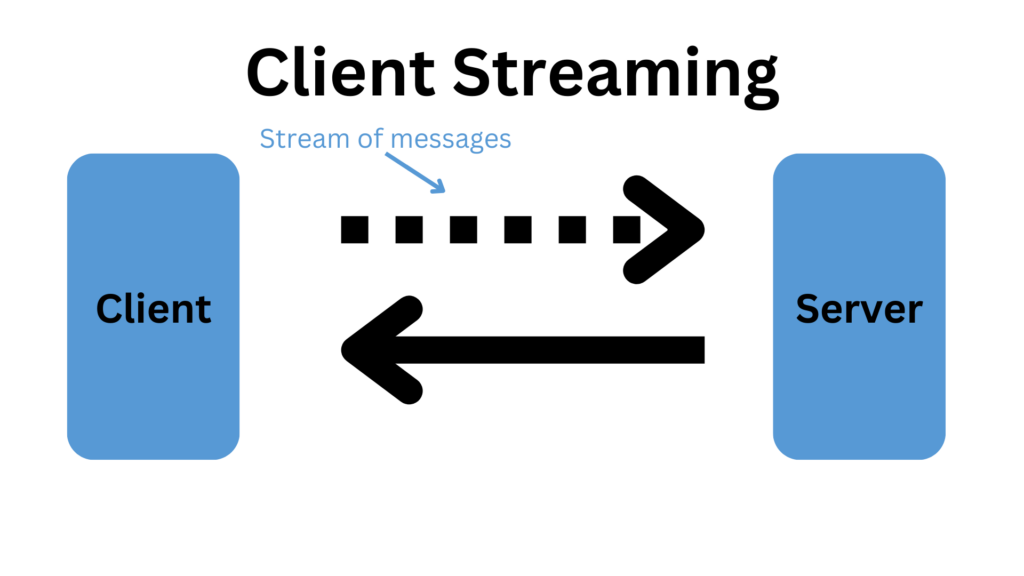
gRPC (gRPC Remote Procedure Calls) is an open-source framework developed by Google, which enables efficient communication between services using HTTP/2. It supports various types of communication patterns, including Unary, Server Streaming, Client Streaming, and Bidirectional Streaming. In this article, we will focus on client streaming, where the client sends a stream of requests to the server and receives a single response.
In a client streaming scenario, the client writes a sequence of messages and sends them to the server. Once the client has finished writing the messages, it waits for the server to read them and return a response.
Prerequisites
To follow along with this example, you will need the following:
- .NET 8 SDK
- Visual Studio Code or Visual Studio, I am using Visual Studio Code for this tutorial
- Basic understanding of gRPC and .NET
You can find this example code in my GitHub repository from here.
here is the folder structure to follow up this tutorial:
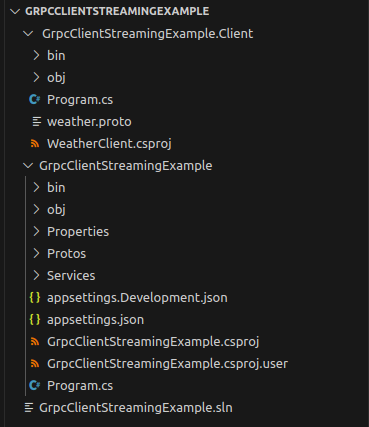
here, GrpcClientStreamingExample will act as server and GrpcClientStreamingExample.Client will act as client
Setting Up the Project
- Create a New gRPC Project
- First, create a new gRPC project using the .NET CLI
dotnet new grpc -o GrpcClientStreamingExample
cd GrpcClientStreamingExample
2. Define the Proto File
The proto file defines the gRPC service and messages. In the Protos folder, create a file named weather.proto and add the following content:
weather.proto
syntax = "proto3";

option csharp_namespace = "GrpcClientStreamingExample";

service Weather {
  rpc RecordTemperatures(stream TemperatureReading) returns (TemperatureSummary);
}

message TemperatureReading {
  string city = 1;
  int32 temperature = 2;
  string timestamp = 3;
}

message TemperatureSummary {
  string city = 1;
  float averageTemperature = 2;
}
This proto file defines a Weather service with a RecordTemperatures RPC method that accepts a stream of TemperatureReading messages and returns a single TemperatureSummary. If you notice here in rpc RecordTemperatures(stream TemperatureReading) returns (TemperatureSummary), we have included the word stream in front of input parameter TemperatureReading, so this is the way we are telling the proto file that this RPC is a client stream.
Generate the gRPC Code
Generate the gRPC client and server code from the proto file by adding the following to your .csproj file:
Note: this is very important step to follow, else your project will not recognize the weather.proto file
<ItemGroup>
  <Protobuf Include="Protos\weather.proto" GrpcServices="Both" />
</ItemGroup>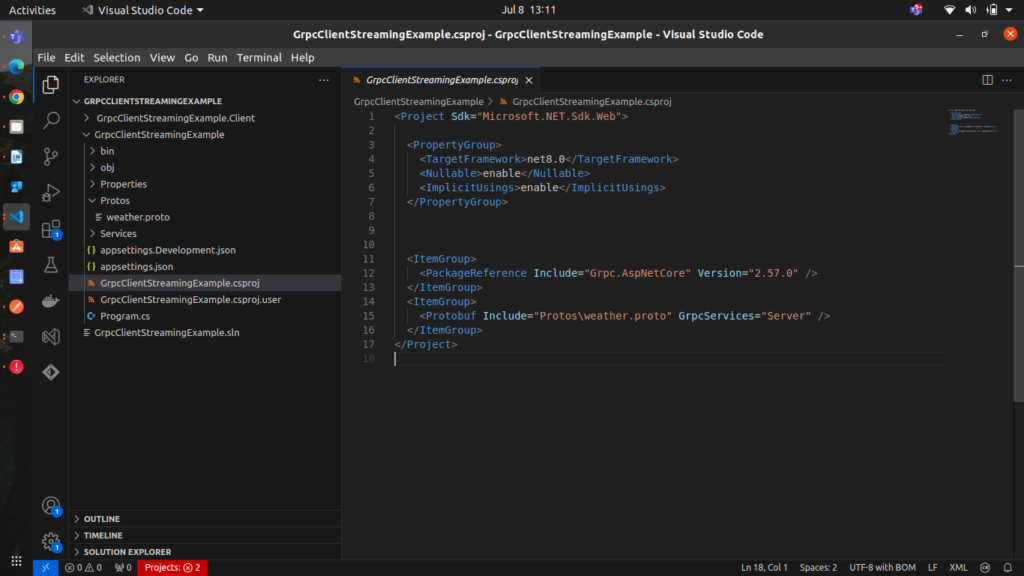
Then, run the following command to restore the project and generate the necessary code:
dotnet restoreImplementing the Server
- Create the Service ImplementationIn the
Servicesfolder, create a class namedWeatherService.csand implement the service:
using Grpc.Core;
using System.Collections.Generic;
using System.Linq;
using System.Threading.Tasks;
using Microsoft.Extensions.Logging;
using GrpcClientStreamingExample;

namespace GrpcClientStreamingExample
{

    public class WeatherService : Weather.WeatherBase
    {
        private readonly ILogger<WeatherService> _logger;

        public WeatherService(ILogger<WeatherService> logger)
        {
            _logger = logger;
        }

        public override async Task<TemperatureSummary> RecordTemperatures(IAsyncStreamReader<TemperatureReading> requestStream, ServerCallContext context)
        {
            var temperatures = new List<int>();
            string city = null;

            await foreach (var reading in requestStream.ReadAllAsync())
            {
                if (city == null)
                {
                    city = reading.City;
                }

                temperatures.Add(reading.Temperature);

                _logger.LogInformation($"Received temperature reading for {reading.City}: {reading.Temperature}°C");
            }

            var averageTemperature = temperatures.Count > 0 ? temperatures.Average() : 0;

            _logger.LogInformation($"Calculating average temperature for {city}: {averageTemperature}°C");

            return new TemperatureSummary
            {
                City = city,
                AverageTemperature = (float)averageTemperature
            };
        }
    }
}
This implementation reads the stream of TemperatureReading messages from the client, stores the temperatures, calculates the average temperature, and returns a TemperatureSummary.
2. Configure the Server
In Program.cs configure the gRPC service:
using GrpcClientStreamingExample.Services;

var builder = WebApplication.CreateBuilder(args);
builder.Services.AddGrpc();

var app = builder.Build();
app.MapGrpcService<WeatherService>();
app.MapGet("/", () => "Use a gRPC client to communicate.");

app.Run();
Implementing the Client
- Create the Client Application
- Create a new .NET console application for the client:
dotnet new console -o GrpcClientStreamingExample.Client
cd GrpcClientStreamingExample.Client
2. Add the gRPC client package to the project:
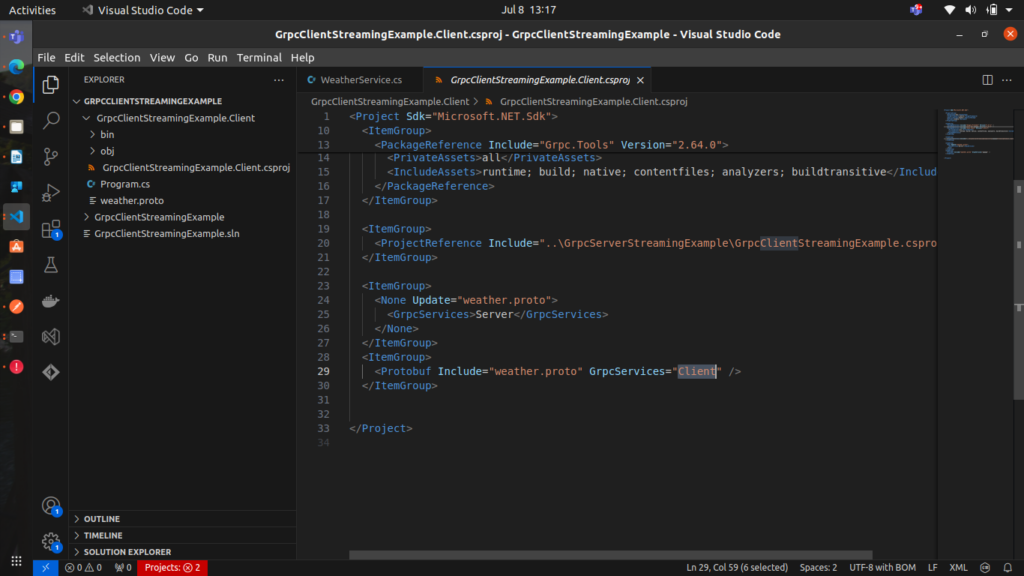
dotnet add package Grpc.Net.Clientand after that add the server project reference in the client project, also make sure to add proto file reference and mention GrpcServices= Client, to mention this project as client project for gRPC Services, refer the image below.
3. Implement the Client
In Program.cs, implement the client:
Note: Change the ports as per your server’s port
using Grpc.Net.Client;
using GrpcClientStreamingExample;
using System;
using System.Net.Http;
using System.Threading.Tasks;

namespace GrpcClientStreamingExample
{
    class Program
    {
        static async Task Main(string[] args)
        {
            // For development, trust all certificates (e.g., self-signed)
            AppContext.SetSwitch("System.Net.Http.SocketsHttpHandler.Http2UnencryptedSupport", true);

            var handler = new HttpClientHandler();
            handler.ServerCertificateCustomValidationCallback = HttpClientHandler.DangerousAcceptAnyServerCertificateValidator;

            using var channel = GrpcChannel.ForAddress("https://localhost:7045", new GrpcChannelOptions
            {
                HttpHandler = handler
            });

            var client = new Weather.WeatherClient(channel);

            // Example of client streaming
            using var streamingCall = client.RecordTemperatures();

            Console.WriteLine("Sending temperature readings...");

            var temperatures = new[]
            {
                new TemperatureReading { City = "New York", Temperature = 25, Timestamp = "2024-07-01T10:00:00Z" },
                new TemperatureReading { City = "New York", Temperature = 23, Timestamp = "2024-07-01T11:00:00Z" },
                new TemperatureReading { City = "New York", Temperature = 21, Timestamp = "2024-07-01T12:00:00Z" }
            };

            foreach (var temp in temperatures)
            {
                Console.WriteLine($"Sending temperature reading for {temp.City}: {temp.Temperature}°C");
                await streamingCall.RequestStream.WriteAsync(temp);
                await Task.Delay(1500); // Mimic delay in sending requests
            }

            await streamingCall.RequestStream.CompleteAsync();

            Console.WriteLine("Completed sending temperature readings.");

            var response = await streamingCall;

            Console.WriteLine($"Average Temperature for {response.City}: {response.AverageTemperature}°C");

            Console.ReadLine();
        }
    }
}
This client sends a stream of three TemperatureReading messages to the server and prints the server’s response.
Running the Application and Output
- Run the Server In the
GrpcClientStreamingExamplefolder, run the server:
dotnet run2. Run the Client In the GrpcClientStreamingExample.Client folder, run the client:
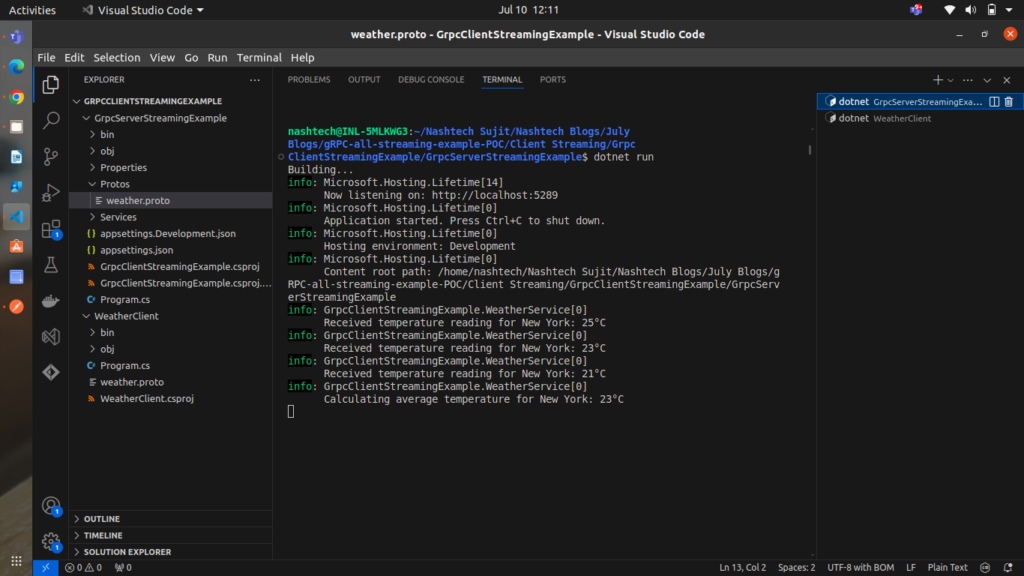
dotnet runserver output:
as you can see in the below, client data is gettting received as stream to server
client output:
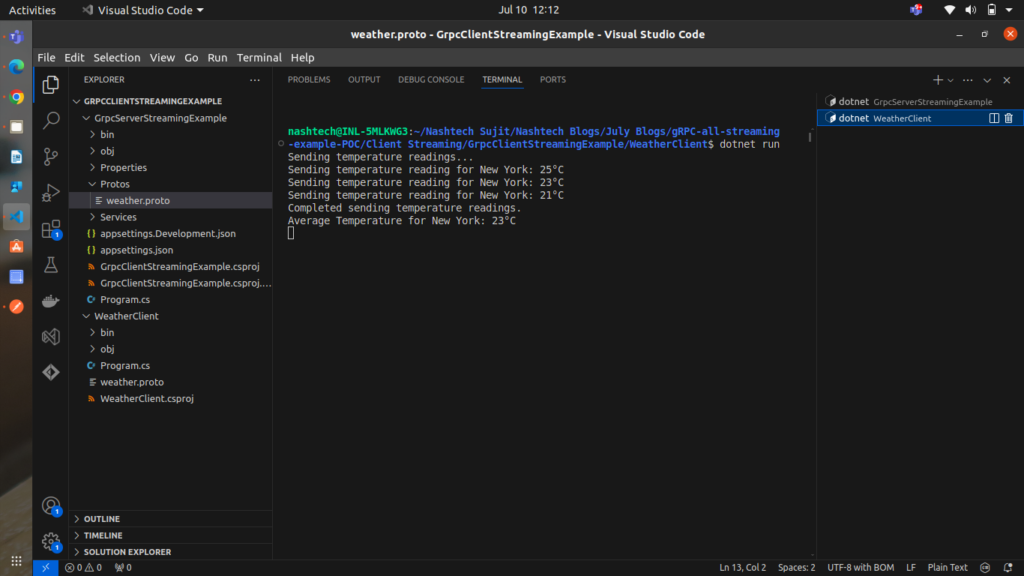
You should see the temperature readings being sent to the server, and the average temperature received from the server printed in the console.
Conclusion
In this article, we demonstrated how to implement client streaming with gRPC in .NET. We covered the creation of a gRPC service, the implementation of the server and client, and how to run and test the application. Client streaming is a powerful feature of gRPC that allows clients to send a stream of messages to the server, enabling efficient and flexible communication patterns in your applications.