
Add Your Tooltip Text Here
Table of Contents
Implementing Graph RAG with LlamaIndex
Retrieval-Augmented Generation (RAG) has revolutionized the way we extract information from large datasets. However, traditional RAG approaches have limitations, especially when it comes to understanding summarized semantic concepts or traversing disparate pieces of information. To address these limitations, we can integrate Knowledge Graphs with RAG, creating a more robust solution known as Graph RAG. This article will guide you through the process of creating a Knowledge Graph and implementing Graph RAG using LlamaIndex.
Understanding the Limitations of Baseline RAG
Baseline RAG primarily uses vector similarity as the search technique. While effective in many scenarios, it falls short in certain areas:
- Connecting Disparate Information: Baseline RAG struggles to synthesize new insights from disparate pieces of information.
- Holistic Understanding: It performs poorly when tasked with understanding summarized semantic concepts over large data collections or singular large documents.
Example
For queries like “What are the top 5 themes in the data?”, traditional RAG relies on vector search of semantically similar text content. This approach lacks the capability to direct the query to the correct information, resulting in poor performance.
Introducing Graph RAG
Graph RAG leverages Knowledge Graphs to enhance the RAG process. A Knowledge Graph is a structured representation of information that highlights relationships between different entities within a dataset. It uses nodes to represent entities and edges to represent relationships.
Benefits of Graph RAG
- Structured Insights: The structure of the knowledge graph provides insights into the overall dataset.
- Enhanced Query Understanding: It allows for better understanding and answering of complex queries.
Creating a Knowledge Graph with LlamaIndex
To implement Graph RAG, we’ll use LlamaIndex, an orchestration framework that simplifies data ingestion, indexing, and querying with Large Language Models (LLMs).
Step-by-Step Guide
Install Necessary Libraries
					from llama_index.core import PropertyGraphIndex
from dotenv import load_dotenv
from llama_index.core import SimpleDirectoryReader
from llama_index.llms.groq import Groq
from llama_index.embeddings.huggingface import HuggingFaceEmbedding
import os
from datetime import datetime
Load Environment Variables
Store the API keys in the .env file.
load_dotenv()
Load Documents
You can use whatever data which you want to represent in graph, and store it in a directory.
documents = SimpleDirectoryReader("./data/book/").load_data()
Initialize LLM and Embedding Model
Here I am using mixtral-8x7b-32768 as LLM from GROQ and for embedding – sentence-transformers/all-MiniLM-L6-v2 from hugging-face.
You can use any LLM from Openai, Gemini, GROQ or by using Ollama.
					model_name = "mixtral-8x7b-32768"
llm = Groq(model=model_name, api_key=os.getenv("GROQ_API_KEY"))
embedding_model = HuggingFaceEmbedding(model_name="sentence-transformers/all-MiniLM-L6-v2")
Create Property Graph Index
					index = PropertyGraphIndex.from_documents(
    documents,
    llm=llm,
    embed_model=embedding_model,
    show_progress=True,
)
On running the above block of code, the below processes will be executed:
					Parsing nodes: 100%|██████████| 1/1 [00:00<00:00, 170.10it/s]
Extracting paths from text: 100%|██████████| 2/2 [00:02<00:00,  1.16s/it]
Extracting implicit paths: 100%|██████████| 2/2 [00:00<00:00, 5903.31it/s]
Generating embeddings: 100%|██████████| 1/1 [00:00<00:00,  1.24it/s]
Generating embeddings: 100%|██████████| 15/15 [00:01<00:00, 10.56it/s]
So lets recap what exactly just happened
PropertyGraphIndex.from_documents()– we loaded documents into an indexParsing nodes– the index parsed the documents into nodesExtracting paths from text– the nodes were passed to an LLM, and the LLM was prompted to generate knowledge graph triples (i.e. paths)Extracting implicit paths– eachnode.relationshipsproperty was used to infer implicit pathsGenerating embeddings– embeddings were generated for each text node and graph node (hence this happens twice)
Save Graph with Timestamp
					timestamp = datetime.now().strftime("%Y%m%d_%H%M%S")
index.property_graph_store.save_networkx_graph(name=f"./Graphs/{model_name}{timestamp}.html")
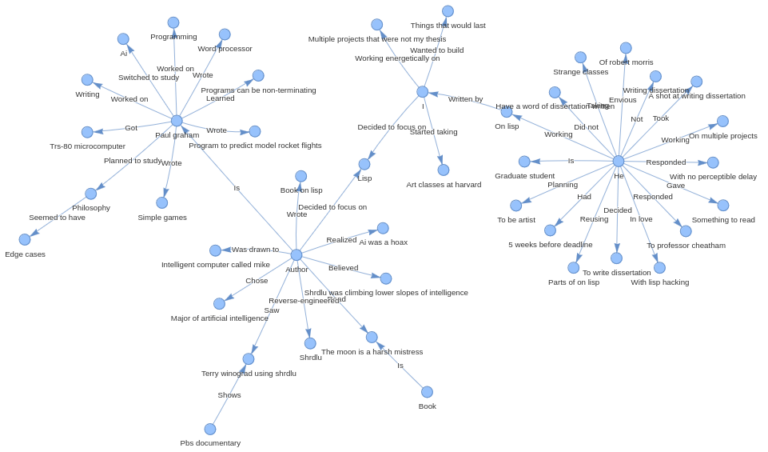
You can visualize the graph by opening the saved html file in any browser –
Persist Index Storage
Save the created index(graph) on our local storage:
index.storage_context.persist(persist_dir="./storage")
Querying the Knowledge Graph
To query the knowledge graph, follow these steps:
Load Index from Storage
					from llama_index.core import StorageContext, load_index_from_storage
index = load_index_from_storage(
    StorageContext.from_defaults(persist_dir="./storage"),
    embed_model=embedding_model,
    llm=llm
)
Initialize Query Engine
					query_engine = index.as_query_engine(
    llm=llm,
    include_text=True,
)
Execute Query
You can ask any question from the document-
					response = query_engine.query("Who is Paul Graham?")
print(str(response))
Output
					Paul Graham is an individual who has a diverse set of interests and experiences. He has a background in programming, having worked on writing and programming before college. He started programming in earnest with a TRS-80 microcomputer, creating simple games, a program to predict model rocket flights, and a word processor. Initially, he planned to study philosophy in college, but found it to be less engaging than he had anticipated. He then switched to studying AI, drawn in by a novel and a PBS documentary featuring an intelligent computer and a programming language called SHRDLU.

Despite there being no AI classes at his college, he taught himself Lisp, a programming language associated with AI. He reverse-engineered SHRDLU for his undergraduate thesis and went on to graduate school at Harvard, where he later realized that the way AI was being practiced at the time was a hoax. He decided to focus on Lisp and wrote a book about Lisp hacking called "On Lisp."

In addition to his programming background, Paul Graham also has an artistic side and was working on multiple projects outside of his thesis while in graduate school. He expresses admiration for a friend who found a dramatic way to leave graduate school by writing the internet worm of 1988.
Experimenting with other Models
In the process of implementing Graph RAG with LlamaIndex, I experimented with a variety of models offered by GROQ and Gemini. The goal was to identify which model delivered the best performance for creating a Knowledge Graph and querying it effectively.
I tried implementing it with Gemini models, below you can see the graphs created with them-
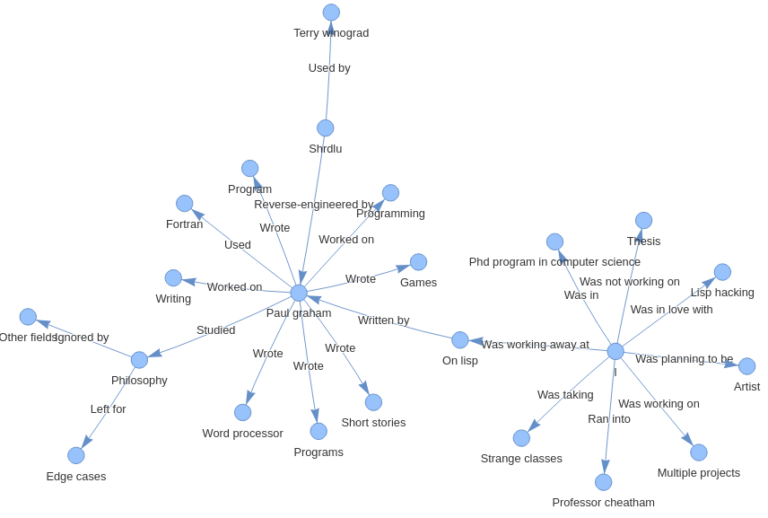
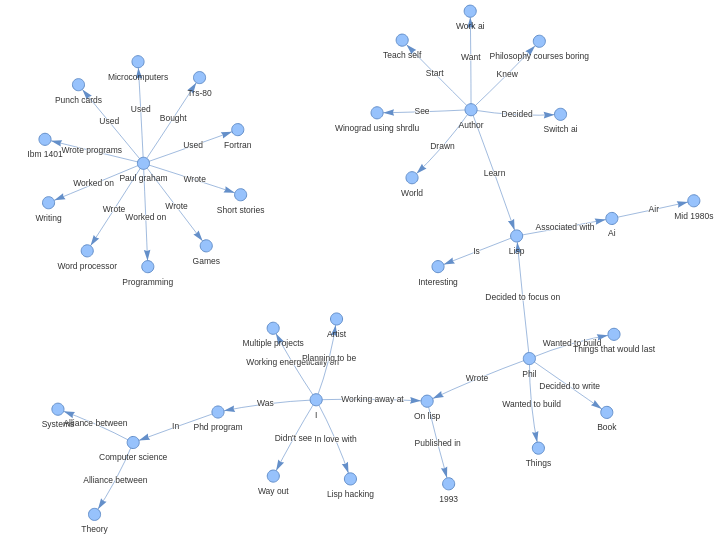
The performance of Gemini models is not that much promising as we can see in the graph created by the Gemini 1.0 pro model, it has extracted much less information from the document than the Mixtral model.
And also, the Gemini 1.5 flash model did not do very well, it has extracted information from the document, but the graph created is not connected and it has also created some entities which are not even in the doc.
Below is the graph created using Mixtral model, it performed best among the models offered by both Gemini and Groq.
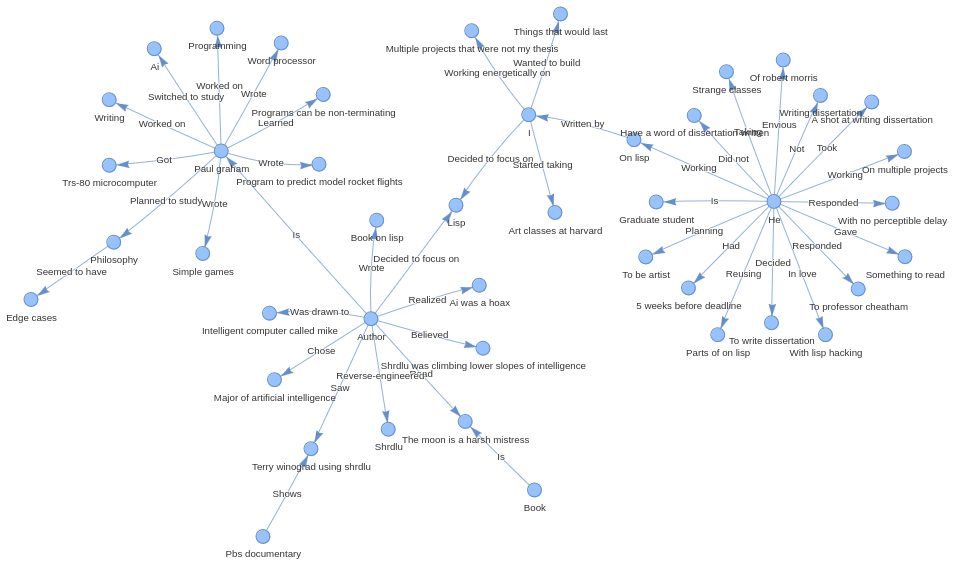
Here we can see that it has extracted more information from the document, the entities are connected and graph is containing almost every information.
Conclusion
Implementing Graph RAG with LlamaIndex significantly enhances document understanding and overcomes the limitations of traditional RAG approaches. By leveraging Knowledge Graphs, we can better connect disparate pieces of information and provide more comprehensive insights.
FAQs
Q: What is RAG (Retrieval-Augmented Generation)?
A: RAG (Retrieval-Augmented Generation) is a method that combines retrieval-based and generation-based approaches in natural language processing. It uses a retrieval system to fetch relevant documents based on a query and then leverages a language model to generate responses by combining information from the retrieved documents.
Q: What is the pricing for using Gemini models, specifically the 1.5 Flash and 1.0 Pro versions?
A: For the 1.5 Flash model:
- Price (Input):
- $0.35 / 1 million tokens (for prompts up to 128K tokens)
- $0.70 / 1 million tokens (for prompts longer than 128K tokens)
- Price (Output):
- $1.05 / 1 million tokens (for prompts up to 128K tokens)
- $2.10 / 1 million tokens (for prompts longer than 128K tokens)
For the 1.0 Pro model:
- Price (Input):
- $0.50 / 1 million tokens
- Price (Output):
- $1.50 / 1 million tokens
Source: https://ai.google.dev/pricing
Q: What is a Knowledge Graph?
A: A knowledge graph is a structured representation of information highlighting relationships between entities within a dataset, using nodes for entities and edges for relationships.
Q: How does Graph RAG improve over traditional RAG?
A: Graph RAG uses knowledge graphs to provide structured insights and enhance the understanding of complex queries.
Q: What is Groq? And the models offered by Groq?
A: Groq is a technology company that offers high-performance hardware and software solutions for AI and machine learning. The models offered by Groq include LLaMA3 8b, LLaMA3 70b, Mixtral 8x7b, Gemma 7b, and Gemma2 9b.
Q: What are other tools to build a Graph RAG?
A: Other tools to build a Graph RAG include Langchain and Microsoft’s GraphRAG.