


Project Loom is bringing exciting changes to Java, making it easier to write programs that do many things at once. One cool feature in Project Loom is Scoped Values. But what are Scoped Values, and how are they different from ThreadLocal? Let’s break it down simply.
What are Scoped Values?
Scoped Values are like special variables that you can use in specific parts of your program. They help you share data safely when your program does many things at the same time. These are created with a well-defined “scope” or lifetime, designed for safe and efficient data sharing in concurrent programming. They allow you to pass data through various parts of your application without the risks associated with traditional data-sharing methods.
Why Do We Need Scoped Values?
When your program does many things at once, like handling multiple users or tasks, you might need to share data between these tasks. This can be tricky and can cause errors. Scoped Values make this easier and safer. Traditionally, ThreadLocal variables have been used for this purpose, but they come with limitations. Scoped Values offer a cleaner and safer alternative, avoiding some of the pitfalls of ThreadLocal.
Scoped Values vs. ThreadLocal
ThreadLocal:
- Each thread has its own separate value.
- Can be hard to manage and might cause memory problems.
- Example Scenario: If you have a web server where each thread handles a separate user request, each thread can store user-specific data using ThreadLocal. However, this data is isolated to each thread and not shared.
Scoped Values:
- Share values safely within a specific part of your program.
- Automatically cleaned up when no longer needed, reducing memory problems.
- Work well with the new virtual threads in Project Loom.
- Example Scenario: In a web application handling multiple requests, you can use Scoped Values to share request-specific data (like a user ID) across various tasks that are part of the same request handling process. All tasks within that request scope can access the same data.
Example: Scoped Values
Here’s a simple example using Scoped Values:
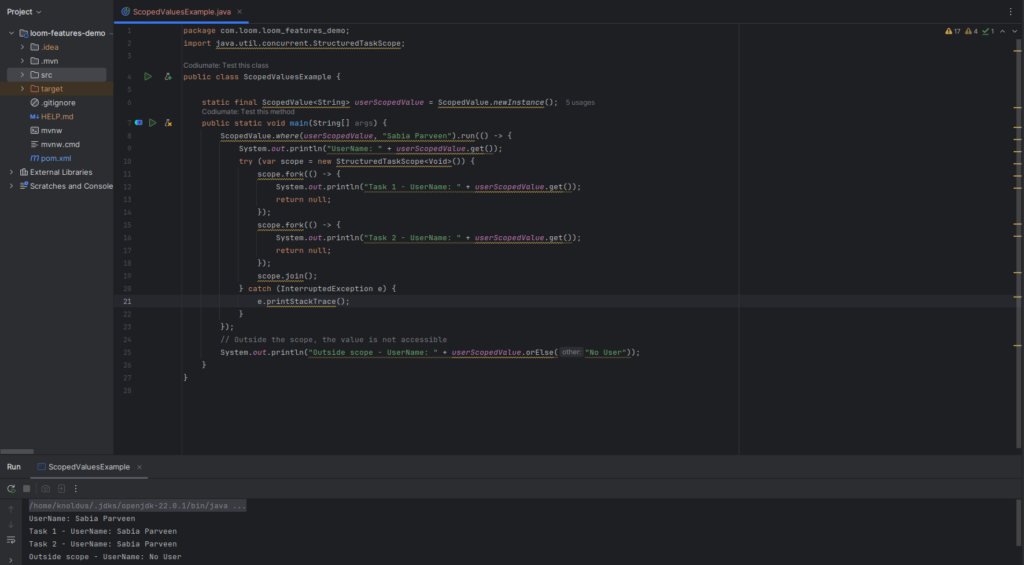
In this example:
- We create a
ScopedValuefor a user name. - Inside a specific part of the program (scope), we set and get the user name.
- Multiple tasks (virtual threads) can access this user name safely.
- Outside this scope, the user name is not accessible.
- Note: The yellow lines in code represents that
ScopedValueis part of the Project Loom incubator features, which means it is available for early access and experimentation but is not yet officially part of the Java SE specification.
Example: ThreadLocal
Now, let’s look at a similar example using ThreadLocal:
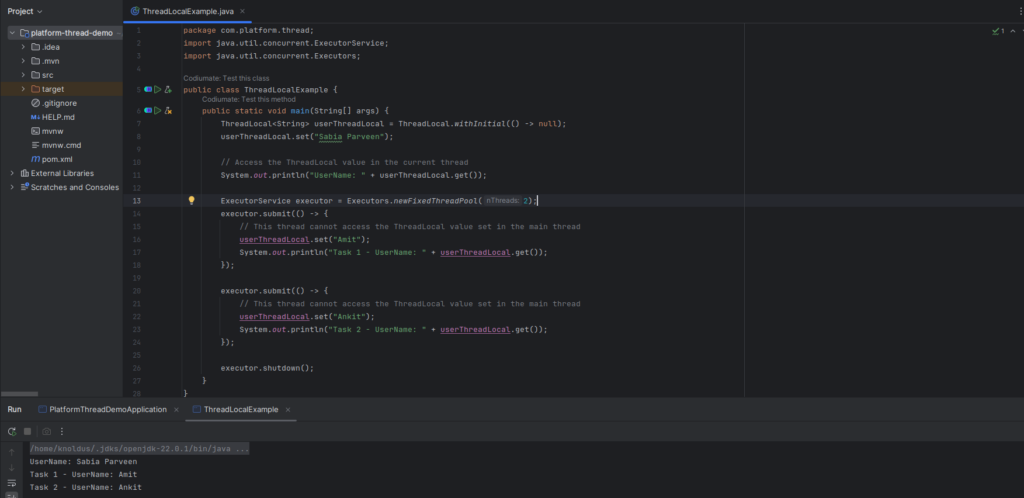
In this example:
- Each thread has its own separate user name.
- The user name set in the main thread is not accessible in the other threads.
Benefits of Scoped Values
- Safety: Scoped Values prevent sharing data by mistake outside their intended part of the program.
- Simplicity: They make it easier to manage shared data in programs doing many things at once.
- Automatic Cleanup: Scoped Values are automatically cleaned up, reducing memory problems.
Where to use:
Use Scoped Values when you need to manage and share data across multiple tasks or threads within a specific scope, particularly in environments with virtual threads and structured concurrency, to benefit from automatic memory management and cleaner code.
Use ThreadLocal to manage thread-specific data that remains within individual threads, especially in environments where you manage and isolate threads effectively.
Conclusion
Both Scoped Values and Thread Local manage data in concurrent programming. However, Scoped Values offer a modern, efficient, and safer method for sharing data across tasks, particularly in environments with virtual threads. They simplify memory management and reduce the risk of errors, making them a valuable addition to Java’s concurrency toolkit. For more, you can refer to the Project Loom documentation: https://openjdk.org/projects/loom/
For a more technical blog, you can refer to the Nashtech Blogs