



Apache Beam provides a robust framework for processing large amounts of data. In this blog, we’ll demonstrate how to use Apache Beam to read JSON data from Google Cloud Storage (GCS), perform transformations, and write the results to a BigQuery table. We’ll guide you through setting up your environment, writing the Apache Beam pipeline, and executing the pipeline
Prerequisites
Before you start, ensure you have the following:
- Maven: For building and managing dependencies.
- IntelliJ IDEA: An IDE for Java development.
- Google Cloud SDK: Command-line tools for Google Cloud.
- Java 8 JDK: Basic knowledge of Java programming.
- Google Cloud Project: Set up with BigQuery and GCS.
Step 1: Set Up Google Cloud Resources
Create a BigQuery Dataset and Table:
- This step is optional as the pipeline we will be making will pick up the schema structure from the JSON itself.
- Go to the BigQuery Console: Navigate to the BigQuery section of the Google Cloud Console.
- Create a Dataset: Under your project, create a new dataset.
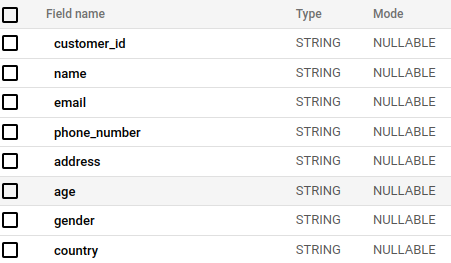
- Create a Table: Define a schema for your output table in BigQuery. For Example :-
Step 2: Prepare the Apache Beam Pipeline
Set Up Your Maven Project:
- Create a New Maven Project in IntelliJ IDEA.
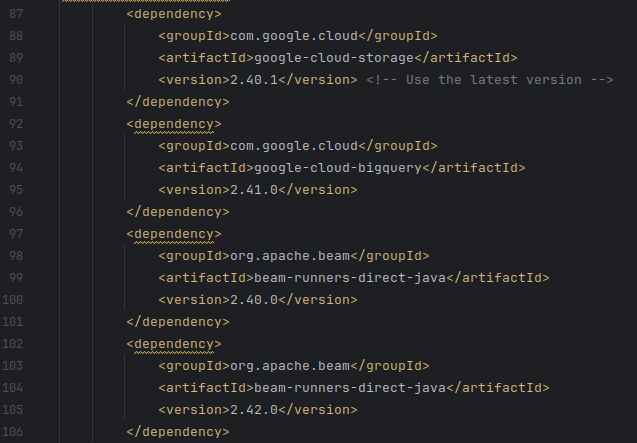
- Add Dependencies: Update your
pom.xmlto include Apache Beam dependencies. Here’s an example snippet:
Write the Beam Pipeline Code:
Create a new Java class, Lets say “JsonToBigQuery.java” , and include the following code:
import org.apache.beam.sdk.Pipeline;
import org.apache.beam.sdk.io.gcp.bigquery.BigQueryIO;
import org.apache.beam.sdk.io.gcp.bigquery.BigQueryIO.Write.CreateDisposition;
import org.apache.beam.sdk.io.gcp.bigquery.BigQueryIO.Write.WriteDisposition;
import org.apache.beam.sdk.io.TextIO;
import org.apache.beam.sdk.options.Default;
import org.apache.beam.sdk.options.Description;
import org.apache.beam.sdk.options.PipelineOptions;
import org.apache.beam.sdk.options.PipelineOptionsFactory;
import org.apache.beam.sdk.transforms.DoFn;
import org.apache.beam.sdk.transforms.ParDo;
import org.apache.beam.sdk.values.PCollection;
import com.google.api.services.bigquery.model.TableRow;
import com.google.api.services.bigquery.model.TableSchema;
import com.google.api.services.bigquery.model.TableFieldSchema;
import com.google.gson.Gson;
import com.google.gson.JsonElement;
import com.google.gson.JsonObject;
import com.google.gson.JsonParseException;
import java.util.ArrayList;
import java.util.List;
import java.util.Map;

public class DynamicGcsToBigQueryPipeline {

    public interface MyOptions extends PipelineOptions {
        @Description("GCS path to input JSON files")
        @Default.String("gs://your-bucket/path/to/json/files/*.json")
        String getInputPath();
        void setInputPath(String value);

        @Description("BigQuery output table name")
        @Default.String("your-project:your_dataset.your_table")
        String getOutputTable();
        void setOutputTable(String value);
    }

    public static class JsonToTableRowFn extends DoFn<String, TableRow> {
        private TableSchema schema;
        private final Gson gson = new Gson();

        @ProcessElement
        public void processElement(@Element String json, OutputReceiver<TableRow> out) {
            try {
                JsonObject jsonObject = gson.fromJson(json, JsonObject.class);
                TableRow row = new TableRow();

                for (Map.Entry<String, JsonElement> entry : jsonObject.entrySet()) {
                    String key = entry.getKey();
                    JsonElement value = entry.getValue();
                    if (value.isJsonPrimitive()) {
                        row.set(key, value.getAsString());
                    }
                }

                if (schema == null) {
                    schema = createSchemaFromJson(jsonObject);
                }

                out.output(row);
            } catch (JsonParseException exception) {
                System.err.println("Error parsing JSON: " + exception.getMessage());
            } catch (IllegalStateException exception) {
                System.err.println("Error processing JSON element: " + exception.getMessage());
            }
        }

        private TableSchema createSchemaFromJson(JsonObject jsonObject) {
            List<TableFieldSchema> fields = new ArrayList<>();
            for (Map.Entry<String, JsonElement> entry : jsonObject.entrySet()) {
                String key = entry.getKey();
                JsonElement value = entry.getValue();
                String type = "STRING"; // Default type
                if (value.isJsonPrimitive()) {
                    if (value.getAsJsonPrimitive().isNumber()) {
                        type = "NUMERIC";
                    } else if (value.getAsJsonPrimitive().isBoolean()) {
                        type = "BOOLEAN";
                    }
                }
                fields.add(new TableFieldSchema().setName(key).setType(type));
            }
            return new TableSchema().setFields(fields);
        }

        public TableSchema getSchema() {
            return schema;
        }
    }

    public static void main(String[] args) {
        MyOptions options = PipelineOptionsFactory.fromArgs(args).withValidation().as(MyOptions.class);
        Pipeline pipeline = Pipeline.create(options);

        PCollection<String> jsonStrings = pipeline.apply("Read JSON from GCS", TextIO.read().from(options.getInputPath()));

        JsonToTableRowFn jsonToTableRowFn = new JsonToTableRowFn();
        PCollection<TableRow> tableRows = jsonStrings.apply("Parse JSON and prepare for BigQuery", ParDo.of(jsonToTableRowFn));

        tableRows.apply("Write to BigQuery", BigQueryIO.writeTableRows()
                .to(options.getOutputTable())
                .withCreateDisposition(CreateDisposition.CREATE_IF_NEEDED)
                .withWriteDisposition(WriteDisposition.WRITE_APPEND)
                .withSchema(jsonToTableRowFn.getSchema()));

        pipeline.run();
    }
}
Configure Your Service Account:
- Go to IAM & Admin in the Google Cloud Console.
- Assign Roles: For the service account, add roles: BigQuery Admin, Storage Admin.
- Download JSON Key: From IAM & Admin > Service Accounts, download the key for your service account.
- Authenticate using the JSON key:
gcloud auth activate-service-account your-service-account@your-project.iam.gserviceaccount.com --key-file=/path/to/key.json --project=your-project-idRun the Pipeline:
Assuming that you must have your Service Account Configured
- Open IntelliJ IDEA and navigate to your project.
- Set Environment Variable:
export GOOGLE_APPLICATION_CREDENTIALS="/path/to/key.json"- Execute the Pipeline:
mvn compile exec:java \
-Dexec.mainClass=DirectGcsToBigQueryPipeline \
-Dexec.args="--runner=DirectRunner \
--project=your-project-id \
--inputPath=gs://your-bucket/path/to/json/* \
--outputTable=your-project-id:your-dataset.your_table"
Conclusion:
You’ve successfully set up an Apache Beam pipeline to read JSON data from Google Cloud Storage, process it, and write the results to BigQuery. This process highlights the power of Apache Beam in handling data pipelines and integrating seamlessly with Google Cloud services.
Feel free to adapt this pipeline for different data formats and processing needs. Happy data processing!
To read more about Data Mesh :-