


In today’s software development landscape, AI’s role is becoming increasingly crucial. While AI-powered testing tools are common, integrating AI into existing test suites remains challenging. Enter ZeroStep, an innovative add-on that provide Playwright with ChatGPT-powered capabilities.
This blog explores how ZeroStep and Playwright leverage AI to simplify test creation, boost test resilience, and minimize maintenance.
1. How ZeroStep’s AI Works With Your Test
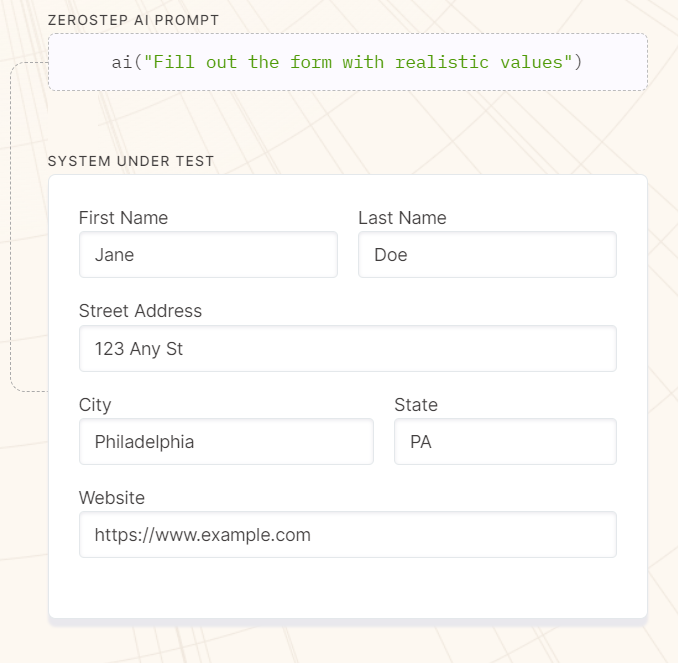
All of ZeroStep’s power lies in its ai() function. It takes user’s prompt and let the AI assistant determines what actions to take at runtime. ZeroStep currently uses GPT 3.5.
2. ZeroStep Pros And Cons
Advantages
- Fast build time, since you can express actions and assertions as plain text instructions;
- Reduce maintenance effort, as ZeroStep doesn’t use selectors;
- Self-healing, since the AI can self-correct in runtime;
- Less technical to develop new test script, thanks to the prompt-based approach. With this, more team members can contribute to writing new test script.

Disadvantages
Currently, one major disadvantage of ZeroStep is that it needs to make background calls to its API to process the prompts. These calls can take up to several seconds depends on the complexity of the instruction.
Furthermore, being fresh to the market, ZeroStep currently only supports Chromium browsers and JavaScript/TypeScript programming languages.
3. Steps To Implement ZeroStep’s AI In Your Playwright Script
Set Up ZeroStep Account And Get API Key
You need to have a ZeroStep account and generate your own key to call to ZeroStep’s own AI API. Simply register at its login site.
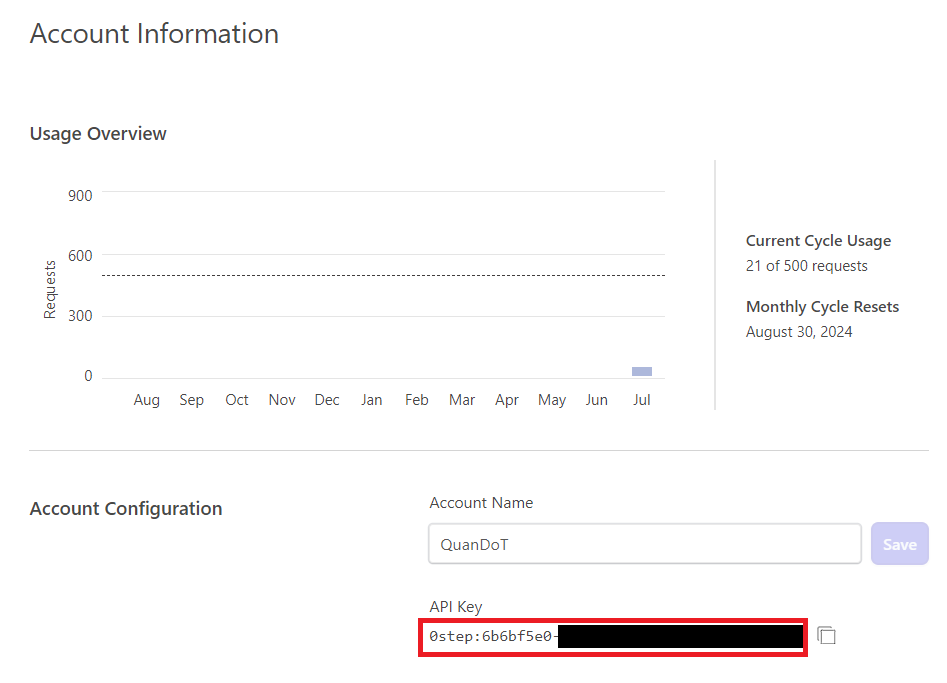
Billing is based on the number of times the test suite requests to ZeroStep’s API, which is also the number of times the ai() function is called. Free users are granted 500 requests per month. Paid users are allowed up to 40,000 requests a month for a subscription cost of $400. You can find out more at ZeroStep’s billing site.
Integrate ZeroStep In Playwright
Prerequisites
ZeroStep only requires you to have Node.js preinstalled, and a Playwright project setup and ready to run. If you’re new to Playwright, please visit its official documents.
Installation
Run the following command to install ZeroStep:
npm i @zerostep/playwright -DImplementation
In the root of your Playwright project, create a zerostep.config.json file with the following content:
{
  "TOKEN": "<your API key here>"
}
Then, import and use the ai() function in your test:
// spec.ts
import { test } from '@playwright/test'
import { ai } from '@zerostep/playwright'

test('zerostep example', async ({ page }) => {
  await page.goto('https://google.com/')

  // An object with page and test must be passed into every call
  await ai(`Type "zerostep" in the search box`, { page, test })
  await ai('Press enter', { page, test })
})
And with that, you have integrated ZeroStep into your Playwright test. To view the AI in action, simply run the command:
npm run test-uiThe page and test objects are required as arguments each time the ai() function is called. However, we can omit them by extending Playwright’s test object like so:
// ai-fixture.ts
import { test as base } from '@playwright/test'
import { aiFixture, type AiFixture } from '@zerostep/playwright'

export const test = base.extend<AiFixture>({
  ...aiFixture(base),
})
The script in spec.ts can then be shortened to:
// spec.ts
import { test } from './ai-fixture.ts'

test('zerostep example', async ({ page }) => {
  await page.goto('https://google.com/')
  await ai(`Type "zerostep" in the search box`)
  await ai('Press enter')
})
5. Performance Compared To Base Playwright
To compare the performance of ZeroStep and base Playwright, we use the below code that test the login function on the same site. Both tests follow a basic flow: user inputs username, then password, click Submit, then see a success message.
Notice the ZeroStep test only need 1 ai prompt to perform the same actions as the base Playwright test.
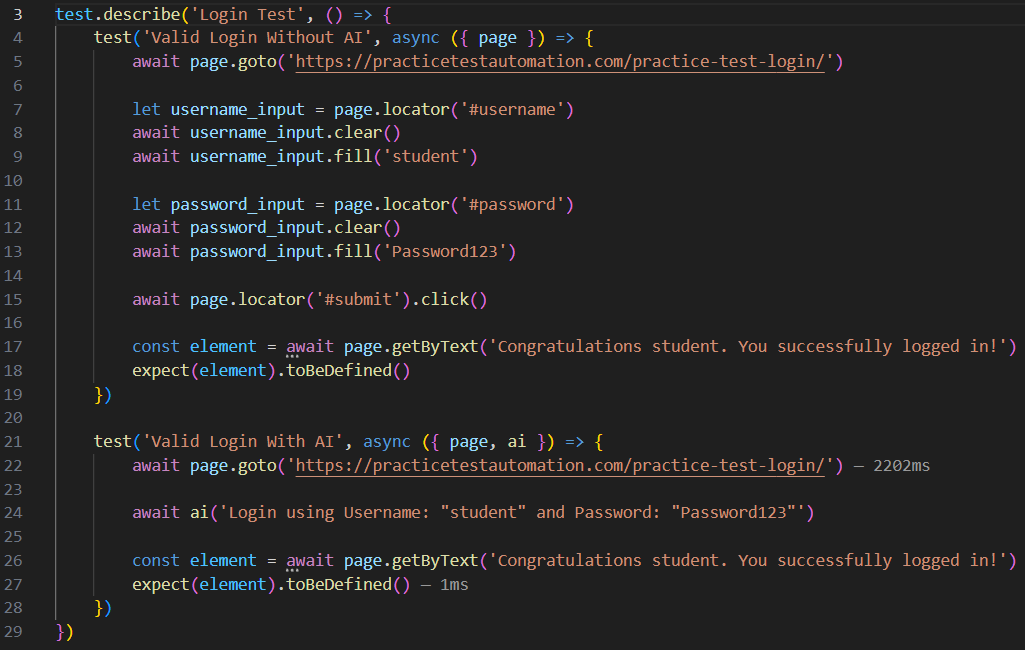
After running both tests, we can see that the ZeroStep adds about 50% time to the test duration. This is because ZeroSteps calls to its API during runtime.

6. Best Practices Working With ZeroStep’s AI
- Write prompts in complete English sentences with no spelling or grammatical mistakes.
- Put quotes around any text that should appear exactly as described. e.g.
Click on the "Login" button - Don’t include CSS/XPath selectors in your prompt, or any other implementation-level details.
- Don’t combine two or more instructions in the same prompt. e.g.
Click on the Settings icon and then click on the "User Profile" link. Instead, each prompt should contain one distinct action, query, or assertion.
Note: The exception here is Action prompts that perform a single logical task accomplished by multiple actions. In other words, a prompt likeFill out the form with realistic valuesis a perfectly fine prompt. - Write prompts to the level of specificity dictated by your requirements. Some level of ambiguity is fine and even desirable in a lot of circumstances. A prompt such as
Click on the "Get Started" linkwill work even when there are multiple “Get Started” links on the page, or if the page is completely redesigned.