


In the fast-paced world of software development, Docker has emerged as a game-changer. Its impact on how developers build, ship, and run applications is profound. Whether you’re a seasoned developer or just starting out, understanding Docker is essential. Let’s delve into what Docker is, why it’s so revolutionary, and how it can benefit your development workflow.
What is Docker?
At its core, Docker is an open-source platform designed to automate the deployment of applications inside lightweight, portable containers. These containers encapsulate an application and all its dependencies, ensuring that it runs consistently across different environments. Think of containers as mini virtual machines, but more efficient and streamlined.
Why Docker Matters
- Consistency Across Environments: One of Docker’s greatest strengths is its ability to ensure that applications work uniformly across various environments. Whether you’re developing on a Mac, testing on a Linux server, or deploying to a cloud service, Docker containers package everything needed to run the application. This consistency eliminates the notorious “it works on my machine” problem.
- Isolation: Docker containers provide isolation for applications, meaning that each container runs independently. This isolation helps avoid conflicts between dependencies and makes it easier to manage multiple applications on the same host. If one application crashes or experiences issues, it doesn’t affect others running on the same system.
- Scalability and Efficiency: Docker’s lightweight nature allows for efficient resource use. Containers start up quickly and require less overhead compared to traditional virtual machines. This efficiency is crucial for scaling applications and managing microservices architectures, where numerous services must operate seamlessly and at scale.
- Streamlined Development Workflow: Docker simplifies the development process by allowing developers to create a consistent development environment. Developers can define the environment and dependencies in a
Dockerfile, ensuring that anyone who pulls the project can replicate the exact setup without complex configuration. - Continuous Integration and Deployment (CI/CD): Docker integrates seamlessly with CI/CD pipelines, facilitating automated testing, building, and deployment. With Docker, you can automate the creation of containers, ensuring that your application goes through consistent build and test stages before deployment. This automation enhances the overall reliability and speed of software delivery.
Getting Started with Docker
- Install Docker: The first step is to install Docker on your machine. Docker provides detailed installation guides for various operating systems on their official website. Once installed, you can use the Docker CLI or Docker Desktop to manage containers.
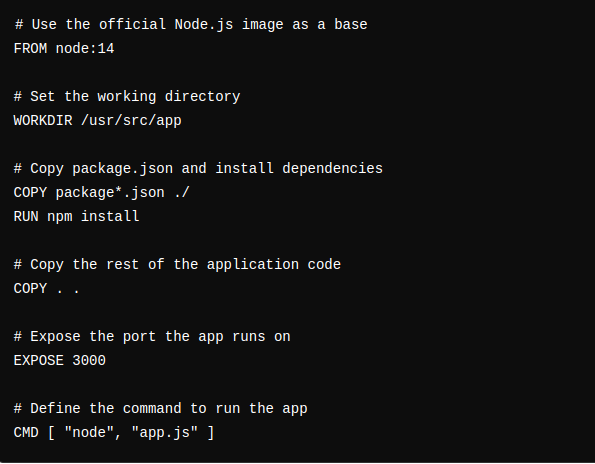
- Create a Dockerfile: A
Dockerfileis a script that contains a series of instructions to build a Docker image. An image is a snapshot of your application and its dependencies. Here’s a simple example of aDockerfilefor a Node.js application: 
- Build and Run Containers: Once you have your
Dockerfile, you can build an image using thedocker buildcommand and run a container withdocker run. For instance: 
- Explore Docker Hub: Docker Hub is a repository of Docker images where you can find pre-built images for various applications and services. It’s a great resource for finding official images or sharing your own.

Conclusion
Docker is transforming the landscape of software development and operations. By providing a consistent, isolated, and efficient environment for applications, Docker simplifies the development process and accelerates deployment. Its integration with CI/CD pipelines and scalability features make it a vital tool for modern software practices.