


Hello everyone! I’ve been diving into some educational management tools lately and came across something that’s really shaking things up in higher education: Canvas LMS by Instructure, which 100% of Ivy League school’s use. If you’re involved in higher education and curious about how top schools like Harvard or UC Berkeley manage their programs—whether you’re an educator, a student, or just someone interested in how technology is transforming learning—Canvas LMS is definitely something you’ll want to know about.
You might already know Instructure for its popular video platform, Canvas Studio, which makes creating and sharing interactive video content a breeze. They also have tools like Canvas Catalog for managing course registrations and MasteryConnect for assessments. But today, I’m focusing on Canvas LMS and how it’s making a big impact in the education space
What Makes Canvas LMS So Special?
Canvas LMS isn’t just another learning management system—it’s a versatile platform designed to make teaching and learning more efficient, engaging, and, quite frankly, enjoyable. Here’s why it’s been getting so much attention:
Super User-Friendly
First off, it’s incredibly user-friendly. Whether you’re a tech wizard or not, you’ll find Canvas easy to navigate. The interface is clean and intuitive, so educators can spend more time teaching and less time troubleshooting. It’s no wonder that more than 30 million users worldwide rely on Canvas LMS for their educational needs.

All-In-One Course Management
Canvas LMS is packed with everything you need to manage your courses efficiently:
- Assignments: Create and grade assignments with options for multiple submission types and even anonymous grading for fairness.
- Quizzes: Build quizzes that range from simple to complex, with various question types to suit your needs.
- Modules: Organize your course content into clear, structured modules that help students stay on track.
Great Communication Tools
Staying connected is key, and Canvas makes it easy:
- Discussions: Perfect for sparking conversations outside of class, these boards support rich media, allowing for a more dynamic exchange of ideas.
- Conferences: Host live video sessions that feel just like a real classroom but with the added convenience of being online.
- Inbox: An integrated messaging system that keeps all your course communications in one place.

Insightful Analytics
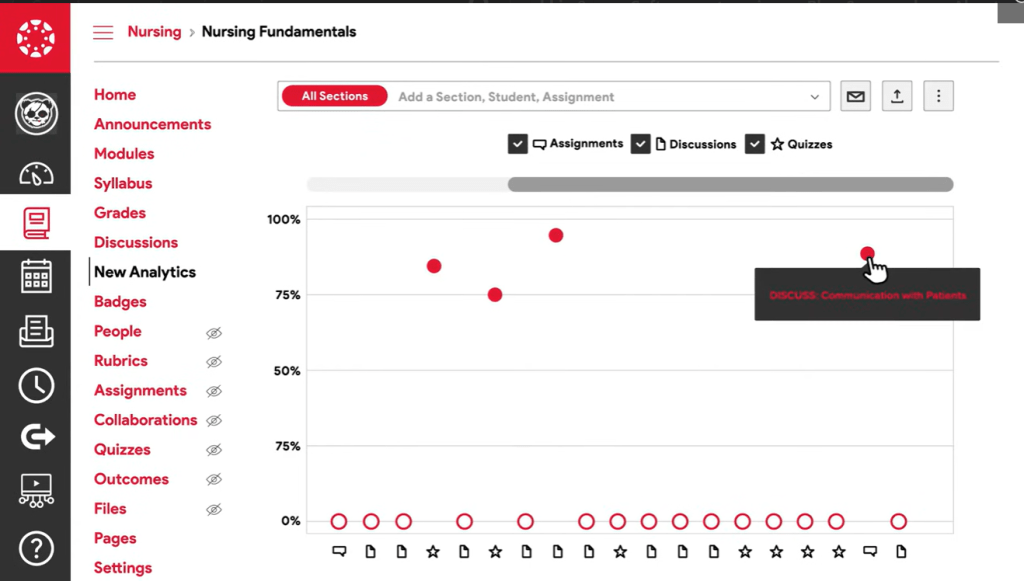
One of the coolest features of Canvas is its data-driven insights. You can track how students are performing in real-time, see who might need extra help, and adjust your teaching methods accordingly. It’s like having an assistant that helps you stay on top of your game. This focus on data is why 89% of users report that Canvas LMS improves their ability to monitor student progress.
Learn Anywhere, Anytime
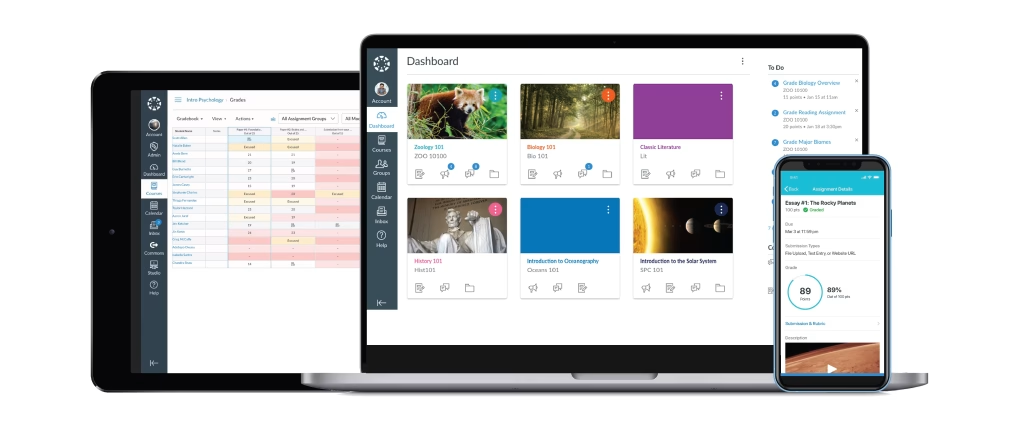
Canvas is mobile-friendly, which is a huge plus. Whether students are on a bus, at a café, or home, they can access course materials, submit assignments, and participate in discussions right from their phones. . This flexibility is perfect for today’s busy students, with over 75% of students using the Canvas mobile app regularly.
Plays Well with Others
Canvas integrates seamlessly with tools you might already be using, like Google Workspace and Microsoft Teams. This means you can easily customize the learning environment to fit your needs, combining the best of Canvas with other great tools. The platform supports over 400 third-party apps through its LTI integrations.
Embracing New Technology
What I love about Canvas is how it keeps up with new technology. Because it’s cloud-based, Canvas gets updated every three weeks with new features and improvements. The best part? These updates happen without any downtime or hassle, so you’re always working with the latest and greatest without worrying about installations or maintenance.
Special Features That Impress
If you’re in higher education and thinking about upgrading your LMS, or if you’re just curious about how modern technology is shaping learning, I highly recommend giving Canvas LMS a look. It’s a game-changer. Below are some features that stand out if you want to check it out for consideration:
Canvas Studio Integration
Canvas LMS seamlessly integrates with Canvas Studio, allowing educators to create and embed interactive video content directly into their courses. This makes learning more engaging and interactive, as students can comment on videos and participate in discussions right within the video player.
Mastery Paths
This is a game-changer for personalized learning. Mastery Paths allows educators to create custom learning paths for students based on their performance. If a student excels in a particular area, they can be directed to more advanced material; if they need extra help, they can be guided to additional resources. It’s all about meeting students where they are.
SpeedGrader
Grading is often a time-consuming task, but with SpeedGrader, it’s a breeze. This feature allows instructors to quickly grade assignments and quizzes while providing detailed feedback. Plus, it supports multimedia feedback, so you can leave audio or video comments for a more personalized touch.
Outcomes and Rubrics
Canvas makes it easy to track and measure student progress toward learning outcomes. Instructors can create detailed rubrics that align with course objectives, ensuring that grading is consistent and transparent.
Canvas LMS is flexible, and powerful, making it easier for educators to teach effectively and for students to learn in a way that suits them best.
The feature list for more details
In case you need the functions comparison, this feature list could help
1. Course Management
Assignments: Instructors can create diverse assignment types (e.g., file uploads, media recordings, and quizzes) to suit different forms of student work. This supports various assessment methods like essays, reports, and multimedia projects.
Quizzes: Ideal for testing knowledge through simple quizzes or complex exams with multiple question types like multiple-choice, fill-in-the-blank, and essays. Teachers can use quizzes for quick assessments or midterm/final exams.
Modules: Organize content into logical sequences or units. Perfect for courses that follow a structured learning path, making it easy for students to follow week-by-week or topic-based modules.
2. Communication Tools
Discussions: Facilitates asynchronous learning by allowing students to participate in class discussions outside of lecture times. Great for fostering peer-to-peer engagement in online or hybrid courses.
Conferences: Supports live virtual classrooms where students and teachers can meet face-to-face online. Useful for remote office hours, online classes, and group presentations.
Inbox: Streamlines communication by keeping all course-related messages between instructors and students in one place, reducing the need for external email platforms.
3. Grading and Feedback
SpeedGrader: Allows for quick and efficient grading of assignments and quizzes. Instructors can provide feedback in text, audio, or video formats, which is helpful in giving more personalized feedback to students in large courses.
Rubrics: Enables clear, consistent grading through custom rubrics aligned with specific learning objectives. Perfect for subjective assignments like essays or projects where predefined criteria ensure fairness.
What-If Grades: Students can enter hypothetical grades to see how future performance might affect their overall course score. Great for students who want to strategize their study efforts for upcoming assignments or exams.
4. Analytics and Reporting
New Analytics: Provides instructors with detailed data on student engagement, assignment completion, and overall performance. Useful for identifying at-risk students early on and implementing interventions to improve retention and success.
Learning Mastery Gradebook: Tracks how well students are achieving learning outcomes. Ideal for competency-based education (CBE), where progress is measured against mastery of specific skills or knowledge areas.
5. Mobile Accessibility
Canvas Mobile Apps: Ensures students and teachers can access their courses, submit assignments, participate in discussions, and check grades from anywhere, supporting distance learning, or on-the-go education.
6. Integration with Third-Party Tools
LTI Integrations: Integrates seamlessly with over 400 tools like Google Workspace, Microsoft Teams, Zoom, and Turnitin. This allows instructors to embed external resources (e.g., plagiarism checkers, collaborative documents) directly into Canvas, simplifying workflows for teachers and students.
Zoom Integration: Directly integrates with Zoom, making it easier to schedule and attend live virtual classes within the LMS interface.
7. Personalized Learning
Mastery Paths: Supports differentiated learning by customizing content based on student performance. For example, high-performing students can be directed to advanced content, while others might receive extra support or review materials. This is essential for personalized learning approaches in blended or self-paced learning environments.
8. Multimedia Support
Canvas Studio: Embeds interactive video content directly into courses, where students can comment and engage with videos in real-time. Ideal for courses that heavily rely on visual media, such as video-based lessons, tutorials, or film studies.
9. Outcomes and Rubrics
Outcomes: Tracks student progress toward achieving specific learning outcomes. Useful in tracking skills mastery and aligning assignments with institutional or course-level objectives.
Rubrics: Allows for easy grading of subjective work, ensuring that students understand the criteria for success from the outset.
10. Customizations and API
Supports the creation of custom tools and integrations, which is ideal for institutions that have specific needs or workflows. For example, universities can create custom dashboards or integrate Canvas with internal systems like student information systems (SIS)