


Introduction
In ASP.NET Core MVC, action methods within controllers can return different types of results, collectively referred to as Action Results. These results dictate the nature of the response sent back to the client. The IActionResult interface provides a unified way for controller action methods to return various responses. Let’s delve into some of the common action result types and see how they can be utilized.
Key Action Results
1. ViewResult
ViewResult is used when you want to render an HTML view as the response. This is one of the most commonly used results in MVC applications.
public IActionResult Home()
{
    return View("HomeView");
}
2. JsonResult
JsonResult is ideal for returning data in JSON format, which is especially useful in APIs or AJAX requests.
public JsonResult GetUserInfo()
{
    var user = new { Username = "Alice", Age = 25 };
    return Json(user);
}
3. ContentResult
ContentResult allows you to return simple text or other types of content as the response.
public ContentResult ShowMessage()
{
    return Content("This is a simple content result.");
}
4. FileResult
FileResult is used to send files to the client, such as images, documents, or any other downloadable content.
public FileResult DownloadDocument()
{
    byte[] fileBytes = System.IO.File.ReadAllBytes("files/sample.docx");
    return File(fileBytes, "application/vnd.openxmlformats-officedocument.wordprocessingml.document", "sample.docx");
}
5. RedirectResult
Use RedirectResult to redirect the client to a specific URL.
public RedirectResult RedirectToExternalSite()
{
    return Redirect("https://www.google.com");
}
6. RedirectToActionResult
This result type redirects the client to another action method within the application.
public RedirectToActionResult GoToDashboard()
{
    return RedirectToAction("Dashboard", "User");
}
7. RedirectToRouteResult
RedirectToRouteResult is used to redirect the client to a route defined in the routing configuration.
public RedirectToRouteResult RedirectToCustomRoute()
{
    return RedirectToRoute(new { controller = "Profile", action = "Details", id = 5 });
}
8. StatusCodeResult
This result type is used to return a specific HTTP status code, such as 404 or 500.
public StatusCodeResult ReturnNotFound()
{
return StatusCode(404); // Not Found
}
9. EmptyResult
EmptyResult does not return any content. It’s useful when an action should execute but doesn’t need to return any data or view.
public EmptyResult ExecuteSilently()
{
    // Perform some operations
    return new EmptyResult();
}
10. PartialViewResult
PartialViewResult renders a partial view, which is a segment of a view that can be used within other views.
public PartialViewResult LoadPartial()
{
    return PartialView("_PartialDetails");
}
11. ObjectResult
ObjectResult is typically used in APIs to return a model object along with an HTTP status code, making it suitable for RESTful services.
public ObjectResult FetchData()
{
var product = new { Id = 1, Name = "Laptop", Price = 999.99 };
return new ObjectResult(product) { StatusCode = 200 };
}
Result types real life example
let’s create a simple ASP.NET Core MVC project that demonstrates the use of various action results outlined above. The project will include a single controller with methods for each action result type, along with the necessary setup to run the application.
1. Set Up the Project
First, create a new ASP.NET Core MVC project using the .NET CLI
dotnet new mvc -n ActionResultDemo
cd ActionResultDemo
2. Create the Controller
In the Controllers folder, create a new controller named ResultDemoController.cs. This controller will include all the action methods demonstrating different action results.
using Microsoft.AspNetCore.Mvc;
using System.IO;

namespace ActionResultDemo.Controllers
{
    // The ResultDemoController demonstrates various ActionResults available in ASP.NET Core MVC.
    public class ResultDemoController : Controller
    {
        // 1. ViewResult: Renders a view (HTML page) to the client.
        // This method returns a view called "HomeView" located in Views/ResultDemo folder.
        public IActionResult Home()
        {
            return View("HomeView");
        }

        // 2. JsonResult: Returns JSON-formatted data, commonly used in APIs.
        // This method returns user data in JSON format.
        public JsonResult GetUserInfo()
        {
            var user = new { Username = "Alice", Age = 25 };
            return Json(user);
        }

        // 3. ContentResult: Returns plain text or other types of content.
        // This method returns a simple text message.
        public ContentResult ShowMessage()
        {
            return Content("This is a simple content result.");
        }

        // 4. FileResult: Returns a file to the client.
        // This method reads a file and returns it as a downloadable file.
        public FileResult DownloadDocument()
        {
            // Replace with the path to your file.
            byte[] fileBytes = System.IO.File.ReadAllBytes("files/sample.docx");
            return File(fileBytes, "application/vnd.openxmlformats-officedocument.wordprocessingml.document", "sample.docx");
        }

        // 5. RedirectResult: Redirects the client to a specified URL.
        // This method redirects to an external website.
        public RedirectResult RedirectToExternalSite()
        {
            return Redirect("https://www.google.com");
        }

        // 6. RedirectToActionResult: Redirects the client to a specific action method.
        // This method redirects to the "Dashboard" action in the "User" controller.
        public RedirectToActionResult GoToDashboard()
        {
            return RedirectToAction("Dashboard", "User");
        }

        // 7. RedirectToRouteResult: Redirects the client to a specific route.
        // This method redirects to a route defined with a controller and action.
        public RedirectToRouteResult RedirectToCustomRoute()
        {
            return RedirectToRoute(new { controller = "Profile", action = "Details", id = 5 });
        }

        // 8. StatusCodeResult: Returns a specific HTTP status code.
        // This method returns a 404 Not Found status code.
        public StatusCodeResult ReturnNotFound()
        {
            return StatusCode(404); // Not Found
        }

        // 9. EmptyResult: Does not return any content.
        // This method performs some operations and returns nothing.
        public EmptyResult ExecuteSilently()
        {
            // Perform some operations here if needed.
            return new EmptyResult();
        }

        // 10. PartialViewResult: Renders a partial view.
        // This method returns a partial view called "_PartialDetails".
        public PartialViewResult LoadPartial()
        {
            return PartialView("_PartialDetails");
        }

        // 11. ObjectResult: Returns an object as the response, typically used in APIs.
        // This method returns product data as an object result with status code 200.
        public ObjectResult FetchData()
        {
            var product = new { Id = 1, Name = "Laptop", Price = 999.99 };
            return new ObjectResult(product) { StatusCode = 200 };
        }
    }
}
3. Create the Views
Add the required views for ViewResult and PartialViewResult.
- HomeView.cshtml (Located in the
Views/ResultDemofolder):
@* Views/ResultDemo/HomeView.cshtml *@
<h2>Welcome to the Home View</h2>
<p>This view demonstrates the ViewResult action result.</p>
- _PartialDetails.cshtml (Located in the
Views/ResultDemofolder):
@* Views/ResultDemo/_PartialDetails.cshtml *@
<h3>This is a partial view result demonstration.</h3>
4. Set Up Routing
Ensure your routing setup allows the ResultDemoController to handle requests properly. Modify Program.cs to set the default controller.
var builder = WebApplication.CreateBuilder(args);

// Add services to the container.
builder.Services.AddControllersWithViews();

var app = builder.Build();

// Configure the HTTP request pipeline.
if (!app.Environment.IsDevelopment())
{
    app.UseExceptionHandler("/Home/Error");
    // The default HSTS value is 30 days. You may want to change this for production scenarios, see https://aka.ms/aspnetcore-hsts.
    app.UseHsts();
}

app.UseHttpsRedirection();
app.UseStaticFiles();

app.UseRouting();

app.UseAuthorization();

app.MapControllerRoute(
    name: "default",
    pattern: "{controller=Home}/{action=Index}/{id?}");

app.Run();
5. Run the Application
Now, run the application using the following command:
dotnet runOpen a browser and navigate to the following URLs to test each action result, since I am running my project on https://localhost:5001, if you want your project to run on same https://localhost:5001 URL, then go to the Properties/launchSettings.json and paste the URL there as shown in below image

6. Outputs
- ViewResult:
https://localhost:5001/ResultDemo/Home
output:
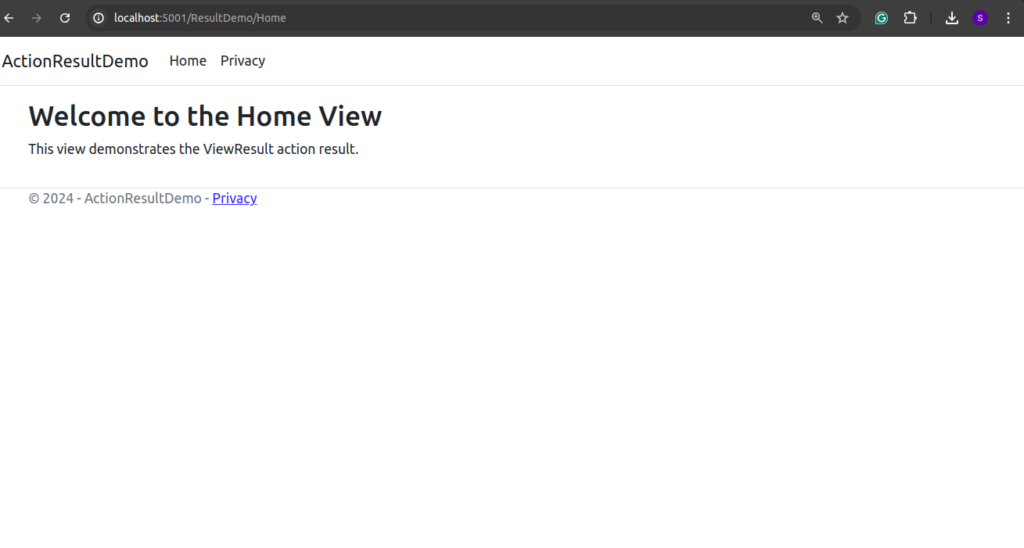
- JsonResult:
https://localhost:5001/ResultDemo/GetUserInfo
output:

- ContentResult:
https://localhost:5001/ResultDemo/ShowMessage
output:

- FileResult:
https://localhost:5001/ResultDemo/DownloadDocument
the above URL will download the document, in our case, it will download sample.docx file.
- RedirectResult:
https://localhost:5001/ResultDemo/RedirectToExternalSite
the above URL will redirect us to google.com
- RedirectToActionResult:
https://localhost:5001/ResultDemo/GoToDashboard
this URL will redirect us to dashboard of the application
- RedirectToRouteResult:
https://localhost:5001/ResultDemo/RedirectToCustomRoute - StatusCodeResult:
https://localhost:5001/ResultDemo/ReturnNotFound - EmptyResult:
https://localhost:5001/ResultDemo/ExecuteSilently - PartialViewResult:
https://localhost:5001/ResultDemo/LoadPartial - ObjectResult:
https://localhost:5001/ResultDemo/FetchData
output:
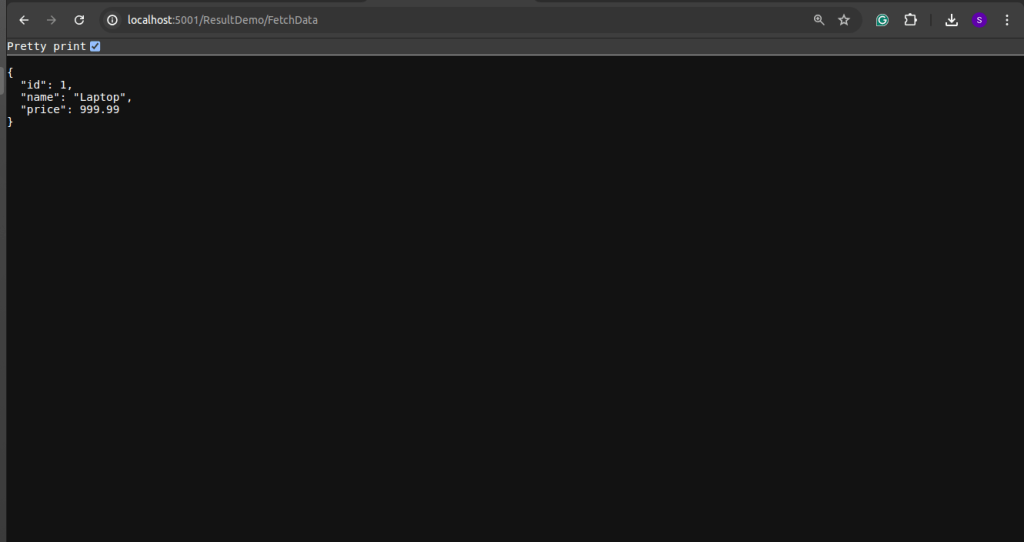
This project demonstrates various types of action results available in ASP.NET Core MVC, showcasing how they can be used to respond to different types of client requests efficiently. You can access the above code in the given github repository from here.
Conclusion
ASP.NET Core MVC provides a wide variety of action results, enabling developers to return different types of responses to client requests. Whether rendering views, sending JSON data, redirecting to other actions, or delivering files, these results help tailor the response to meet specific application needs. Understanding these results is key to developing flexible and responsive web applications in ASP.NET Core.