


1. Introduction
In modern software development, Continuous Integration (CI) and Continuous Deployment (CD) pipelines are essential for maintaining a rapid development cycle. Integrating TestCafe into CI/CD systems allows teams to automatically run end-to-end tests on every code change, ensuring that applications remain stable. In this article, we will explore how to configure TestCafe in a CI/CD pipeline, handle test results, manage test environments, and deal with common CI/CD challenges in projects.
2. CI/CD Fundamentals and TestCafe Integration
At its core, CI/CD involves the automation of the build, test, and deployment processes. This ensures that each code change is tested automatically and deployed seamlessly if all tests pass.
2.1 CI/CD Pipeline Overview
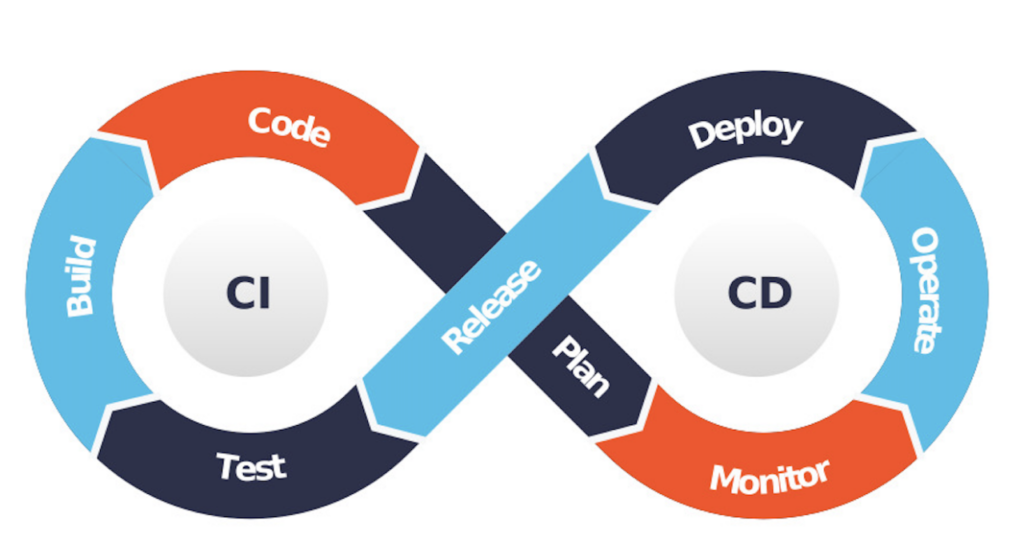
A typical CI/CD pipeline includes the following stages:
– Build: The source code is compiled, and dependencies are installed.
– Test: Automated tests, including unit, integration, and end-to-end tests, are executed.
– Deploy: The application is deployed to staging or production environments.
2.2 TestCafe in CI Pipelines
TestCafe in CI Pipelines: TestCafe can be easily integrated into any CI system, whether itʼs Jenkins, GitLab CI, CircleCI, or GitHub Actions. Hereʼs a simple example for Azure DevOps pipeline.
#azure-pipeline-e2e.yml - file is typically used to define the configuration for the pipeline.
name: TestCafe E2E Tests
on:
 push:
 branches:
 - main
jobs:
 test:
 runs-on: ubuntu-latest
 steps:
 - uses: actions/checkout@v2
 - name: Set up Node.js
 uses: actions/setup-node@v2
 with:
 node-version: '14'
 - run: npm install
 - run: npm test
3. Handling Environment Variables and Secrets
In real-world applications, tests often require environment variables or secrets, such as API keys, database credentials, or login details. Managing these securely within a CI/CD pipeline is crucial to avoid leaks and ensure the tests can access the right data.
Azure DevOps Example: Azure DevOps provides a secure way to store and retrieve environment variables:
#azure-pipeline-e2e.yml
jobs:
 test:
 runs-on: ubuntu-latest
 steps:
 - uses: actions/checkout@v2
 - name: Set up Node.js
 uses: actions/setup-node@v2
 - name: Set environment variables
 env:
      API_KEY: ${{ secrets.API_KEY }}
 - run: npm test
Environment-Specific Configuration: To handle different environments (e.g., development, staging, production), you can set up environment-specific configurations using .env files or CI system variables.
const environment = process.env.NODE_ENV || 'development';
const config = require(`./config/${environment}.json`);
4. Handling Test Artifacts and Results
One of the key aspects of running tests in CI/CD is managing the test results. You need to collect, analyze, and report the results to maintain visibility over test performance.
– TestCafe Reporter: TestCafe offers a range of built-in and third-party reporters that allow you to generate reports in formats like JSON, JUnit, or even visual HTML files.
#package.json - file managed dependencies, scripts for project
testcafe chrome tests/ --reporter junit:report.xml
These reports can then be uploaded as artifacts in your CI system, providing insights into test failures and execution time.
– Storing Test Artifacts Most CI/CD platforms allow you to store test artifacts, such as screenshots or videos. This can be especially useful when debugging failed tests.
#testcaferc.json - file used to configure various settings
artifacts:
 paths:
 - report.xml
 - screenshots/
5. Dealing with Flaky Tests in CI
Flaky tests are a significant pain point in CI pipelines, as they can lead to false negatives. TestCafe provides some tools to help deal with flakiness, but the key lies in careful test design and retry strategies.
– Retrying Failed Tests: Using the –retry-test-pages flag, you can instruct TestCafe to retry tests that fail due to page errors in config.testcaferc.json file
#testcaferc.json
testcafe chrome tests/ --retry-test-pages
– Handling Asynchronous Flakiness: Sometimes, flakiness comes from race conditions in the application or test itself. TestCafe’s built-in retries for dynamic elements help, but explicit waiting or polling may still be required.
#LoginPage.js
await t.expect(Selector('.dynamic-element').exists).ok({ timeout:10000 });
6. Conclusion
Integrating TestCafe into CI/CD pipelines for projects involves more than just running tests after a code change. By automating testing within your CI/CD pipeline, teams can ensure that code changes are consistently validated, reducing the risk of bugs and improving software quality. TestCafe’s capabilities allow for efficient cross-browser testing, enabling developers to deliver reliable applications faster. Continuous integration and deployment ensure your application stays stable as it evolves, helping your team catch issues early and deliver software faster.