


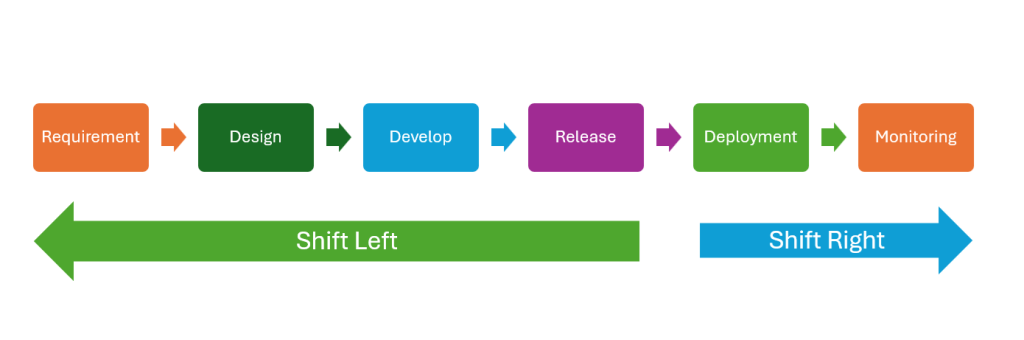
1.What is shift right testing?
In the modern development lifecycle, continuous testing is one of the required methodologies. In continuous testing, we have both shift left and shift right testing. Certainly, both have their advantages and are necessary for us. Shift right testing is also known as production testing, and it helps us gather issues or real user feedback which cannot be detected within the development environment.
1.1 Why do we need shift right?
Before deploying to production, we’ve tested our product on other environments like testing or staging. However, we still need to do the testing activities on production because of the following reasons:
- The real user data is only available in the production environment
- Users behave in unpredictable ways, which may not be fully simulated during pre-deployment testing
- Check the stability and availability of our product or services in real time
- Gather and analyze behavior of the real user on our application
1.2 Key activities of shift right testing
For shift right testing, we will care most about the stability, performance and usability of our product. To evaluate these criteria, we’ll focus on some activities like:
- Monitoring & Observability
- Log analysis
- User behavior analysis
- Performance testing
- Security testing
2. Key benefit of shift right testing
- Real world validation: Testing on production provides us more accurate feedback from the real user.
- Continuous improvement: Based on feedback from the user, we can continue to improve our product
- Increase confidence in the product quality: By monitoring and gathering metrics related to application, we can ensure the product quality in real time
- Resilience and Fault Tolerance: By technique like Chaos engineer, we can build more resilience system
- Risk mitigation: Instead of releasing the new version to all users, we can leverage the technique like Canary Release to reduce the risk of product delivery and minimize the impact of the failure.
- Faster time to marker: By applying techniques like canary releases or feature toggles, testing and release can be done incrementally. Therefore, new features and improvements can be delivered more quickly
3. Shift right testing techniques and toolset
In this article, we’ll focus on some of the most popular shift right testing techniques.
3.1 Chaos engineering
Chaos engineering is the technique which will inject the fault into the system to test its resilience and ability to recover. It’s designed to test the weakness or vulnerability of our application during unexpected conditions like network issues, hardware problems or high traffic load.
Popular tools for Chaos engineering:
- Chaos Monkey
- Gremlin
- AWS Fault Injection Service
- LimutChaos
- Azure Chaos Studio
3.2 A/B testing
A/B testing is the technique to compare 2 or more versions of the application to determine which is better. In A/B testing, the users will be randomly divided into 2 or more groups, and each group will use a different version of the application. Then, we can monitor the user usage on each version and evaluate them based on predefined criteria like user engagement or conversion rate.
Key tools for A/B testing:
- Google Optimize
- Optimizely
- VWO
- Adobe Target
3.3 Canary Release
Canary Release is a software deployment strategy where a new version of our product will be released to a small group of real users. Thanks to that, the team can monitor the performance, usability and stability of the application in the real world. After making sure that the application works well, we can release it to all the users. Canary Release especially helps us in reducing the risk of failure and detecting bugs early.
Popular tools for Canary Release:
- Kubernetes
- AWS Elastic Load Balancing (ELB)
- Google Cloud Traffic Director
- NGINX
3.4 Synthetic monitoring
Synthetic monitoring is a proactive approach to monitor the function and performance of the application by simulating user interaction on the application. It will help us to detect issues early before they impact the real user. We’ll run the automation script which simulate critical workflow on a regular schedule from various locations to check the performance, availability and functionality of our application.
Popular tools for Synthetic monitoring:
- Prometheus
- New Relic
- Dynatrace
- Uptrends
- Checkly
3.5 CX testing and analytic
CX testing and analytic is the technique to evaluate and improve user interaction on our product. By testing and analyzing CX, businesses can gain insights into customer behavior, preferences, and pain points, helping them enhance satisfaction, engagement, and loyalty.
Popular tools for CX testing and analytic:
- Google analytics
- Mixpanel
- Hotjar
4. How NashTech can support shift right testing
4.1 Propose shift right testing solution
For each customer, we can propose the specific testing types and techniques which are appropriate with their application based on their infrastructure, product domain and technologies applied in developing their products. We also experience in configuring alert mechanism so that when the system is down or doesn’t work correctly, we can be notified as soon as possible.
4.2 Set up and add customized metrics for monitoring
We have experience in various kinds of monitoring tools like Prometheus, Telegraf, DataDog, ELK, etc. Besides setting up the toolset to collect data related to performance of the infrastructure, the service availability, we’re also able create the script to collect customized metrics.
4.3 Implement automation testing script for synthetic monitoring
For synthetic monitoring, we can develop automation test scripts to run it on various kinds of monitoring tools like New Relic or Checkly. With strong automation testing skill, we can create the stable test script which can help us avoid the false alert from the monitoring tool.
4.4 Performance testing and penetration testing
We can ensure the quality of product by proposing the approach for performance testing and penetration testing. For performance testing, we experience in various kinds of tool like Jmeter, K6, Gatling, etc. We also provide security and penetration testing for many clients to ensure the security for their product.
4.5 Set up Google analytics and analyze the result
While developing the application, we also configure Google analytics into our product so that we can support clients collecting the data from users of the application. Based on the data collected, we can analyze and suggest improvements for the products. Beside that, the collected data also help us in create the test strategy for performance testing.
Conclusion
With a lot of benefit of shift right testing, we should apply it in our development life cycle. It helps us not only in ensuring the quality of our products but also in improving them. Moreover, shift right testing also support us balancing the development speed and quality of our products by focusing on real-time validation and continuous monitoring post-deployment.