



1. Introduction
In the previous post, you can start using Postman in API testing efficiently, but you need to update static data if you rerun the Postman request many times. By using dynamic data, you do not need to edit static data manually. Additionally, generating random data in Postman requests is useful for scenarios in API testing with different input values or simulating various user interactions. In this post, we will go step by step to help you generate and use random dynamic data in Postman requests with detailed examples.
2. List of simple methods to generate dynamic data with detailed examples
There are many methods to generate dynamic data. In this post, we will go with the simplest two methods
2.1. Use Pre-request Scripts for Dynamic Data
Pre-request scripts in Postman are executed before the request is sent. You can use them to generate random data and set it as environment or global variables, which can then be used in your requests.
Example: Generate Random clientName and clientEmail to register a client and get access token for authorization
Input information
URL: https://simple-books-api.glitch.me/api-clients/
Method: POST
Add a Pre-request Script: Go to Scripts tab, select Pre-request section and put script as below

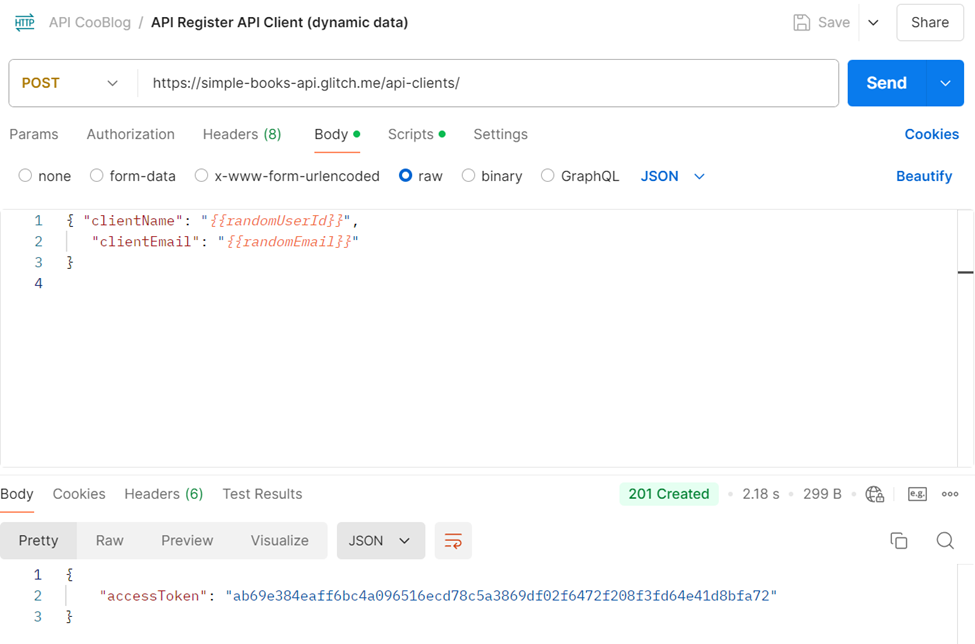
Body for dynamic data: Put
{ “clientName”: “{{randomUserId}}“,
“clientEmail”: “{{randomEmail}}” }
Instead of static data in the previous post
{ “clientName”: “yKbOqqUNMKATALON122”,
“clientEmail”: “yKbOqqUNM122@example.com” }
Click “Send” button to see an access token in the response section. With this way, you do not need to change data manually for each time test to have new access token.
2.2. Use Postman built-in variables to generate dynamic data
Postman has several built-in functions that can be used to generate dynamic data can greatly enhance your API testing by allowing you to create requests that adapt to various scenarios. Here’s a quick guide on how to use them with some example functions as below.
{{$randomInt}} — generates a random integer within a specified range.
{{$randomEmail}} — generates a random email.
{{$randomUsername}} — generates a random username.
{{$timestamp}} — generates a Unix timestamp.
For more detail, you can refer to this link for the different build-in functions
Using Built-in Variables in Requests: You can incorporate these variables directly into your request URLs, headers, or body
Example: Input theses variables into Request Body to generate Random clientName and clientEmail to register a client and get access token for authorization
Input information
URL: https://simple-books-api.glitch.me/api-clients/
Method: POST
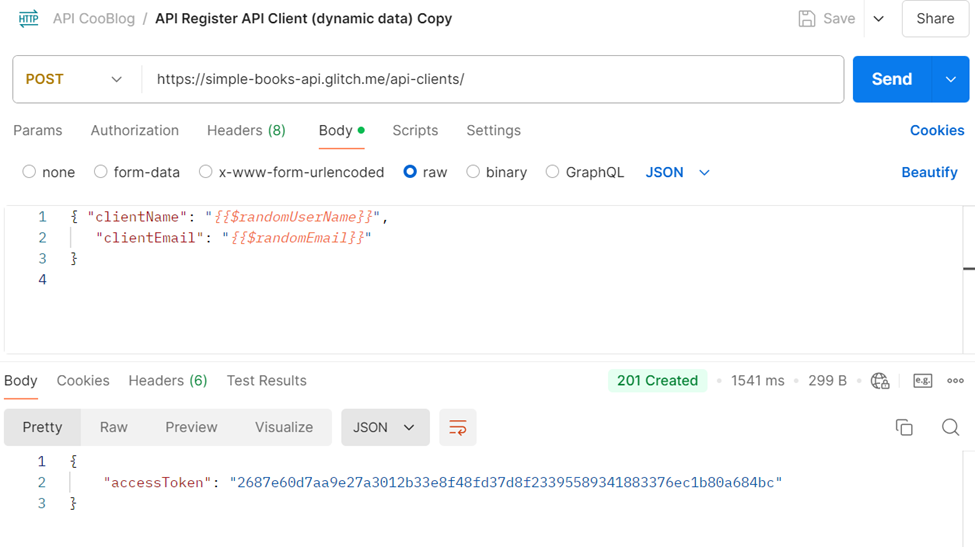
Body for dynamic data
{ “clientName”: “{{$randomUserName}}“,
“clientEmail”: “{{$randomEmail}}” }
Click “Send” button to see an access token in the response section
3. Conclusion
By following these steps, you can effectively incorporate random dynamic data into your Postman requests to enhance your API testing in handling a wide range of inputs, saving time and simulation scenarios. Thanks for your reading and happy testing with Postman.
References
https://github.com/vdespa/introduction-to-postman-course/blob/main/simple-books-api.md
https://learning.postman.com/docs/tests-and-scripts/write-scripts/variables-list