


Introduction
As the digital world expands, businesses face an influx of unstructured data in formats like JSON, XML, images, and BLOBs. Snowflake, known for its high scalability and performance, offers robust solutions to store, query, and analyze unstructured data efficiently. This guide will explore Snowflake’s approach to handling files and BLOBs and provide actionable examples to help you integrate unstructured data into your analytics workflow seamlessly.
Storing Unstructured Data in Snowflake
Snowflake uses stages for managing unstructured data, which can reside either internally or in external locations such as Amazon S3, Azure Blob Storage, or Google Cloud Storage.Snowflake enables data storage through stages, which are categorized into two types:
- External Stages: These stages allow data storage in external cloud locations like Amazon S3, Google Cloud Storage, and Azure Blob Storage. Snowflake provides metadata references for files in these stages, allowing efficient access without fully loading the files into Snowflake tables.
- Internal Stages: Managed by Snowflake, internal stages are quick to set up and maintain but may incur higher storage costs for large files.
Working with File Formats in Snowflake
To handle various unstructured data formats, Snowflake offers support for a range of file types, including JSON, XML, Parquet, and Avro. The VARIANT data type allows Snowflake to store and query semi-structured data directly within tables, which makes it easy to handle complex data.
Example: Loading JSON Files into Snowflake
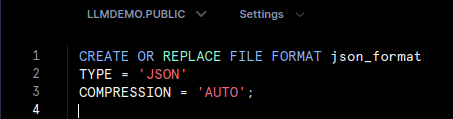
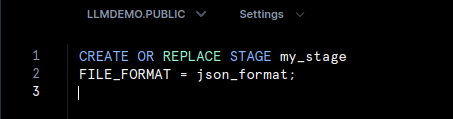
The following steps demonstrate how to load JSON files into a Snowflake table using the VARIANT data type.
1. Define a JSON File Format:
2. Create an Internal Stage:
3. Load JSON Data into a Table:

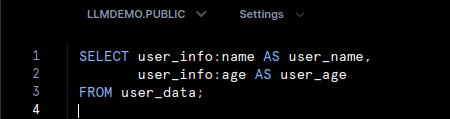
4. Query JSON Fields:
You can query specific fields within the JSON data using SQL functions, as shown below:
Handling Binary Large Objects (BLOBs) in Snowflake
When dealing with binary files, such as images and audio files, Snowflake offers flexible options:
- Storing as BASE64: For moderately sized binary objects, BASE64 encoding allows BLOB data to be stored as VARCHAR.
- Metadata Storage for Large Files: For larger binary files stored in external locations, you can store metadata like file name, size, and location within Snowflake, allowing you to reference and manage the files without loading the binary data.
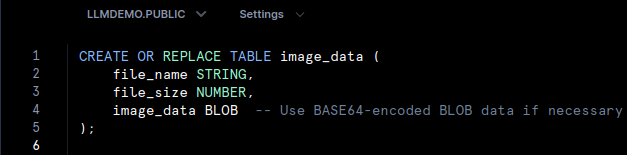
Example: Managing Image Metadata
This example demonstrates how to create a table to store metadata for image files:
Querying and Analyzing Unstructured Data
Snowflake’s architecture makes it simple to query unstructured data, even in complex formats. For instance, nested JSON structures stored as VARIANT can be queried directly without prior transformation.
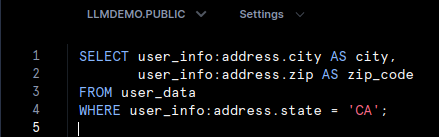
Example: Analyzing Nested JSON Data
The following example demonstrates how to extract nested fields from JSON data:
Advanced Data Processing with Snowpark for Unstructured Data
Snowflake’s Snowpark framework provides the ability to process unstructured data using languages such as Python, Java, and Scala. Snowpark is especially beneficial for complex data transformations or machine learning applications, where Python can be used directly within Snowflake to process and analyze data.
Example: Processing JSON Data with Snowpark (Python)
This is an example of how Snowpark can be used to filter and analyze JSON data:

Best Practices for Managing Unstructured Data in Snowflake
To maximize efficiency and cost savings, keep these best practices in mind:
- Use External Storage for Large Files: For very large files, external stages (e.g., AWS S3) are more cost-effective than storing directly in Snowflake.
- Optimize File Formats: When working with large datasets, consider using compressed formats like Parquet or Avro to reduce storage costs and improve query performance.
- Compress Files: Snowflake supports compression for various file formats, such as GZIP, reducing storage costs while maintaining performance.
Conclusion
Snowflake’s versatile approach to unstructured data storage makes it a powerful tool for modern data applications. With the ability to manage unstructured data via internal and external stages, query semi-structured data using the VARIANT data type, and integrate with languages like Python through Snowpark, Snowflake provides a complete solution for handling files and BLOBs effectively.
By applying best practices, Snowflake users can unlock valuable insights from unstructured data, optimising for both performance and cost. Whether you’re dealing with JSON files, images, or binary objects, Snowflake’s unstructured data capabilities allow you to harness the full potential of all data types in your analytics stack.