


Introduction to API Testing and Automation
Glimpse into API Testing
Before we get into integrating REST Assured with a custom Java framework, let’s recall what API testing is. An API (Application Programming Interface) is the go-between that lets two pieces of software talk to each other. By testing those calls directly, long before a UI ever loads, you catch bugs early, make your app sturdier, and save your team a ton of rework.
A Sneak Peek into REST Assured
A popular Java-based library that simplifies the validation and testing process of RESTful Web Services. It supports all standard REST HTTP methods. It also validates response status codes, header cookies, JSON/XML bodies, and basic and OAuth authentication handling.
Building a Custom Java Framework
Building Blocks of Automation
- Test Cases: These are the individual checks. Each one has specific inputs, expected conditions, and outcomes. Think of them as targeted tasks which validate a piece of functionality at a time.
- Test Suites: A test suite is simply a collection of related test cases organised together. It helps ensure that the concerned feature or part of the application works as expected from end to end.
- Test Data: Just like real-world scenarios need realistic input, automated tests also rely on prepared data to simulate various user interactions and behaviours. This includes everything from typical values to edge cases.
- Reporting: The Process of generating and presenting information about the execution of automated tests.
- Configuration: Centralised configuration settings for different environments
Designing a Modular and Extensible Automation Framework
To create strong, maintainable, and scalable test automation solutions, it’s important to design the framework in a way that’s both modular and flexible. Here are some key strategies and principles to keep in mind while designing an automation framework.
Clear Modular Structure
- Functional Modules: Granularise your framework into small modules, each responsible for specific functionalities such as Test Data Management, Reporting, Logging, Page Object Model, Utility Functions
- Object Repository: Centralise the API endpoints or web elements to enhance readability and maintainability
- Configuration Management: Use configuration files and tools to handle environment-specific settings. This ensures flexibility and consistency across different test environments
Strong Layer Architecture
- Test Layer: Contains the actual test cases and scenarios
- Utility Layer: Offers reusable functions for common operations like logging, reporting and data manipulation.
- Framework Layer: Defines the overall framework structure, including core functionalities and configuration settings.
Effective Use of Design Patterns
- Page Object Model (POM): Segregates page-specific elements and actions from test cases, making tests clear and accessible.
- Factory Pattern: Create objects dynamically based on runtime configurations and input patterns, making it easier to adapt and expand.
- Singleton Pattern: Ensures that only one instance of a class is created, which is useful for shared resources like config readers or logging services
Integrating REST Assured with a Custom Java Framework
Integrating REST Assured with a custom Java framework allows you to leverage its powerful features for API testing within a structured and maintainable environment. Here’s a step-by-step guide on how to achieve this:
Set up the project and dependencies
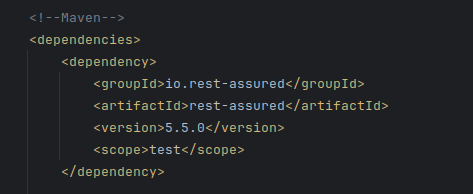
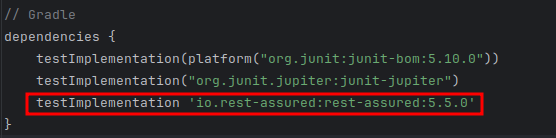
Create a new project. Then, add Rest Assured dependency in the project’s pom.xml (Maven) or build.gradle (Gradle).
Create RESTAssured Framework Structure
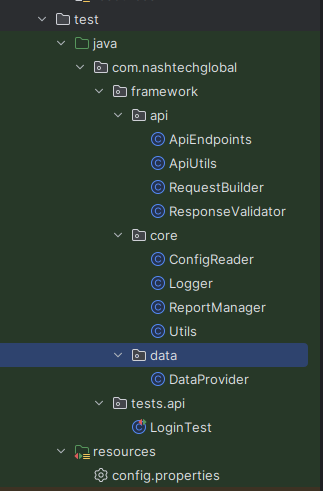
- Core Modules
- ConfigReader: Reads configuration properties from the config.properties file
- Logger: Handles logging using a suitable library (log4j,slf4j)
- ReportManager: Handles test reports (Allure, ExtentReports)
- Utils: Contains utility methods such as string manipulation, etc.
- API Modules
- ApiEndpoints: Defines API endpoints as constants
- RequestBuilder: Builds API requests (GET, POST, PUT, DELETE)
- ResponseValidator: Validates API responses like status code, headers, etc.
- ApiUtils: Contains utility methods related to API for serialisation, JSON parsing, etc
- Data Module
- DataProvider: Provides test data from various external resources.
- Test Module
- Contains API test classes.
Implementing RestAssured Framework
Core Module Implementation
- Logger: Utilise a chosen framework to log messages at different levels such as INFO, DEBUG and ERROR.
- ReportManager: Configures a reporting framework. It has methods to log test results, add screenshots and generate reports.
API Module Implementation
- ApiEndpoints: Contains API endpoints as CONSTANTS

- RequestBuilder builds API requests using RestAssured and provides a method for setting the header, request body, and other request parameters.
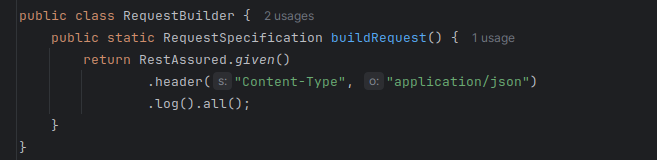
- ResponseValidator: Validates responses using assertions. Provides methods to verify status codes, headers and response body.

Best Practices for Maintaining and Scaling Your API Test Framework
- Divide your framework into smaller, independent modules with well-defined responsibilities
- Minimise dependencies between modules to improve maintainability and allow for easier modifications or replacements.
- Store test data in external files (e.g., Excel, CSV, JSON) or databases.
- Implement data providers to efficiently supply test data to your tests
- Generate detailed test reports with clear summaries, detailed logs, screenshots, and performance metrics.
- Utilise a version control system like Git to track changes to your code, collaborate effectively, and easily revert to previous versions if needed.
- Integrate your tests into your CI/CD pipeline to automate test execution and get faster feedback on code changes.
- Conduct regular code reviews to ensure code quality, identify potential issues, and share knowledge within the team.
- Regularly refactor your code to improve its design, readability, and maintainability
- Keep your framework and dependencies up-to-date to benefit from bug fixes, performance improvements, and new features.
References
- https://github.com/rest-assured/rest-assured/wiki/GettingStarted
- https://www.toolsqa.com/rest-assured-tutorial/