



Introduction
Modern software development cycles require rapid iterations and reliable testing strategies. However, traditional automation frameworks often struggle with frequent UI or backend changes. HealX, a Selenium-based self-healing automation tool, leverages AI/ML and heuristic techniques to dynamically adapt to locator changes. By detecting, predicting, and resolving issues such as broken locators or modified UI elements, HealX minimises manual intervention and ensures robust, resilient test automation. This reduces maintenance efforts while enhancing the reliability of automated testing in dynamic environments.
HealX Framework Overview
The HealX framework is a self-healing test automation system designed to improve the resilience of automated tests. It consists of three main parts: Core Components, Healing Approaches, and Driver Logic.
1. Core Components
The HealX framework’s fundamental components are as follows:
- Extending Framework Functionalities: HealX enhances the traditional Page Object Model (POM) to support healing features.
- FirstRun & FirstRunDriver: These manage the first test run by capturing and saving the original locators (the “addresses” of elements in the UI).
- CustomWebDriver: Manages test runs after the first one by tracking locator changes and performing healing if needed.
- HealX Core Class: The central hub of the framework that implements all healing strategies to fix broken locators.
- NormalRun: Handles routine test executions using healed locators.
- Remote Database: Stores and updates locator information to facilitate healing during test execution.
2. Healing Approaches
HealX uses several strategies to address broken locators and ensure smooth test execution:
- Retry Mechanism: If an element isn’t found due to slow page loading, HealX retries the interaction.
- Alternate Locators: If the primary locator fails, HealX tries a backup (e.g., name or CSS).
- Attribute Combination: Combines multiple attributes (e.g., ID + class) to identify an element when one attribute isn’t sufficient.
- Attribute Priority: Prioritises locators based on their type: ID, Name, CSS, XPath, and custom attributes (e.g.,
data-testid). - Element Position: As a last resort, HealX identifies an element based on its position on the page if all other methods fail.
3. Driver Logic
The driver logic ensures seamless communication between HealX, the test framework, and the application under test. It:
- Directs the flow of tests.
- Ensures locators are healed in real-time during test runs.
Building a Framework: Practical Implementation
STRUCTURE: The entire logic of self-healing and related are compiled in a package named “Self Healing”. The package further contains various classes that play an important role in designing this framework.
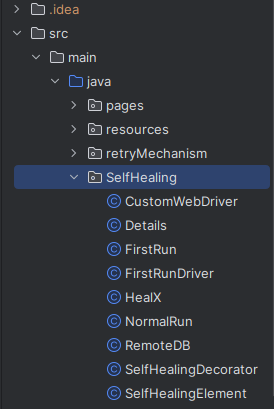
Major Classes
1. CustomWebDriver
The CustomWebDriver is a specialised version of the Selenium WebDriver that adds advanced features like healing broken locators and handling complex interactions. It wraps around the standard Selenium WebDriver to enhance its capabilities while still working as the original browser driver.
1.1 Implements Multiple Interfaces:
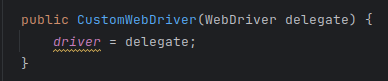
The class extends Selenium’s core functionality by implementing these interfaces:
- WebDriver: The main interface for controlling the browser.
- TakesScreenshot: Adds the ability to capture screenshots during test execution.
- JavascriptExecutor: Enables running JavaScript directly in the browser.
- Interactive: Supports advanced interactions such as mouse and keyboard operations.
1.2 Enhanced Element Finding with Self-Healing:
1.2.1 findElement(By by):
- This method attempts to locate an element, waiting up to 30 seconds using explicit waits.
- If the element isn’t found, it triggers a self-healing mechanism to recover the element and continue the test execution.
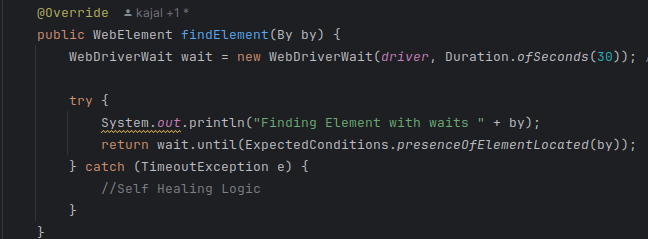
1.2.2 findElements(By by):
- Similar to findElement, but designed to work with multiple elements (i.e., a list).
- It employs reflection to dynamically identify and heal missing locators if the elements aren’t found.
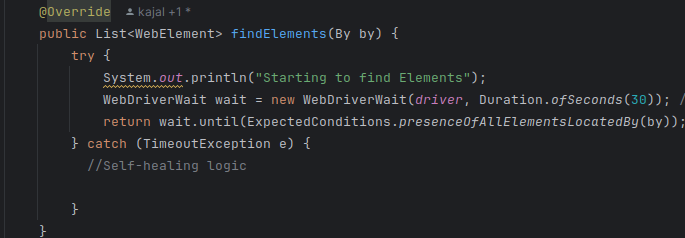
1.3 Reflection-Based Healing:
Reflection allows the class to inspect the calling code to identify locator names dynamically:
- The driver checks the test class’s fields and methods to determine the original locator, making it adaptive to locator changes.
- If an element’s locator changes (e.g., ID or class), the CustomWebDriver can automatically recover and continue the test without interruption.
1.4 Handling Complex User Interactions:
The CustomWebDriver makes handling intricate user interactions effortless. It adds methods to manage advanced actions like dragging, dropping, or multi-step interactions:
- perform(Collection<Sequence> actions): This method supports combined mouse and keyboard actions, allowing for complex sequences in your tests.
- resetInputState(): Resets the current mouse or keyboard states, ensuring that interactions start fresh for each test scenario.


1.5 Screenshot Capability:
By implementing the TakesScreenshot interface, the CustomWebDriver allows for easy capture of screenshots during test execution. These screenshots can be forwarded to the underlying WebDriver, which supports taking screenshots directly in the browser. This feature is crucial for visual validation and debugging.

1.6 JavaScript Execution:
The CustomWebDriver also supports JavaScript execution within the browser through the JavascriptExecutor interface:
- executeScript(String script, Object… args): Runs synchronous JavaScript in the browser and returns the result immediately.
- executeAsyncScript(String script, Object… args): Executes JavaScript asynchronously. This is useful for handling longer operations like waiting for a callback to complete before continuing the test.

2. NormalRun
The NormalRun class is designed to locate web elements during automated tests and fix issues (self-heal) when elements can’t be found using their original locators. It combines efficient searching, dynamic recovery strategies, and database-driven locator management.

2.1 Key Methods
- findElement(String locatorType, String locatorValue):
- Finds a single element based on the provided locator type and value.
- Locator types include id, cssSelector, xpath, or generic attribute selectors.
- waitForAllElementsToBeVisible():
- Waits for at least 60% of the page’s elements to load.
- Uses JavaScript to count the total elements in the DOM and compare them with currently visible elements.
- getElement(String locatorName, By locatorByType):
This is the core method for retrieving elements. It follows these steps:- Initial Search: Tries to find the element using the original locator stored in the Remote Database (Remote DB).
- Page Refresh: If the element isn’t found, refreshes the page and waits for elements to load.
- Alternate Locator Search: Checks if there’s an alternate locator (e.g., backup locator) in the database and uses it to find the element.
- Self-Healing Mechanism: If the element still isn’t found, uses the HealX class to recover the element by:
1. Searching based on its attributes (like ID, class, or text).
2. Locating it based on its position on the page. - Return Element: If the element is found, returns it otherwise logs an error for debugging.
- getElements(String locatorName, By locatorByType):
This is the core method for retrieving elements. It follows these steps:- Similar to getElement, but retrieves a list of elements instead of just one.
- Uses the same process, including alternate locator search and self-healing.
- getElement(String locatorName):
- A simpler version of the getElement method.
- Automatically fetches the locator type and value from the Remote DB.
- Applies the same self-healing logic as the other methods.
3. Details Class
The Details class is designed to help retrieve the name of a locator (like By.id, By.xpath, etc.) during test execution. This is especially useful for identifying and fixing (“healing”) broken locators in Selenium-based test automation.

3.1 Key Methods
- getLocatorName(By locator):
- Retrieves the field name of a specific locator object (e.g., a variable holding By.id or By.xpath).
- Useful for debugging or healing locators during runtime.
- locator (By): The locator you want to identify by name.
4. FirstRunDriver
The FirstRunDriver is a custom wrapper around a standard Selenium WebDriver (e.g., ChromeDriver, FirefoxDriver). It enhances the WebDriver’s functionality by introducing self-healing and first-run locator data collection, ensuring better automation reliability during tests.

4.1 Key Features
- Wrapper Class:
- Acts as a layer on top of the regular WebDriver.
- Intercepts calls to methods like findElement() and findElements() to add custom behaviour.
- FirstRun Integration:
- Works with a FirstRun object to:
- Apply self-healing for broken locators.
- Collect and update locator details when elements are encountered for the first time.
4.2 Key Overridden Methods
1. findElement(By by) :
This method is customised to include self-healing and first-run logic while finding a single element.
How It Works:
- Standard Search:
- Calls the standard driver.findElement(by) to locate the element.
- Retrieve Locator Name:
Extracts the name of the locator by:- Fetching the calling class name from the stack trace (assumes classes follow naming conventions like pages.<ClassName>).
- Using reflection to call getLocatorName(By by) on the calling class to fetch the locator’s variable name.
- Parse Locator Details:
Matches the By locator’s string (e.g., By.id(“submit”)) using a regex to extract:- Locator Type (e.g., id, cssSelector, etc.).
- Locator Value (e.g., submit).
- Update FirstRun Data:
Calls the FirstRun object’s firstRunUpdate() method to:- Store locator details.
- Prepare for healing if needed later.
- Debugging:
- Logs locator details for troubleshooting.
2. findElements(By by):
This method is similar to findElement() but is designed to handle a list of elements.
How it Works:
- Standard Search:
- Uses driver.findElements(by) to locate a group of elements.
- FirstRun Update:
- Passes the first element of the list to the FirstRun object’s firstRunUpdate() for processing.
- Debugging Information:
- Logs the stack trace and locator details for insight into the search process.
5. FirstRun Class
The FirstRun class enhances the Selenium WebDriver by collecting information about elements during the first test run, storing it in a Remote Database (Remote DB) for self-healing and future reference.
- Locating elements.
- Retrieving element attributes.
- Getting element coordinates.
- Storing this information in a Remote Database (Remote DB) for self-healing and future reference.
This class ensures a smoother automation process by collecting and updating essential data about web elements during the first run of the tests.
5.1 Key Features
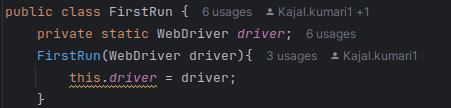
1. Constructor:
- Takes a Selenium WebDriver instance and assigns it to a static field in the class.
- Ensures that all methods have access to the driver for interacting with elements.
5.2 Key Methods
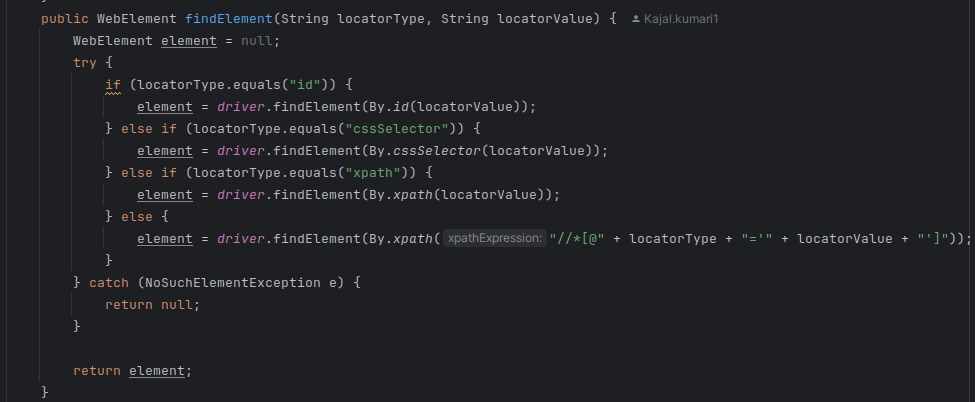
1. findElement(String locatorType, String locatorValue):
Finds a web element based on the type and value of the locator.
- How It Works:
- Supports standard locator types like id, CSS Selector, and XPath.
- For custom attributes, it dynamically constructs an XPath expression to locate the element.
- Handles failures gracefully by catching the NoSuchElementException and returning null if the element isn’t found.
2. getElementAttributes(WebElement element):
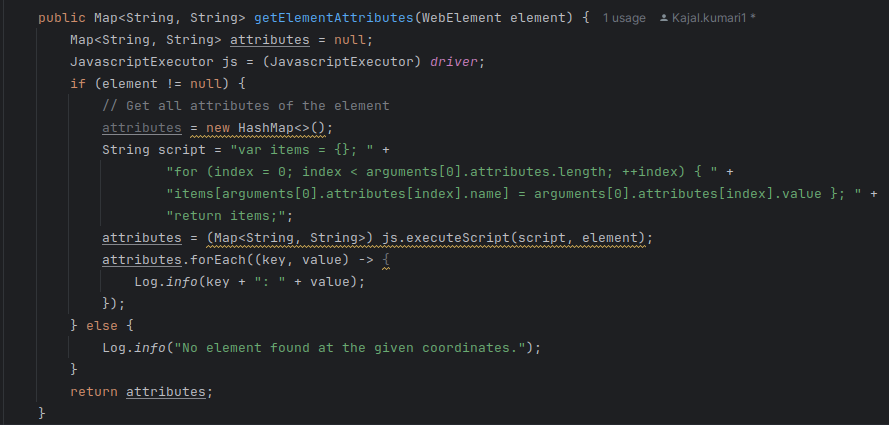
Retrieves all attributes of a given web element and returns them as a key-value pair map.
- How It Works:
- Uses a JavaScriptExecutor to extract all attributes of the element.
- Stores attributes in a HashMap (e.g., {id: “username”, class: “input-field”}).
- Logs each attribute using a custom logging mechanism.
- If no element is provided, logs an error message and returns an empty result.
3. getCoordinates(WebElement element):
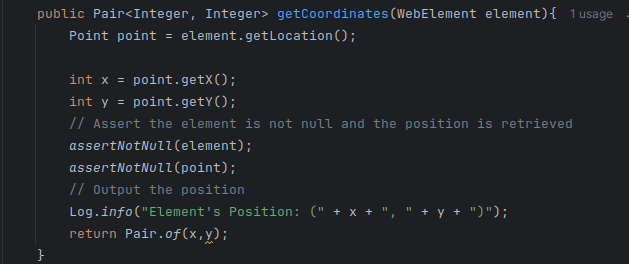
Fetches the x and y coordinates of an element’s position on the page.
- How It Works:
- Uses the getLocation() method from Selenium to get the position as a Point object.
- Extracts x and y values from the Point.
- Verifies that the element and coordinates are valid using assertions.
- Logs the coordinates for debugging and returns them as a Pair object.
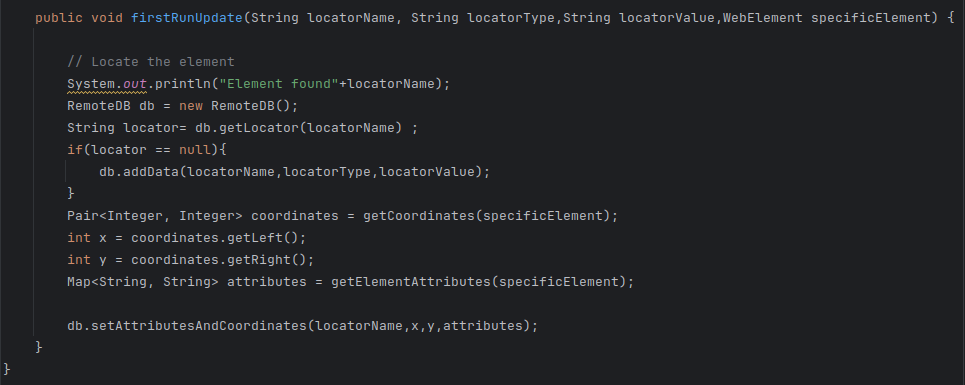
4. firstRunUpdate(String locatorName, String locatorType, String locatorValue, WebElement specificElement):
Updates the database with information about an element, including its locators, attributes, and coordinates.
How It Works:
- Checks Database:
- Look for the locator in the Remote DB.
- If the locator isn’t found, it creates a new entry.
- Collects Element Data:
- Retrieves the coordinates using getCoordinates().
- Retrieves the attributes using getElementAttributes().
- Update Database:
- Calls the setAttributesAndCoordinates() method in the Remote DB to store: Locator information (name, type, value), Element attributes and Coordinates.
6. SelfHealingDecorator
The SelfHealingDecorator class enhances Selenium’s element-finding process by introducing self-healing capabilities. It intercepts and decorates WebElement interactions with logic to handle broken locators, making the automation framework more resilient to UI changes.
6.1 Key Features
- Constructor:
- Purpose: Initialises the decorator with the necessary components for self-healing.
- ElementLocatorFactory factory: Used to create locators for elements.
- WebDriver driver: The browser driver instance for managing interactions.
- Passes the factory to the parent class (DefaultFieldDecorator).
- Stores the driver for future use.
- Logs the initialisation for debugging purposes.
References
6.2 Key Methods
1. decorate(ClassLoader loader, Field field):
Enhances standard field decoration by wrapping WebElement instances with self-healing functionality.
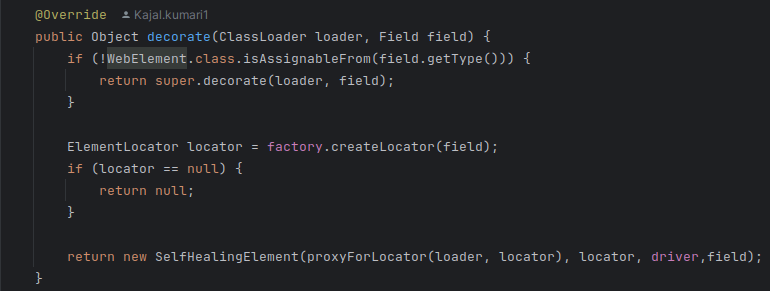
How It Works:
- Check Field Type:
- Confirms if the field is of type WebElement.
- If not, it falls back to the parent class’s decoration mechanism.
- Create Locator:
- Uses the factory to create an ElementLocator for the field.
- If no locator is found, it skips decorating the field.
- Wrap with Self-Healing Logic:
- Wraps the located WebElement in a SelfHealingElement object.
- Adds logic to detect and recover from broken locators during interactions.
2. proxyForLocator(ClassLoader loader, ElementLocator locator):
Creates a dynamic proxy for a WebElement to support self-healing behaviour.

How It Works:
- Use Parent Method:
- Calls the proxyForLocator method of the parent class (DefaultFieldDecorator) to generate a standard proxy for the element.
- Enhance with Self-Healing:
- Casts the proxy to a WebElement and integrates self-healing logic for runtime recovery.
7. SelfHealingElement
The SelfHealingElement class enhances Selenium WebDriver’s functionality by wrapping a WebElement to add self-healing capabilities. This means it can attempt to recover and locate broken elements during test execution without failing the test.
7.1 Key Components
- Fields/Properties:
- originalElement: The original WebElement wrapped by this class, used for interactions.
- locator: The locator (e.g., By.id, By.cssSelector) used to find the element.
- driver: The Selenium WebDriver instance controlling the browser.
- field: A reference to the field in the code representing the web element, used for dynamic reflection.
- locatorName: The name or identifier for the locator, derived from the field, to help identify the element in logs and during healing.
- objectFirstRun: An instance of the FirstRun class, managing locator updates and healing during the initial test execution.
- Constructor
- Purpose: Initialises the SelfHealingElement instance with all necessary details.
- originalElement – The original WebElement.
- locator – The locator used to find the element.
- driver – The WebDriver instance.
- field – Reflection-based reference to the element’s code field.
7.2 Key Methods
1. healLocator():
Attempts to recover the element if it cannot be found using the original locator.
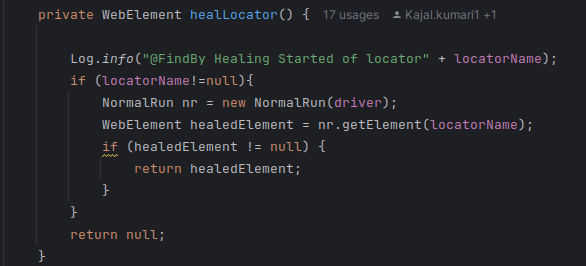
- How It Works:
- Calls the NormalRun class to fetch the element using its locatorName.
- If the locator has been updated or healed, it uses the new locator to locate the element.
- Logs the healing process for debugging purposes.
2. getElement():
Retrieves the wrapped WebElement.
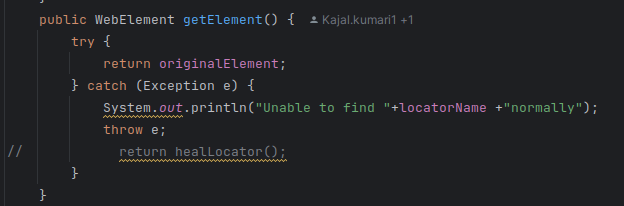
- How It Works:
- Tries to locate the element using the original locator.
- If the element is not found, it invokes healLocator() to recover it.
- Returns the element if found; otherwise, logs an error.
3. getWrappedElement():
Returns the original, unmodified WebElement.
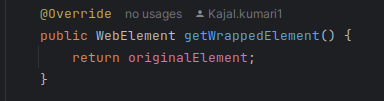
Use Case: Allows direct interaction with the base element, bypassing any self-healing logic.
8. Remote DB
The Remote DB class stores locator information in a JSON file, supporting CRUD operations on locator data for self-healing.
8.1 Key Features
- Handles locator storage, updates, and retrieval.
- Stores data like locator type, value, attributes, and coordinates.
8.2 Key Methods and Their Functions
- initializeFileIfEmpty():
- Ensures a JSON file exists and initialises it with an empty structure if missing or empty.
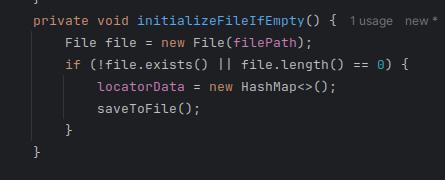
- loadFromFile():
- Loads locator data from the JSON file using Jackson’s ObjectMapper.
- Creates a new file if it doesn’t exist.
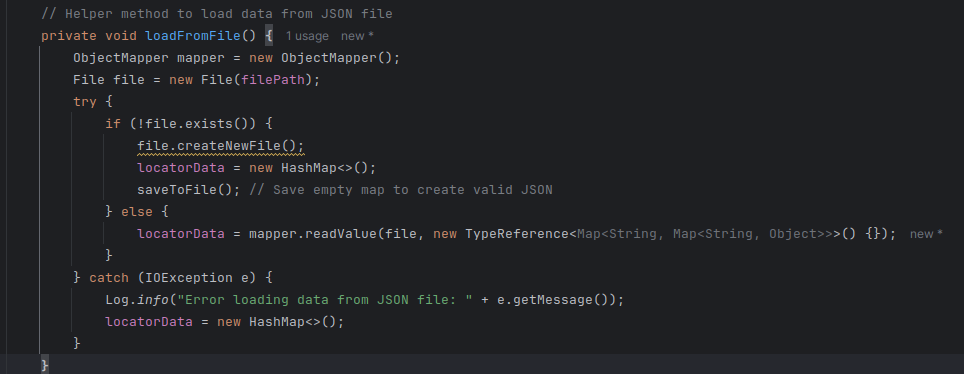
- validateAndFixJsonFile():
- Checks the JSON file for structural correctness (e.g., closing braces).
- Fixes and saves the file if issues are found.
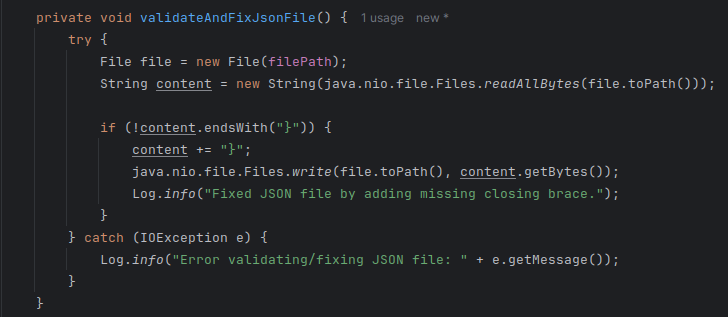
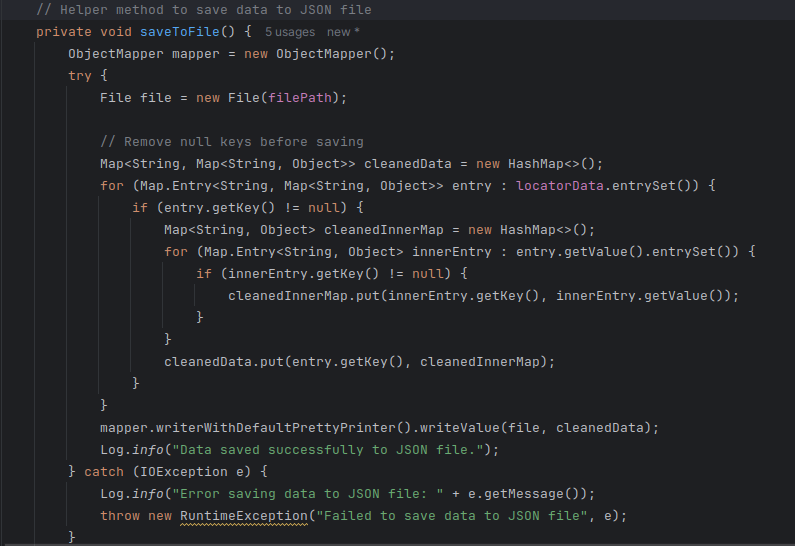
- saveToFile():
- Writes the current locator data to the file, ensuring all null or invalid entries are removed for a clean structure.
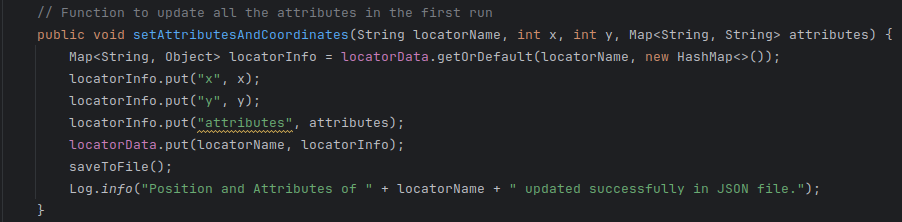
- setAttributesAndCoordinates(locatorName, x, y, attributes):
- Updates or adds position (x, y) and attributes (e.g., “id”, “class”) for a locator.
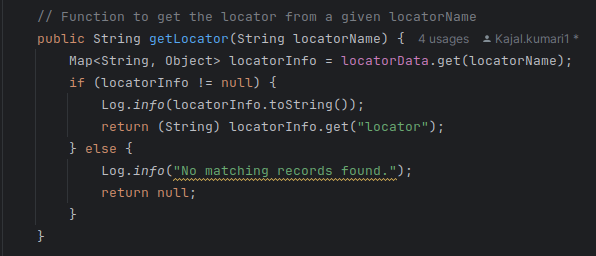
- getLocator(locatorName):
- Retrieves the locator value (e.g., CSS selector or XPath) for a given locator name.
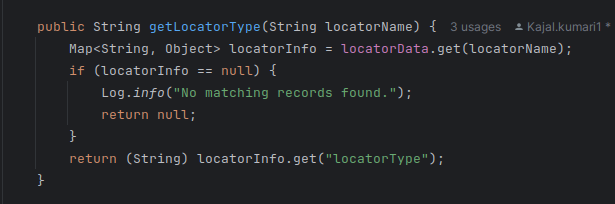
- getLocatorType(locatorName):
- Fetches the locator type (e.g., “CSS”, “XPath”).
- setAlternateLocator(locatorName, alternateLocator):
- Saves a fallback locator for scenarios where the original one fails.

- getAlternateLocator(locatorName):
- Retrieves the alternate locator for a given locator name.
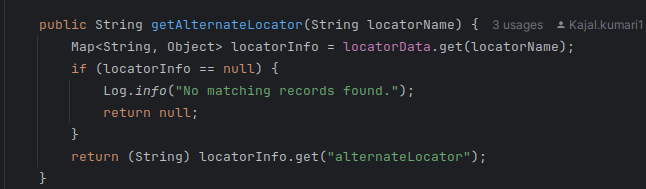
- getLocatorAttributeValue(locatorName, attributeName):
- Retrieves a specific attribute’s value for a locator (e.g., class name).
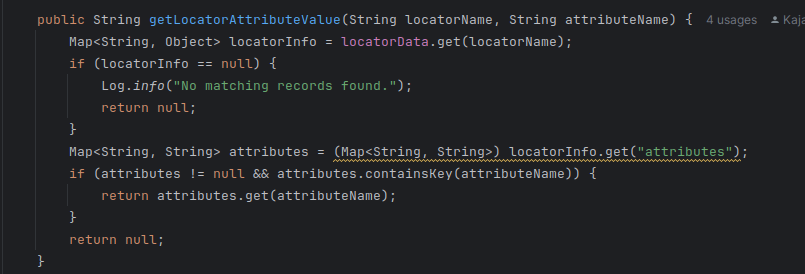
- addData(locatorName, locatorType, locatorValue):
- Adds a new locator entry with its type, value, coordinates, attributes, and alternate locator.
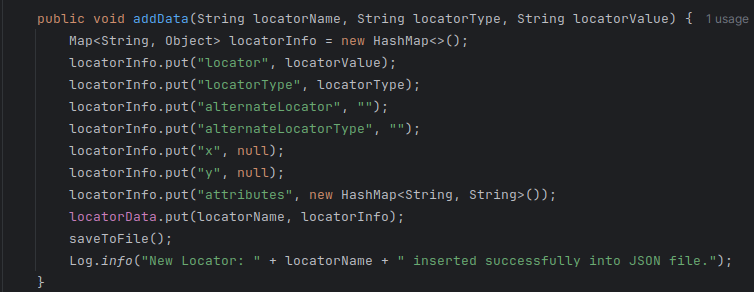
- getElementPosition(locatorName):
- Retrieves the x and y coordinates of a locator, returning them as a pair.
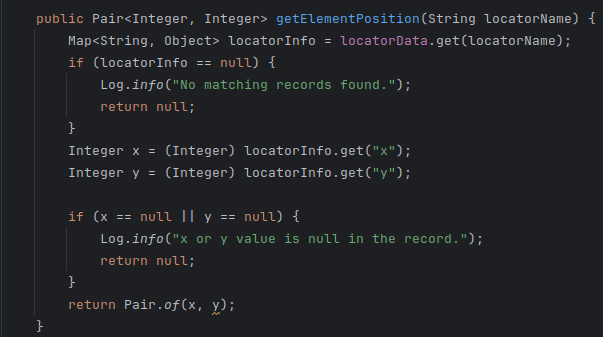
9. HealX
The HealX class is the core of the self-healing framework, designed to recover from broken locators or missing elements during Selenium test automation. It uses multiple healing strategies such as:
9.1 Key Approaches for Element Healing
Building a resilient test automation framework involves addressing issues where locators might break due to changes in the application’s structure. Here are the key approaches HealX uses to ensure tests remain effective even when elements change:
9.1.1 Alternate Locator Usage (Fallback Heuristic)
Objective: Provide a backup method to identify elements when the primary locator fails.
Problem: Locators can break due to changes in the DOM or page structure. For example, the ID, class name, or XPath of an element might change, causing automated tests to fail.
Procedure:
- Locator Failure: When the primary locator fails (e.g., due to changes in the page layout), the framework will search for alternate locators.
- Fallback Mechanism: These alternate locators are stored during the first test run (via a Remote DB) and may be derived from different attributes or locator types (such as CSS selector, XPath, etc.).

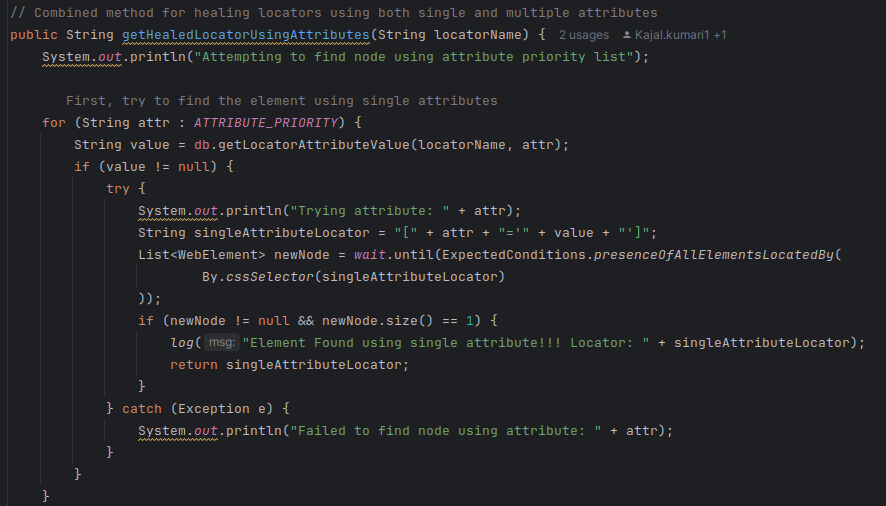
9.1.2 Locator Attribute Heuristics (Adaptive Attribute Locator Algorithm)
Objective:
Adapt to changes in element attributes and enhance the ability to find elements with dynamic or frequently changing attributes.
Problem:
Over time, the attributes of elements, such as class names, IDs, or text content, can change. These changes can cause traditional locators like By.id or By.name to break, leading to test failures.
Procedure:
- Single Attribute Trial: The system initially attempts to locate the element by using each stored attribute individually. This includes attributes like ID, class, name, and others that might uniquely identify the element.
- n-Attribute Combinations Trial: If the single-attribute attempts fail, the algorithm tries combinations of multiple attributes (e.g., id + class), increasing the chances of successfully identifying the element.
- Dynamic Adaptation: The algorithm adapts by trying out new combinations of available attributes, making the locator more flexible as the page evolves.
9.1.3 Contextual Heuristics (Positional Heuristics)
Objective:
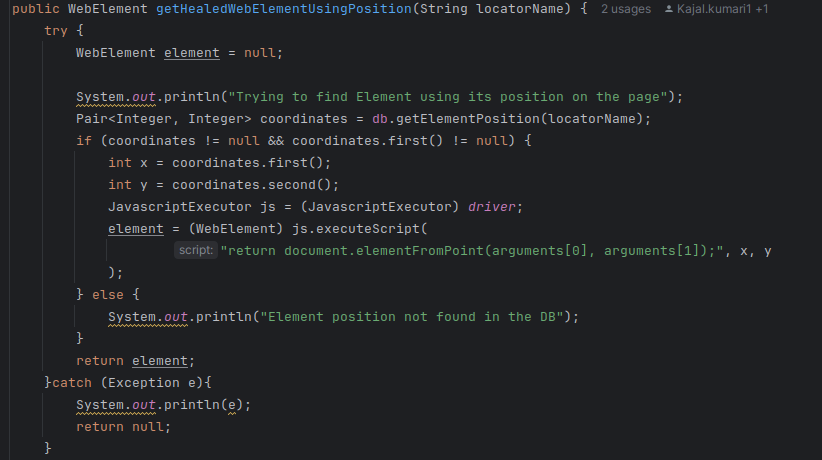
Use the element’s positional context on the page to locate it when traditional locators and attributes fail.
Problem:
While changes in element attributes or locators (e.g., ID, class) are common, the position of an element relative to others on the page often remains consistent. This can be a reliable fallback when traditional locators fail.
Procedure:
- Storing Positional Data: During the first test run, the system records the position of key elements (e.g., index, relative position) in relation to other elements on the page. This information is stored for future use.
- Fallback on Position: If traditional locators and attributes no longer work due to changes in the page, the system resorts to using this stored positional data to try and locate the element based on its place in the page structure.
- Consistency Assumption: The system assumes that even if some elements’ attributes change (e.g., name, class), their relative position in relation to other elements on the page will remain largely consistent. This assumption helps maintain element identification, even in dynamic environments.
Conclusion
Building a resilient test automation framework with HealX emphasises automation reliability, scalability, and reduced manual effort. By incorporating AI-driven self-healing capabilities, teams can enhance test coverage, seamlessly adapt to changes, and deliver high-quality applications faster.