



Apache Kafka is the backbone of many real-time data pipelines, making security an essential aspect of its deployment. Protecting your Kafka ecosystem involves implementing encryption to safeguard data, authentication to verify user identities, and authorization to control access. This guide provides a comprehensive overview of these three pillars of securing Kafka, complete with code examples to help you implement best practices.
1. Encryption: Securing Data in Transit and at Rest
Encryption ensures that data exchanged between Kafka components and stored on brokers is protected from unauthorized access.
1.1 Encryption in Transit
Use SSL/TLS to encrypt communication between Kafka clients and brokers. Follow these steps:
Step 1: Generate SSL Certificates
Use a tool like OpenSSL or a Java keystore to create certificates.
# Generate a keystore and key
keytool -keystore kafka.server.keystore.jks -alias localhost -validity 365 -genkey

# Export the certificate
keytool -keystore kafka.server.keystore.jks -alias localhost -certreq -file cert-file

# Sign the certificate (using a CA or self-sign)
openssl x509 -req -CA ca-cert -CAkey ca-key -in cert-file -out cert-signed -days 365 -CAcreateserial

# Import the CA and signed certificate
keytool -keystore kafka.server.keystore.jks -alias CARoot -import -file ca-cert
keytool -keystore kafka.server.keystore.jks -alias localhost -import -file cert-signed
Step 2: Configure Kafka Brokers
Update server.properties to enable SSL:
listeners=SSL://:9093
ssl.keystore.location=/path/to/kafka.server.keystore.jks
ssl.keystore.password=your_keystore_password
ssl.key.password=your_key_password
ssl.truststore.location=/path/to/kafka.server.truststore.jks
ssl.truststore.password=your_truststore_password
security.inter.broker.protocol=SSL
Step 3: Configure Kafka Clients
Update client properties to use SSL:
security.protocol=SSL
ssl.truststore.location=/path/to/client.truststore.jks
ssl.truststore.password=your_truststore_password
1.2 Encryption at Rest
Encrypt Kafka logs and data directories using file system-level encryption, such as LUKS on Linux or BitLocker on Windows.
2. Authentication: Verifying User Identities
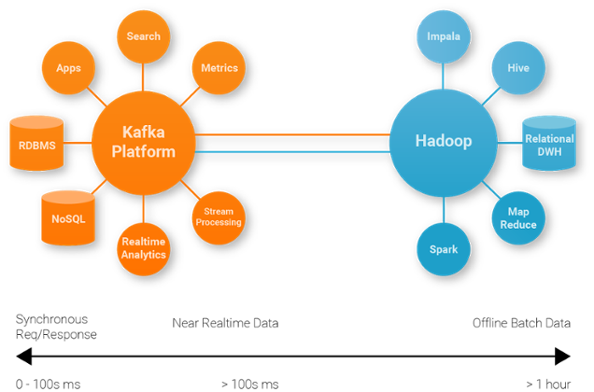
Kafka supports multiple authentication methods to verify client and broker identities.
2.1 SASL Authentication
SASL (Simple Authentication and Security Layer) provides mechanisms like GSSAPI (Kerberos) and SCRAM for authentication.
Step 1: Enable SASL on Brokers
Update server.properties to configure SASL:
listeners=SASL_SSL://:9094
sasl.enabled.mechanisms=SCRAM-SHA-512
sasl.mechanism.inter.broker.protocol=SCRAM-SHA-512
security.inter.broker.protocol=SASL_SSL
Step 2: Create SCRAM Users
Use Kafka’s CLI tool to create users:
kafka-configs --zookeeper localhost:2181 --alter --add-config 'SCRAM-SHA-512=[password=your_password]' --entity-type users --entity-name test_userStep 3: Configure Kafka Clients
Update client properties to include SASL configurations:
security.protocol=SASL_SSL
sasl.mechanism=SCRAM-SHA-512
sasl.jaas.config=org.apache.kafka.common.security.scram.ScramLoginModule required username="test_user" password="your_password";
2.2 Kerberos Authentication
For enterprise environments, Kerberos provides a robust authentication mechanism. Set up a Kerberos server and configure Kafka brokers and clients to use GSSAPI.
3. Authorization: Controlling Access to Resources
Authorization ensures that authenticated users have access only to the Kafka resources they are permitted to use.
3.1 Apache Kafka ACLs
Kafka provides Access Control Lists (ACLs) for resource-level authorization.
Step 1: Enable ACLs on Brokers
Update server.properties:
authorizer.class.name=kafka.security.auth.SimpleAclAuthorizer
super.users=User:admin
Step 2: Add ACLs for Users
Use the Kafka CLI to define ACLs:
# Grant produce access to a user on a specific topic
kafka-acls --authorizer-properties zookeeper.connect=localhost:2181 \
  --add --allow-principal User:test_user \
  --operation Write --topic test_topic

# Grant consume access to a user on a specific group
kafka-acls --authorizer-properties zookeeper.connect=localhost:2181 \
  --add --allow-principal User:test_user \
  --operation Read --group test_group
3.2 Role-Based Access Control (RBAC)
Confluent Kafka offers RBAC for fine-grained access control. Define roles like ResourceOwner and assign them to users.
Step 1: Assign Roles
Use Confluent’s CLI:
confluent iam rolebinding create --principal User:test_user --role ResourceOwner --resource Topic:test_topicStep 2: Monitor Access Logs
Audit access to ensure compliance and identify anomalies:
tail -f /var/log/kafka/audit.logConclusion
Securing your Kafka ecosystem requires a comprehensive approach, encompassing encryption, authentication, and authorization. By implementing SSL/TLS for data encryption, SASL or Kerberos for authentication, and ACLs or RBAC for authorization, you can protect your Kafka deployment against unauthorized access and data breaches. Regularly monitor and update your configurations to stay ahead of evolving security threats.
That’s it for now. I hope this blog gave you some useful insights. Please feel free to drop a comment, question or suggestion.