


Introduction to Apache Airflow
Apache Airflow is a popular workflow automation tool used for orchestrating complex workflows and data pipelines. Instead of handling data directly, Airflow coordinates and schedules tasks in a workflow, ensuring they run in the right sequence and at the right time. This enables seamless handling of ETL (Extract, Transform, Load) pipelines, data processing, and other recurring tasks.
Key Components in Airflow
Directed Acyclic Graph (DAG)
A DAG is Airflow’s primary concept. Think of a DAG as a blueprint for a workflow where each step or task depends on one or more previous steps.
Example:
from airflow import DAG
from airflow.operators.dummy import DummyOperator
from datetime import datetime

with DAG(
    'my_first_dag',
    default_args={'retries': 1},
    description='A simple example DAG',
    schedule_interval='@daily',
    start_date=datetime(2023, 1, 1),
    catchup=False,
) as dag:
    start = DummyOperator(task_id='start')
    process = DummyOperator(task_id='process')
    end = DummyOperator(task_id='end')

    # Defining the task order
    start >> process >> end
This DAG has three tasks—start, process, and end—that run in sequence. Each DAG file is written in Python and saved in the dags/ folder.
Operators
Operators are building blocks of tasks in a DAG. Airflow provides various operators to handle different types of actions:
- PythonOperator: Runs a Python function.
- BashOperator: Executes Bash commands.
- EmailOperator: Sends an email.
- DummyOperator: To indicate starting and ending of task.
- Sensor: Waits for a particular event (e.g., a file to arrive).
Example:
from airflow.operators.python import PythonOperator

def greet():
    print("Hello from Airflow!")

greet_task = PythonOperator(
    task_id='greet_task',
    python_callable=greet,
    dag=dag,
)
Task Dependencies
Airflow allows defining task dependencies using >> or << operators. This makes it easy to control the sequence in which tasks run:
start >> process >> end # Defines sequential dependency from start to endAirflow Installation and Setup
Installation: Airflow requires Python 3.7 or above and is best installed in a virtual environment:
cmd: pip install apache-airflowInitialize the Database: Airflow requires a metadata database to track the state of tasks. Run:
cmd: airflow db migrate
Note: If using an older Airflow version, you may need to run airflow db init.
Start the Web Server and Scheduler To start Airflow’s web server:
cmd: airflow webserver --port 8082In a new terminal, start the scheduler:
cmd: airflow schedulerCreating a More Complex DAG
Let’s create a DAG with a few more tasks and dependencies to illustrate real-world use.
from airflow import DAG
from airflow.operators.python import PythonOperator
from datetime import datetime

def extract_data():
    print("Extracting data...")

def transform_data():
    print("Transforming data...")

def load_data():
    print("Loading data to database...")

with DAG(
    'etl_dag',
    default_args={'retries': 2},
    schedule_interval='@daily',
    start_date=datetime(2023, 1, 1),
    catchup=False,
) as dag:
    extract_task = PythonOperator(task_id='extract', python_callable=extract_data)
    transform_task = PythonOperator(task_id='transform', python_callable=transform_data)
    load_task = PythonOperator(task_id='load', python_callable=load_data)

    # Setting task dependencies
    extract_task >> transform_task >> load_task
This is a classic ETL (Extract, Transform, Load) pipeline, where data flows sequentially from extraction to transformation and finally loading. Some more code reference.
Working with Airflow CLI
The Airflow CLI helps manage workflows and monitor tasks. Here are some commonly used commands:
- List all DAGs: airflow dags list
- Trigger a DAG manually: airflow dags trigger dag_name
- Pause and Unpause a DAG (e.g., to stop or resume scheduled runs): airflow dags pause dag_name, airflow dags unpause dag_name
- List tasks in a specific DAG: airflow tasks list dag_name
- View logs of a task: airflow tasks logs dag_name <task_id> <execution_date>
Essential Airflow Concepts: Catchup, Backfill, and Scheduling
Catchup: Airflow’s catchup feature, if enabled, will backfill tasks for all missed schedules. For example, if your DAG was scheduled daily but started a week late, catchup will attempt to run all missed daily tasks. You can disable this by setting catchup=False in the DAG definition.
Backfill: Backfill is a form of catchup but typically done manually to rerun historical data pipelines.
Scheduling: The schedule_interval argument defines when the DAG should run. Airflow supports cron expressions and predefined intervals, like:
@weekly: Once a week.@daily: Once a day.@hourly: Every hour.
Example:
schedule_interval ='0 12 * * *' # Every day at noonAirflow Task States and Retries
Each task in Airflow can have different states:
- Skipped: Task did not run, typically due to a dependency not being met.
- Success: Task completed successfully.
- Failed: Task execution failed.
To handle intermittent failures, you can set retries in default_args:
default_args = {
    'retries': 3,
    'retry_delay': timedelta(minutes=5),  # Wait 5 minutes between retries
}
Monitoring and Debugging in Airflow
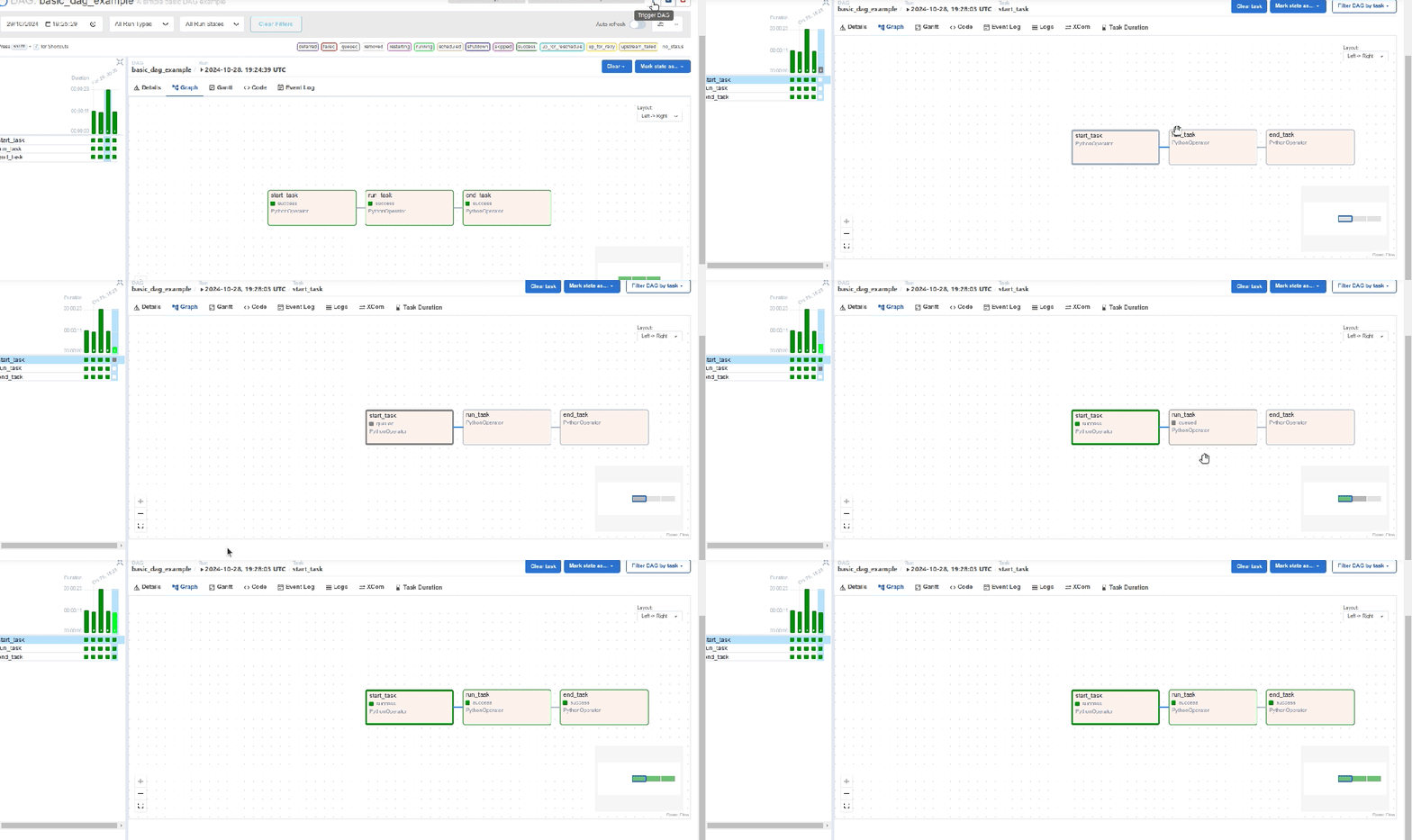
The Airflow UI is the primary interface for monitoring and debugging. It offers a graphical view of DAGs, task states, and logs for each run. Here are some useful views:
- Logs: Each task has logs accessible from the UI, which are crucial for debugging.
- Graph View: Visual representation of task dependencies.
- Tree View: Shows a timeline of task states.
Conclusion
Apache Airflow simplifies and automates workflows, making it invaluable for data engineers and developers handling complex pipelines. This guide introduced Airflow’s core concepts, setup, and practical applications to get you started. With its highly customizable framework, Airflow can grow with your data needs, ensuring scalability and efficiency. Refer link for more blogs.