


Insight into API Testing with Playwright
APIs (Application Programming Interfaces) are the backbone of modern software development, facilitating seamless communication between various components and systems. As the significance of APIs continues to rise, ensuring their reliability, functionality, and security becomes increasingly critical. API testing plays a crucial role in guaranteeing the quality and performance of these interfaces. In this blog, we’ll explore real-world use cases of leveraging Playwright for API testing to accelerate the testing process, improve efficiency, and enhance the overall quality of backend services.

Understanding of Playwright
Microsoft created the open-source Playwright testing framework, which enables programmers and testers to automate the testing of online applications on various platforms and browsers. Although Playwright is most known for its browser automation features, it can also be used for API testing, and it provides a complete end-to-end testing solution.
Use Case of API Testing
Automating API Endpoint Testing:
Playwright is mostly used for API testing, and one of its main applications is the automation of API endpoint testing. To make sure that APIs are operating properly, we can conduct HTTP requests, verify replies, and carry out a variety of assertions thanks to Playwright’s versatile scripting features. Testing may be completed more quickly using this method, especially for applications with many endpoints. early API testing.
Backend Service Integration Testing:
Playwright can be easily incorporated into testing frameworks that are already in place to carry out backend service integration tests. We can confirm the end-to-end functionality of apps, including the way frontend components communicate with backend APIs, by mimicking user interactions and API calls within the test scripts. Thanks to this comprehensive methodology, any integration problems can be found early in the development lifecycle. e-commerce, third-party integration
“Consider a popular e-commerce website like Amazon: Let’s say Amazon has an API that allows third-party sellers to manage their product listings. As part of the API functionality, sellers can create new product listings, update existing ones, and retrieve product information.
Amazon wants to ensure that its API works correctly and reliably for all sellers. Run API tests to verify the following:
Authentication and Authorization:
Ensure that only authenticated and authorized sellers can access API endpoints. The test verifies that valid credentials are required, and invalid credentials are rejected.
Product List Creation:
Tests the API endpoint responsible for creating a new product list. This includes submitting a request with valid details and confirming that the product has been successfully added to the seller’s inventory.
Update Product List:
Tests the API endpoint for updating an existing product list. This involves submitting requests with different types of data (price, description, availability updates, etc.) and ensuring that changes are reflected correctly.
Retrieve product information:
Test the API endpoint for retrieving product information. This includes sending requests to retrieve specific products based on ID or other parameters and verifying that the correct data is returned.
Error handling:
Test how the API handles different error scenarios. Invalid input data, server errors, or network problems. Verify that appropriate error messages and status codes are returned to the client.
Performance and Scalability:
Test the performance of our API under various loads to ensure that it can handle large requests from multiple sellers simultaneously without significant delays or downtime.
Amazon conducts thorough API testing to ensure that our third-party platforms are reliable, secure, and efficient, ultimately improving the overall user experience and maintaining trust in our services. can do.”
Process of API Testing
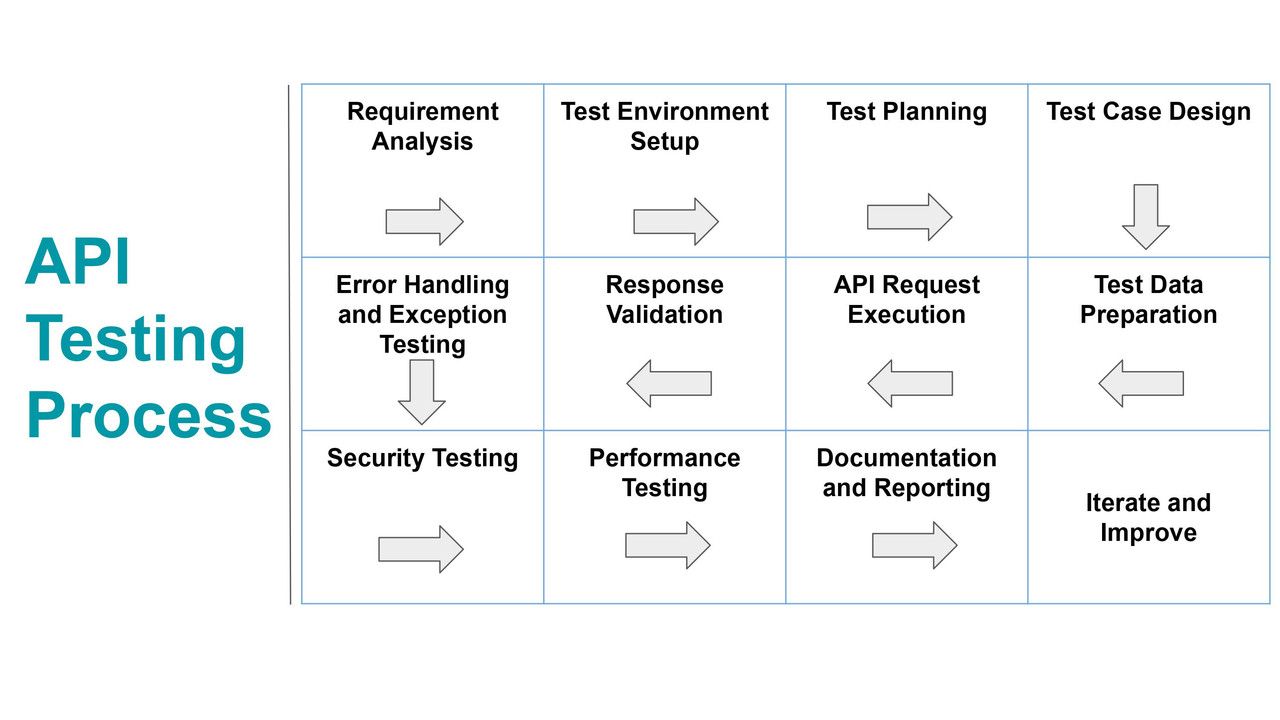
Execution Testing of APIs and installation of Playwright:
The playwright’s capacity to simulate client behaviour makes it well-suited for the execution of API testing. Test scripts can be outlined to recreate concurrent demands to API endpoints, permitting the analyzer to assess the responsiveness and adaptability of backend administrations beneath changing stack conditions.
- First, make sure we have Node.js installed on our system. Then install Visual Studio Code in our system.
- Create a folder in the system and open it in the VS Code, open the terminal in it and download the dependencies of Playwright by using the command:
npm install @playwright/test
- Now, let’s create a new file in the test folder, a script to execute API testing.
- We have created a post_tests.spec.js file and we have written some assertions and tests that we’ll use for POST API testing.
// Add imports
import { test, expect } from '@playwright/test';
// Use the request context to create a test
test ("API POST Request", async ({request}) => {

// Send a POST request along with request body & store response in a variable
const response = await request.post("https://reqres.in/api/users", {
data: {
"name": "James",
"job": "Tester"
}
});
// Verify response status code is 201
expect(response.status()).toBe(201);
// Check if the response text contains the name "James"
const text = await response.text();
expect(text).toContain('James');
// Print the response in console
console.log(await response.json());
});
- Now, we can execute the API testing script using the following command:
npx playwright test
The results are as follows:

To check the response and changes on the Playwright UI
npx playwright test –ui


This can be a fundamental case to induce us to begin with API testing utilizing Playwright. Depending on our particular necessities and the complexity of our APIs, we ought to customize the script appropriately. Also, we’ll be able to coordinate this script into our CI/CD pipeline for mechanized testing as a portion of our improvement workflow.
Security Testing for API Endpoints with Playwright
API testing should include security testing for endpoints. Test scripts need to check for common security vulnerabilities, such as injection attacks and authentication bypasses. By integrating security testing into automated testing workflows, teams can proactively identify and mitigate potential security risks.
To perform security testing for API endpoints, We’ll make a test script that sends mischievous requests to the endpoints and then checks for security subjection within the reaction. Underneath is a case code illustrating how we’ll be able to do this:
// security-test.js
// Import the Playwright Test and anticipate its functions
const { test, expect } = require('@playwright/test');
// Establish a test scenario for API endpoint security testing
test('Security Testing of API Endpoints', async ({ page }) => {
// Define a mischievous query to replicate a security vulnerability (SQL injection)
const mischievousQuery = '\' OR 1=1';
// Send a request to the API endpoint with the mischievous query
const response = await page.evaluate(query => {
// fetch API to send a GET request to the API endpoint
return fetch(`https://api.example.com/search?query=${encodeURIComponent(query)}`)
.then(res => res.json()); // Parse the response as JSON }, mischievousQuery);
// Validate the response
// Expecting a 400 status code
expect(response.statusCode).toBe(400);
// Assuming the security vulnerability is indicated by an error message returned by the API
expect(response.error).toContain('SQL injection detected'); });
In this scenario:
Basically, We initiate a mischievous request to the API endpoint by including a query parameter that contains an SQL injection payload. Subsequently, we anticipate the API to respond with a status code that signifies a security concern (such as 400 Bad Request). An error message indicating the detection of an SQL injection. We can customize the test script based on the specific security subjection we wish to assess. ” For instance, we can test for various types of injection attacks, authentication bypasses, data exposure risks, and so on. Furthermore, we can seamlessly incorporate this security testing script into our automated testing pipeline. To monitor and safeguard our API endpoints against potential security threats.
Conclusion:
Organizations can streamline and strengthen their program applications by leveraging Playwright’s capabilities for automating API endpoint testing, integration testing, execution testing, and security testing.
Within the quickly advancing scene of computer program advancement, embracing proficient testing is fundamental for remaining ahead of the bend. As a tester, we have a flexible tool to handle the complexities of API testing. That guarantees the backend administrations meet the most noteworthy benchmarks of quality and execution.
Reference Link
For more info please visit – https://playwright.dev/docs/api-testing