



In the rapidly evolving landscape of software development, cloud-native applications have become essential for delivering scalable, resilient, and high-performance solutions. .NET Aspire is a cutting-edge platform designed to streamline and accelerate cloud-native application development. This blog will explore how .NET Aspire can facilitate the efficient building and deployment of cloud-native applications.
What is Cloud-Native application?
Imagine working on a modern, full-stack web application, consisting of the following traditional components:
- Frontend UI, accessible through a web browser
- Backend API, which the frontend uses to retrieve and update the product catalog
- Database, which the backend uses to store the product catalog
- Some sort of file storage, which the frontend uses to store the images
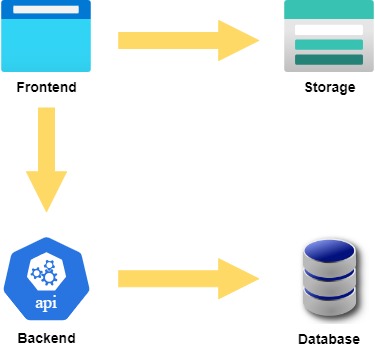
The application works locally, but now it needs to be prepared for the cloud, making it accessible to everyone. However, this involves addressing several challenges, such as:
- Service Discovery: Ensuring the frontend can communicate with the backend, and both can communicate with their dependent services
- Resilience: Ensuring the application can recover from failures, such as a server going down
- Deployment: Ensuring the application can be deployed to the cloud in a way that is fast, reliable, and repeatable
- Observability: Ensuring the application can be monitored, with the ability to quickly identify and fix any issues that may arise
- Scalability: Ensuring the application can handle a large number of users without crashing or slowing down
To address all these concerns, the full-stack application needs to be turned into a cloud-native application.
A cloud-native application is a specific type of distributed application that takes full advantage of the scalability, resilience, and manageability of the cloud.
Going cloud-native has traditionally been quite a challenge for .NET developers, but not anymore.
What is .NET Aspire?
.NET Aspire is an opinionated, cloud-ready stack for building observable, production-ready, cloud-native applications.
It is designed to improve the experience of building .NET cloud-native apps through a consistent, opinionated set of tools and patterns that facilitate the creation and operation of distributed apps.

.NET Aspire achieves this by providing .NET developers with:
- Orchestration: Manages the running and connecting of multi-project applications and their dependencies.
- Components: NuGet packages for commonly used services with standardized interfaces ensuring consistent and seamless integration with applications.
- Tooling: Project templates and tooling experiences that assist in creating and interacting with .NET Aspire apps.
Transition into cloud-native application using .NET Aspire
Step 1: Install .NET Aspire
.NET Aspire will likely be included as part of the .NET SDK at some point, but at the time of writing, it needs to be manually installed with these commands:
dotnet workload update
dotnet workload install aspire
It is also assumed that the .NET 8 SDK and either Docker Desktop or PodMan are already installed. If not, download and install them.
Step 2: Add .NET Aspire projects
To turn the application into a .NET Aspire app, add two new projects to the solution:
- App Host: An orchestrator project designed to connect and configure the different projects and services of the app.
- Service Defaults: A shared project to manage configurations reused across the projects in the solution, related to resilience, service discovery, and telemetry.
These projects can be quickly added using the project templates provided by .NET Aspire:
dotnet new aspire-apphost -n SampleApp.AppHost
dotnet new aspire-servicedefaults -n SampleApp.ServiceDefaults
Step 3: Enable the Service Defaults
The new Service Defaults project includes pre-configured settings for telemetry, health checks, service discovery, and other essential cloud-native aspects.
To enable these in the application, first add a reference from both the frontend and backend projects to the Service Defaults project.
Then, in the Program.cs file of both frontend and backend projects, add the following call to enable the Service Defaults:

And this line to map the health check endpoints:

Now it’s time to model the cloud-native application via the App Host.
Step 4: Define the app model
In .NET Aspire, the app model describes all the resources in a cloud-native application and their relationships.
To define the app model, start by adding a reference from the App Host project to both the backend and frontend projects.
Since the application uses Azure resources (Blob Storage), install this NuGet package in the App Host project:
dotnet add package Aspire.Hosting.Azure --prereleaseThen, in the Program.cs file of the App Host project, add the following code to define the app model:
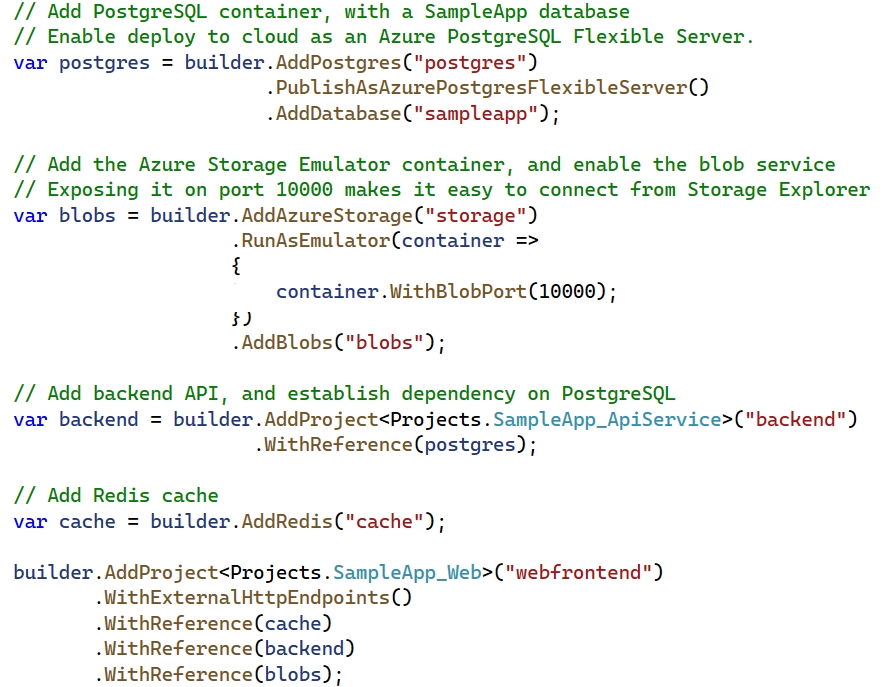
The comments in the code provide an idea of the structure of the cloud-native app, all using C# code.
Next, update the frontend and backend projects to make use of the services defined in the app model.
Step 5: Use .NET Aspire components
Connecting the Application to Dependent Services with .NET Aspire
.NET Aspire provides a series of components in the form of NuGet packages that simplify connecting an app with its dependent services.
Backend API Setup
The backend API needs to connect to a PostgreSQL database. Instead of using the standard Npgsql package, .NET Aspire offers a more opinionated and cloud-native package. Install it into the backend project with the following command:
dotnet add package Aspire.Npgsql.EntityFrameworkCore.PostgreSQL --prereleaseTo register the PostgreSQL DBContext, add this code to the backend Program.cs:

The “sampleapp” connection string is sourced from the App Host project, where it was defined as follows:

At runtime, the App Host will initialize the PostgreSQL container, determine the correct connection string to connect to the SampleApp database, and inject it as an environment variable into the backend API.
Frontend Setup
Similarly, to connect the frontend to Blob Storage, start by installing the Blob Storage NuGet package:
dotnet add package Aspire.Azure.Storage.Blobs --prereleaseThen, add these lines to the frontend Program.cs:

Here, “blobs” is the connection string defined in the App Host project:
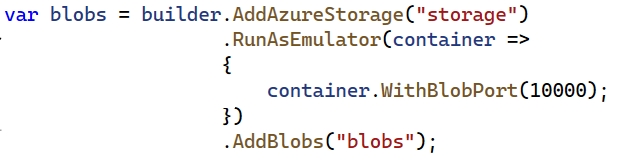
“backend” is the name given to the backend API host, also in the App Host project:

.NET Aspire handles the connection strings and URLs, simplifying the configuration process.
Now, the cloud-native app is ready to run locally.
Step 6: Run .NET Aspire app
Ensure either Docker Desktop or PodMan is running, and then start the App Host:
dotnet run --project .\SampleApp.AppHostThe terminal will display messages like these:
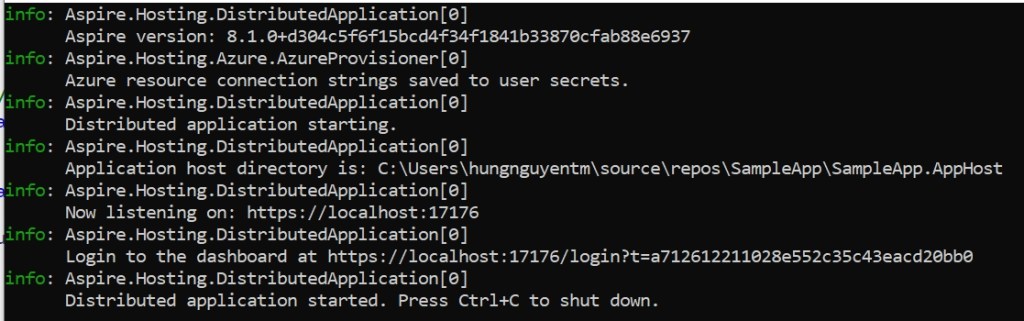
Browse to the URL provided to access the .NET Aspire dashboard. This dashboard displays all the services and dependencies of the cloud-native app, allowing for monitoring and management.

Click on the endpoint assigned to the frontend project to see the app running in the browser.
The transformation of the full-stack application into a cloud-native app using .NET Aspire is now complete.
If the application is cloud-native, how to deploy it to the Azure cloud?
Deploying to the Azure cloud is straightforward since .NET Aspire is designed for easy deployment to Azure. Aspire applications are compatible with any environment that supports containers. In Azure, services like Azure Container Apps (ACA) and Azure Kubernetes Services (AKS) are ideal.
The Microsoft Azure Developer CLI (AZD) simplifies the deployment of .NET Aspire apps to Azure Container Apps. Additionally, the open-source Aspirate tool assists in deploying Aspire applications to a Kubernetes cluster. Both deployment methods are detailed in the Microsoft documentation:
- ACA: https://learn.microsoft.com/en-us/dotnet/aspire/deployment/azure/aca-deployment-azd-in-depth
- K8S: https://learn.microsoft.com/en-us/dotnet/aspire/deployment/k8s-deployment
Conclusion
.NET Aspire offers a comprehensive and powerful platform for developing cloud-native applications. Leveraging its advanced features accelerates the development process, ensures scalability, and delivers high-performance applications. Whether building new applications or modernizing existing ones, .NET Aspire provides the necessary tools and frameworks to succeed in the cloud-native era.
Embrace .NET Aspire today to transform the development, deployment, and management of cloud-native applications. If seeking a partner to assist with this solution or any Microsoft technology solutions, including .NET modernization, Azure migration, system re-architecture, platform engineering, and DevOps transformation, get in touch at: IT Consulting Services & Solutions | Technology Services – NashTech (nashtechglobal.com)