


Adding Health Checks for ASP.NET and Azure Function App
Table of Contents
1.Introduction
In the fast-paced realm of digital technology, ensuring our web and serverless applications run smoothly is essential. However, it’s not just about fixing problems as they arise; it’s about staying ahead of the curve. That’s where health checks come in – they’re like our apps’ personal doctors, constantly monitoring their vital signs and alerting us to any potential issues.
In this guide, we’ll dive into the world of health checks and learn how to seamlessly integrate them into both ASP.NET web and Azure Function apps. By the end, you’ll have the tools you need to keep your applications healthy and robust, providing a seamless experience for your users.
2. Adding Health Checks to ASP.NET Web App
Create a new project or open your existing application
2.1 Basic Health Checks
1. Add a new method call inside Program.cs
builder.Services.AddHealthChecks();
Make sure this is done before building the WebApplication.
2. Next step is to add an Endpoint for this health check, we need to add this method call after creation of WebApplication by following:
app.MapHealthChecks(“health-check”);
3. Now, when we run the application and call the “health-check” endpoint, it will return us following response.

2.2 Adding more checks
4. Next, we are going to add something more useful like adding health check to see whether database is responding or not.
builder.Services.AddDbContext<ApplicationDbContext>(options =>
{
    options.UseNpgsql("Server=localhost;Port=5432;User Id=postgres;Password=postgres;Database=healthcheck;");
});
5. Create a new class and call it DatabaseHealthCheck and then inherit from IHealthCheck interface as following:
 public class DatabaseHealthCheck : IHealthCheck
{
    private readonly ApplicationDbContext _dbContext;
    public DatabaseHealthCheck(ApplicationDbContext dbContext)
    {
        _dbContext = dbContext;
    }
    public async Task<HealthCheckResult> CheckHealthAsync(HealthCheckContext context, CancellationToken cancellationToken)
    {
        try
        {
            var check = await _dbContext.Database.CanConnectAsync(cancellationToken);
            return check ? HealthCheckResult.Healthy() : HealthCheckResult.Unhealthy();
        }
        catch(Exception exception)
        {
            return HealthCheckResult.Unhealthy(exception: exception);
        }
    }
}
Inside CheckHealthAsync method, you can write your own custom logic depending on your needs and application. To keep it simple here we will just call CanConnectAsync method from EF core and pass down cancellation token.
We will just return the result whether result is Healthy or not.
Tip: You can create a timer and execute a custom query and
based on the time taken you can return HealthCheckResult to be either Healthy, Degraded
or UnHealthy.
6. Now, when you call “health-check” endpoint again, it will show same response, basically it just combines the output of all the health checks and just returns healthy or unhealthy.
2.3 Adding 3rd-party packages
7. To get more detailed response, we will add a NuGet package: AspNetCore.HealthChecks.UI.Client
8. Add following line in Program.cs after AddHealthChecks()
.AddCheck<DatabaseHealthCheck>("PostgresDb");
9. Add new parameter in MapHealthChecks call as following:
app.MapHealthChecks("/health-check", new HealthCheckOptions
{
    ResponseWriter = UIResponseWriter.WriteHealthCheckUIResponse
});
10. Re-running the application should give us the following response:
{
    "status": "Healthy",
    "totalDuration": "00:00:00.0004621",
    "entries": {
        "PostgresDb": {
            "data": {},
            "duration": "00:00:00.0003986",
            "status": "Healthy",
            "tags": []
        }
    }
}
Similarly, we might have several other services like Redis, Hangire, RabbitMQ, etc.
We can write health check for each of them, but we don’t have to. Since there are packages already available for them. You can explore more of them just by searching for `AspNetCore.HealthChecks`.
11. We will install `AspNetCore.HealthChecks.Npgsql` and then we can configure it like following:
builder.Services.AddHealthChecks()
    .AddNpgSql(connectionString, name: "PostgresDb");
2.4 Adding Health Checks UI
12. Now, if we want to add a UI on top of it, you can add package: AspNetCore.HealthChecks.UI.Client
Configure it like following:
builder.Services
.AddHealthChecksUI(setupSettings: setup =>
{
setup.AddHealthCheckEndpoint("check-db", "/health-check");
})
.AddInMemoryStorage();
13. Make sure to add an endpoint for this UI after building application with following:
app.MapHealthChecksUI();
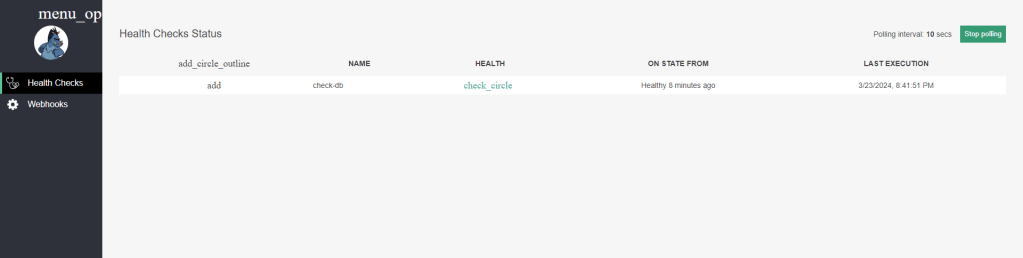
14. Now visit `/healthchecks-ui` from browser and Voila, you will see UI like following which will poll the backend every 10 secs:
3. Adding Health Checks to Azure Function App
Now, let’s look at how we can add Health Checks in Azure Function app
1. Similar to previous one, we will install AspNetCore.HealthChecks.NpgSql NuGet Package and configure it like following inside Program.cs:
builder.Services.AddHealthChecks()
    .AddNpgSql(connectionString, name: "PostgresDb");
2. Create a new class HealthChecks like following which will expose the endpoint
namespace HealthCheckAzureFNA
{
    public class HealthChecks
    {
        private readonly HealthCheckService _healthCheckService;
        public HealthChecks(HealthCheckService healthCheckService)
        {
            _healthCheckService = healthCheckService;
        }
        [Function(nameof(HealthChecks))]
        public async Task<IActionResult> Run([HttpTrigger(AuthorizationLevel.Function, "get")] HttpRequest req)
        {
            var result =  await _healthCheckService.CheckHealthAsync();
            return new OkObjectResult(result);
        }
    }
}
Here, we are getting HealthCheckService from DI container and then calling CheckHealthAsync method on it and passing down the result to the client.
3. Now, when you call the endpoint `http://localhost:7271/api/HealthChecks`, you will get following response:
{
    "entries": {
        "PostgresDb": {
            "data": {},
            "description": null,
            "duration": "00:00:00.2241609",
            "exception": null,
            "status": 2,
            "tags": []
        }
    },
    "status": 2,
    "totalDuration": "00:00:00.2308915"
}
It was as simple and straight forward, of course you can add more health checks for other services and get the result for them.
4. Conclusion
As developers, we know that prevention is often better than cure. By implementing health checks in our ASP.NET web and Azure Function apps, we’re not just fixing problems – we’re stopping them in their tracks. These checks act as our early warning system, ensuring our apps stay resilient and reliable, even in the face of adversity.
So, as you continue to refine your applications, remember the power of health checks. Treat them as indispensable tools in your development arsenal, and you’ll be well-equipped to build software that stands the test of time.