


Introduction:
Welcome to our blog on “Advanced Techniques for Mobile App Test Automation with Appium and Java.” In this article, we’ll explore some advanced strategies and methods for automating tests on mobile applications using the powerful combination of Appium and Java. Whether you’re a seasoned mobile app developer or a QA engineer looking to enhance your testing skills, you’re in the right place. We’ll delve into the intricacies of Appium and Java to help you streamline your mobile app testing processes and ensure the highest quality user experience. So, let’s dive in and discover the world of advanced mobile app test automation!
Advanced Appium Concepts
Advanced Appium Concepts involve going beyond the basics of mobile app automation testing and delving into more sophisticated techniques. These concepts are essential for achieving robust and efficient test automation for mobile applications.
Here, we will explore three key advanced concepts
1. Desired Capabilities for Mobile Devices
Desired Capabilities are a crucial part of configuring your Appium tests. They are a set of key-value pairs that define the characteristics and behaviour of the automation session. When you initiate an Appium session, you need to specify these capabilities to tell Appium how to interact with the target mobile device or emulator. Some common capabilities include:
platformName: Specifies the mobile platform (e.g., Android or iOS).deviceName: The name or identifier of the mobile device or emulator.app: The path or app package name of the application under test.automationName: The automation framework to use (e.g., UiAutomator2, XCUITest).udid: The device’s unique identifier when testing on real iOS devices.appPackageandappActivity(for Android): Identifies the main package and activity of the Android app.
2. Leveraging the Page Object Model (POM) for Test Automation
The Page Object Model is a design pattern commonly used in mobile test automation (and web automation) to enhance test maintainability and reusability. In POM, each mobile app page is represented by a separate class, and the elements and actions related to that page are encapsulated within that class.
Benefits of using POM in Appium automation include:
- Improved code organization: POM separates test logic from page structure, making the codebase cleaner and more maintainable.
- Reusability: Elements and actions defined in page classes can be reused across multiple tests.
- Reduced maintenance effort: If the UI changes, you only need to update the relevant page class rather than modifying multiple test scripts.
3. Dealing with Dynamic Elements and Wait Strategies.
Mobile apps often contain elements that load dynamically or may not be immediately visible. Waiting strategies are essential to handle such elements effectively.
Appium provides various ways to wait for elements, such as:
- Implicit Waits: Set a timeout for Appium to wait for an element to appear before throwing an error.
- Explicit Waits: Wait for a specific condition (e.g., element visibility) before proceeding.
- Fluent Waits: Combine explicit waits with conditions to create more flexible wait strategies.
Dealing with dynamic elements also involves using strategies like polling and retries to ensure robust test execution in changing app environments.
Advanced Test Automation Techniques
Advanced test automation techniques are essential for thoroughly testing mobile applications in today’s fast-paced development environment. These techniques go beyond the basics of test automation and delve into more intricate aspects of mobile app testing.
1. Handling Gestures: Swipes, Taps, and Pinches
In mobile app automation, it’s common to perform gestures like swipes, taps, and pinches to interact with elements and navigate through the app. These gestures are essential for testing scenarios such as scrolling through a list, zooming in on an image, or tapping on a button.
- Swipe from one element to another:
// Swipe from one element to another
WebElement element1 = driver.findElement(By.id("element1"));
WebElement element2 = driver.findElement(By.id("element2"));
TouchAction action = new TouchAction(driver);
action.press(ElementOption.element(element1))
      .waitAction(WaitOptions.waitOptions(Duration.ofMillis(500)))
      .moveTo(ElementOption.element(element2))
      .release()
.perform();- Tap on an element:
// Tap on an element
WebElement elementToTap = driver.findElement(By.id("tappableElement"));
elementToTap.click();- Pinch to zoom in or out:
// Pinch to zoom in or out
MultiTouchAction multiTouch = new MultiTouchAction(driver);
multiTouch.add(new TouchAction(driver).press(PointOption.point(100, 100))
                                      .moveTo(PointOption.point(200, 200))
                                      .release())
         .add(new TouchAction(driver).press(PointOption.point(300, 300))
                                      .moveTo(PointOption.point(200, 200))
                                      .release())
                                      .perform();
2. Automating Native and Hybrid Apps
Mobile apps come in different forms: native, hybrid, or web-based. Testing these apps requires specific techniques to deal with their unique characteristics. Native apps are developed for a particular platform (e.g., iOS or Android), while hybrid apps combine web elements with native components. Advanced automation techniques involve selecting the right testing frameworks and tools to automate the testing of these diverse app types. This ensures thorough coverage and accurate results across different app categories.
- Native Apps: Automating native apps with Appium is straightforward. You need to set the desired capabilities to target the app’s package and activity. Here’s a simplified
DesiredCapabilities desiredCapabilities = new DesiredCapabilities();
desiredCapabilities.setCapability("platformName", "Android");
desiredCapabilities.setCapability("deviceName", "your-device-name");
desiredCapabilities.setCapability("appPackage", "com.example.myapp");
desiredCapabilities.setCapability("appActivity", ".MainActivity");

AndroidDriver<WebElement> driver = new AndroidDriver<>(new URL("http://localhost:4723/wd/hub"), desiredCapabilities);
- Hybrid Apps: For hybrid apps, you may need to switch between the web context and the native context to interact with web elements.
- Switch to web context
// Switch to web context
Set<String> contextHandles = driver.getContextHandles();
for (String context : contextHandles) {
    if (context.contains("WEBVIEW")) {
        driver.context(context);
        break;
    }
}- Interact with web elements:
// Interact with web elements
WebElement webElement = driver.findElement(By.id("webElementId"));
webElement.sendKeys("Text for web element");
- Switch back to the native context
// Switch back to native context
driver.context("NATIVE_APP");
3. Working with Complex User Flows
Complex user flows involve a sequence of actions and interactions within an app, such as navigating through multiple screens, filling out forms, and validating results. Testing these flows requires careful planning and automation scripting.
// Perform a login action
WebElement usernameField = driver.findElement(By.id("username"));
WebElement passwordField = driver.findElement(By.id("password"));
WebElement loginButton = driver.findElement(By.id("loginButton"));

usernameField.sendKeys("your_username");
passwordField.sendKeys("your_password");
loginButton.click();

// Navigate to the payment screen
WebElement paymentTab = driver.findElement(By.id("paymentTab"));
paymentTab.click();

// Perform a payment action
WebElement creditCardNumber = driver.findElement(By.id("creditCardNumber"));
WebElement paymentButton = driver.findElement(By.id("paymentButton"));

creditCardNumber.sendKeys("1234 5678 9012 3456");
paymentButton.click();

// Assert that the payment was successful
WebElement successMessage = driver.findElement(By.id("successMessage"));
Assert.assertEquals(successMessage.getText(), "Payment successful");
Integrating Test Frameworks
When it comes to mobile app test automation with Appium and Java, integrating robust test frameworks can significantly enhance your testing process. Two popular choices are TestNG and JUnit. These frameworks not only provide structured ways to manage your tests but also offer valuable features like parallel test execution and comprehensive reporting.
- TestNG: TestNG, which stands for “Test Next Generation,” is a versatile and extensible testing framework designed to address the shortcomings of JUnit. It excels in managing test suites, providing robust annotations, and allowing you to define dependencies between tests
- JUnit: JUnit is one of the most popular testing frameworks for Java. Although it’s commonly associated with unit testing, it can also be effectively used for mobile app test automation.
Parallel Testing and Scalability
In today’s fast-paced world of mobile app development, speed and efficiency are top priorities. As your app expands, so does the need for efficient testing. This is where parallel testing and scalability come in. Let’s dive into running tests on multiple devices at once, a technique that can significantly speed up testing, and explore how test parallelization can make your testing process even faster.
Running Tests on Multiple Devices Simultaneously
Testing one device at a time works well for small projects. But when your app grows, you need to support multiple platforms and devices.
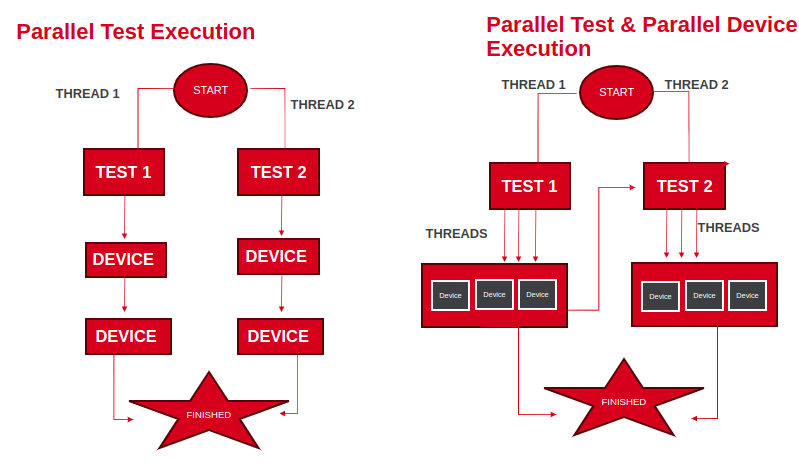
Running tests on several devices at the same time can make a huge difference:
- Faster Testing: Your tests are completed much quicker.
- Better Coverage: You catch more issues.
- Compatibility Early Warning: You spot problems sooner.
- Boosted Productivity: You get more done in less time.
Integrating Appium Tests into CI/CD Pipelines
In the world of speedy software development, it’s crucial to seamlessly blend mobile app testing into your Continuous Integration and Continuous Deployment (CI/CD) process. This ensures your mobile apps are rigorously checked and ready for release without slowing down development. Let’s dive into two essential aspects: “Adding Appium Tests to Your CI/CD Pipeline” and “Creating a Dockerized Mobile Test Environment.”
Adding Appium Tests to Your CI/CD Pipeline
In a CI/CD setup, the idea is to automate and smoothen every part of software development, including testing. Integrating Appium tests into your CI/CD pipeline is a vital step to guarantee that each code change is thoroughly examined before going live.
Here’s how it functions:
- Automated Testing Triggers: Tests kick off automatically whenever there’s a code change.
- Parallel Testing: Multiple tests run simultaneously, saving time.
- Continuous Feedback: Swiftly spot and fix issues as they arise.
- Gatekeeping: Only code that passes tests proceeds to the next stage.
- Deployment Confidence: Know your app works as expected when it’s deployed.
Creating a Dockerized Mobile Test Environment
Docker has transformed how we package and deploy apps and their requirements. By dockerizing your mobile testing setup, you construct a consistent, self-contained testing environment that can be duplicated across your CI/CD pipeline.
Here’s how this benefits mobile app testing:
- Isolation: Tests run in a secure, isolated environment.
- Portability: Easily move your testing setup anywhere.
- Scalability: Adapt your testing environment to match your needs.
- Version Control: Keep control over the environment’s components.
- Cross-Platform Testing: Test on various platforms without hassle.
Conclusion
Thank you for joining us as we explored Advanced Techniques for Mobile App Test Automation with Appium and Java in this blog. This is just the start of our journey. Stay tuned for more insightful content in the future!