


AG-UI The Standardized Interaction Protocol for the Agentic APPLICATION

In the rapidly evolving AI landscape, AG-UI (Agent User Interaction Protocol) has established itself as one of the three prominent open agentic protocols, alongside MCP (Model Context Protocol) and Agent Protocol.
While MCP focuses on how Agents access data and Agent Protocol manages task execution between machines, AG-UI focuses on the most critical layer: How Agents interact with humans.
What is AG-UI?
AG-UI is an event-driven protocol designed to be the “common language” connecting Frontend applications and AI Agents. Instead of reinventing how to stream text or display tool calls for every project, AG-UI provides a consistent standard. This decouples Agent logic from UI rendering, allowing developers to build robust AI interfaces without being locked into a specific framework.
Core Architecture
AG-UI follows a standardized Client-Server model, creating a stable bidirectional data pipeline:
- Application (Frontend): Your user-facing app (React, Vue, etc.).
- AG-UI Client: A generic communication client (like
HttpAgent) that listens to and decodes the event stream. - Secure Proxy: An optional backend layer to manage API keys and route requests to multiple Agents.
- AI Agents (Backend): Where the logic (LLM, RAG) lives. Agents emit a stream of standardized events.
Key Architectural Strengths:
- Transport Agnostic: Flexible support for SSE (Server-Sent Events), WebSockets, or high-performance HTTP Binary Protocol.
- Middleware Layer: Acts as an adapter, allowing existing agents (LangChain, CrewAI, etc.) to become AG-UI compatible without changing their core logic.
The 5 Core Pillars
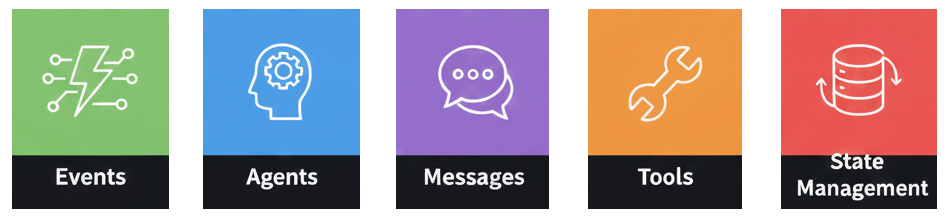
To manage complex agentic workflows, AG-UI relies on five technical pillars:
The Event System
AG-UI event is a structured, streamed message that an Agent (AG) sends to a User Interface (UI) to describe what the agent is doing, step by step, in a machine-readable way.
Communication is based on Typed Events inheriting from BaseEvent.
| Property | Description |
|---|---|
type | The specific event type identifier |
timestamp | Optional timestamp indicating when the event was created |
rawEvent | Optional field containing the original event data if transformed |
- Start-Content-End Pattern: Specifically for streaming data (Text, Tool calls).
- Lifecycle Events: Monitors the “heartbeat” of a run via
RUN_STARTED,STEP_FINISHED, andRUN_ERROR.
Refer more events https://docs.ag-ui.com/concepts/events
Example:
  sendEvent(res, {
    protocol: "ag-ui",
    version: "1.0",
    type: "agent.start",
    runId,
    agentId: "analysis-agent",
    timestamp: Date.now()
  });

//...
  /**
 * Helper to send AG-UI event
 */
function sendEvent(res, event) {
  res.write(`data: ${JSON.stringify(event)}\n\n`);
}
Agents
“Agents are the core components in the AG-UI protocol that process requests and generate responses. They establish a standardized way for front-end applications to communicate with AI services through a consistent interface, regardless of the underlying implementation.”
Agents in AG-UI are structured classes:
- AbstractAgent: The base class defining the
run()interface. - Context Continuity: Maintains conversation threads and supports seamless Handoff (transferring tasks between different Agents) via
threadId.
Example http agent:
import { HttpAgent } from "@ag-ui/client"

const agent = new HttpAgent({
  url: "https://your-agent-endpoint.com/agent",
  headers: {
    Authorization: "Bearer your-api-key",
  },
})
Refer https://docs.ag-ui.com/concepts/agents
Messages
Standardizes text streaming. Every message is assigned a role (assistant, user, system, tool) and a unique messageId, allowing the Frontend to render content bit-by-bit (delta) as it’s generated.
Example:
interface BaseMessage {
  id: string // Unique identifier for the message
  role: string // The role of the sender (user, assistant, system, tool)
  content?: string // Optional text content of the message
  name?: string // Optional name of the sender
}
Refer https://docs.ag-ui.com/concepts/messages
Tools
Tools are a fundamental concept in the AG-UI protocol that enable AI agents to interact with external systems and incorporate human judgment into their workflows. By defining tools in the frontend and passing them to agents, developers can create sophisticated human-in-the-loop experiences that combine AI capabilities with human expertise.
AG-UI makes AI actions transparent:
- Streams tool calls via:
TOOL_CALL_START→TOOL_CALL_ARGS→TOOL_CALL_END. - Users see exactly what arguments the AI is inputting into a tool in real-time.
Example:
interface Tool {
  name: string // Unique identifier for the tool
  description: string // Human-readable explanation of what the tool does
  parameters: {
    // JSON Schema defining the tool's parameters
    type: "object"
    properties: {
      // Tool-specific parameters
    }
    required: string[] // Array of required parameter names
  }
}
Refer https://docs.ag-ui.com/concepts/tools
State Management
State management is a core feature of the AG-UI protocol that enables real-time synchronization between agents and frontend applications. By providing efficient mechanisms for sharing and updating state, AG-UI creates a foundation for collaborative experiences where both AI agents and human users can work together seamlessly.
The most efficient part of AG-UI:
- Snapshot: Provides the full “picture” of data at a specific point in time.
Example:
interface StateSnapshotEvent {
  type: EventType.STATE_SNAPSHOT
  snapshot: any // Complete state object
}- JSON Patch (RFC 6902): Instead of re-sending bulky State objects, the Agent only sends the “difference” (STATE_DELTA). This drastically saves bandwidth and accelerates UI responsiveness.
Example:
interface StateDeltaEvent {
  type: EventType.STATE_DELTA
  delta: JsonPatchOperation[] // Array of JSON Patch operations
}add: Adds a value to an object or array:
{ "op": "add", "path": "/user/preferences", "value": { "theme": "dark" } }Refer https://docs.ag-ui.com/concepts/state#json-patch-format
E-commerce Assistant Use Case
Let’s see AG-UI in action with a Shopping Agent scenario:
User Query: “Find me Nike running shoes under $100 and check stock at the Downtown store.”
- Initialization (Lifecycle): As soon as the user hits send,
RUN_STARTEDtriggers a “Processing…” indicator on the UI. - Streaming (Messages): The Agent responds: “I’m looking that up for you…”. Text appears smoothly via
TEXT_MESSAGE_CONTENTevents. - Action (Tools): *
TOOL_CALL_STARTdisplays a “Searching inventory…” icon.TOOL_CALL_ARGSlets the user see the filters being applied: Nike, Price < $100.TOOL_CALL_RESULTreturns product data, which the Frontend renders into beautiful Product Cards.
- State Sync (State Management): If the user adds a shoe to their cart, the Agent sends a tiny
STATE_DELTApatch. The cart icon updates instantly without a page reload. - Completion:
RUN_FINISHEDcloses the stream, leaving the UI ready for the next interaction.
Conclusion
AG-UI provides the backbone for building AI applications that don’t just “talk” but “act” with a premium user experience. With its consistency, high performance, and scalability, it is the go-to protocol for any developer building the next generation of AI apps.