



Welcome back to our journey of Akka Agentic AI! The last blog, Akka Agentic AI: Secret to Planning a Perfect Trip – Part 4, provides a step-by-step guide to add a view via which a User can query all trip plans recommended by Akka AI Agents. This helped User to evaluate the plans and select the best one.
However, till now we have been telling Akka AI Agents (Weather Agent & Planning Agent) how to coordinate via a predefined workflow (PlanTripWorkflow). In a larger system there can be 10s/100s of AI agents, and it would be cumbersome to orchestrate them via a single workflow. A better approach would be to let the AI model come up with a plan consisting of – which agents to use and in which order to execute them to achieve the required goal.
This article will guide us on adding a Dynamic Plan, which will orchestrate multiple AI Agents and use a Workflow to execute the plan. It’s a 4-step process:
- Select Agents (select)
- Coordinate Selected Agents (coordinate)
- Execute Workflow (execute)
- Summarize Results (summarize)
1. Select Agents (select)
First step of a dynamic plan is selecting the required agents. An Agentic AI System can contain multiple AI Agents, but all might not be required to respond to a request. Hence, we need to add a SelectorAgent, which will generate a list of agents required for responding to a request.
import akka.javasdk.JsonSupport;
import akka.javasdk.agent.Agent;
import akka.javasdk.agent.AgentRegistry;
import akka.javasdk.annotations.AgentDescription;
import akka.javasdk.annotations.ComponentId;
import com.example.domain.AgentSelection;

@ComponentId("selector-agent")
@AgentDescription(
        name = "Selector Agent",
        description = """
    An agent that analyses the user request and selects useful agents for
    answering the request.
  """
)
public class SelectorAgent extends Agent {

    private final String systemMessage;

    public SelectorAgent(AgentRegistry agentsRegistry) {
        var agents = agentsRegistry.agentsWithRole("worker");

        this.systemMessage = """
      Your job is to analyse the user request and select the agents that should be
      used to answer the user. In order to do that, you will receive a list of
      available agents. Each agent has an id, a name and a description of its capabilities.

      For example, a user may be asking to book a trip. If you see that there is a
      weather agent, a city trip agent and a hotel booking agent, you should select
      those agents to complete the task. Note that this is just an example. The list
      of available agents may vary, so you need to use reasoning to dissect the original
      user request and using the list of available agents,
      decide which agents must be selected.

      You don't need to come up with an execution order. Your task is to
      analyze user's request and select the agents.

      Your response should follow a strict json schema as defined bellow.
      It should contain a single field 'agents'. The field agents must be array of strings
      containing the agent's IDs. If none of the existing agents are suitable for executing
      the task, you return an empty array.

       {
         "agents": []
       }

      Do not include any explanations or text outside of the JSON structure.

      You can find the list of existing agents below (in JSON format):
      Also important, use the agent id to identify the agents.
      %s
    """.stripIndent()
                .formatted(JsonSupport.encodeToString(agents));
    }

    public Effect<AgentSelection> selectAgents(String message) {
        return effects()
                .systemMessage(systemMessage)
                .userMessage(message)
                .responseAs(AgentSelection.class)
                .thenReply();
    }
}
In case you are wondering, the information about the AI agents in the AgentRegistry comes from the @ComponentId and @AgentDescription annotations. Hence, when generating a dynamic plan it becomes important that the agents define those descriptions. So, let’s add required descriptions to Weather & Planning agents.
Weather Agent Description
import akka.javasdk.agent.Agent;
import akka.javasdk.annotations.AgentDescription;
import akka.javasdk.annotations.ComponentId;

@ComponentId("weather-agent")
@AgentDescription(
        name = "Weather Agent",
        description = """
          An agent that provides weather information. It can provide current weather,
          forecasts, and other related information.
        """,
        role = "worker"
)
public class WeatherAgent extends Agent
Planning Agent Description
import akka.javasdk.agent.Agent;
import akka.javasdk.annotations.AgentDescription;
import akka.javasdk.annotations.ComponentId;

@ComponentId("planning-agent")
@AgentDescription(
        name = "Planning Agent",
        description = """
          An agent that suggests plans in the real world. Like for example,
          a team building activity, sports, an indoor or outdoor game,
          board games, a city trip, etc.
        """,
        role = "worker"
)
public final class PlanningAgent extends AgentNote: SelectorAgent will retrieve a subset of the agents with the role “worker“. Hence, we need to make sure that this role is defined in the @AgentDescription annotation of all agents.
2. Coordinate Selected Agents (coordinate)
After selecting the required agents, we need a CoordinatorAgent to help us in deciding the order in which the selected agents should be used. Also, how each agent should receive the request to perform its task.
import akka.javasdk.JsonSupport;
import akka.javasdk.agent.Agent;
import akka.javasdk.agent.AgentRegistry;
import akka.javasdk.annotations.AgentDescription;
import akka.javasdk.annotations.ComponentId;
import com.example.domain.AgentPlan;
import com.example.domain.AgentPlanStep;
import com.example.domain.AgentSelection;
import java.util.List;

@ComponentId("coordinator-agent")
@AgentDescription(
        name = "Coordinator",
        description = """
          An agent that analyzes the user request and available agents to coordinate the tasks
          to produce a suitable answer.
        """
)
public class CoordinatorAgent extends Agent {

    public record Request(String message, AgentSelection agentSelection) {}

    private final AgentRegistry agentsRegistry;

    public CoordinatorAgent(AgentRegistry agentsRegistry) {
        this.agentsRegistry = agentsRegistry;
    }

    private String buildSystemMessage(AgentSelection agentSelection) {
        var agents = agentSelection.agents().stream().map(agentsRegistry::agentInfo).toList();
        return """
      Your job is to analyse the user request and the list of agents and devise the
      best order in which the agents should be called in order to produce a
      suitable answer to the user.

      You can find the list of existing agents below (in JSON format):
      %s

      Note that each agent has a description of its capabilities.
      Given the user request, you must define the right ordering.

      Moreover, you must generate a concise request to be sent to each agent.
      This agent request is of course based on the user original request,
      but is tailored to the specific agent. Each individual agent should not
      receive requests or any text that is not related with its domain of expertise.

      Your response should follow a strict JSON schema as defined bellow.
       {
         "steps": [
            {
              "agentId": "<the id of the agent>",
              "query: "<agent tailored query>",
            }
         ]
       }

      The '<the id of the agent>' should be filled with the agent id.
      The '<agent tailored query>' should contain the agent tailored message.
      The order of the items inside the "steps" array should be the order of execution.

      Do not include any explanations or text outside of the JSON structure.
    """.stripIndent()
                // note: here we are not using the full list of agents, but a pre-selection
                .formatted(JsonSupport.encodeToString(agents));
    }

    public Effect<AgentPlan> createPlan(Request request) {
        if (request.agentSelection.agents().size() == 1) {
            // no need to call an LLM to make a plan where selection has a single agent
            var step = new AgentPlanStep(request.agentSelection.agents().getFirst(), request.message());
            return effects().reply(new AgentPlan(List.of(step)));
        } else {
            return effects()
                    .systemMessage(buildSystemMessage(request.agentSelection))
                    .userMessage(request.message())
                    .responseAs(AgentPlan.class)
                    .thenReply();
        }
    }
}
Update Signature of Worker Agents
CoordinatorAgent will provide a list of steps in which the worker agents (Weather & Planning) will be called. But which agent will be called and in which order, is not known beforehand. Hence, all worker agents should have same signature.
public record AgentRequest(String userId, String message) {}Weather Agent Signature
public Effect<String> query(AgentRequest request) {
    // prettier-ignore
    return effects()
            .systemMessage(SYSTEM_MESSAGE)
            .userMessage(request.message())
            .thenReply();
}
Planning Agent Signature
public Effect<String> query(AgentRequest request) {
    var allPreferences = componentClient
            .forEventSourcedEntity(request.userId())
            .method(PreferencesEntity::getPreferences)
            .invoke();

    String userMessage;
    if (allPreferences.entries().isEmpty()) {
        userMessage = request.message();
    } else {
        userMessage = request.message() +
                "\nPreferences:\n" +
                allPreferences.entries().stream().collect(Collectors.joining("\n", "- ", ""));
    }

    return effects()
            .systemMessage(SYSTEM_MESSAGE)
            .userMessage(userMessage)
            .thenReply();
}
3. Execute Plan (execute)
To execute the plan, the final orchestration is done by the PlanTripWorkflow. Since, SelectorAgent and CoordinatorAgent only selects the agents and put them in order, a workflow is required to connect them.
import akka.Done;
import akka.javasdk.annotations.ComponentId;
import akka.javasdk.annotations.StepName;
import akka.javasdk.client.ComponentClient;
import akka.javasdk.client.DynamicMethodRef;
import akka.javasdk.workflow.Workflow;
import com.example.domain.AgentPlan;
import com.example.domain.AgentPlanStep;
import com.example.domain.AgentRequest;
import com.example.domain.AgentSelection;
import org.slf4j.Logger;
import org.slf4j.LoggerFactory;

import java.util.HashMap;
import java.util.Map;

import static java.time.Duration.ofSeconds;

@ComponentId("plan-trip")
public class PlanTripWorkflow extends Workflow<PlanTripWorkflow.State> {

    private static final Logger logger = LoggerFactory.getLogger(PlanTripWorkflow.class);

    public record Request(String userId, String message) {}

    enum Status {
        STARTED,
        COMPLETED,
        FAILED,
    }

    public record State(
            String userId,
            String userQuery,
            AgentPlan plan,
            String finalAnswer,
            Map<String, String> agentResponses,
            Status status
    ) {
        public static State init(String userId, String query) {
            return new State(userId, query, new AgentPlan(), "", new HashMap<>(), Status.STARTED);
        }

        public State withFinalAnswer(String answer) {
            return new State(userId, userQuery, plan, answer, agentResponses, status);
        }

        public State addAgentResponse(String response) {
            // when we add a response, we always do it for the agent at the head of the plan queue
            // therefore we remove it from the queue and proceed
            var agentId = plan.steps().removeFirst().agentId();
            agentResponses.put(agentId, response);
            return this;
        }

        public AgentPlanStep nextStepPlan() {
            return plan.steps().getFirst();
        }

        public boolean hasMoreSteps() {
            return !plan.steps().isEmpty();
        }

        public State withPlan(AgentPlan plan) {
            return new State(userId, userQuery, plan, finalAnswer, agentResponses, Status.STARTED);
        }

        public State complete() {
            return new State(userId, userQuery, plan, finalAnswer, agentResponses, Status.COMPLETED);
        }

        public State failed() {
            return new State(userId, userQuery, plan, finalAnswer, agentResponses, Status.FAILED);
        }
    }

    private final ComponentClient componentClient;

    public PlanTripWorkflow(ComponentClient componentClient) {
        this.componentClient = componentClient;
    }

    public Effect<Done> start(Request request) {
        if (currentState() == null) {
            return effects()
                    .updateState(State.init(request.userId(), request.message()))
                    .transitionTo(PlanTripWorkflow::selectAgentsStep)
                    .thenReply(Done.getInstance());
        } else {
            return effects()
                    .error("Workflow '" + commandContext().workflowId() + "' already started");
        }
    }

    public Effect<Done> runAgain() {
        if (currentState() != null) {
            return effects()
                    .updateState(State.init(currentState().userId(), currentState().userQuery()))
                    .transitionTo(PlanTripWorkflow::selectAgentsStep)
                    .thenReply(Done.getInstance());
        } else {
            return effects()
                    .error("Workflow '" + commandContext().workflowId() + "' has not been started");
        }
    }

    public ReadOnlyEffect<String> getAnswer() {
        if (currentState() == null) {
            return effects().error("Workflow '" + commandContext().workflowId() + "' not started");
        } else {
            return effects().reply(currentState().finalAnswer());
        }
    }

    @StepName("select-agents")
    private StepEffect selectAgentsStep() {
        var selection = componentClient
                .forAgent()
                .inSession(sessionId())
                .method(SelectorAgent::selectAgents)
                .invoke(currentState().userQuery);

        logger.info("Selected agents: {}", selection.agents());
        if (selection.agents().isEmpty()) {
            var newState = currentState()
                    .withFinalAnswer("Couldn't find any agent(s) able to respond to the original query.")
                    .failed();
            return stepEffects().updateState(newState).thenEnd(); // terminate workflow
        } else {
            return stepEffects()
                    .thenTransitionTo(PlanTripWorkflow::createPlanStep)
                    .withInput(selection);
        }
    }

    @StepName("create-plan")
    private StepEffect createPlanStep(AgentSelection agentSelection) {
        logger.info(
                "Calling planner with: '{}' / {}",
                currentState().userQuery,
                agentSelection.agents()
        );

        var plan = componentClient
                .forAgent()
                .inSession(sessionId())
                .method(CoordinatorAgent::createPlan)
                .invoke(new CoordinatorAgent.Request(currentState().userQuery, agentSelection));

        logger.info("Execution plan: {}", plan);
        return stepEffects()
                .updateState(currentState().withPlan(plan))
                .thenTransitionTo(PlanTripWorkflow::executePlanStep);
    }

    @StepName("execute-plan")
    private StepEffect executePlanStep() {
        var stepPlan = currentState().nextStepPlan();
        logger.info(
                "Executing plan step (agent:{}), asking {}",
                stepPlan.agentId(),
                stepPlan.query()
        );
        var agentResponse = callAgent(stepPlan.agentId(), stepPlan.query());
        if (agentResponse.startsWith("ERROR")) {
            throw new RuntimeException(
                    "Agent '" + stepPlan.agentId() + "' responded with error: " + agentResponse
            );
        } else {
            logger.info("Response from [agent:{}]: '{}'", stepPlan.agentId(), agentResponse);
            var newState = currentState().addAgentResponse(agentResponse);

            if (newState.hasMoreSteps()) {
                logger.info("Still {} steps to execute.", newState.plan().steps().size());
                return stepEffects()
                        .updateState(newState)
                        .thenTransitionTo(PlanTripWorkflow::executePlanStep);
            } else {
                logger.info("No further steps to execute.");
                return stepEffects()
                        .updateState(newState)
                        .thenTransitionTo(PlanTripWorkflow::summarizeStep);
            }
        }
    }

    private String callAgent(String agentId, String query) {
        var request = new AgentRequest(currentState().userId(), query);
        DynamicMethodRef<AgentRequest, String> call = componentClient
                .forAgent()
                .inSession(sessionId())
                .dynamicCall(agentId);
        return call.invoke(request);
    }

    @StepName("summarize")
    private StepEffect summarizeStep() {
        var agentsAnswers = currentState().agentResponses.values();
        var finalAnswer = componentClient
                .forAgent()
                .inSession(sessionId())
                .method(SummarizerAgent::summarize)
                .invoke(new SummarizerAgent.Request(currentState().userQuery, agentsAnswers));

        return stepEffects()
                .updateState(currentState().withFinalAnswer(finalAnswer).complete())
                .thenPause();
    }

    @Override
    public WorkflowSettings settings() {
        return WorkflowSettings.builder()
                .defaultStepTimeout(ofSeconds(30))
                .defaultStepRecovery(maxRetries(1).failoverTo(PlanTripWorkflow::interruptStep))
                .stepRecovery(
                        PlanTripWorkflow::selectAgentsStep,
                        maxRetries(1).failoverTo(PlanTripWorkflow::summarizeStep)
                )
                .build();
    }

    @StepName("interrupt")
    private StepEffect interruptStep() {
        logger.info("Interrupting workflow");

        return stepEffects().updateState(currentState().failed()).thenEnd();
    }

    private String sessionId() {
        return commandContext().workflowId();
    }

    private StepEffect error() {
        return stepEffects().thenEnd();
    }
}Note: In place of using ordinary method of ComponentClient, we are using dynamicCall of ComponentClient with the id of the agent. Because, when executing the plan and calling the agents we would know the id of the agent to call, but not the agent class. It can be the WeatherAgent or PlanningAgent. Also, this is the same reason why we had to update the method signatures of the AI agents in Step #2.
4. Summarize Results (summarize)
The last step of a dynamic plan is summarizing the results. For that we need a SummarizerAgent. It will help in creating a summary of the results from the selected agents.
import akka.javasdk.agent.Agent;
import akka.javasdk.annotations.AgentDescription;
import akka.javasdk.annotations.ComponentId;
import java.util.Collection;
import java.util.stream.Collectors;

@ComponentId("summarizer-agent")
@AgentDescription(
        name = "Summarizer",
        description = "An agent that creates a summary from responses provided by other agents"
)
public class SummarizerAgent extends Agent {

    public record Request(String originalQuery, Collection<String> agentsResponses) {}

    private String buildSystemMessage(String userQuery) {
        return """
      You will receive the original query and a message generate by different other agents.

      Your task is to build a new message using the message provided by the other agents.
      You are not allowed to add any new information, you should only re-phrase it to make
      them part of coherent message.

      The message to summarize will be provided between single quotes.

      ORIGINAL USER QUERY:
      %s
    """.formatted(userQuery);
    }

    public Effect<String> summarize(Request request) {
        var allResponses = request.agentsResponses
                .stream()
                .filter(response -> !response.startsWith("ERROR"))
                .collect(Collectors.joining(" "));

        return effects()
                .systemMessage(buildSystemMessage(request.originalQuery))
                .userMessage("Summarize the following message: '" + allResponses + "'")
                .thenReply();
    }
}
Let’s Plan a Trip!
1. Set OpenAI API Key as environment variable
set OPENAI_API_KEY=<your-openai-api-key>2. Start the service locally
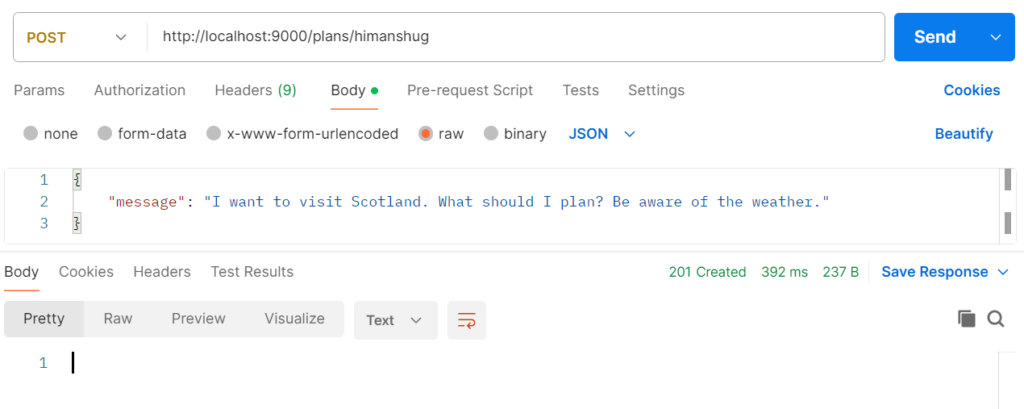
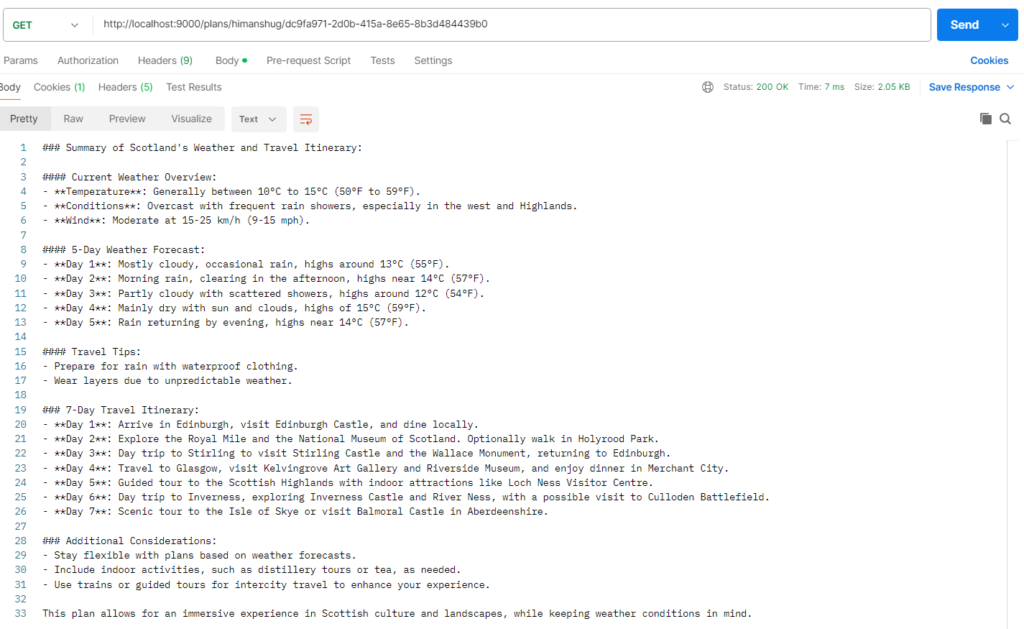
mvn compile exec:java3. Plan Trip
Conclusion
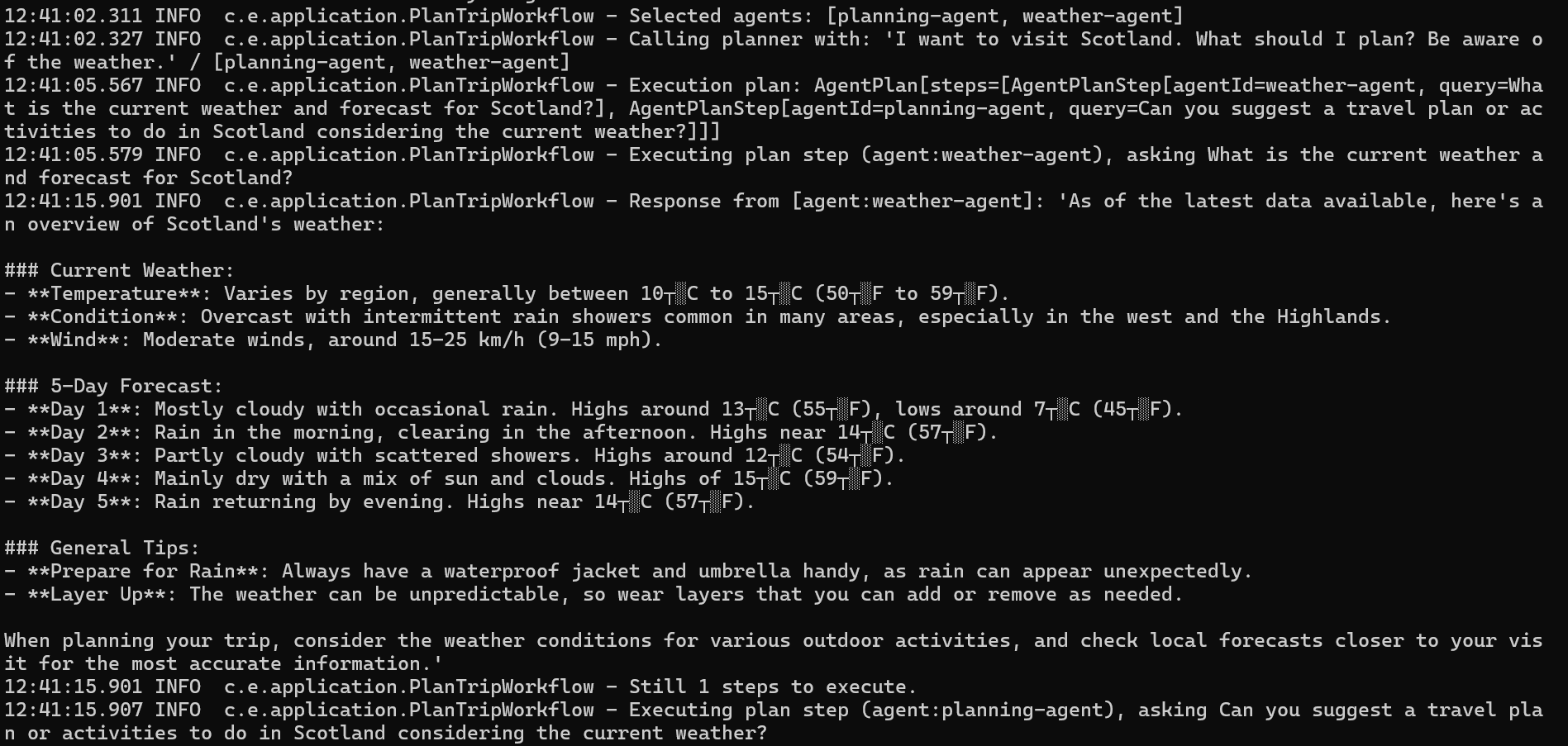
Dynamic planning (orchestration) in Akka Agentic AI is a 4 step process:
- Selection
- Coordination
- Execution
- Summarization
Selecting the required agents is done by the SelectorAgent. Then CoordinatorAgent puts the selected agents in an order. This order is then used by PlanTripWorkflow to execute it. At last the result of each agent is summarized by the SummarizerAgent.
Next Steps
Evaluation of AI Agents’ results is key to an enhanced User experience. Till now, trip plan(s) were being evaluated by the User. To make the application fully autonomous, a better approach would be to use an AI agent to evaluate the previous recommendation when the user preferences are changed or if new suggestions are created. We will explore this feature of Akka Agentic AI in our next blog, hence, stay tuned 🙂