



What is Block Storage?
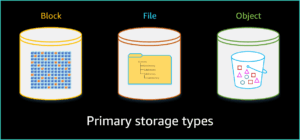
Whether on-premises or in a cloud environment, you have three primary types of storage: block, file, and object. Different storage hardware manufacturers and cloud service providers implement these storage types differently. However, the fundamentals for each storage type are basically the same, regardless of where the storage type is located, who manufactures the hardware, or who provides the service. The specific features and functionality differ based on how the manufacturer or service provider implements the storage.
Overview
Block storage is raw storage in which the hardware storage device or drive is presented, as either disk or volume, to be formatted and attached to the computing system for use. The storage is formatted into predefined continuous segments on the storage device. These segments are called blocks, which is where this storage type gets its name. The blocks are the basic fixed storage units used to store data on the device.
Storage devices can be hard disk drives (HDDs), solid state drives (SSDs), or newer types of storage devices, such as Non-Volatile Memory Express (NVMe). In addition to individual storage devices, block storage can be deployed on storage area network (SAN) systems.
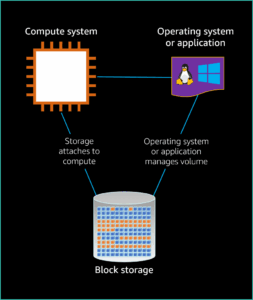
The storage device is presented to be used by the operating system or an application that has the capabilities to directly manage block storage. In cases where the application manages the block storage, the application often shares management with an operating system.
Architecture
Block storage systems have three main parts:
- Block storage: This is the physical or virtual space that holds your data, like a hard drive or a cloud storage volume.
- Compute system: This is the computer that needs the storage, like a server or a virtual machine.
- Operating system (OS): The software that manages the computer and interacts with the block storage.
Connecting the pieces:
- The block storage can be directly plugged into the computer (physical) or connected through a network (logical).
- The OS recognizes the block storage and prepares it for use, similar to formatting a new hard drive.
Amazon EBS Overview
Amazon EBS is an easy-to-use, high-performance, block storage service designed for use with Amazon EC2 for both throughput and transaction-intensive workloads at any scale.
AWS recommends Amazon EBS for data that must be quickly accessible and requires long-term persistence. EBS volumes are particularly well suited for use as the primary storage for file systems, databases, or any applications that require fine granular updates and access to raw, unformatted, block-level storage. Amazon EBS is well suited to both database-style applications that rely on random reads and writes, and to throughput-intensive applications that perform long, sequential reads and writes.
EBS volumes behave like raw, unformatted block devices. You can mount these block devices as EBS volumes on your EC2 instances. EBS volumes that are attached to an EC2 instance are exposed as raw block storage volumes that persist independently from the life of the instance. You can create a file system on top of these volumes or use them in any way you would use a block device (such as a hard drive). You can dynamically change the configuration of a volume attached to an EC2 instance, unlike traditional disk drives that come in fixed sizes.
You can choose from six different EBS volume types to balance optimal price and performance. You can achieve single-digit millisecond latency for high-performance database workloads such as SAP HANA or gigabyte-per-second throughput for large, sequential workloads such as Apache Hadoop. You can change EBS volume types, tune performance, or increase volume size without disrupting your critical applications. Amazon EBS provides you cost-effective block storage when you need it.
Designed for mission-critical systems, EBS volumes are replicated within an AWS Availability Zone and can easily scale to petabytes of data. Also, you can use EBS snapshots with automated lifecycle policies to back up your volumes in Amazon Simple Storage Service (Amazon S3) while ensuring geographic protection of your data and business continuity.
With Amazon EBS, you pay for only the storage and resources that you provision.
AWS block storage portfolio
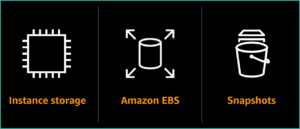
Instance Storage
Instance storage is temporary block-level storage attached to host hardware that is ideal for storing information that frequently changes or is replicated across multiple instances.
- Instance storage units are referred to as instance stores and are directly associated with an Amazon EC2 instance. Instance stores are also referred to as EC2 instance stores.
- An instance store is non-persistent and is terminated when the associated EC2 instance is terminated.
- Instance stores resemble Amazon EBS storage in initial configuration options. However, they functionally most closely resemble a directly attached disk drive. The available storage type is directly tied to the EC2 instance type.
Amazon EBS Storage
Amazon EBS is a block storage service designed for use with Amazon EC2. Amazon EBS scales to support virtually any workload and any volume size.
- EBS volumes attach to your EC2 instances and can be moved from one EC2 instance to a different EC2 instance.
- EBS volumes are persistent, which means they persist independently from the life of your EC2 instance. If an EC2 instance goes down, your volume and, most importantly, your data on that volume remain available to attach to a different EC2 instance.
Snapshots
Snapshots are incremental, point-in-time copies of your data stored on your EBS volumes. You can use snapshots to restore new volumes, expand the size of a volume, or move volumes across Availability Zones.
Snapshots let you geographically protect your data and achieve business continuity. You can use Amazon Data Lifecycle Manager (Amazon DLM) to automate snapshot management without any additional overhead or cost.
Features and Benefits
Persistent
Amazon EBS volumes are durable and persistent by default. Your EBS volume survives even if your EC2 instance is terminated. Your data is preserved for your future use and persists until you decide to delete it.
EBS volumes are managed independently from the Amazon EC2 instances to which they are attached. You can detach an existing EBS volume from an EC2 instance and reattach it to a different EC2 instance. This provides you the ability to change EC2 instance types to meet your performance requirements and optimize your Amazon EC2 costs. It also means that spot instances can be stopped or terminated without losing your data.
Built-in encryption
Amazon EBS encryption offers seamless encryption of EBS data volumes, boot volumes, and snapshots, eliminating the need to build and manage a secure key management infrastructure.
Amazon EBS encryption enables data-at-rest security by encrypting your data volumes, boot volumes, and snapshots using AWS-managed keys or keys that you create and manage using the AWS Key Management Service (AWS KMS). You can also configure your profile so that encryption is enabled by default for all newly created EBS volumes.
The encryption occurs on the servers that host EC2 instances, providing data-in-transit encryption of your data as it moves between EC2 instances and EBS data and boot volumes.
With your data encrypted in transit and at-rest, you are protected from unauthorized access to your data.
High availability and high durability
EBS volumes are designed to be highly available, reliable, and durable at no additional charge to you. EBS volume data is replicated across multiple servers in an Availability Zone to prevent the loss of data from the failure of any single component.
Amazon EBS offers a higher durability io2 volume that is designed to provide 99.999 percent durability with an annual failure rate (AFR) of 0.001 percent, where failure refers to a complete or partial loss of the volume. For example, if you have 100,000 EBS io2 volumes running for 1 year, you should expect only one io2 volume to experience a failure. This makes io2 ideal for business-critical applications such as SAP HANA, Oracle, Microsoft SQL Server, and IBM DB2 that will benefit from higher uptime. io2 volumes are 2,000 times more reliable than typical commodity disk drives, which fail with an AFR between 2 and 4 percent.
All other Amazon EBS volumes are designed to provide 99.8-99.9 percent durability with an AFR of 0.1 to 0.2 percent. Amazon EBS also supports a snapshot feature, which is a good way to take point-in-time backups of your data.
Multiple volume-type options
Amazon EBS provides multiple volume types that allow you to optimize storage performance and cost for a broad range of applications. These volume types are divided into two major categories: SSD-backed storage for transactional workloads, such as databases, virtual desktops, and boot volumes, and HDD-backed storage for throughput-intensive workloads, such as MapReduce and log processing.
- SSD-based volumes include two levels to meet your application requirements: General Purpose SSD volumes and Provisioned IOPS SSD volumes.
- General Purpose SSD volumes (gp3 and gp2) balance price and performance for transactional applications, including virtual desktops, test and development environments, and interactive gaming applications.
- Provisioned IOPS SSD volumes are the highest-performance EBS volumes (io2 and io1) for your most demanding transactional applications, including SAP HANA, Microsoft SQL Server, and IBM DB2.
- HDD-based volumes include Throughput Optimized HDD (st1) for frequently accessed, throughput-intensive workloads and the lowest cost Cold HDD (sc1) for less frequently accessed data.
You can choose the volume type that best meets your application and use case requirements. You can change from one volume type to another.
Elastic volumes
Elastic Volumes is a feature that allows you to easily adapt your volumes as the needs of your applications change. The Elastic Volumes feature allows you to dynamically increase capacity, tune performance, and change the type of any new or existing current generation volume with no downtime or performance impact. You can easily right-size your deployment and adapt to performance changes.
You can create a volume with the capacity and performance needed today, knowing that you have the ability to modify your volume configuration in the future. Elastic Volumes can save you hours of planning cycles.
By using Amazon CloudWatch with AWS Lambda, you can automate volume changes to meet the changing needs of your applications.
The Elastic Volumes feature makes it easier to adapt your resources to changing application demands, giving you confidence that you can make modifications in the future as your business needs change.
Multi-attach
Customers can enable Multi-attach on an EBS Provisioned IOPS io2 or io1 volume. Multi-attach allows a single EBS volume to be concurrently attached to up to 16 Nitro-based EC2 instances within the same Availability Zone.
Multi-attach makes it easier to achieve higher application availability for applications that manage storage consistency from multiple writers. Each attached instance has full read and write permission to the shared volume. Applications using Multi-attach need to provide I/O fencing for storage consistency. There is no additional fee to enable Multi-attach.
Volume Monitoring
Performance metrics, such as bandwidth, throughput, latency, and average queue length, are available through the AWS Management Console. Using these metrics, provided by CloudWatch, you can monitor the performance of your volumes to make sure that you are providing enough performance for your applications without paying for resources you don’t need.
Snapshots
Amazon EBS provides the ability to save point-in-time snapshots of your volumes to Amazon S3. EBS snapshots are stored incrementally. Only the blocks that have changed after your last snapshot are saved, and you are billed only for the changed blocks.
When you delete a snapshot, you remove only the data not needed by any other snapshot. All active snapshots contain all the information needed to restore the volume to the instant at which that snapshot was taken. The time to restore changed data to the working volume is the same for all snapshots.
Snapshots can be used to instantiate multiple new volumes, expand the size of a volume, or move volumes across Availability Zones. When a new volume is created, you can choose to create it based on an existing EBS snapshot. In that scenario, the new volume begins as an exact replica of the snapshot.
Key snapshot feature capabilities
- Direct read access to EBS snapshots
- Ability to create EBS snapshots from any block storage
- Immediate access to EBS volume data
- Instant full performance on EBS volumes restored from snapshots using Fast Snapshot Restore (FSR)
- Additional hourly charge for FSR
- Ability to resize EBS volumes
- Ability to share EBS snapshots
- Ability to copy EBS snapshots across AWS Regions
Backups
AWS Backup supports backing up your EBS volumes. AWS Backup allows you to centralize and automate data protection across AWS services. AWS Backup offers a cost-effective, fully managed, policy-based service that further simplifies data protection at scale.
AWS Backup also helps you support your regulatory compliance obligations and meets your business continuity goals. Together with AWS Organizations, AWS Backup enables you to centrally deploy data protection (backup) policies to configure, manage, and govern your backup activity across your organization’s AWS accounts and resources.
AWS Backup supports many AWS services, including EC2 instances, EBS volumes, Amazon Relational Database Service (Amazon RDS) databases (including Amazon Aurora clusters), Amazon DynamoDB tables, Amazon EFS, FSx for Lustre, FSx for Windows File Server, and AWS Storage Gateway volumes.
Conclusion
This blog post has provided a foundation for understanding block storage and its implementation through Amazon EBS. We’ve explored the core benefits of EBS, such as scalability, durability, and high performance.
But this is just the beginning! In Part 2, we’ll delve deeper into the practical applications of Amazon EBS. We’ll explore real-world use cases and how EBS can optimize performance for various workloads. Stay tuned for the next part, where we’ll unlock the full potential of EBS for your cloud storage strategy!