


Amazon EC2 Instance Connect (EIC) is a powerful tool that provides secure remote access to your Amazon Elastic Compute Cloud (EC2) instances. With EIC, you can easily and securely connect to your instances using the AWS Management Console or SSH clients, eliminating the need to manage SSH keys or passwords. In this ultimate guide, we will walk you through the process of setting up and using Instance Connect, as well as highlight the benefits and best practices for secure remote access. Whether you are a seasoned AWS user or new to EC2, this guide will help you master Amazon EC2 Instance Connect and enhance your remote access capabilities.
Understanding the importance of secure remote access
Secure remote access is crucial for businesses and individuals alike. With the increasing number of cyber threats, ensuring the security of your EC2 instances is paramount. Amazon EC2 Instance Connect (EIC) simplifies the process of secure remote access by eliminating the need for SSH keys or passwords.
By using EIC, you benefit from an extra layer of security, as the system generates temporary credentials for each session. This reduces the risk of unauthorized access and enhances the overall security posture of your EC2 instances.
Jump Server
Jump servers play a critical role in network security by providing a secure gateway for administrators to access and manage sensitive systems and data. By acting as a single entry point, jump servers greatly reduce the attack surface and minimize the risk of unauthorized access.
Running the bastion host instance incurs costs. Billing issue for the compute resources (CPU, memory, storage) used by the bastion host. The specific cost will depend on the instance type and how long the bastion host is running. If the data exchanged between the private instances and the bastion host, there will be a cost issue.
After EIC
EC2 Instance Connect, often abbreviated as EIC, is a feature provided by Amazon Web Services (AWS) that simplifies and enhances the process of securely connecting to your Amazon Elastic Compute Cloud (EC2) instances. It’s a service that enables you to connect to your EC2 instances using SSH (Secure Shell) directly from the AWS Management Console or AWS CLI without the need for traditional SSH key management.
EC2 Instance Connect (EIC) and a bastion host serve distinct roles in managing access to Amazon Elastic Compute Cloud (EC2) instances. EIC streamlines and simplifies SSH access by eliminating the need for SSH key management, allowing users to connect directly through the AWS Management Console or CLI. It offers fine-grained access control through AWS Identity and Access Management (IAM), providing centralized access management and robust auditing. The choice between EIC and a bastion host depends on the balance of security, ease of use, and complexity that aligns with your specific use case and access requirements.
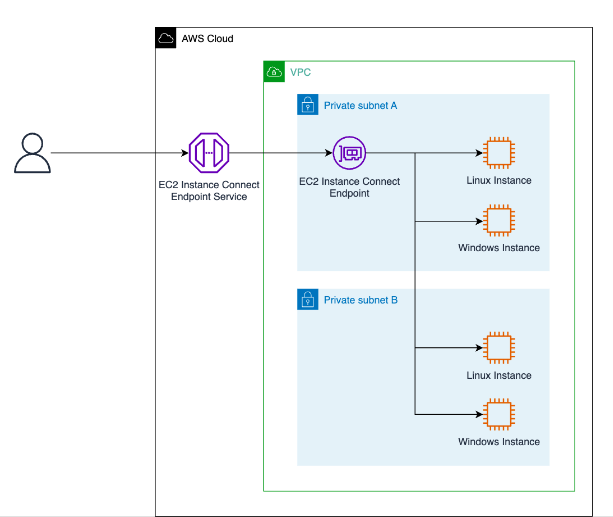
Steps
- Create an endpoint under the VPC, only one endpoint is required per VPC
aws ec2 create-instance-connect-endpoint --subnet-id [SUBNET] --security-group-id [SG-ID]
- Create a security group. With the inbound rules as shown click on Create endpoint. Make sure you attach the same security group with the private instance.
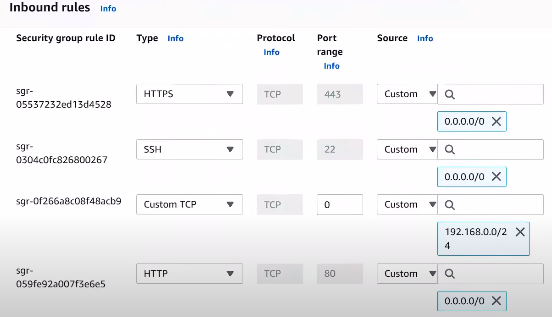
- Now create the private EC2 instance and attach the same security group as we made for EIC
- Now click Connect on the instance as shown below:
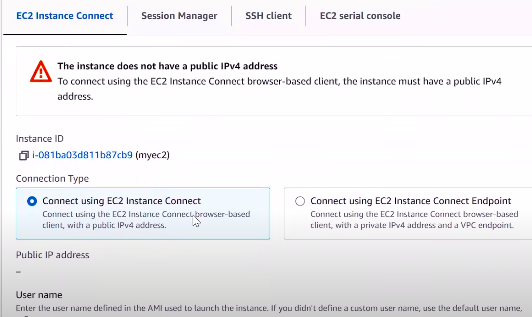
- Now Connect the endpoint that we configure.
In this way, you can connect with the private EC2 instance through the console. This can connect through the AWS CLI, for that you may refer to the official documentation.