


I. What is ReqNRoll?
Reqnroll is an open-source BDD test automation framework for .NET, created as a reboot of SpecFlow.
It uses Gherkin to write executable specifications with Given-When-Then style scenarios that become automated tests.
Supporting all major OS and .NET versions, Reqnroll works with MsTest, NUnit and xUnit. It’s compatible with Visual Studio 2022, VS Code, Rider, or can run without an IDE.
Created by Gaspar Nagy of Spec Solutions, Reqnroll is an independent community-supported project that will be transferred to a foundation while maintaining Gaspar’s involvement.
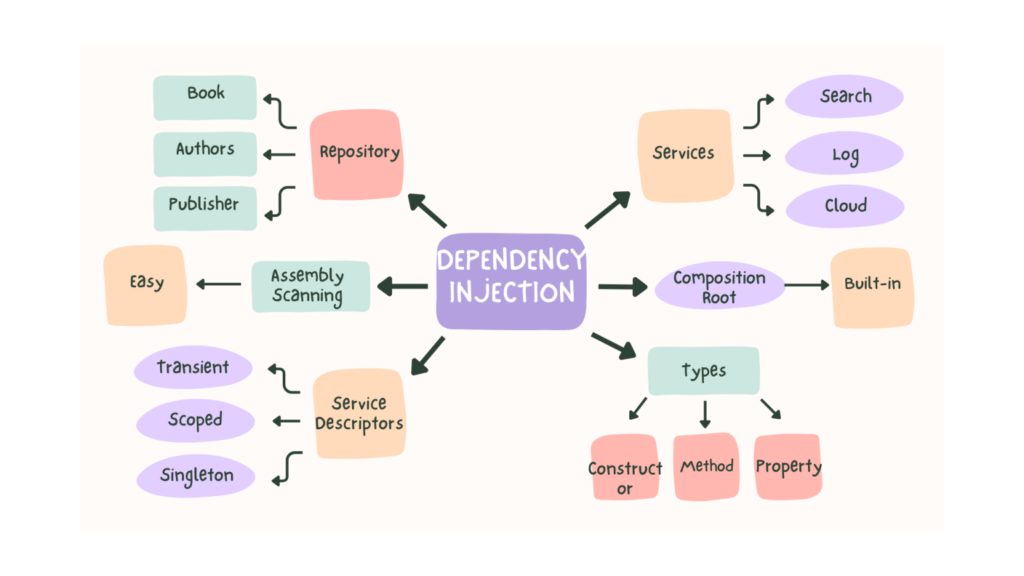
II. What is Dependency Injection
Dependency Injection (DI) is a design pattern in software engineering where an object receives its dependencies from an external source rather than creating them internally. This promotes loose coupling, making code more testable, maintainable, and flexible. Instead of an object creating its dependencies, it receives them, often through constructors, method arguments, or setters
III. Benefits of apply DI
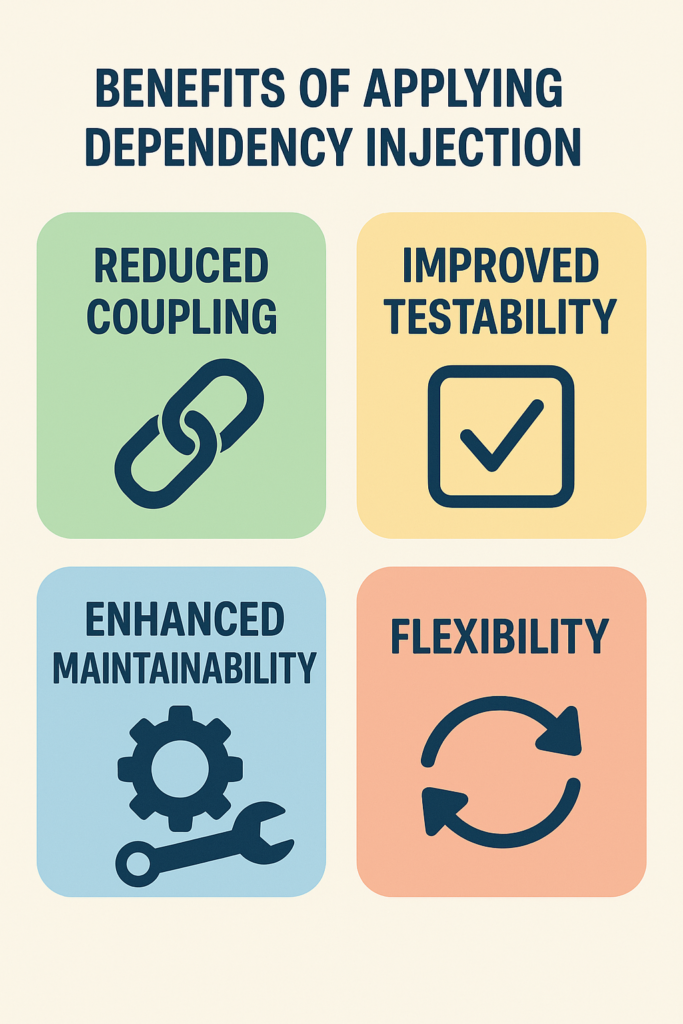
IV. Benefits of applying DI in Reqnroll/SpecFlow test project
- Easier Test Maintenance
- Better Reusability and Modularity
- Promotes Loose Coupling
- Centralized Configuration Management
- Centralized Dependency Initialisation / Page Objects Initialisation
V. Setup Reqnroll project and apply DI
1. Prerequisites
- Set up reqnroll project: https://docs.reqnroll.net/latest/installation/setup-project.html.
- Add DI nuget package: https://www.nuget.org/packages/Reqnroll.Microsoft.Extensions.DependencyInjection
- Some additional packages: Microsoft.Extensions.Configuration.Json, Microsoft.Extensions.Configuration, Microsoft.Extensions.Configuration.Abstractions, System.Configuration.ConfigurationManager
2. Framework structure
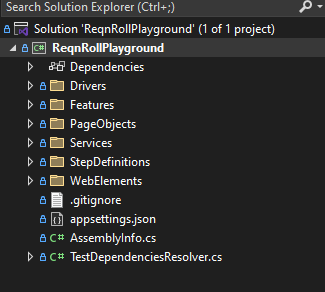
ReqnRollPlayground/
├─ Drivers/ — Setup and initialize driver/browser instance
├─ Features/ — Contains test files written in Gherkin format
├─ PageObjects/ — Page Object classes
├─ Services/ — Contains 3rd service classes
├─ StepDefinitions/ — Step definition classes
├─ WebElements/ — Web Element helper classes
├─ TestDependenciesResolver.cs — Service Container class
3. Implementation
3.1. Drivers implementation
- BrowserFactory.cs
using OpenQA.Selenium;
using System;
using System.Threading;

namespace ReqnRollPlayground.Drivers
{
    public class BrowserFactory
    {
        public static ThreadLocal<IWebDriver> ThreadLocalWebDriver = new ThreadLocal<IWebDriver>();

        public void InitializeDriver(string browserName = "chrome")
        {
            IDriverSetup driverSetup = browserName.ToLower() switch
            {
                "chrome" => new ChromeDriverSetup(),
                "firefox" => new FirefoxDriverSetup(),
                _ => throw new ArgumentOutOfRangeException(browserName),
            };

            ThreadLocalWebDriver.Value = driverSetup.CreateInstance();
        }

        public static IWebDriver GetWebDriver()
        {
            Console.WriteLine("Thread ID: " + ThreadLocalWebDriver.Value.GetHashCode());
            return ThreadLocalWebDriver.Value;
        }

        public static void CleanUp()
        {
            if (GetWebDriver() != null)
            {
                foreach (string window in GetWebDriver().WindowHandles)
                {
                    GetWebDriver().SwitchTo().Window(window);
                    GetWebDriver().Close();
                }

                GetWebDriver().Quit();
                GetWebDriver().Dispose();
            }

        }
    }
}- ChromeDriverSetup.cs
using NUnit.Framework;
using OpenQA.Selenium;
using OpenQA.Selenium.Chrome;
using System.Collections.Generic;

namespace ReqnRollPlayground.Drivers
{
    public class ChromeDriverSetup : IDriverSetup
    {
        public IWebDriver CreateInstance()
        {
            return new ChromeDriver(GetDriverOptions());
        }

        private ChromeOptions GetDriverOptions()
        {
            var chromeOptions = new ChromeOptions();
            chromeOptions.AddArguments("test-type --no-sandbox --start-maximized");
            chromeOptions.AddUserProfilePreference("autofill.credit_card_enabled", false);
            chromeOptions.SetLoggingPreference(LogType.Performance, LogLevel.All);

            var experimentalFlags = new List<string>
            {
                "enable-tls13-kyber@2",
            };
            chromeOptions.AddLocalStatePreference("browser.enabled_labs_experiments", experimentalFlags);

            return chromeOptions;
        }
    }
}
3.2. Page Object implementation
We will use this test site for this framework: https://testautomationpractice.blogspot.com
- HomePage.cs
using OpenQA.Selenium;
using ReqnRollPlayground.WebElements;

namespace ReqnRollPlayground.PageObjects
{
    public class HomePage
    {
        private readonly WebObject _nameInput = new WebObject(By.Id("name"));
        private readonly WebObject _emailInput = new WebObject(By.Id("email"));
        private readonly WebObject _phoneInput = new WebObject(By.Id("phone"));
        private readonly WebObject _addressInput = new WebObject(By.Id("textarea"));

        public HomePage() { }

        public void EnterName(string name)
        {
            _nameInput.EnterText(name);
        }

        public void EnterEmail(string email)
        {
            _emailInput.EnterText(email);
        }

        public void EnterPhone(string phone)
        {
            _phoneInput.EnterText(phone);
        }

        public void EnterAddress(string address)
        {
            _addressInput.EnterText(address);
        }
    }
}
3.3. WebElement helper implementation
- WebObject.cs
using OpenQA.Selenium;

namespace ReqnRollPlayground.WebElements
{
    public class WebObject
    {
        public By By { get; set; }
        public string Name { get; set; }

        public WebObject(By by, string name = "")
        {
            By = by;
            Name = name;
        }
    }
}- WebObjectExtension.cs
using OpenQA.Selenium;
using OpenQA.Selenium.Support.UI;
using ReqnRollPlayground.Drivers;
using SeleniumExtras.WaitHelpers;
using System;

namespace ReqnRollPlayground.WebElements
{
    public static class WebObjectExtension
    {
        public static int GetWaitTimeoutSeconds()
        {
            return 60;
        }

        public static IWebElement WaitForElementToBeVisible(this WebObject webObject)
        {
            try
            {
                var wait = new WebDriverWait(BrowserFactory.GetWebDriver(), TimeSpan.FromSeconds(GetWaitTimeoutSeconds()));
                wait.IgnoreExceptionTypes(typeof(StaleElementReferenceException));

                return wait.Until(ExpectedConditions.ElementIsVisible(webObject.By));
            }
            catch (WebDriverTimeoutException exception)
            {
                throw exception;
            }
        }

        public static IWebElement WaitForElementToBeExisted(this WebObject webObject)
        {
            try
            {
                var wait = new WebDriverWait(BrowserFactory.GetWebDriver(), TimeSpan.FromSeconds(GetWaitTimeoutSeconds()));
                wait.IgnoreExceptionTypes(typeof(StaleElementReferenceException));
                wait.Until(ExpectedConditions.ElementExists(webObject.By));

                return BrowserFactory.GetWebDriver().FindElement(webObject.By);
            }
            catch (WebDriverTimeoutException exception)
            {
                throw exception;
            }
        }

        public static void ClickOnElement(this WebObject webObject)
        {
            try
            {
                var element = webObject.WaitForElementToBeVisible();
                element.Click();
            }
            catch (Exception ex)
            {
                throw ex;
            }
        }

        public static void EnterText(this WebObject webObject, string text, bool bypassClearText = false)
        {
            try
            {
                var element = webObject.WaitForElementToBeVisible();
                element.Clear();
                element.SendKeys(text);
            }
            catch (WebDriverException)
            {
                throw;
            }
        }
    }
}
3.4. Setup DI container
- TestDependenciesResolver.cs
using Microsoft.Extensions.Configuration;
using Microsoft.Extensions.DependencyInjection;
using Reqnroll.Microsoft.Extensions.DependencyInjection;
using ReqnRollPlayground.Drivers;
using ReqnRollPlayground.PageObjects;
using ReqnRollPlayground.Services;
using System.IO;

namespace ReqnRollPlayground
{
    public static class TestDependenciesResolver
    {
        [ScenarioDependencies]
        public static IServiceCollection CreateServices()
        {
            var configuration = new ConfigurationBuilder()
                .SetBasePath(Directory.GetCurrentDirectory())
                .AddJsonFile("appsettings.json").Build();

            var services = new ServiceCollection();

            services.AddSingleton<IConfiguration>(configuration);
            services.AddScoped<BrowserFactory>();
            services.AddScoped<MailService>();
            services.AddScoped<HomePage>();

            return services;
        }
    }
}
This class TestDependenciesResolver configures and provides services that will be available during your test scenarios
namespace ReqnRollPlayground
{
public static class TestDependenciesResolver- This static class is a container for DI setup
- Since it’s static, you don’t instantiate it—Reqnroll calls it automatically
[ScenarioDependencies]
public static IServiceCollection CreateServices()[ScenarioDependencies]: Special Reqnroll attribute that tells the framework
→ “This method provides the services (dependencies) needed for test scenarios.”CreateServices()returns anIServiceCollection, which is the standard .NET DI container
var configuration = new ConfigurationBuilder()
.SetBasePath(Directory.GetCurrentDirectory())
.AddJsonFile("appsettings.json").Build();- Creates a configuration object by:
- Setting base path to the current directory
- Adding
appsettings.json - Building it into an
IConfigurationobject
- This lets you load settings like URLs, credentials, or environment-specific values into your tests
var services = new ServiceCollection();- Creates an empty service collection, which is the DI container.
services.AddSingleton<IConfiguration>(configuration);- Registers the
configurationobject as a singleton (only one instance for the whole test run). - Anywhere you inject
IConfiguration, you’ll get this instance
services.AddScoped<BrowserFactory>();
services.AddScoped<MailService>();
services.AddScoped<HomePage>();- Registers your custom classes
BrowserFactory(probably for managing WebDriver/browser instances).MailService(likely to simulate or check emails in tests).- TueTranDuy1500052275
- Scoped means: a new instance is created per test scenario, and disposed after. This is perfect for tests, since you want isolation between scenarios.
3.5. Inject / Use dependencies in classes
3.5.1. Use Browser Factory in Hooks class
using NUnit.Framework;
using Reqnroll;
using ReqnRollPlayground.Drivers;
using System;

namespace ReqnRollPlayground.StepDefinitions
{
    [Binding]
    public class Hooks
    {
        private readonly ScenarioContext _scenarioContext;
        private readonly FeatureContext _featureContext;
        private readonly BrowserFactory _browserFactory;

        public Hooks(BrowserFactory browserFactory)
        {
            _browserFactory = browserFactory;
        }

        [BeforeScenario]
        public void BeforeScenario(ScenarioContext scenarioContext, FeatureContext featureContext)
        {
            Console.WriteLine("BaseTest Set up");

            _browserFactory.InitializeDriver("chrome");
        }

        [AfterScenario]
        public static void AfterTestRun()
        {
            TestContext.Progress.WriteLine("=========> Global OneTimeTearDown");
            BrowserFactory.CleanUp();
        }
    }
}
This is how we inject dependencies from the DI container to derive classes; we inject them to the constructor of that class, like this, and here, magic happens. We don’t need to use the new() keyword, but can still access the dependecy’s property
private readonly BrowserFactory _browserFactory;

public Hooks(BrowserFactory browserFactory)
{
    _browserFactory = browserFactory;
}
3.5.2. Use IConfiguration
Other case is we some how need to get IConfiguration instance and get value from appsettings, here is the way we do
using Microsoft.Extensions.Configuration;
using Reqnroll;
using ReqnRollPlayground.Drivers;

namespace ReqnRollPlayground.StepDefinitions
{
    [Binding]
    public class CommonSteps
    {
        private IConfiguration _configuration;

        public CommonSteps(IConfiguration configuration)
        {
            _configuration = configuration;
        }

        [Given(@"^I am on the Automation Testing Practice page$")]
        public void GoToUrl()
        {
            DriverUtils.GoToUrl(_configuration["Base.Url"]);
        }
    }
}
Similar to above, we inject IConfiguration to a class constructor, and now we can easily get appsettings value from it
3.5.3. Use Page Object in Step Definition classes
using Reqnroll;
using ReqnRollPlayground.PageObjects;

namespace ReqnRollPlayground.StepDefinitions;

[Binding]
public sealed class HomePageSteps
{
    private readonly HomePage _homePage;

    public HomePageSteps(HomePage homePage)
    {
        _homePage = homePage;
    }

    [Given(@"^User fills name ""(.*)""$")]
    public void GivenUserFillsName(string name)
    {
        _homePage.EnterName(name);
    }

    [Given(@"^User fills email ""(.*)""$")]
    public void GivenUserFillsEmail(string email)
    {
        _homePage.EnterEmail(email);
    }

    [Given(@"^User fills phone ""(.*)""$")]
    public void GivenUserFillsPhone(string phone)
    {
        _homePage.EnterPhone(phone);
    }

    [Given(@"^User fills address ""(.*)""$")]
    public void GivenUserFillsAddress(string address)
    {
        _homePage.EnterAddress(address);
    }
}
By injecting the Page Object class (HomePage) into the step definition’s constructor, we can easily initialize the page object instance without code duplication.
3.5.4. Using 3rd services
For example, we want to call some 3rd service like an email service, or APIs, we can take advantage of DI to avoid creating too many service instances and centralize service initialization in one place – service container and inject them into class, where we want to use them.
For example, I will create a fake MailService class, like below, with SendMail method.
using Microsoft.Extensions.Configuration;
using System;

namespace ReqnRollPlayground.Services;

public class MailService
{
    private readonly IConfiguration _configuration;

    public MailService(IConfiguration configuration)
    {
        _configuration = configuration;
    }

    public void SendMail(string subject, string body)
    {
        Console.WriteLine($"Sending mail from {_configuration["MailSettings:Mail.From"]} to {_configuration["MailSettings:Mail.To"]} using {_configuration["MailSettings:Mail.Server"]}");
        Console.WriteLine($"Subject: {subject}");
        Console.WriteLine($"Body: {body}");
    }
}
After creating MailService.cs class, we need to define it in the service container – TestDependenciesResolve.cs
services.AddScoped<MailService>();After that, we can use it in the step definition class, like below, and anywhere else without re-creating its instance
using Reqnroll;
using ReqnRollPlayground.Services;
using System;

namespace ReqnRollPlayground.StepDefinitions
{
    [Binding]
    public class EmailSteps
    {
        private readonly MailService _mailService;
        private ScenarioContext _scenarioContext;

        public EmailSteps(MailService mailService, ScenarioContext scenarioContext)
        {
            _mailService = mailService;
            _scenarioContext = scenarioContext;
        }

        [Given(@"Email with subject ""(.*)""")]
        public void GivenEmailWithSubject(string subject)
        {
            _scenarioContext["EmailSubject"] = subject;
        }

        [Given(@"Email with body ""(.*)""")]
        public void GivenEmailWithBody(string body)
        {
            _scenarioContext["EmailBody"] = body;
        }

        [When(@"User sends email")]
        public void WhenUserSendsEmail()
        {
            var subject = _scenarioContext.Get<string>("EmailSubject");
            var body = _scenarioContext.Get<string>("EmailBody");

            _mailService.SendMail(subject, body);
        }

        [Then(@"Email should be sent successfully")]
        public void ThenEmailShouldBeSentSuccessfully()
        {
            Console.WriteLine("Email sent successfully.");
        }
    }
}
VI. Conclusion
By applying Dependency Injection (DI) in a test automation framework, teams gain a cleaner, more scalable, and flexible architecture. DI reduces coupling between components, making the framework easier to maintain and extend as the project grows. It enables better testability through mocking, encourages reusability of common services, and centralizes configuration management. Ultimately, DI not only improves code readability and collaboration within the team but also ensures the framework can adapt quickly to changing requirements and technologies—leading to more reliable and sustainable test automation in the long run.