Key takeaways:
Argo CD and the various Argo projects undeniably simplify life by enabling the automation of every aspect of your system’s production release, migration, and operational workflows.
By embracing industry best practices, you’re setting the stage to empower your teams and implement GitOps for your infrastructure, enabling more frequent deployments to production
What is Argo CD?
Argo CD serves as a declarative, GitOps-based continuous delivery solution tailored for Kubernetes. It empowers you to specify, set up, and roll out your applications to Kubernetes clusters, all while relying on Git repositories as the primary source of truth. Argo CD diligently keeps an eye on your running applications, ensuring their current state aligns with the intended state outlined in your Git repository.
Argo CD has many features, such as:
- Support for multiple config management/templating tools (Kustomize, Helm, Jsonnet, plain-YAML)
- Ability to manage and deploy to multiple clusters
- Rollback/Roll-anywhere to any application configuration committed in Git repository
- Health status analysis of application resources
- Automated configuration drift detection and visualization
At the heart of Argo CD lies the Applications Controller, which conducts ongoing monitoring of applications and subsequently evaluates them against the live application state, comparing them to the target state specified within your Git repository.
The Application Controller fetches the resource manifest you’ve defined in your Git repository and performs a comparison with the live resources within your Kubernetes cluster. This approach harnesses Git as the foundation of truth, facilitating GitOps in your deployment workflow

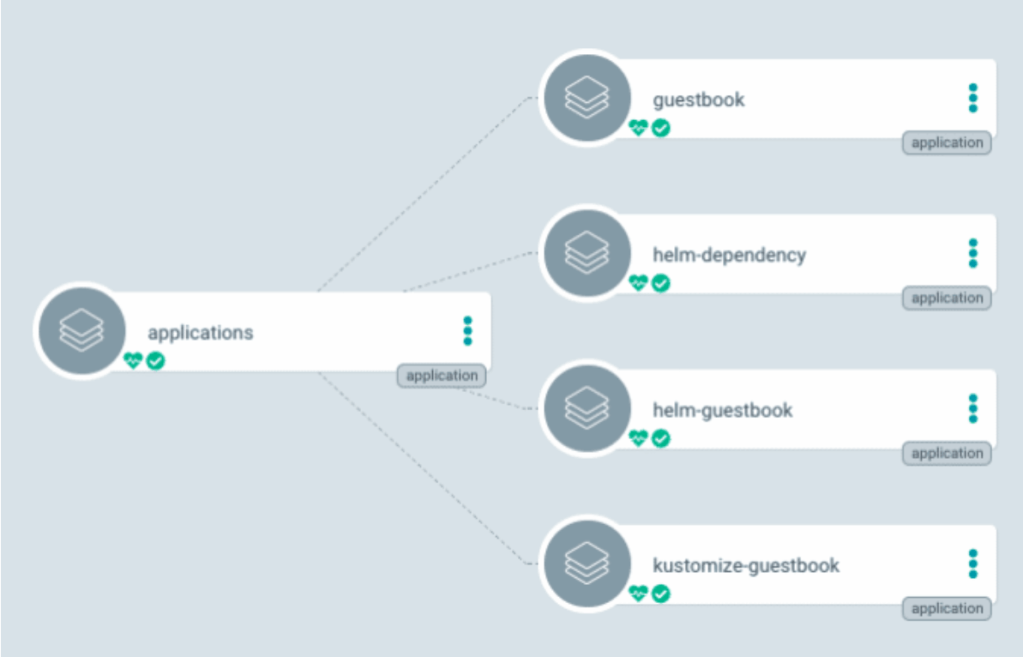
The image above shows the primary Argo CD dashboard with a single Argo application successfully deployed
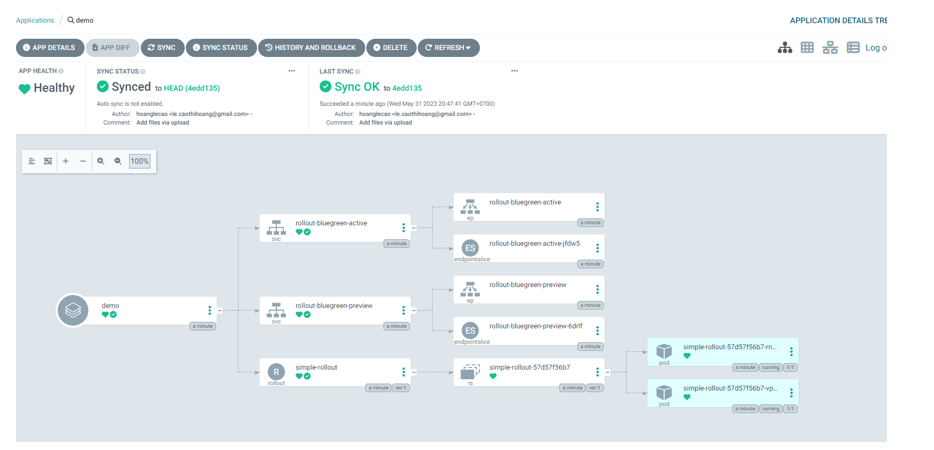
The dashboard above provides a detailed view of the same Argo application deployed in the image above. However, it also provides an understanding of the status of the Kubernetes resources.
Argo CD Best Practices
While Argo CD encompasses numerous best practices, we will examine a selection of the most crucial ones curated from the Argo community and listed below for your reference.
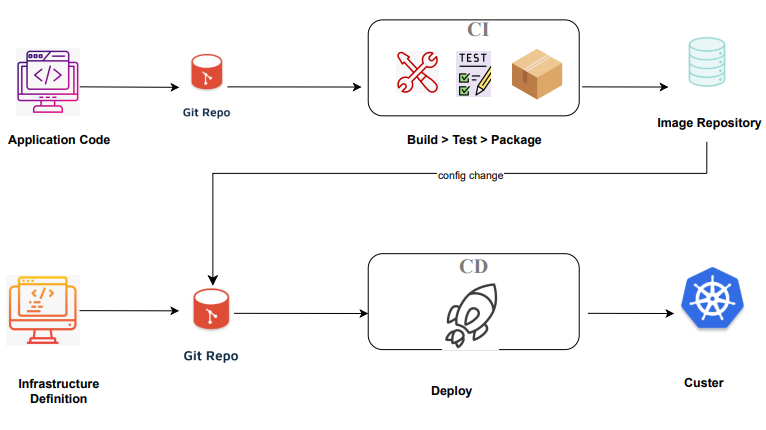
Separate your Git repositories
Maintaining a clear separation between your configurations and source code within distinct Git repositories is of utmost importance. This separation not only restricts commit access but also helps prevent inadvertent pushes to production environments.
Furthermore, isolating your repositories enhances security and enforces access restrictions, reducing the risk of accidental misconfigurations in your applications.
Structure directories for multi-application Argo CD deployments
After segregating source code and configurations into distinct repositories, it’s vital to establish a GitOps-oriented directory structure for Argo CD deployments. Tailor the repository structure to align with your organization’s specific requirements and preferences.
Nonetheless, we’ll provide some guidelines for effectively structuring your directories with Argo CD
Do: Our recommendation is to represent your environments or clusters by organizing them into separate directories within your configuration repository, such as ‘prod,’ ‘staging,’ ‘testing,’ and so on, instead of utilizing branches.
Do: Ensure clear separation between your cluster and environment configurations repositories; for example, keep your production configuration in a distinct repository from your staging configuration.
Do: Implement manifest management tools like raw Kubernetes YAML files, Kustomize, or Helm for defining your application environments.
Do: Create an ‘argocd’ folder in your configuration repository for each cluster and create an Argo CD Application manifest for each app in the cluster’s repository. By creating the separate ‘argocd’ folder, you can also implement role-based access control for different clusters if you wish with Git repository permissions
Do: Leverage a multi-folder or a multi-repo structure instead of a multi-branch approach. You should NOT have permanent branches for your clusters or environments.
Don’t: Never put any independent applications or applications managed by different teams in the same repository.
Adopting these directory structure strategies offers numerous benefits, including enhanced security, simplified rollbacks, efficient audit logs, streamlined testing, automated manifest updates, and the ability to dynamically create and remove applications.
Manage your secrets securely
There’s no universal secret management solution applicable to all organizations. Nevertheless, certain common approaches can guide effective secret handling with Argo CD, considering these two key factors
Encrypt your secrets directly in your Git repository:
Sealed secrets offer a method to encrypt secrets generated by anyone, with the ability to decrypt them exclusively by the controller operating within the target cluster.
OPS (Secret OperationS) is an open-source solution designed for encrypting and decrypting entire files or fields within your Kubernetes secrets. This method empowers you to store not only your secrets but also other Kubernetes manifests directly in your Git repository
Externalizing your secrets from your Git repository
While this approach sparks debate regarding its alignment with GitOps principles, it remains a solution leveraging Kubernetes authentication with Vault. In this setup, the Argo CD repository server grants Vault the authorization to utilize the service account token found in the secret manifest, replacing the necessary value and generating the secret on your behalf.
Cloud Provider Secrets
Cloud provider secrets vary based on your cloud service provider, and it’s crucial to assess their secret management solutions for your security needs. Storing secrets in a Git repository can be challenging, so consider externalizing secrets if your organization has distinct policies or existing systems. When using Git for source control, ensure sensitive data is encrypted to maintain security. Argo CD can facilitate secure management of secrets in your Git repository while ensuring proper processes and tools are in place to protect sensitive information.
Increase automation for your system with the other Argo projects
Progressive Delivery
Progressive delivery is a set of practices that roll out new features gradually instead of all at once.
Argo Rollouts provide advanced deployment capabilities and rolling updates for progressive delivery approaches you might already know, such as blue-green, canary, etc.
Advanced Deployment with CI
To utilize Argo Workflows and Events, you need to have an established Continuous Integration (CI) process in place.
Argo Workflows enable the construction and orchestration of parallel jobs while making use of a Kubernetes-based pipeline.
Argo Events is an event-driven workflow automation framework that is used with Kubernetes.
Through the adoption of these additional Argo projects, you can streamline cluster management, execute workflows, and implement GitOps in your Kubernetes environment. Nevertheless, the transition to full automation in Kubernetes may not be suitable for every organization. Combining these tools necessitates a comprehensive understanding of your system and a thoughtful assessment of which tool will best enhance your team’s processes.
Determine a promotion strategy
Having set up your directory structure, you might encounter a challenge in determining the most effective approach for promoting deployments across clusters. When managing multiple applications using Argo CD, it’s advisable to choose a single promotion strategy that aligns with your directory structure and consistently follow it. Here, we will outline ways to tailor this strategy to your specific requirements.
Group your applications
Once you’ve established an application management strategy and face challenges due to a growing number of applications, consider using the ApplicationSet. Note that it was once an external controller but is now integrated for ease of use. While the ‘App of Apps’ pattern is user-friendly, the ApplicationSet offers extra support and automation capabilities for managing multiple applications across clusters, making it the preferred choice for production deployments.
This way, you can simultaneously deploy your Argo apps to multiple Kubernetes clusters.

App of Apps
For managing ten or fewer applications, the ‘App of Apps’ pattern is ideal. It streamlines the deployment of multiple applications by using a ‘Root App’ to encapsulate them, simplifying the management of a group of applications through declarative deployments and supporting recursive declaration of child apps.