1. Introduction
Astro is a modern web framework designed for building fast, content-focused websites. Unlike traditional JavaScript-heavy frameworks, Astro delivers zero JavaScript by default and only loads interactive components as needed. This results in lightning-fast page loads and a great user experience.
I chose Astro for this project because I wanted to explore a new approach to web development that prioritizes performance and simplicity. Astro’s ability to combine static site generation with support for popular UI frameworks like React made it an ideal choice for building a feature-rich yet efficient Todo App. Its file-based routing, component islands architecture, and seamless integration with tools like Tailwind CSS and Supabase allowed me to focus on building features without worrying about unnecessary complexity or bloat.
For my learning project, I built a Todo App using Astro. This app lets users manage their daily tasks with features like adding, editing, and tracking completion status-all wrapped in a clean, modern interface.
The goal of this blog post is to share my journey learning Astro: how I approached building the app, the challenges I faced, and the key lessons I learned along the way. Whether you’re new to Astro or just curious about modern web development, I hope my experience will help you get started and inspire you to try Astro for your own projects.
2. Why Astro?
Astro stands out from other web frameworks thanks to its unique approach to building websites. One of its most innovative features is the concept of component islands: instead of sending a large JavaScript bundle to the browser, Astro renders most of your site as static HTML and only hydrates interactive components on the client as needed. This results in much faster load times and a better user experience, especially for content-heavy sites.
Another key advantage is that Astro is framework-agnostic. You can use React, Vue, Svelte, or even plain HTML components within the same project. This flexibility lets you choose the right tool for each part of your site, or gradually migrate an existing project to Astro without a complete rewrite.
Performance is at the heart of Astro’s design. By default, it ships zero JavaScript to the browser unless you explicitly add it. This means less bloat, faster pages, and improved SEO out of the box.
My motivation for trying Astro was to explore these modern web development ideas in practice. I wanted to see how Astro’s performance-focused philosophy and flexible component model could help me build a real-world app—like a Todo App—while keeping the codebase clean and maintainable. I was also curious about how easy it would be to integrate tools like Tailwind CSS and Supabase, and how Astro’s developer experience compares to more established frameworks.
3. Project Overview
The project I built is a Todo App designed to help users manage their daily tasks efficiently. The app features a clean, modern interface and focuses on usability and productivity.
Features
User Authentication: Secure sign-in and registration.
Task Management: Add, edit, and delete tasks.
Task Status Tracking: Mark tasks as completed or pending.
Task Statistics: View stats on completed and pending tasks.
Responsive Design: Works well on both desktop and mobile devices.
User Profile: Displays user information and allows logout.
Structure
The app is organized using Astro’s file-based routing and component system:
Pages: Each route (e.g., Home, About, Sign In) is an .astro file in src/pages/.
Components: Reusable UI elements (like buttons, dialogs, navigation, and task lists) are in src/components/.
Layouts: Shared page structure and global styles are managed in src/layouts/ and src/styles/.
Backend Integration: Supabase is used for authentication and data storage.
Backend Integration: Supabase is used for authentication and data storage.
4. Building with Astro
Building with Astro
Astro’s development model is both modern and intuitive, making it easy to build scalable web apps. Here’s how I approached building my Todo App with Astro:
File-based Routing
Astro uses a file-based routing system: every .astro file in the src/pages directory automatically becomes a route. For example, src/pages/index.astro is the homepage, while src/pages/about/index.astro becomes /about. This makes it easy to organize and add new pages—just create a new file!
.astro Files vs. React/TSX Components
Astro components (.astro files) are used for static content, layout, and server-side logic. They’re great for rendering HTML, fetching data, and composing the page structure. For example, my main dashboard and layout are built with .astro files.
For interactive parts of the app—like the task list, dialogs, and forms—I used React components (.tsx files). Astro lets you seamlessly integrate React (or other frameworks) and only loads the JavaScript for those components on the client when needed. This approach, called “component islands,” keeps the site fast while enabling rich interactivity.
Example:
src/components/todo-section/todoSection.astro fetches tasks and renders the TaskList React component using the client:load directive for client-side interactivity.
Integrating UI Components
Reusable UI components like buttons and dialogs are organized in the src/components/ directory. Some are Astro components (e.g., Button.astro), while others are React components (e.g., CreateTaskDialog.tsx). This modular approach keeps the codebase clean and makes it easy to update or reuse components across the app.
Example:
src/components/Button.astro is a simple, styled button component using Tailwind CSS.
Dialogs for creating and editing tasks are React components, allowing for more complex state and interactivity.
Styling with CSS
Styling is handled with Tailwind CSS, which is imported in src/styles/global.css. This file also defines custom CSS variables and themes for light/dark mode. Astro supports both global styles and component-scoped styles, so you can keep your CSS organized and avoid conflicts.
Global styles (e.g., typography, colors, layout) are defined in src/styles/global.css.
Component-specific styles can be added directly in .astro files using <style> blocks.
5. Adding Functionality
Adding Functionality
Astro’s flexibility made it easy to add dynamic features and interactivity to my Todo App. Here’s how I handled state, user actions, and backend integration:
Handling State and Interactivity
While Astro is optimized for static content, it allows you to use React (or other frameworks) for interactive components. In my app, I used React components for features that require state and user interaction, such as the task list and dialogs for creating or editing tasks.
For example, the TaskList and dialog components are written in React (.tsx files) and imported into Astro components using the client:load directive. This means they are only loaded and hydrated on the client when needed, keeping the rest of the site fast and static.

Connecting to Supabase
I used Supabase as the backend for authentication and data storage. The Supabase client is initialized in src/lib/supabase.ts and imported wherever database access is needed. This setup allows the app to securely handle user sign-in, registration, and CRUD operations for tasks.
For example, fetching tasks for the authenticated user is done server-side in an Astro component:

Example: Creating and Editing Tasks
Creating and editing tasks is handled by React dialog components (CreateTaskDialog.tsx and EditTaskDialog.tsx). These components manage their own state, handle form submissions, and interact with Supabase to update the database.
When a user adds a new task, the CreateTaskDialog component collects the input and sends a request to Supabase to insert the new task.
Editing a task works similarly, with the EditTaskDialog component updating the task in Supabase and reflecting the changes in the UI.
This hybrid approach—using Astro for static rendering and React for interactivity—allowed me to build a fast, modern app without sacrificing user experience or maintainability.
6. Challenges and Solutions
1. Integrating React Components
Challenge:
Astro’s component islands architecture is powerful, but integrating React components (especially those with complex state or context) required some learning. I had to ensure that interactive components like dialogs and task lists were only hydrated on the client, and that their dependencies (like React hooks) were properly managed.
Solution:
I used Astro’s client:load directive to load React components only when needed. I also kept React components self-contained, managing their own state and logic, which made integration smoother. Reading the Astro documentation on framework components was very helpful.
2. Authentication with Supabase
Challenge:
Handling authentication flows (sign-in, sign-out, session management) with Supabase in a server-rendered environment like Astro was tricky. I needed to securely store tokens and redirect users based on their authentication state.
Solution:
I managed authentication tokens using Astro’s server-side cookies and checked them at the start of each page load. If a user wasn’t authenticated, I redirected them to the sign-in page. Supabase’s JavaScript client made it easy to handle user sessions and database queries.
7. What I Learned
Astro is Blazingly Fast: By default, Astro ships zero JavaScript to the browser unless you need it. This results in super-fast load times and a smooth user experience.
Component Islands Are Powerful: Astro’s approach of only hydrating interactive components (like React, Vue, or Svelte) where needed keeps your site lightweight and efficient.
Framework Agnostic: You can mix and match different UI frameworks in a single project, which is great for gradual migrations or using the best tool for each job.
Great Developer Experience: File-based routing, clear project structure, and excellent documentation make Astro easy to pick up and productive to use.
Easy Integration: Tools like Tailwind CSS and Supabase integrate smoothly, letting you focus on building features rather than wrestling with configuration.
Limitations
SSR and Dynamic Features: While Astro supports server-side rendering, some advanced use cases (like real-time updates or complex state management) may require extra setup or workarounds compared to full client-side frameworks.
Learning Curve for Hybrid Apps: Mixing static and dynamic content, or integrating multiple frameworks, can be confusing at first—especially if you’re new to the “islands” architecture.
Ecosystem Still Growing: Astro is relatively new, so some plugins or integrations may not be as mature as those for older frameworks.
8. Demo
Login with google

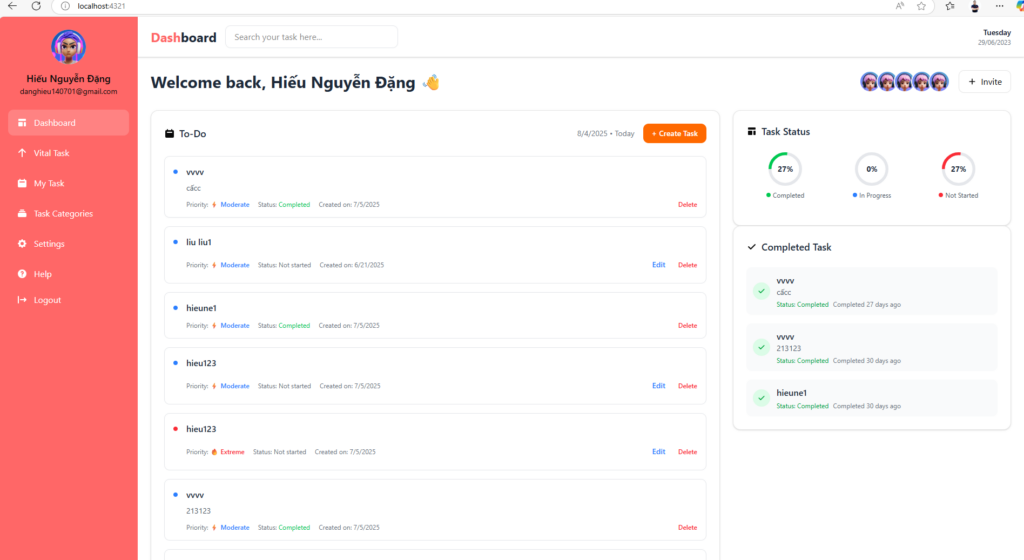
Dashboard page includes:
Navigation, List task, task status, filter task completed, create a task
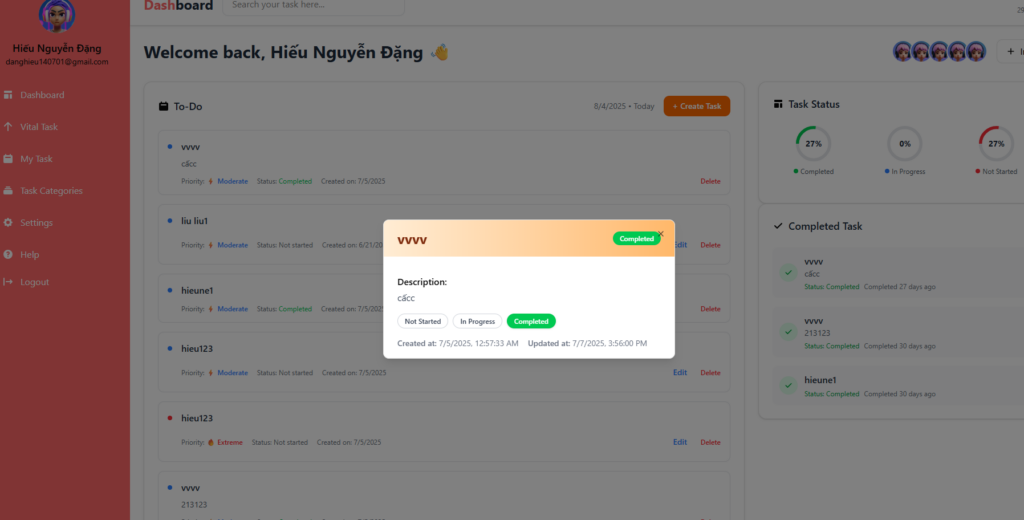
Click an item task will show the popup task, can change status of that task
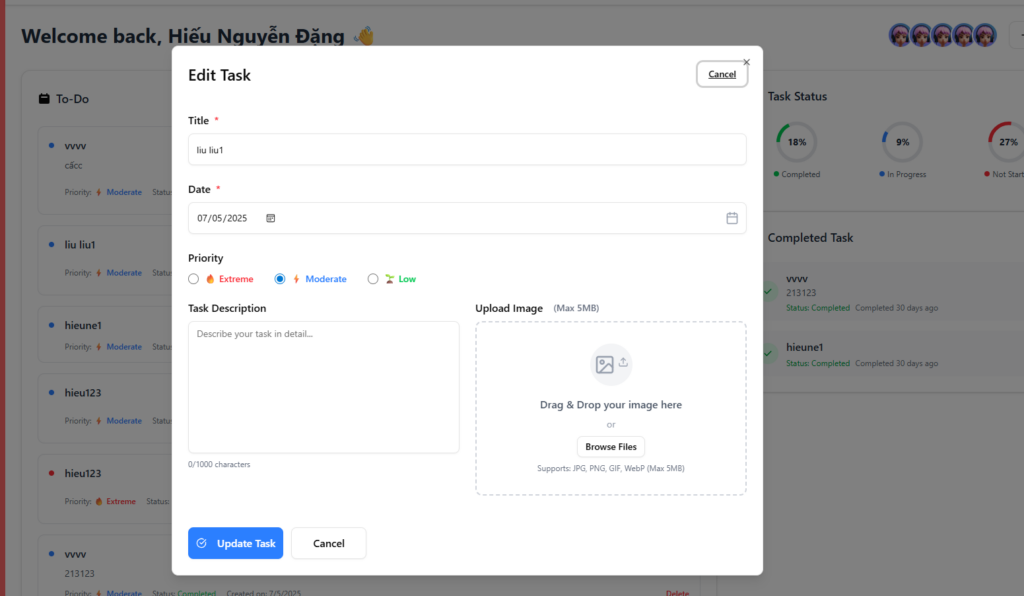
Only can edit task which not completed
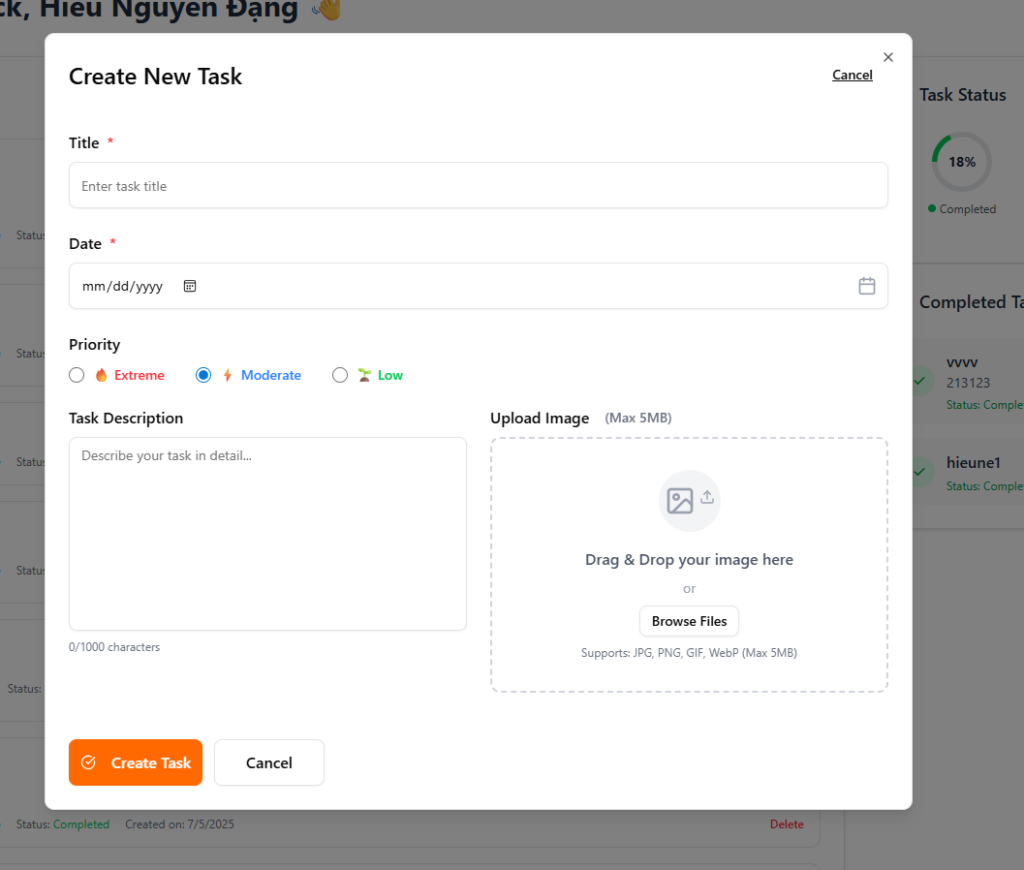
Create task UI