


Introduction to AutoGen:
AutoGen is a framework that lets you create dream teams of AI specialists. Each “agent” brings its own expertise, from the analytical power of large language models (LLMs) to the precision of software tools and even your own human genius. They converse, share information, and tackle challenges together, just like a crack team of collaborators.
The result? Powerful AI applications that can solve complex problems you never thought possible.
Imagine an AI assistant that can not only answer your questions but also brainstorm with you, consult external resources, and even write code alongside you. That’s what AutoGen helps you build.
AutoGen was officially released for .NET on April 26, 2024. This framework, initially created in March 2023, facilitates the development of applications using multiple conversational agents and is part of Microsoft’s broader initiative to enhance AI capabilities in various development environments.
The figure below shows the built-in agents in AutoGen.

Main Features
- Easy to Use: AutoGen simplifies the process of setting up and managing conversations between different agents, making advanced LLM applications accessible with minimal effort.
- Performance Optimization: It enhances the performance of LLM models and addresses their weaknesses through efficient orchestration and automation.
- Supports Various Conversation Patterns: Developers can create different types of conversations based on the number of agents and their interactions, supporting diverse workflows.
- Customizable Agents: Agents can be tailored to fit specific needs and workflows, allowing for flexibility in application development.
- Ready-to-Use Systems: AutoGen provides a variety of pre-built systems for different applications and complexities, showcasing its ability to handle diverse conversation patterns easily.
Installation of AutoGen in .NET:
To start with AutoGen in .NET, you can simply run this command on terminal:
dotnet add package AUTOGEN_PACKAGES
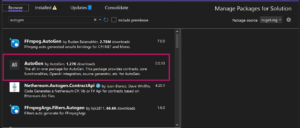
It will install the AutoGen Package in your project. Or simply you can install it from your Nuget Package Manager in Visual Studio:
Agents
In AutoGen, an agent is an entity that can communicate by sending and receiving messages with other agents. These agents can be powered by different components:
- Models: For example, a large language model like GPT-4 can act as an agent, processing and generating text.
- Code Executors: Tools like an IPython kernel can function as agents, executing code and handling computations.
- Humans: People can also be agents, interacting with other agents through the system.
- Combination of Components: An agent can also be a mix of models, code executors, humans, and other customizable and pluggable components.
This flexibility allows developers to create a wide range of applications, combining different types of agents to suit their specific needs and workflows.
Create an AutoGen Assistant Agent in .NET:
AssistantAgent is a built-in agent in AutoGen that functions as an AI assistant. It uses a large language model (LLM) to generate responses to user inputs. If the underlying LLM model supports it (like gpt-3.5-turbo-0613), AssistantAgent can also perform function calls.
Create an AssistantAgent using OpenAI model:
// get OpenAI Key and create config
var openAIKey = Environment.GetEnvironmentVariable("OPENAI_API_KEY") ?? throw new Exception("Please set OPENAI_API_KEY environment variable.");
var llmConfig = new OpenAIConfig(openAIKey, "gpt-3.5-turbo");

// create assistant agent
var assistantAgent = new AssistantAgent(
    name: "assistant",
    systemMessage: "You are an assistant that help user to do some tasks.",
    llmConfig: new ConversableAgentConfig
    {
        Temperature = 0,
        ConfigList = new[] { llmConfig },
    });

//Create a message
var message = new TextMessage(Role.User, "Tell me a joke");
IMessage reply = await assistantAgent.GenerateReplyAsync(new List<IMessage> { message });
Console.WriteLine(reply);

var message2 =await assistantAgent.SendAsync("Tell me a city name that starts with L");
reply = await assistantAgent.GenerateReplyAsync(new List<IMessage> { message2 });
Console.WriteLine(reply);
To run this code, you need to replace OpenAI_API_Key with your own OpenAI key. Follow these steps to create your OpenAI API key:
- Go to OpenAI Platform.
- Log in or sign up.
- On the left-hand side, find the option for API keys.
- Generate your API key and save it somewhere secure, as it will only be visible once.
- Go to Settings -> Billing.
- Check your credits. If you don’t have free credits, you can add a minimum of $5 in credits to your account.
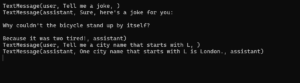
Once you replace that key, you will be able to run to the C# code and you will get the output something like this:
Now you know how to run your first code using AutoGen. You can experiment with different types of agents and even create your own workflows.
Conclusion
AutoGen is a powerful framework that simplifies the creation of AI applications by allowing multiple specialized agents to work together. By leveraging the strengths of large language models, code executors, and human input, AutoGen can tackle complex problems effectively. Its ease of use, performance optimization, and support for various conversation patterns make it a valuable tool for developers. With customizable agents and pre-built systems, AutoGen provides a flexible and robust solution for building next-gen AI applications. Start experimenting with different agents and workflows to fully harness its capabilities.