


Maintaining a clean and efficient Kubernetes cluster is crucial for optimal performance and resource management. One common task is to regularly clean up old pods that are no longer needed, especially those that have completed their execution successfully. We’ll guide you through setting up a Kubernetes CronJob that automatically deletes old pods based on their age and status, ensuring your cluster remains tidy and free of unnecessary clutter.
Overview
In this guide, we’ll set up a Kubernetes CronJob that performs the following tasks:
- Run a Cleanup Task: Schedule the cleanup task to run every minute.
- Use a ConfigMap: Store a shell script for identifying and deleting old pods.
- Utilize a ServiceAccount: Provide the CronJob with the necessary permissions to interact with the Kubernetes API.
- Define a Role: Set the permissions required for the ServiceAccount to manage pods.
Components
1. CronJob
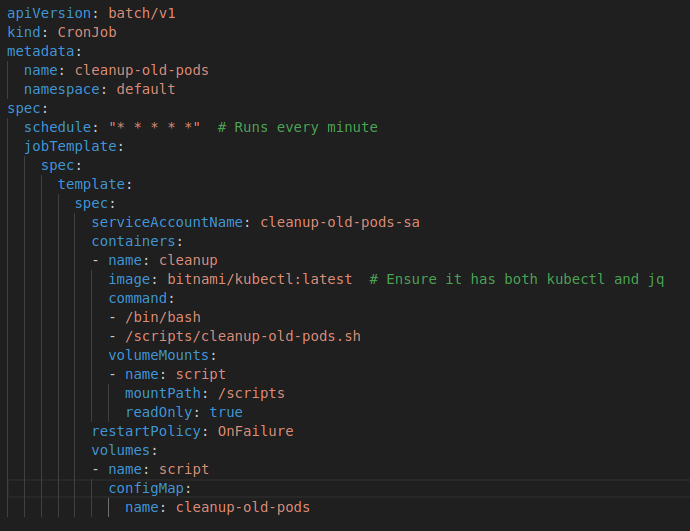
A Kubernetes CronJob allows you to run jobs on a scheduled basis, similar to a cron job in Unix-based systems. Our CronJob will execute every minute to check and clean up old pods.
2. ConfigMap
The ConfigMap contains a shell script that handles the logic for identifying and deleting old pods. This script calculates the age of each pod and deletes those that have been in the Succeeded status for more than 30 days.
3. ServiceAccount
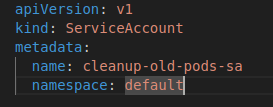
A ServiceAccount is required for the CronJob to authenticate and interact with the Kubernetes API. It ensures that the CronJob has the necessary permissions to perform operations on pods.
4. Role
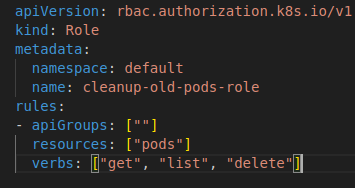
The Role defines the permissions granted to the ServiceAccount. Specifically, it allows listing, getting, and deleting pods within the namespace.
Prerequisites
Before applying the configuration, make sure you have:
- Kubernetes CLI (kubectl): Ensure
kubectlis installed and configured to access your Kubernetes cluster. - jq: The shell script uses
jqfor JSON parsing. Installjqon your system if it’s not already present.
How It Works
1. Namespace Definition
The provided script targets the default namespace. You can easily modify this by changing the NAMESPACE variable in the script to target a different namespace if needed.
2. Date Calculation
The script calculates a cutoff date to determine which pods are older than 30 days. This is done by subtracting 30 days from the current date.
3. Pod Selection
The script retrieves all pods in the specified namespace with a status of Succeeded. It then filters these pods based on their age.
4. Pod Deletion
Pods that are older than 30 days are selected for deletion. The script ensures that only those pods are removed, keeping your cluster free of outdated resources.
Configuration Files
ConfigMap: cleanup-script-configmap.yaml

ServiceAccount: cleanup-serviceaccount.yaml
Role: cleanup-role.yaml
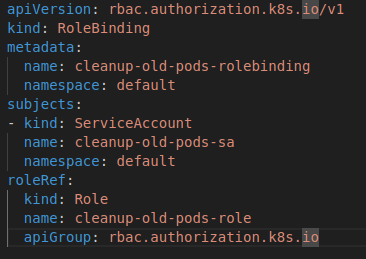
RoleBinding: cleanup-rolebinding.yaml
CronJob: cleanup-cronjob.yaml
Conclusion
With this setup, your Kubernetes cluster will automatically clean up old pods every minute, keeping your environment tidy and free of outdated resources. This approach not only simplifies maintenance but also helps prevent potential issues caused by excessive resource usage.
Feel free to adapt the configuration to better suit your needs, such as adjusting the pod age threshold or targeting different namespaces. Automated cleanup is a great way to ensure your Kubernetes environment remains efficient and manageable.