


Why Integrate Gatling with CI/CD?
Let me take you back to a few months ago. Our team was pushing code at lightning speed, and while functionality was always spot-on, performance would sometimes nosedive in staging. That’s when we realised manual load testing wasn’t cutting it anymore.
So, we decided to embed Gatling directly into our CI/CD pipelines. And honestly? It changed everything.
By automating performance tests using Gatling, we eliminated guesswork and manual test runs. Every time someone pushed a change, the system automatically checked latency, throughput, and error rates. No delays. No surprises.
The Real Advantages of Gatling in CI Pipelines
Here’s what stood out once we got rolling:
- Speed: Tests kicked off the moment code landed.
- Consistency: No room for human error (same logic every time).
- Early Detection: Found bottlenecks before they became post-deploy nightmares.
- Simulation: As demand increased, we could easily scale up the number of simulated users without reconfiguring the entire setup.
- Collaboration: Our whole team shared and reviewed standardised simulation scripts under version control.
How Gatling Works with CI/CD Workflows
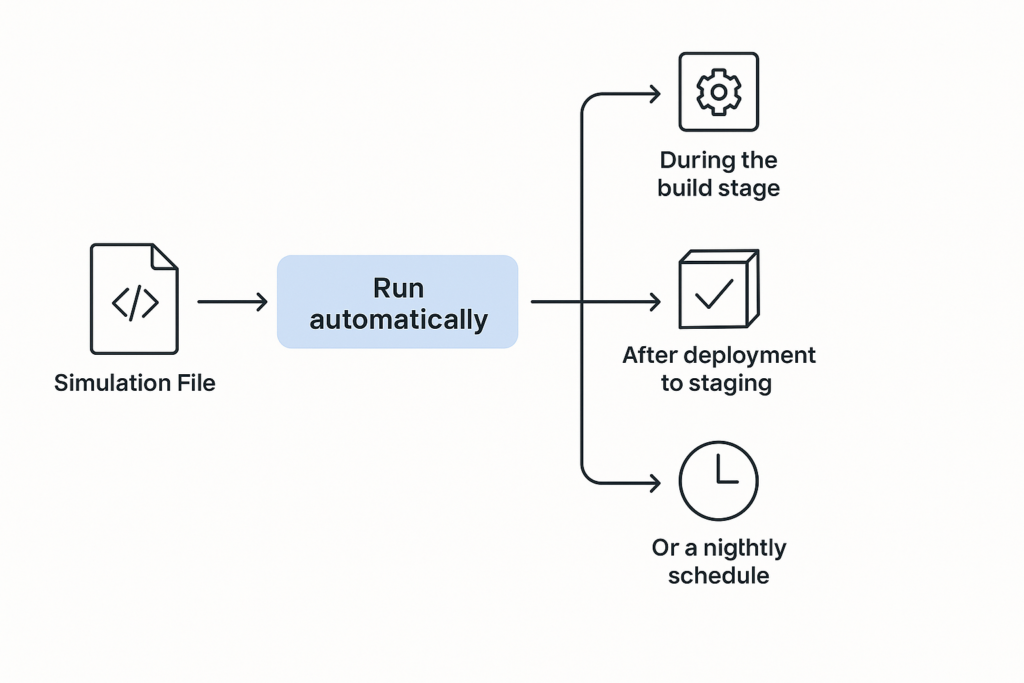
At its core, Gatling is built in Scala and runs on the Java Virtual Machine (JVM), which enables it to integrate well with almost any Continuous Integration/Continuous Deployment (CI/CD) setup. You define test scenarios in simulation files, essentially code-based test plans, and run them at specific points:
- During the build stage
- After deployment to staging
- On a nightly schedule
- Or even on-demand via webhooks
The results? You get clear HTML reports you can view in a browser, structured JSON files for further processing, or live performance data ready to be visualised in tools like Grafana.
Jenkins + Gatling: A Working Example
Here’s how we wired it up in Jenkins:
pipeline {
  agent any
  stages {
    stage('Build') {
      steps {
        sh 'mvn clean install'
      }
    }
    stage('Gatling Test') {
      steps {
        sh './gatling-charts-highcharts-bundle-3.9.5/bin/gatling.sh -s simulations.AdvancedSimulation'
      }
    }
    stage('Publish Results') {
      steps {
        publishHTML([allowMissing: false,
                     alwaysLinkToLastBuild: true,
                     keepAll: true,
                     reportDir: 'gatling/results',
                     reportFiles: 'index.html',
                     reportName: 'Gatling Performance Test Report'])
      }
    }
  }
}
This pipeline builds our project, executes Gatling tests, and automatically publishes reports that we can share with stakeholders.
GitHub Actions: Gatling Made Even Simpler
With its streamlined setup and event-driven nature, GitHub Actions provides an efficient route to trigger Gatling tests as part of your development workflow.
name: Gatling Performance Test

on: [push]

jobs:
  gatling-test:
    runs-on: ubuntu-latest
    steps:
      - uses: actions/checkout@v2
      - name: Setup Java
        uses: actions/setup-java@v3
        with:
          distribution: 'temurin'
          java-version: '11'
      - name: Run Gatling
        run: |
          ./gatling-charts-highcharts-bundle-3.9.5/bin/gatling.sh -s simulations.LoadTest
We used this to run tests with every push on critical branches, ensuring speed, effectiveness, and complete integration.
Simplifying Setup: Run Gatling with Docker
Avoid the pain of local dependencies by using Docker:
docker run --rm -v $(pwd):/opt/gatling gatlingio/gatling -s simulations.SmokeTestThis makes your setup reproducible, environment-independent, and CI-ready.
When Should You Trigger Gatling Tests?
- After deployments to staging for real-world checks.
- As nightly jobs for longer endurance tests.
- On code push to critical services or high-traffic endpoints.
This flexibility helps you balance frequency with test depth.
Exporting and Analysing Gatling Results in CI/CD Dashboards
Want live dashboards? Pipe your test metrics into InfluxDB, and display them in Grafana:
data.writers = [console, graphite]
graphite {
  host = "influxdb"
  port = 2003
  protocol = "tcp"
}
You can even configure alerts to trigger Slack messages or emails when thresholds are breached.
Best Practices
- Label tests appropriately and keep quick smoke checks separate from intensive load scenarios to avoid confusion.
- Feed fresh data via feeder files to avoid caching skew.
- Secure secrets via encrypted environment variables.
- Store simulations in Git for traceability and collaboration.
Common Pitfalls (and How to Avoid Them)
- Time drift across agents – Fix with NTP syncing.
- Leftover test data – Ensure proper clean-up using teardown steps to maintain a consistent testing environment.
- Overloading too fast – Ramp up users gradually.
Conclusion: Level Up Your Pipeline with Gatling Integration
In conclusion, integrating Gatling with Continuous Integration Pipelines for Automated Performance Testing transforms performance validation into an automated, scalable, and reliable part of your software delivery process.
Teams that embrace automated Gatling tests experience fewer surprises in production, lower latency, and higher user satisfaction.