



Introduction
Atlantis is an open-source tool designed to streamline collaboration on Terraform infrastructure as code (IaC). It enables teams to run terraform plan and terraform apply directly from pull requests (PRs), with the results automatically posted as comments on the PR. As a result, this approach enhances visibility, security, and automation in infrastructure workflows.
Why Atlantis Is Valuable for Large Teams
Managing Terraform workflows in large teams can be challenging. Fortunately, Atlantis addresses several pain points:
Improved Review Process
Without Atlantis:
- Reviewers only see code diffs, not the actual plan output, which makes it difficult to validate changes.
- Developers must run
terraform planlocally and share results manually.
With Atlantis
- Developers push code and open a PR.
- Atlantis runs
terraform planautomatically and posts the output as a comment. - Reviewers can easily assess the impact of changes directly in the PR.
Preventing Drift Between Code and Infrastructure
Manual workflows risk inconsistencies:
- Someone might merge a PR without applying the changes.
- Errors during
applymay go unnoticed, leading to drift.
To prevent this, Atlantis ensures:
- Atlantis executes
terraform applyonly after approval. - The infrastructure state remains in sync with the codebase.
Credential Security
Traditionally, developers need access to sensitive credentials to apply changes. However, with Atlantis:
- The Ops team centrally manages credentials.
- Developers trigger actions via PR comments (e.g.,
atlantis apply), without direct access to secrets.
Controlled Apply with Approval Gates
Atlantis supports approval workflows. Specifically:
- PRs must be approved before
applyis allowed. - This prevents unauthorized or premature changes to infrastructure.
Workspace Locking
To avoid conflicts, Atlantis locks the Terraform workspace during the plan phase. As a result, the system blocks other PRs targeting the same workspace until it releases the lock. Ultimately, this mechanism helps teams apply changes in a controlled and conflict-free manner.
How Atlantis Works
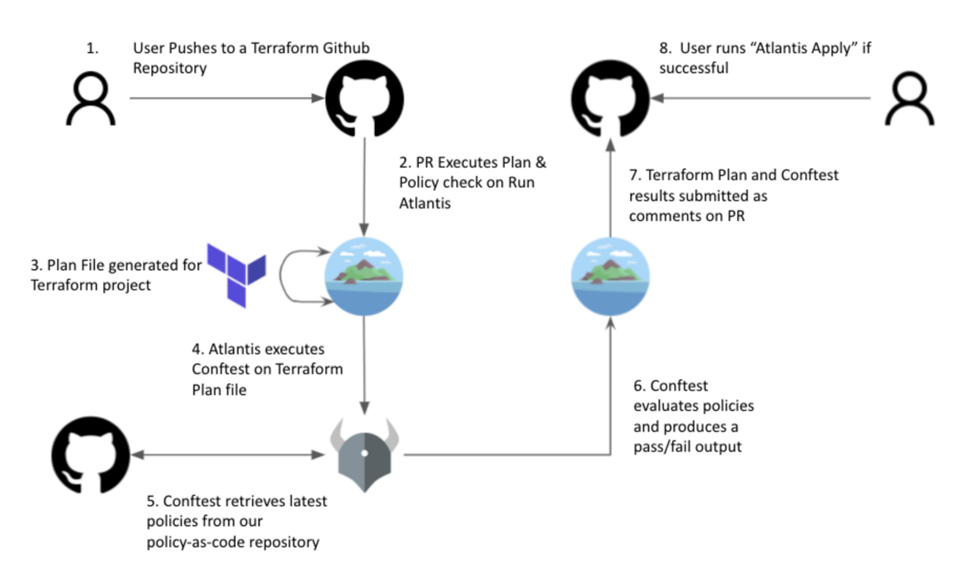
Atlantis acts like a remote Terraform operator. In practice, it performs the following actions:
- Initially, it listens for Git events (e.g., PR opened, updated).
- Next, it executes
terraform planandapplyin response to PR comments. - After that, it posts the output back to the PR for visibility.
- Finally, it manages workspace locking and enforces approval rules to ensure consistency.
Example: Environment-Specific Variable Files
Atlantis automatically includes workspace-specific variable files to reduce duplication.
Directory structure:
my-terraform-project/
├── main.tf
├── variables.tf
└── env/
    ├── default.tfvars
    ├── staging.tfvars
    └── production.tfvars
Behavior:
atlantis plan→ includesenv/default.tfvarsatlantis plan -w staging→ includesenv/staging.tfvarsatlantis plan -w production→ includesenv/production.tfvars
Step-by-step to apply the Terrafom code
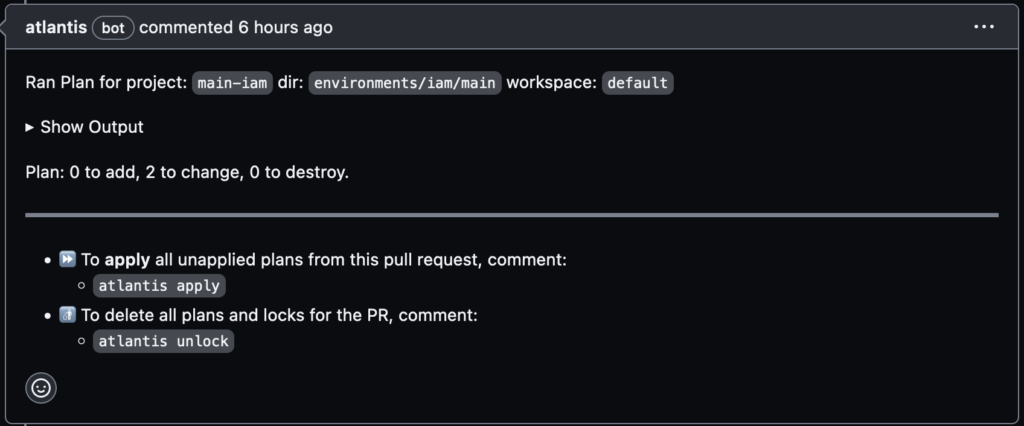
- Edit
env/staging.tfvarsor any relevant.tffile, then push your changes to a branch and open a Pull Request. - If autoplan is enabled, Atlantis will automatically run
terraform plan. - Once reviewed and approved, trigger apply by commenting: atlantis plan/atlantis apply
Setting Up Atlantis Server
You can deploy Atlantis in various environments, including:
Kubernetes (Helm, manifests, Kustomize)
- OpenShift
- AWS Fargate
- GKE
- Docker
- Custom installations using the Atlantis binary or Docker image
Configuration Options
Atlantis requires Git webhook integration to respond to PR events. You can configure it using:
Command-line flags when starting the server — for example, setting Git credentials or SSL certs.
- Server-side repo config file via
--repo-config— controls per-repo behavior. - Repo-level
atlantis.yamlfiles — customize workflows and structure per repo.
Example Using All Keys
version: 3 # Available since v0.1.0
automerge: true # Available since v0.15.0
autodiscover: # Available since v0.18.0
  mode: auto
  ignore_paths:
  - some/path
delete_source_branch_on_merge: true # Available since v0.15.0
parallel_plan: true # Available since v0.17.0
parallel_apply: true # Available since v0.17.0
abort_on_execution_order_fail: true # Available since v0.17.0
projects:
- name: my-project-name # Available since v0.1.0
  branch: /main/ # Available since v0.21.0
  dir: . # Available since v0.1.0
  workspace: default # Available since v0.1.0
  terraform_distribution: terraform # Available since v0.25.0
  terraform_version: v0.11.0 # Available since v0.1.0
  delete_source_branch_on_merge: true # Available since v0.17.0
  repo_locking: true # deprecated: use repo_locks instead, Available since v0.17.0
  repo_locks: # Available since v0.17.0
    mode: on_plan
  custom_policy_check: false # Available since v0.17.0
  autoplan: # Available since v0.1.0
    when_modified: ["*.tf", "../modules/**/*.tf", ".terraform.lock.hcl"]
    enabled: true
  plan_requirements: [mergeable, approved, undiverged] # Available since v0.17.0
  apply_requirements: [mergeable, approved, undiverged] # Available since v0.17.0
  import_requirements: [mergeable, approved, undiverged] # Available since v0.17.0
  silence_pr_comments: ["apply"] # Available since v0.17.0
  execution_order_group: 1 # Available since v0.17.0
  depends_on: # Available since v0.20.0
    - project-1
  workflow: myworkflow # Available since v0.17.0
workflows: # Available since v0.1.0
  myworkflow:
    plan:
      steps:
      - run: my-custom-command arg1 arg2
      - run:
          command: my-custom-command arg1 arg2
          output: hide
      - init
      - plan:
          extra_args: ["-lock", "false"]
      - run: my-custom-command arg1 arg2
    apply:
      steps:
      - run: echo hi
      - apply
allowed_regexp_prefixes: # Available since v0.19.0
- dev/
- staging/
Conclusion
Atlantis transforms the way teams manage Terraform workflows by bringing automation, transparency, and control directly into the pull request process. By enabling terraform plan and apply through PR comments, it eliminates manual steps, reduces the risk of drift, and enhances collaboration across development and operations teams. For organizations scaling their infrastructure, Atlantis is not just a convenience — it’s a critical tool for maintaining secure, auditable, and efficient IaC practices.