Overview
In .NET, a test framework and a test platform are different components that work together to discover and run tests.
- The test framework defines the test model you write against, such as MSTest, NUnit, xUnit.net, or TUnit.
- The test platform runs tests, integrates with IDEs and CLI, and provides shared extension points, such as VSTest, Microsoft.Testing.Platform (MTP)
Microsoft.Testing.Platform (MTP) is the new platform for testing from Microsoft. MTP is a lightweight and portable alternative to VSTest for running tests in all contexts, including continuous integration (CI) pipelines, CLI, Visual Studio Test Explorer, and VS Code Text Explorer. The new approach simplifies test execution while providing better performance and diagnostics compared to the VSTest integration method.
Advantages of MTP
1. Faster test execution
One of the biggest improvements is performance as MTP has:
- faster startup time
- reduced process overhead
- less memory usage
- optimized test discovery
This is especially noticeable for:
- large solutions
- CI/CD pipelines
- repositories with thousands of tests
2. Better extensibility
Instead of one large test platform, MTP allows functionality to be added through extensions, for examples:
- code coverage
- test filtering
- retry logic
- reporting
- logging
- custom diagnostics
This makes it easier for Microsoft and third parties to add features without changing the core platform.
3. Smaller footprint
MTP only loads the components that are actually needed.
- lower memory usage
- faster startup
- simpler dependency graph
4. Better CI/CD experience
Since startup is faster, build pipelines spend less time preparing the test environment. This is particularly beneficial when:
- many small test projects exist
- tests are split across multiple jobs
- cloud runners start from scratch every build
5. Future-focused architecture
Microsoft has indicated that future investments in .NET testing will be centered around MTP rather than VSTest. New testing features are expected to arrive here first.
6. Independent feature delivery
With MTP, features are delivered as NuGet packages rather than being tied to Visual Studio releases can be updated independently, for example:
- new reporters
- diagnostics
- retry support
- crash dump collection
Update Project .NET 10 SDK to Use MTP
To change a current test project to use MTP, you need to update .csproj file to use NUnit3TestAdapter version 5.0 or greater.
And In a property group (use the top-level one), add the following two properties:
 <PropertyGroup>
   <EnableNUnitRunner>true</EnableNUnitRunner> <!-- which enables MTP -->
   <OutputType>Exe</OutputType>  <!-- which run as an executable -->
</PropertyGroup>
Starting with .NET 10 SDK, there is native support for MTP. To use it, you must specify the test runner as Microsoft.Testing.Platform in global.json:
{
  "test": {
    "runner": "Microsoft.Testing.Platform"
  }
}
Running Tests in Azure DevOps
Option 1: Use the DotNetCoreCLI task
The DotNetCoreCLI Azure DevOps task now supports Microsoft.Testing.Platform
- task: DotNetCoreCLI@2
  displayName: 'Run tests'
  inputs:
    command: 'test'
    projects: '**/*Tests.csproj'
    arguments: '--no-build --report-trx'
Option 2: Run ‘dotnet test’ directly
You can run the dotnet test command directly using a script or command-line task. This gives you maximum flexibility and doesn’t require specific Azure DevOps task updates.
- task: CmdLine@2
  displayName: 'Run tests'
  inputs:
    script: 'dotnet test --no-build --report-trx'
New options in dotnet test with MTP against VSTest
Refer dotnet test command with Microsoft.Testing.Platform (MTP) – .NET CLI | Microsoft Learn
Retry Tests in Azure DevOps
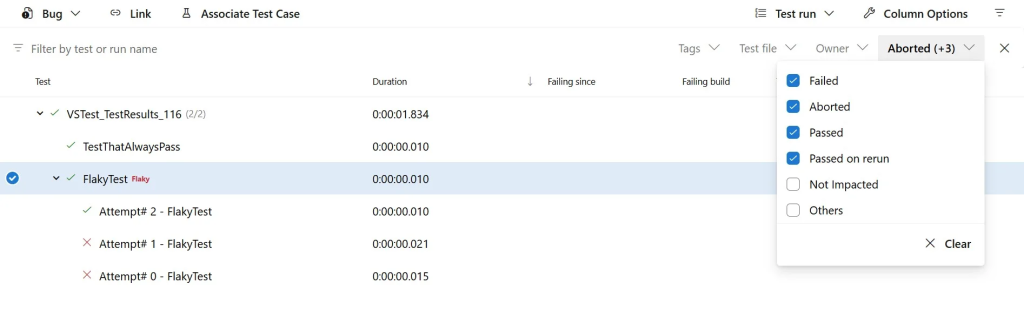
With Microsoft.Testing.Extensions.Retry extension, you get automatic retry handling with proper Azure DevOps integration; no custom scripting required. However, MTP generates a separate TRX file for each attempt. Previously, the PublishTestResults task treated these as independent test runs, leading to two problems:
- Incorrect exit codes: The task would fail even when tests eventually passed after retry
- Confusing UI: Test results appeared as separate runs instead of grouped retry attempts
These issues are solved! The PublishTestResults task now intelligently handles multiple TRX files from retry attempts, correctly grouping them and setting appropriate exit codes.
MTP uses the standard TRX format (also known as VSTest test results format) through the Microsoft.Testing.Extensions.Retry package. The PublishTestResults task has always supported TRX files. What’s new is the intelligent handling of retry scenarios.
Add Retry Nuget packages to your test project
<ItemGroup>
  <PackageReference Include="Microsoft.Testing.Extensions.Retry" Version="2.2.3" />
  <PackageReference Include="Microsoft.Testing.Extensions.TrxReport" Version="2.2.3" />
</ItemGroup>
Required ConfigurationTo enable retry-aware test result publishing, set the AllowPtrToDetectTestRunRetryFiles variable to true in your pipeline. This opt-in flag activates the new behavior that correctly interprets multiple TRX files as retry attempts rather than separate test runs.
Complete pipeline example
Here’s a full pipeline demonstrating test execution with retries and proper result publishing:
trigger:
- main

jobs:
- job: MyJob
  variables:
    AllowPtrToDetectTestRunRetryFiles: true

  steps:

  # Your usual steps to install .NET SDK, restore, and build.

  - task: CmdLine@2
    displayName: 'Run tests'
    inputs:
      script: 'dotnet test --no-build --report-trx --retry-failed-tests 3 --results-directory TestResults'

  - task: PublishTestResults@2
    displayName: 'Publish test results'
    inputs:
      testResultsFormat: 'VSTest'
      testResultsFiles: '**/*.trx'
      mergeTestResults: true
      failTaskOnFailedTests: true
    condition: succeededOrFailed()