


In today’s digital landscape, safeguarding cloud resources is paramount. With the proliferation of cyber threats, ensuring the security of your Azure infrastructure is not just an option but a necessity. It offers a robust suite of tools to automate security scanning, identify vulnerabilities, and facilitate timely remediation. In this guide, we’ll walk you through leveraging it for automated security scanning of Azure resources, accompanied by practical examples of vulnerability identification and remediation.
Understanding Azure Security Center
Azure Security Center serves as a centralized hub for monitoring and improving the security posture of resources. It provides continuous security assessment, threat detection, and actionable insights to help you protect your cloud environment.
Automated Security Scanning
- Continuous Monitoring: Security Center continuously monitors your Azure resources, analyzing their security state against industry standards and best practices.
- Recommendations: Access security recommendations tailored to your Azure environment. These recommendations cover areas such as network security, identity and access management, data protection, and more.
Identifying Vulnerabilities
- Vulnerability Assessment: Security Center performs automated vulnerability assessments on your VMs, containers, and other resources.
- Threat Detection: Receive alerts for suspicious activities and potential threats detected within your Azure environment.
- Integrated Solutions: Utilize integrated security solutions within Security Center for deeper insights, such as Azure Defender for advanced threat protection.
Remediation Strategies
- Prioritize Vulnerabilities: Assess the severity of identified vulnerabilities and prioritize remediation efforts based on risk levels.
- Automated Remediation: Leverage Security Center’s automated remediation capabilities to address common security issues swiftly.
- Manual Remediation: For more complex issues, follow detailed remediation guidance provided by Security Center.
Azure Security Center Automated Security Scanning
Step 1: Enable Azure Security Center
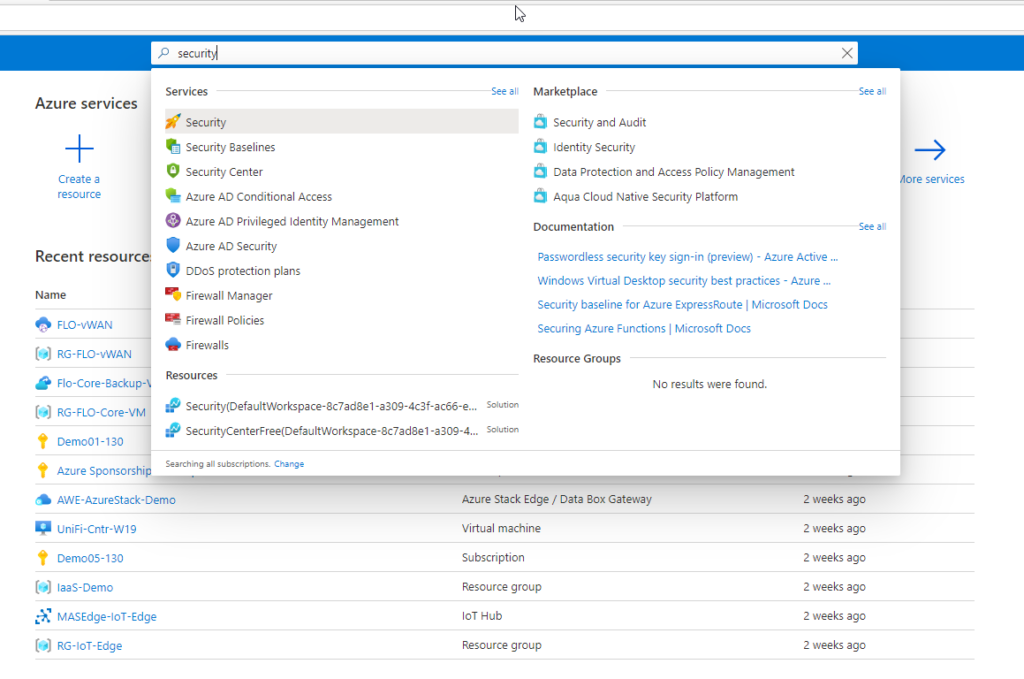
Login to Azure portal (https://portal.azure.com/) and search for ‘Security Center’ in the search bar on top.
As you can see in Pricing & Settings, the free tier is enabled by default.
You choose a subscription and move to Standard to alter the pricing tier. After that, you may select the service to use the Standard Plan on. You’ve successfully altered the Pricing Tier for that service when you click “Save”.

Step 2: Check the Security Vulnerability
For your workloads running in Azure, on-premises, and other clouds, Azure Security Centre offers unified infrastructure security management that fortifies security posture and offers sophisticated threat prevention.
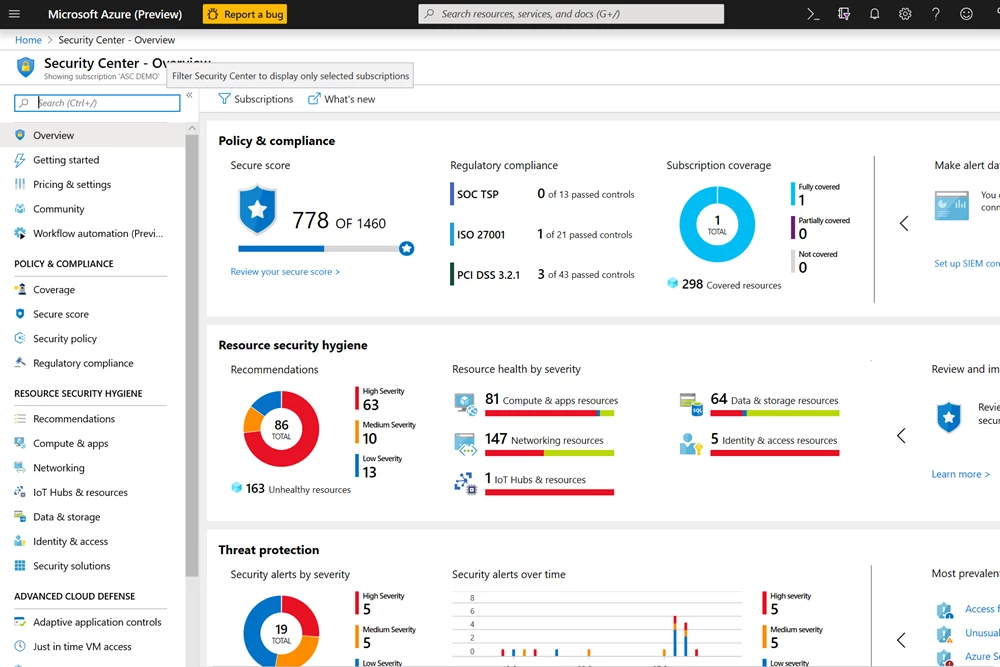
With Security Centre, you can use hundreds of pre-made security evaluations or build your own in a central dashboard to keep an eye on the security of computers, networks, and Azure services.
Step 3: Azure Secure Score
Azure Security Center has two primary goals:
- to assist clients with their existing security circumstances.
- to help customers efficiently and proactively improve their overall security.
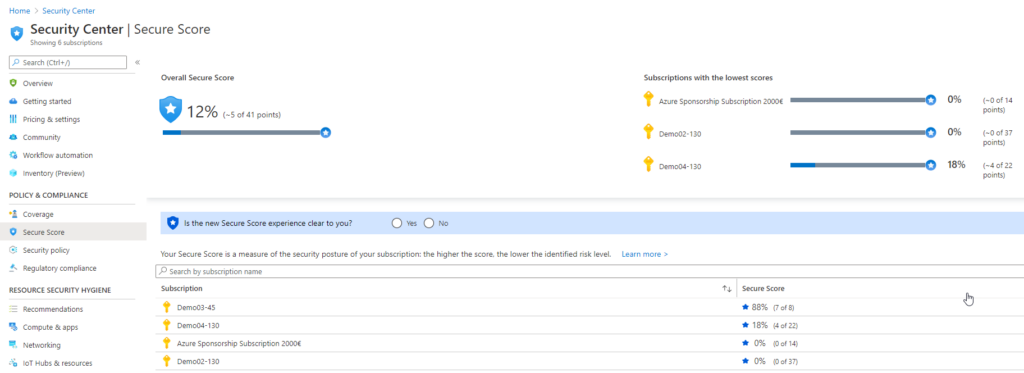
The Azure Secure Score is the key to achieving these objectives. Per subscription as well as for all of your subscriptions together, the Score is displayed as a percentage.
Step 4: Operations
Get – Achieve a secure score for a particular Security Center initiative within your current scope. Use ‘ascScore’ for the ASC Default initiative.
List – Display secure scores for all Security Center initiatives within your current scope.
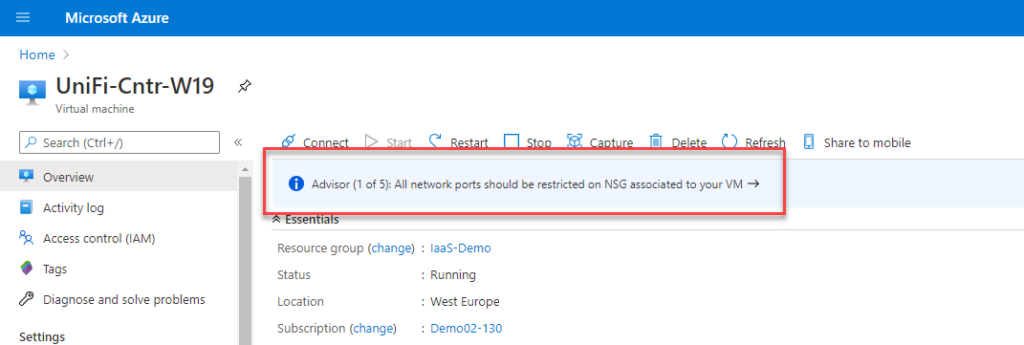
Step 5: Azure Advisor Recommendations
Also, each resource has a similar view as demonstrated with the sample virtual machine below. Azure Advisor and Security Center work together to enhance Security and usability by providing their recommendations.

Step 6: Improve Azure Secure Score
First, let’s access the recommendations by clicking on the subscription we want to improve. Select the most recently created option.

Select a security risk for removal. Different resolutions will give you different percentages of improvement. You should always hunt for the ones with the highest priority, those are also the ones most likely to be used by bad actors to attack your workload.
In my situation, I’ll do a straightforward upgrade by encrypting the disc of one of my older virtual machines (VMs), which wasn’t previously supported for disc encryption.

We only need to click on the recommendation, select the resource you want to update, and activate the logic app.
Conclusion
Azure Security Center empowers organizations to fortify their Azure environment against evolving cyber threats. By automating scanning, identifying vulnerabilities, and offering remediation guidance, Security Center streamlines the process of securing Azure resources. Embrace Security Center as your ally in the ongoing battle for cloud security, ensuring the resilience and integrity of your Azure infrastructure.