NashTech Blog

reactjs-web-security-img

Introduction

React is a JavaScript library for building user interfaces. While React itself doesn’t inherently create security vulnerabilities, when developers enable certain options during implementation, it can leave the application open to attacks. It’s important for developers to be mindful of potential vulnerabilities and take steps to address them.

Following are some of the best practices we should follow to secure our React applications:

1. Use default React XSS protection with data binding

In React, data binding using curly braces {} automatically escapes values for textContent but not HTML attributes.

Use JSX data binding syntax ({}) to place data in your elements.

Do:
				
					<div>{data}</div>


Avoid dynamic attribute values without custom validation.

Avoid:
				
					<form action="{data}">...</form>


2. Sanitize and render HTML

It is possible to insert HTML directly into rendered DOM nodes using dangerouslySetInnerHTML. Any content inserted this way must be sanitized beforehand. Use a sanitization library like dompurify on any values before placing them into the dangerouslySetInnerHTML prop. Use dompurify when inserting HTML into the DOM.
Do:
Avoid:

3. Avoid JSON injection attacks

It is common to send JSON data along with server-side rendered React pages. Always try to replace < character with a gentle value (Unicode value) to prevent injection attacks.

Always try to replace HTML specific codes from JSON with its equivalent characters.

Do:

4. Secure React server-side rendering

Data binding will provide automatic content escaping when using server-side rendering functions like ReactDOMServer.renderToString() and ReactDOMServer.renderToStaticMarkup(). Avoid concatenating strings onto the output of renderToStaticMarkup() before sending the strings to the client for hydration. To avoid XSS, don’t concatenate unsanitized data with the output of renderToStaticMarkup().

Do:

5. Never serialize sensitive data

There is a good chance that your React app uses JSON to set the initial state of your application.

This can be potentially dangerous because JSON.stringify() is a function that converts any data into a string without detecting malicious values. An attacker can manipulate data like username and password by injecting a JS object that can modify valid data.

6. Check for known vulnerabilities in dependencies

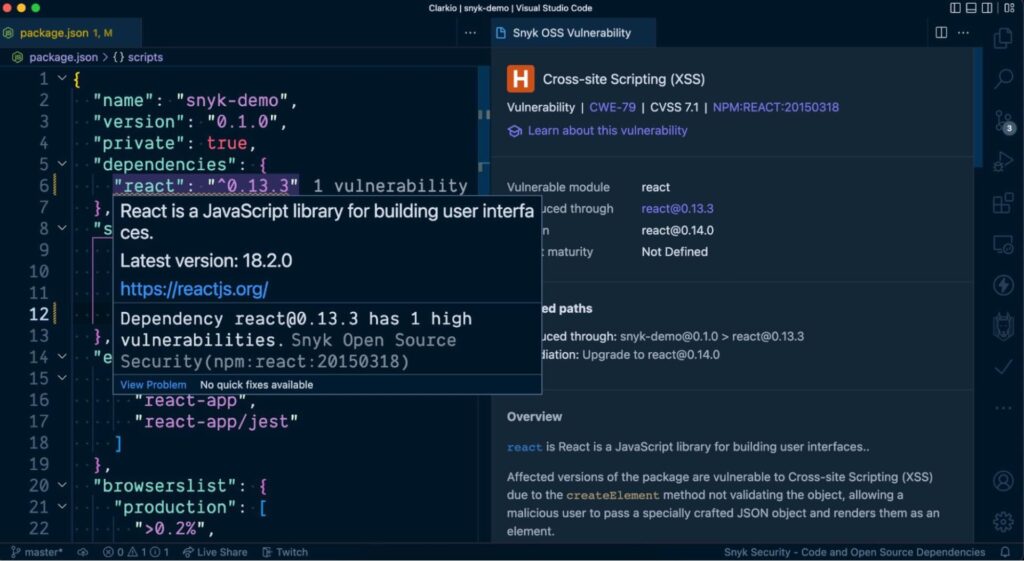
Snyk VS Code extension

While developing a React application in VS Code you can use the Snyk extension to alert you of any known vulnerabilities in your project. You’ll find visibility to these alerts via squiggly line warnings directly in your package.json file, the Snyk extensions panel and the VS Code problems panel. This is helpful so that you don’t have to switch context out of your development environment to learn of these vulnerabilities — it’s all within your scope.

Conclusion

React security is intangible at first glance. However, all the unique features, attractive UIs, and seamless performance won’t matter unless your app is secure. With new threats coming up every day and attackers exploiting more and more loopholes, making your React app secure is the top priority during the development.

References:

  • https://snyk.io/blog/10-react-security-best-practices/
  • https://medium.com/whatfix-techblog/reactjs-security-best-practices-6542b71a5577
  • https://www.freecodecamp.org/news/best-practices-for-security-of-your-react-js-application/
Scroll to Top