


I. Introduction
AI in QA workflow is becoming one of the hottest topics in software testing. Yet, when people talk about AI, the conversation almost always starts with one question:
“Can AI generate test cases?”
While that’s true, it misses where QA engineers actually spend most of their time.
Writing test cases is only one part of the job. Much of our work involves understanding requirements, clarifying ambiguities, assessing risks, preparing test data, collaborating with stakeholders, and maintaining test automation.
Over the past few months, our team has been exploring how AI fits into this entire workflow. We use Rovo inside Jira to better understand requirements and design tests, and Microsoft 365 Copilot to streamline repetitive documentation tasks in Excel, such as maintaining test cases and test reports.
Rather than replacing testers, AI has become an engineering assistant – helping us work faster while leaving the critical thinking and decision-making to the QA team.
II. The QA Workflow
A typical sprint follows a workflow that looks something like this:
Sprint Planning
↓
Read Jira Stories
↓
Understand Business Logic
↓
Clarify Requirements
↓
Write Test Cases
↓
Prepare Test Data
↓
Manual Testing
↓
Automation Testing
↓
Bug Reporting
↓
Regression Testing
↓
Sprint Summary
Notice that “writing test cases” is only one activity among many.
Every stage involves analysis, communication, and decision-making. The earlier we discover unclear requirements or hidden risks, the less time we spend fixing misunderstandings later.
That realization changed how we use AI.
Instead of treating AI as a “test case generator,” we began treating it as a thinking partner throughout the sprint.
III. Understand before testing
One of the biggest mindset shifts was surprisingly simple:
Don’t ask AI to generate test cases first. Ask it to understand the requirement first.
Consider this Jira story:
As a user, I want to reset my password.
Acceptance Criteria
- User can reset password.
Many AI demonstrations would immediately prompt:
“Generate test cases.”
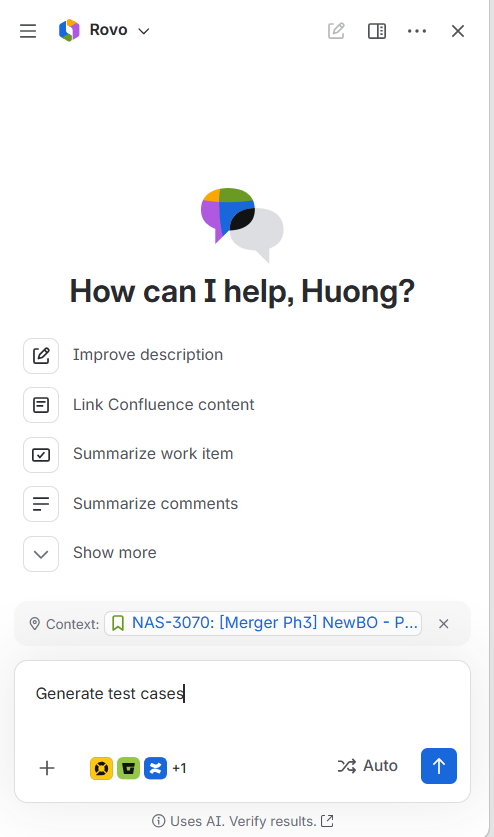
While the output might look impressive, it’s built on incomplete information.
Instead, we ask Rovo questions such as:
- What information is missing from this story?
- What assumptions are being made?
- Which acceptance criteria are ambiguous?
- What questions should QA ask the Business Analyst?
- What edge cases are implied but never mentioned?
The conversation quickly becomes far more valuable.
Rovo might point out questions like:
- Can users request multiple reset emails?
- Does the reset link expire?
- What happens if the email address is unregistered?
- Can the old password still be used after reset?
- Is there any rate limiting to prevent abuse?
- What are the password complexity requirements?
- How should the system behave if the token has already been used?
None of these are test cases.
They’re requirement questions.
And requirement questions often uncover more defects than any number of generated test cases.
Good testing begins with good understanding.
IV. AI-Assisted Workflow
As our team gained confidence using Rovo, we gradually integrated it into each stage of our test design process.
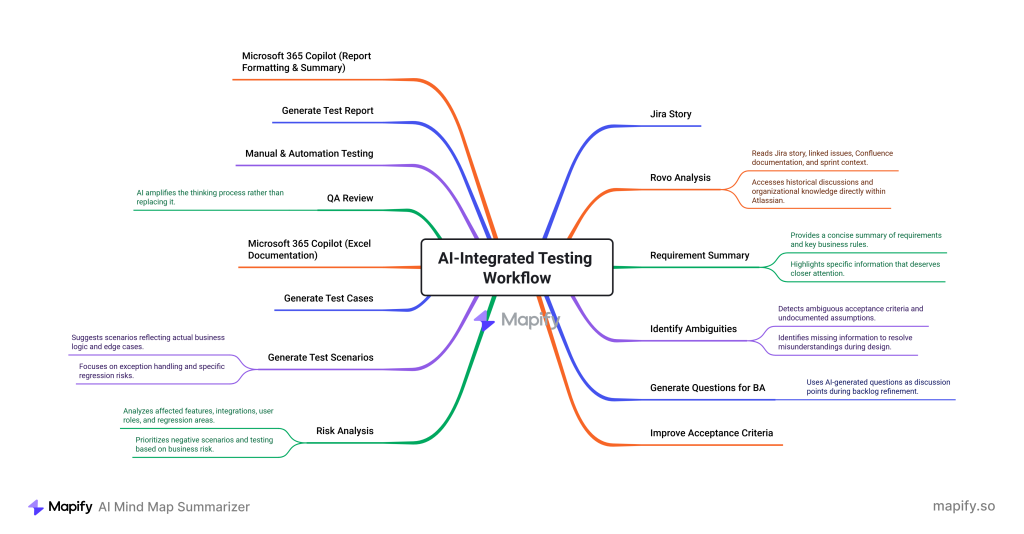
Although AI appears multiple times throughout the workflow, its role changes depending on the stage.
1. Understanding requirements
Instead of reading every Jira story manually, we use Rovo to quickly understand the requirement.
Rovo can analyze:
- Jira stories and linked issues
- Confluence documentation
- Sprint context
- Historical discussions
- Organizational knowledge
=> Faster requirement understanding with less context switching.
2. Clarifying requirements
Before generating test cases, we ask Rovo to identify gaps in the story.
Typical questions include:
- What’s missing?
- Which acceptance criteria are ambiguous?
- What assumptions are undocumented?
- What should QA clarify with the BA?
=> Better requirements before development starts.
3. Risk analysis
Once the requirements are clear, we assess the impact.
Rovo helps identify:
- Affected user flows
- Integration risks
- Regression scope
- Negative scenarios
- Automation opportunities
=> Prioritized testing based on business risk.
4. Test design
Only then do we generate test scenarios.
Instead of generic test cases, AI suggests:
- Happy paths
- Edge cases
- Negative scenarios
- Business rule validation
- Regression scenarios
=> More meaningful test design with less manual effort.
V. Why Rovo fits
Most AI tools rely on the context you provide.
Rovo starts with the context it already knows.
By working directly inside Jira, it understands your stories, documentation, and project history, making its suggestions more relevant with less manual effort.
| General AI | Rovo |
|---|---|
| General knowledge | Organization knowledge |
| No Jira context | Reads Jira issues |
| No sprint history | Understands project context |
| Manual copy & paste | Works directly inside Jira |
| Limited documentation | Connects to Confluence |
This integration fundamentally changes the workflow.
Instead of switching between applications, QA engineers remain inside Jira – the same place where planning, refinement, development, and testing already happen.
AI becomes another teammate participating in the engineering process rather than an isolated chatbot.
VI. From Jira to Excel
Although requirements are managed in Jira, our team still maintains test cases and test reports in Excel.
After Rovo generates the test scenarios, Microsoft 365 Copilot takes over the documentation work by:
- Inserting test cases into the template
- Filling in test steps and expected results
- Preserving formatting, numbering, and structure
Instead of formatting spreadsheets, QA engineers simply review and refine the generated content.
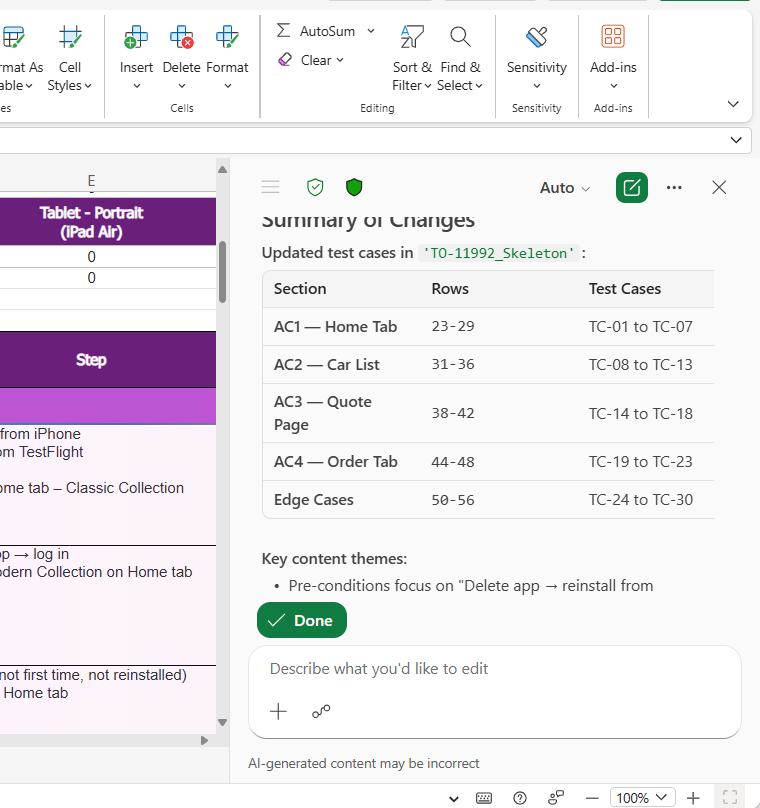
AI handles the documentation.
QA engineers handle the decisions.
VII. AI beyond test cases
The same principle applies after testing is completed.
Preparing test execution reports often involves repetitive formatting, statistics, and documentation.
Using Microsoft 365 Copilot, we can quickly:
- summarize execution results,
- organize failed test cases,
- calculate execution statistics,
- format Excel reports,
- prepare stakeholder-ready summaries.
Again, AI isn’t making release decisions.
It’s simply removing administrative work.
This allows testers to spend more time analyzing defects, investigating failures, and improving product quality.
VIII. Lessons learned
After integrating AI into our workflow, several lessons stood out.
1. Don’t ask AI to generate test cases first.
- Ask it to understand the requirement first.
- Better understanding naturally leads to better testing.
2. AI output depends heavily on requirement quality.
- Poor Jira stories produce poor AI suggestions.
- Clear acceptance criteria produce remarkably useful outputs.
- AI amplifies the quality of your inputs.
3. AI accelerates thinking.
- It doesn’t replace critical thinking.
- AI can organize information, identify patterns, and suggest ideas.
- Only experienced engineers can decide what truly matters.
4. The best prompts aren’t about testing.
The most valuable prompts ask:
- What’s missing?
- What assumptions exist?
- What risks should we consider?
- What should we clarify before implementation?
Those questions improve software long before testing begins.
5. Automation engineers benefit even more.
- Because AI assists with both testing and development tasks, automation engineers gain productivity throughout the entire software lifecycle – not just during test execution.
IX. Looking ahead
Today, AI helps us understand requirements, design better tests, and automate repetitive tasks.
Tomorrow, AI agents may proactively review Jira stories, identify testing risks, recommend regression scope, and even generate automation pull requests.
As these capabilities evolve, QA engineers will spend less time executing repetitive work and more time doing what humans do best: understanding the product, evaluating risks, and making sound engineering decisions.
X. Final thoughts
The real impact of AI isn’t generating more test cases.
It’s helping QA engineers understand better, ask better questions, and make better decisions throughout the software development lifecycle.
AI handles the repetitive work.
QA engineers provide the judgment.
AI accelerated our workflow. It never replaced our engineering judgment.