


Introduction: Why “Everything Works” Is Not Enough
Most applications look perfect when everything goes right.
- The network is stable
- APIs return 200 OK
- Images load correctly
- JavaScript files never fail
But production environments are never perfect.
Servers go down.
Third-party APIs fail.
Images disappear.
CDNs time out.
If your app collapses when one request fails, users lose trust instantly.
That’s why resilience testing matters — and today, you’ll learn a simple but powerful technique to do it: Blocking API requests on purpose.
What Does “Blocking an API” Mean?
Blocking an API means intentionally preventing a specific request from loading, so you can observe how your application reacts when a resource is unavailable.
This allows you to simulate real-world disasters such as:
- An API returning 500 Internal Server Error
- A missing image file
- A JavaScript file failing to load
- A third-party service going offline
All without touching backend code.
A Real-World Story: One Failed API, One Broken Page
I once tested a product page that worked flawlessly.
The page depended on:
- Core product data (internal API)
- A “Special Promotion” API from a third-party server
One day, that promotion API returned a 500 error.
What happened?
Instead of showing a simple message like:
“Promotions are temporarily unavailable.”
The entire page:
- Turned white
- Crashed completely
- Became unusable
One failed request destroyed the whole experience.
That’s when I realized:
The application was functional, but not resilient.
The Solution: Block Request URL in Chrome DevTools
Chrome DevTools provides a hidden gem called “Block Request URL”.
It lets you simulate failures in a controlled way.
No backend access.
No special tools.
Just your browser.
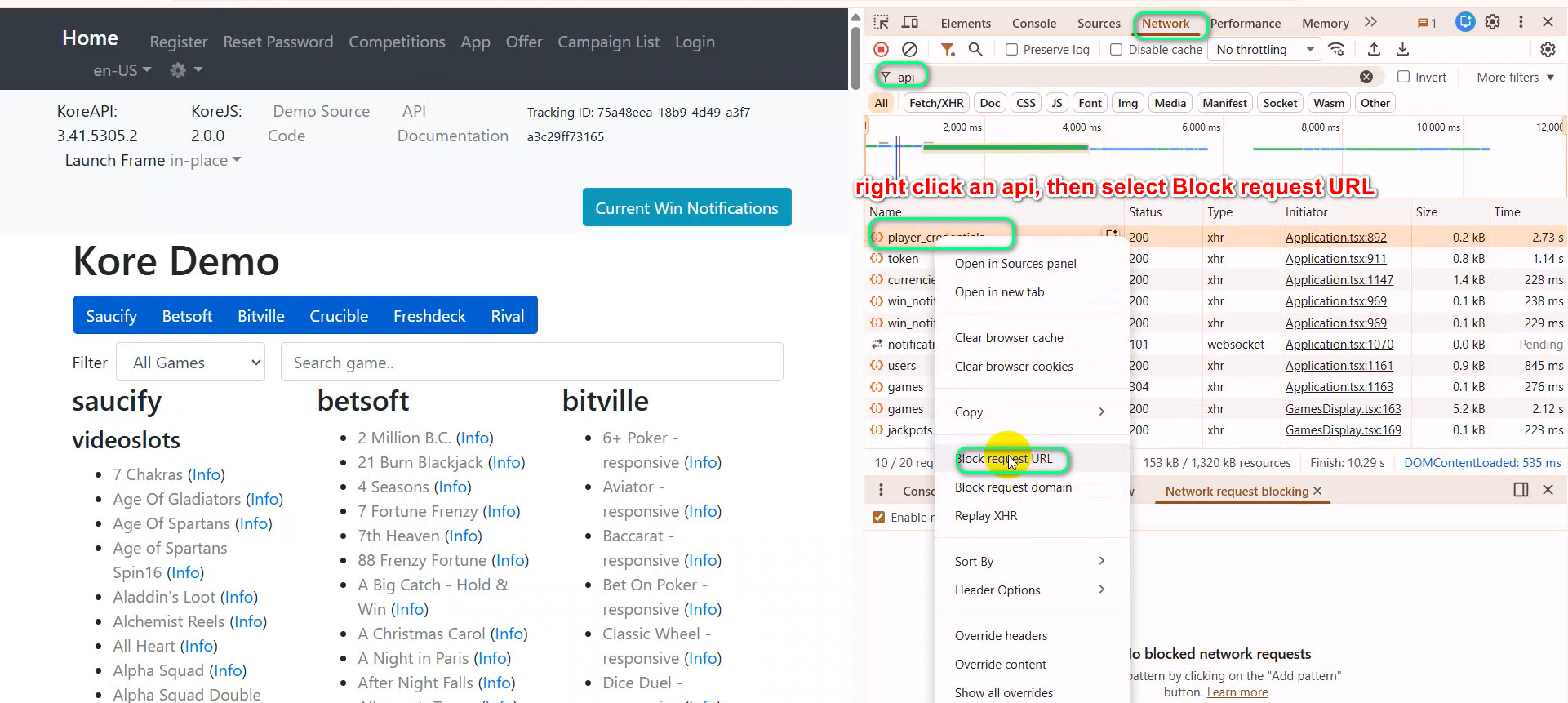
Step-by-Step: How to Block an API Request
Step 1: Open Chrome DevTools
- Right-click on the page → Inspect
- Or press F12
- Go to the Network tab
Step 2: Identify the Target Request
Look for the request you want to block, such as:
- An API call (e.g. /api/promotions)
- An image file (logo.png)
- A JS or CSS file
Step 3: Block the Request
- Right-click the request
- Choose:
- “Block request URL” (for one request)
- or “Block request domain” (to block the entire domain)
Step 4: Reload and Observe
Refresh the page and carefully watch:
- Does the page still render?
- Is there an error message?
- Do other features continue working?
What Should You Test For?
1. The App Must Not Crash
- No white screen
- No broken layout
- No frozen UI
A failed request should not kill the app.
2. Clear and Friendly Error Messages
Users should see messages like:
- “Unable to load promotions. Please try again later.”
- “Some content is temporarily unavailable.”
Avoid:
- Technical error codes
- Empty screens
- Silent failures
3. Core Features Must Keep Working
Even if one request fails:
- Login should work
- Navigation should work
- Cart and checkout should work
This proves your app handles errors independently, not globally.
Advanced Resilience Checklist
Application Behavior
- Graceful degradation:
When one API fails, others continue working - Smart fallback:
- Placeholder images
- Cached data
- Retry after delay
- Intelligent client:
- Skips failed modules
- Renders the rest of the page
Testing & Observation
- Block different resource types:
- APIs
- Images
- JS
- CSS
- Watch loading states:
- No infinite spinners
- Reasonable timeouts
- Check logging:
- Console errors
- Sentry / Crashlytics events
- Unblock and reload:
- App should recover normally
- No broken cache or state
Why This Technique Changes Your Testing Mindset
Blocking requests teaches you to think beyond “Does it work?”
You start by asking:
- What happens when this fails?
- Is the system prepared for chaos?
- Can users still complete their tasks?
Key Takeaways
- Resilience is a feature
- Failure is normal in production
- Strong apps fail gracefully, not dramatically
“A good application doesn’t only work when everything is perfect.
It behaves gracefully when things go wrong.”
Conclusion: Test Survival, Not Just Success
By mastering Block Request URL, you move from:
- Finding bugs➡️ to Evaluating system resilience
You’re no longer just testing features.
You’re testing architecture strength.
And that’s how great testers think.