



A lot of automation test engineers usually prefer to apply automation frameworks like Playwright, Cypress, and Selenium for website automation testing. Although these frameworks are very powerful and flexible, they frequently require coding knowledge and programming skills. But they still need ongoing maintenance, particularly if the tests are failed because of modifications to user interfaces or the way page elements are identified. Furthermore, traditional approach to test automation uses code-based tools can leading to Delay in achieving ROI. With Low Code Automation, BrowserStack introduced a solution that builds on its current existing cross-browser testing platform, it can help to speeds up and make the testing process smoother.
1. What is Low-Code Testing?
Low Code testing is an alternative approach to test automation that requires minimal or no coding. And test recorder is the most popular way to do low-code testing, it will interact with your application to capture a test scenario > Add test validation > Configure test steps (if any). Low-code testing can help adopt test automation with less efforts and faster velocity to avoid challenges like Delayed Releases, Test flakiness, non-Tech experts in automation.
But Low-code still needs a developer mindset to testing. It will help to bring development best practices into low-code testing makes it maintainable & scalable in long term, also include in Reusability, Modularity, Variables, and Data-driven testing

2. BrowserStack Low Code Automation
Low Code Automation includes a web-based application and a desktop application. The web application allows you to view tests, manage test suites, trigger test suites, and view the build reports. The desktop application helps you to create the tests and execute them on a local browser. Now, we will go through some of its key features that help to address common automation challenges:
2.1 Intuitive Test Recorder
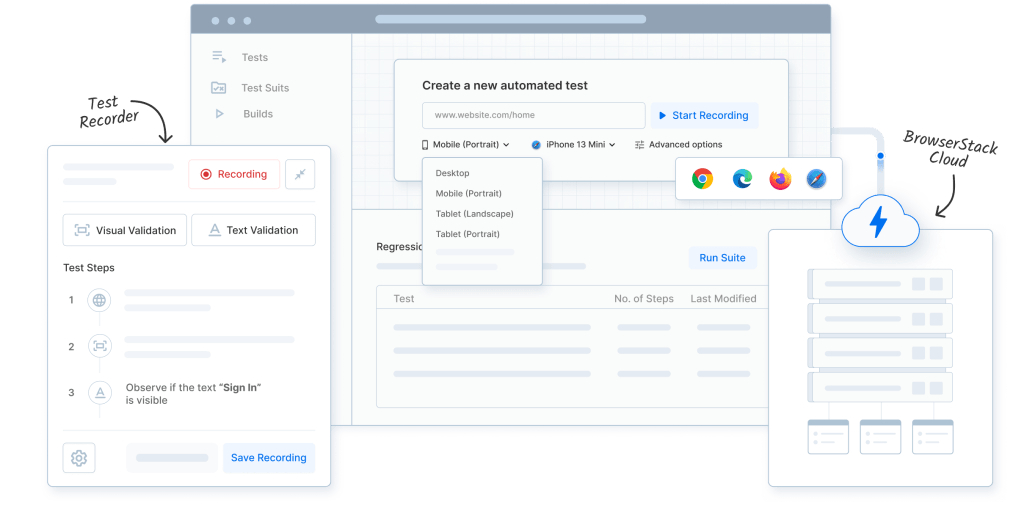
BrowserStack’s Low Code Automation uses a browser extension, such as one for Chrome, to capture how you interact with a web application.
- How It Works: Specify the URL to test and perform actions on your website just like you do for manual testing. The recorder will automatically capture the corresponding steps (clicks, typing, navigating…) for you. It also tracks elements using various identifiers like IDs, names, and CSS selectors, along with accessibility features.
- Readable Steps: Instead of showing lines of code, the tool converts these recorded actions into plain English instructions (like “Click the ‘Login’ button” or “Enter your email in the box labeled ‘Enter email’”). This high-level language makes it easy for anyone to understand and adjust the tests.
2.2 Visual Validation
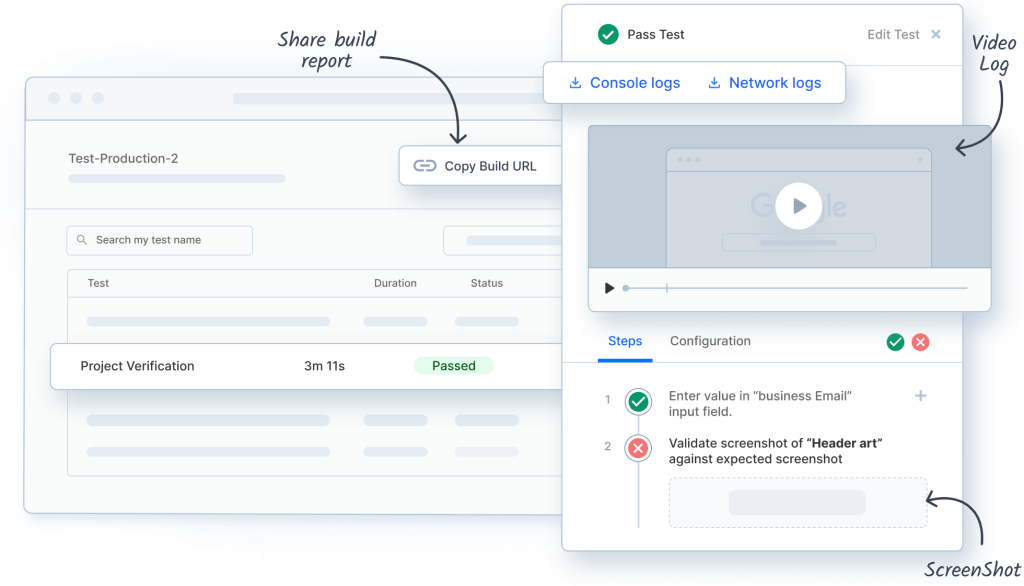
Unlike traditional frameworks where you have to dive into the code to make changes, BrowserStack keeps things user-friendly.
- Easy Modifications: You can change tests directly through the interface without needing to deal with code. Parameters and assertions can be easily updated using a straightforward UI or through the same natural language approach, which simplifies the whole process. Easily verify complex assertions by just adding visual validations during recording.
- Intelligent Step Timeout: Automatically detects optimal wait time-out based on network requests and page navigations and waits for element to become actionable.
2.3 Self-Healing

Sometimes tests fail due to minor changes on a webpage, like an updated ID or a slight tweak in structure. BrowserStack Low Code Automation addresses this problem with an intelligent self-recovery feature, eliminate the need for manual test update when application changes are detected and achieve resilient and reliable test executions.
- Multiple Factor Analysis: If a recorded step fails, the AI doesn’t just give up. Instead, it looks at a range of attributes related to the target element being interacted with. This includes things like the text it contains, its position on the page, neighboring elements, and visual characteristics.
- Adaptable Matching: Even if the primary identifier has changed, the engine uses these properties to figure out which element you likely meant to interact with. It employs smart matching techniques to keep tests running smoothly.
- Reduced Maintenance: Thanks to this adaptable way of identifying elements, tests can keep passing even after minor changes on the frontend, which means less maintenance for developers.
2.4 Cloud Execution
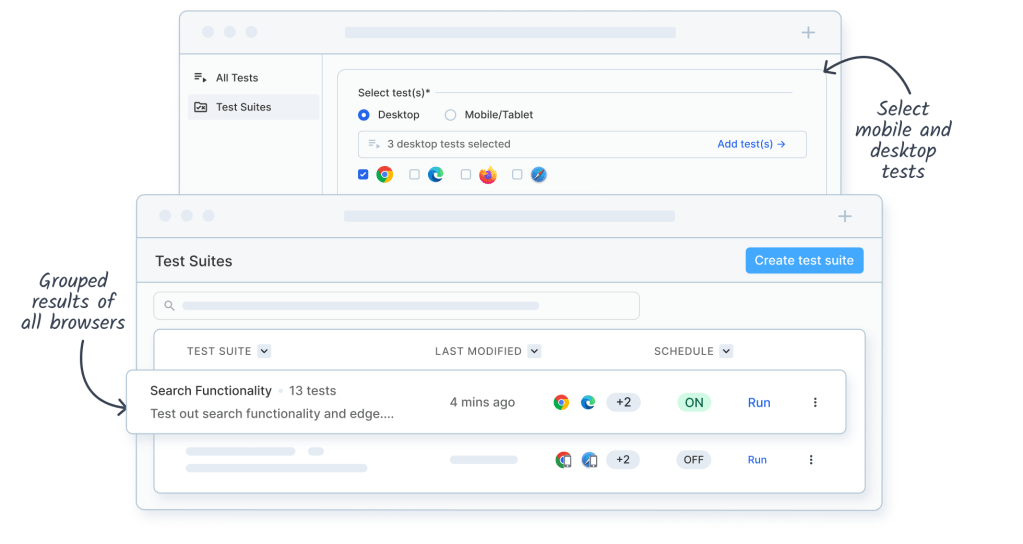
This makes use of BrowserStack’s primary advantage. The low-code interface’s described tests are not limited to being run locally or against emulators.
- Real Device Cloud: The vast cloud grid of BrowserStack, which includes thousands of actual desktop browsers (including different iterations of Chrome, Firefox, Edge, and Safari on macOS and Windows) and actual mobile devices (iOS and Android), is the focus of execution. This removes the need to set up and maintain the infrastructure for thorough cross-compatibility testing.
- Parallelization: The platform’s built-in capability for parallel test execution across certain configurations greatly reduces the time required to finish regression suite runs as compared to sequential execution.
3. BrowserStack Low Code Automation vs MABL

Conclusion
In summary, BrowserStack Low Code Automation stands out as an interesting option for web testing. This tool combines advanced AI solutions with a reliable cloud of real devices and an easy-to-use interface for setting up tests. It’s especially helpful for teams that want to simplify the process of creating functional tests while minimizing ongoing maintenance and covering various browsers. Development teams can save time by not getting lost in coding details and instead focusing on test scope and what really matters in their testing. If you’re finding different ways to automate processes while still sticking to your regular coding practices, you might want to check out BrowserStack’s Low Code Automation. It could be a helpful addition to your workflow.