


1. Overview
What is RPA?
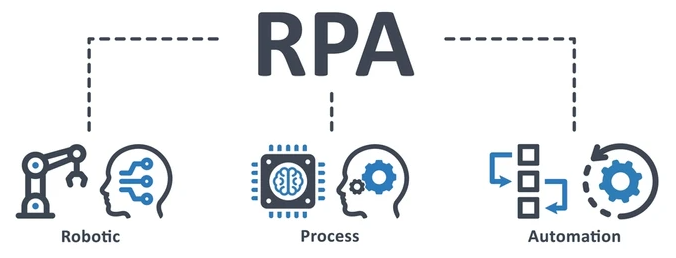
Robotic Process Automation (RPA) is a technology that uses software robots to automate repetitive, rule-based tasks traditionally performed by humans. RPA helps organizations reduce manual effort, minimize errors, and increase efficiency by allowing robots to handle routine digital work such as data entry, data validation, report generation, and system integration.
RPA is widely used across various industries, including finance and accounting, banking, insurance, human resources, healthcare, supply chain, and customer service, where processes are high-volume, time-consuming, and rule-driven. By automating these tasks, employees can focus on higher-value activities such as analysis, decision-making, and customer engagement.
What is UiPath?
UiPath is a leading Robotic Process Automation (RPA) platform that enables organizations to design, build, and manage software robots to automate business processes. It provides a low-code development environment, along with powerful tools for orchestration, monitoring, and integration with enterprise systems.
Today, several RPA platforms are available on the market, such as UiPath, Automation Anywhere, Blue Prism, Microsoft Power Automate, … Among them, UiPath stands out for its user-friendly interface, strong community support, rich activity ecosystem, and scalability for both small teams and large enterprises. Its end-to-end platform—covering development, deployment, and governance—makes UiPath a popular choice for organizations starting or scaling their automation journey.

What is Attended Robots?
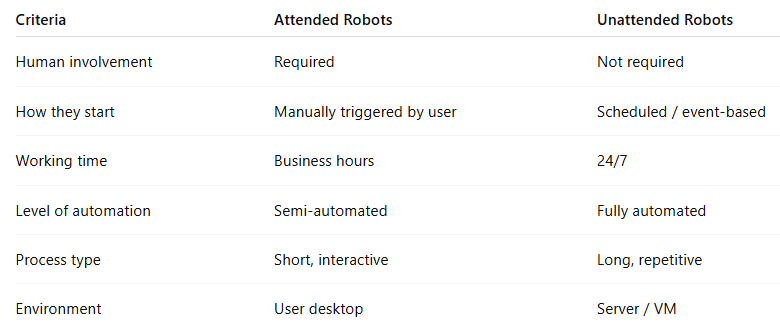
Attended Robots work with human users. They run on a user’s desktop and are triggered by the user while they are logged in. Typical use cases: short tasks that require human judgment or interaction, such as data lookup, form filling, or customer support assistance.
What is Unattended Robots?
Unattended Robots run fully automatically without human involvement. They can be scheduled or triggered by events and operate 24/7 on servers or virtual machines. Typical use cases: long-running, high-volume processes such as invoice processing, report generation, or system integrations.
What is High Density Robots?
High Density Robots in UiPath refer to a deployment model where multiple Unattended Robots run concurrently on the same physical machine or virtual machine, each under a separate Windows user account. This approach maximizes hardware utilization by allowing multiple robots to share a single machine, regardless of the Windows version, as long as multiple user sessions are available.
By using High Density Robots, organizations can significantly reduce infrastructure costs, increase automation throughput, and scale automation more efficiently without provisioning additional machines. This model is especially effective for background, service-based, or API-driven processes, where user interface interaction is minimal. As a result, High Density Robots help enterprises achieve better performance, higher ROI, and more efficient resource management in large-scale automation environments.
In the following sections, we will walk through a practical setup of High Density Robots on a single virtual machine using two shared Windows accounts, and configure schedules to execute both robots at the same time, demonstrating how concurrent execution can be achieved on one machine.
Note: High Density Robots are configured only with Unattended Robots, not Attended Robots.
2. Install Remote Desktop Session Host on the Virtual Machine
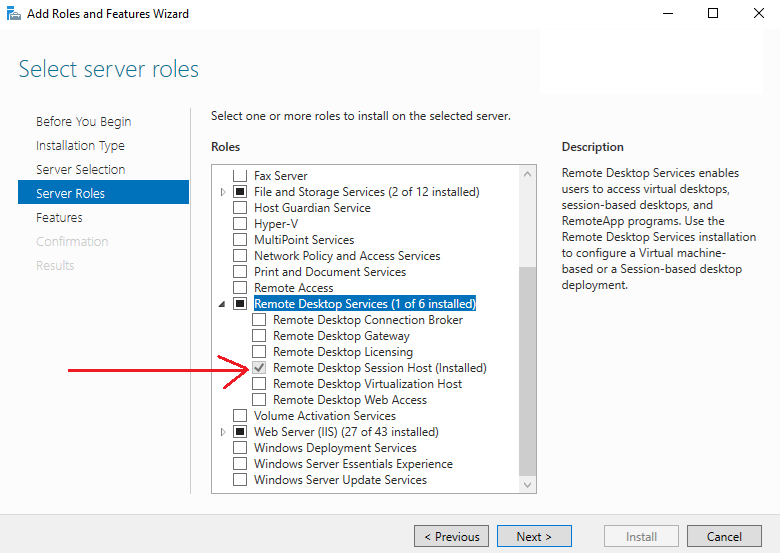
On Virtual Machine > Open Server Manager > Add Roles and Features Wizard > Server Roles > Remote Desktop Services > click Remote Desktop Session Host to install.
3. Add User Accounts on the Virtual Machine
We need 2 or more account with email address to add users to Active Directory on the Virtual Machine. In this guideline, we use 2 accounts.
Robot 1:
Remote account: .\user_hdr1
Email: nashtechrpa1@outlook.com
Robot 2:
Remote account: .\user_hdr2
Email: nashtechrpa2@outlook.com
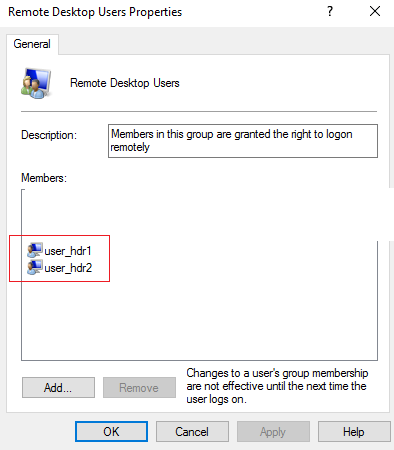
On Virtual Machine > Open Computer Management > Local Users and Groups > Groups > Remote Desktop Users > Remote Desktop Users Properties > Add 2 above accounts user_hdr1 & user_hdr2.
4. Add the Machine to UiPath Orchestrator
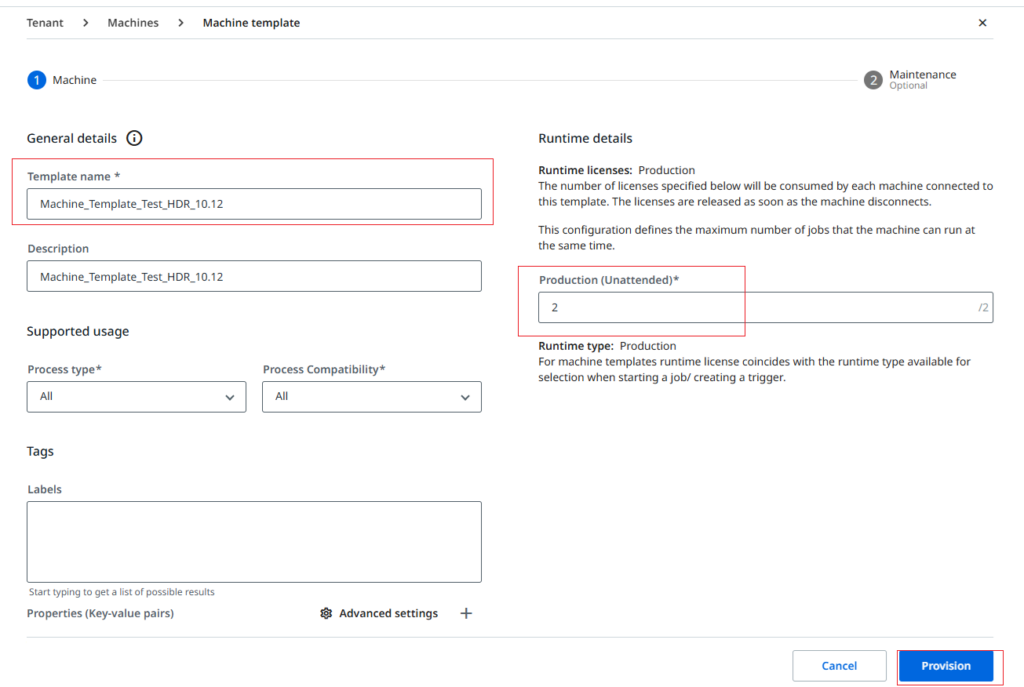
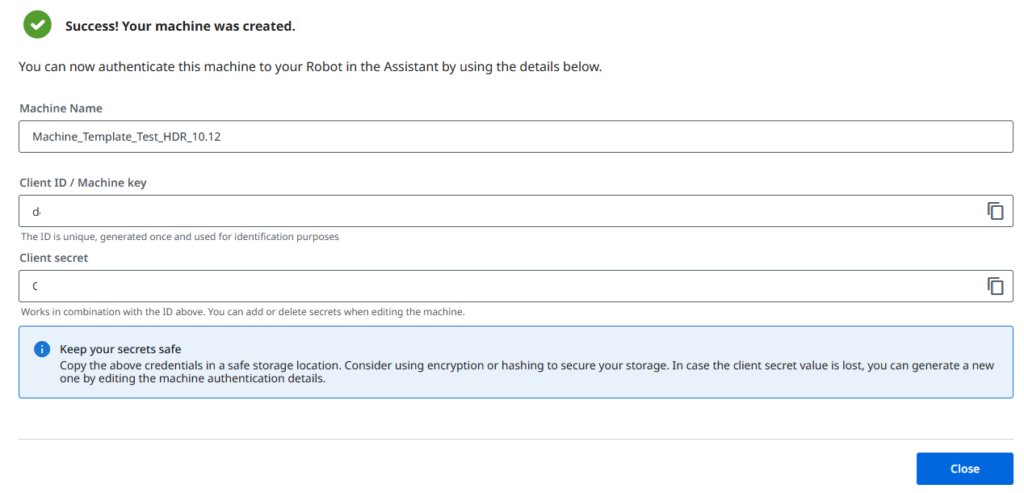
Open UiPath Orchestrator at https://cloud.uipath.com > click Tenant > Machines > Add machine > Machine template > Input Template name > click Provision to add template.

5. Configure Robot Licenses in UiPath Orchestrator
On UiPath Orchestrator > click Tennant > click License tab > click See More.
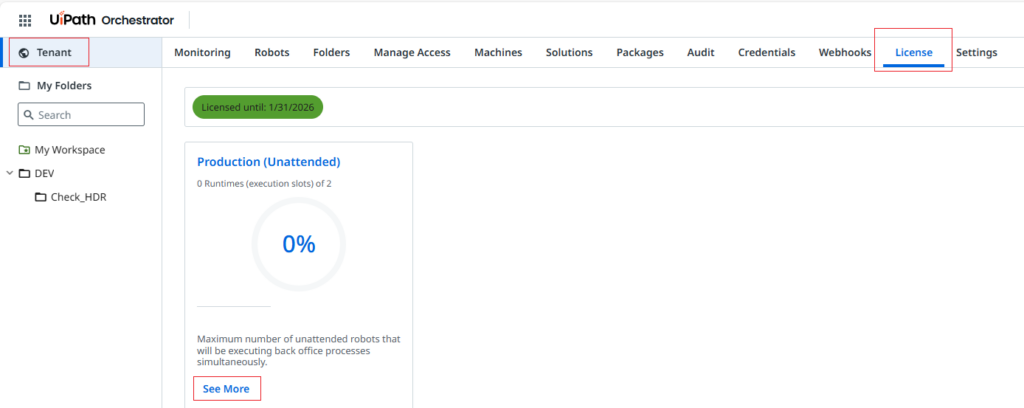
We need two or more licenses (runtimes) to run two or more robots at the same time. This means that we need to inactivate all machines and assign multiple runtimes only to the machine that will run the High-Density Robots.

6. Add User Accounts to UiPath Orchestrator
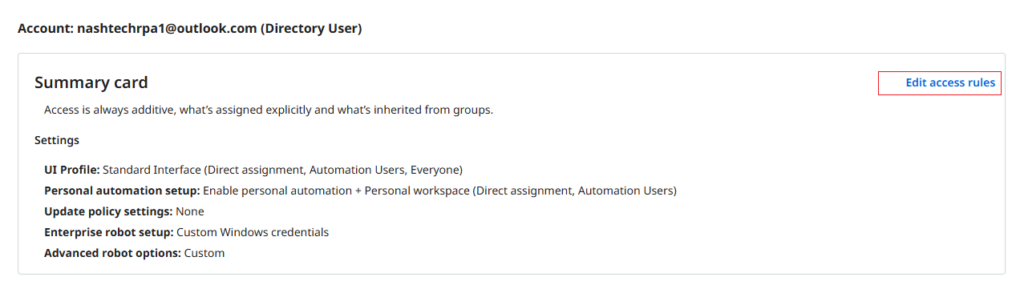
In UiPath Orchestrator, go to Tenant > Manage Access > Assign User, then click Assign to provision two accounts as shown below.

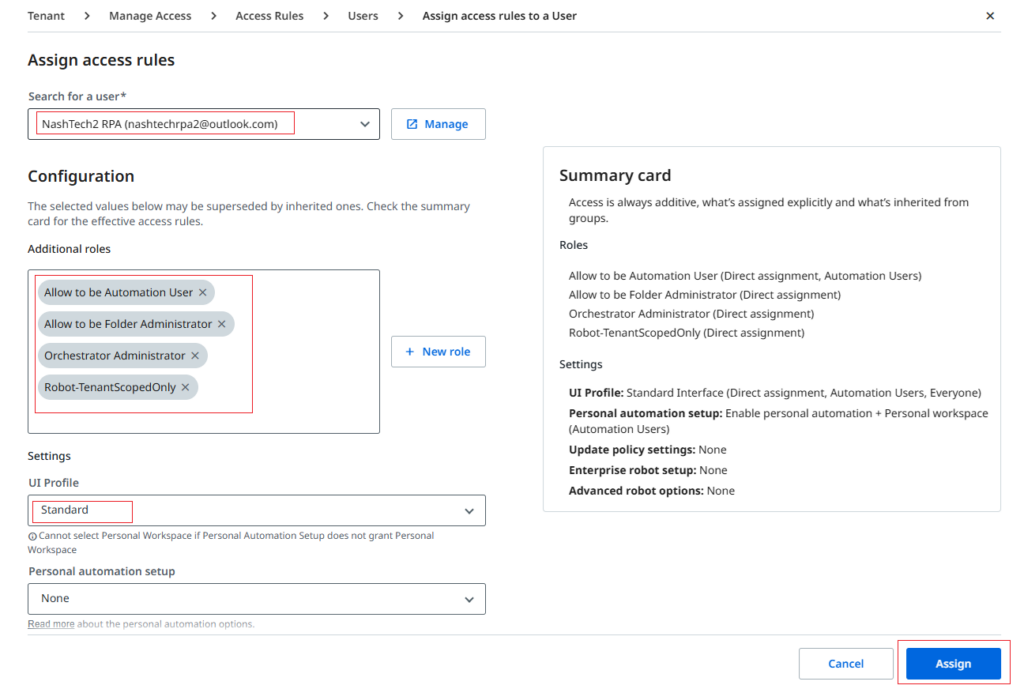

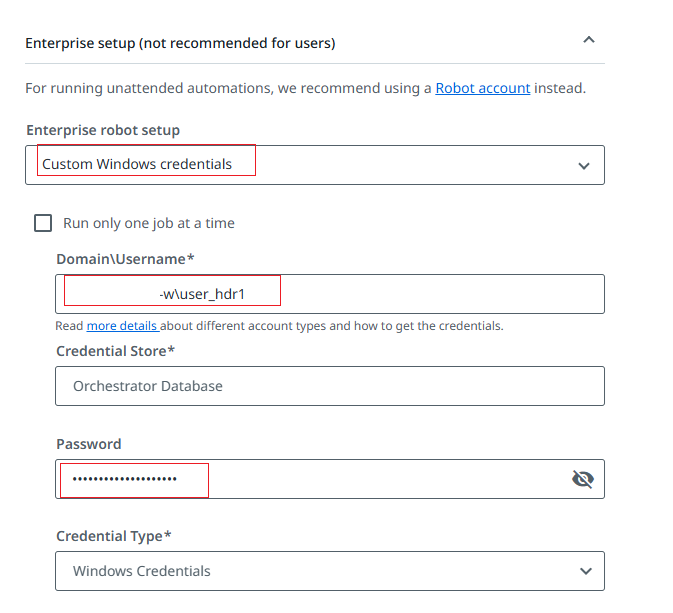
Enterprise setup: Click Check Access > Edit Access Rules, and enter the username and password to connect to your virtual machine.

Next steps, we will build 2 workflows by UiPath Studio.
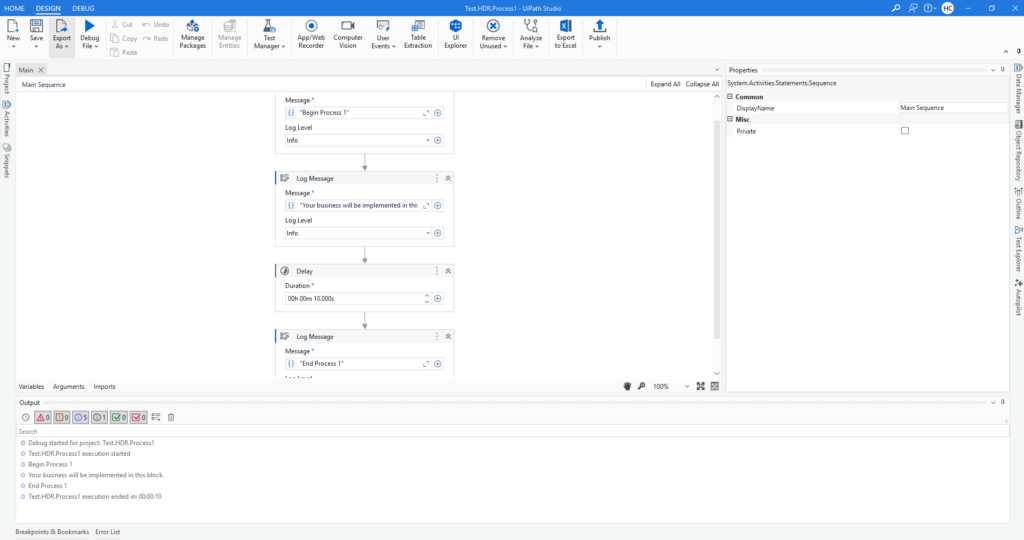
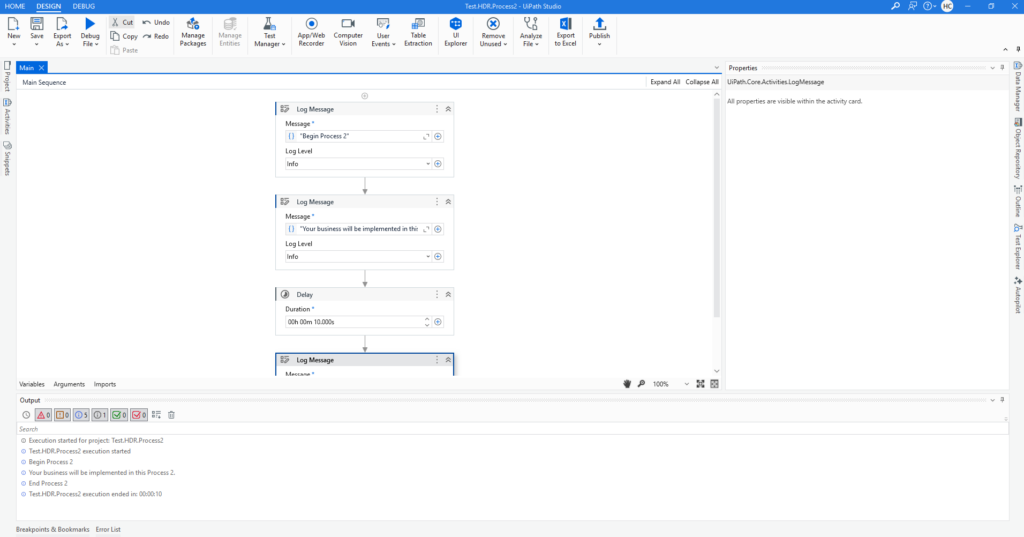
The outputs of two processes look like this.

Publish NUGET packages & deploy to UiPath Orchestrator.


Create process.
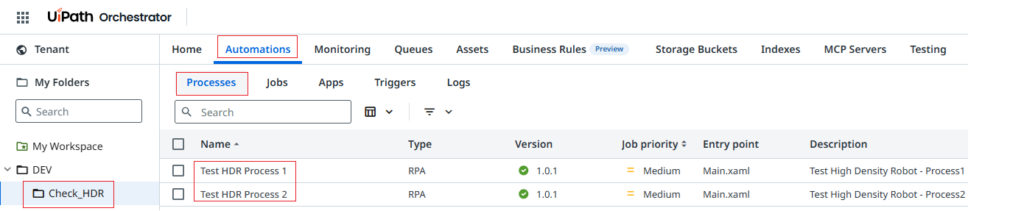
7. Configure UiPath Assistant on the Virtual Machine
Step 1: Login Virtual Machine with admin account
Step 2: Open UiPath Assistance and login with admin account. That will be connected to the Orchestrator with “org admin”
Step 3: On the UiPath Assistance and sync all Process 1 & Process 2
8. Verify the High Density Robot
Step 1: Open Orchestrator and click to Check_HDR folder
Step 2: Click “Automations”
Step 3: Click “Jobs”
Step 4: Click “Start” button to start a new job
Both Process 1 and Process 2 are running simultaneously on the same machine.

9. Conclusion
In this blog, we successfully demonstrated how to build a single virtual machine configured with UiPath High Density Robots. By provisioning multiple unattended robot sessions on one VM, we were able to execute automations concurrently while maximizing hardware utilization.
This High Density Robot setup allows enterprises to use robots more efficiently, reduce infrastructure costs, and scale automation capacity without the need to provision additional machines. It is particularly well-suited for background, service-based, and API-driven processes, where high throughput and stability are required.
Overall, leveraging UiPath High Density Robots is a practical and effective approach for organizations looking to optimize automation performance, improve ROI, and support large-scale enterprise automation initiatives.
References:
What is High Density Robots? (https://docs.uipath.com/robot/docs/high-density-robots)
Setting Up Windows Server for High-Density Robots (https://docs.uipath.com/installation-and-upgrade/docs/setting-up-windows-server-for-high-density-robots)
Windows Sessions (https://docs.uipath.com/robot/docs/windows-sessions)
— End —