


Introduction
In modern cloud architectures, organizations often need to connect multiple Virtual Private Clouds (VPCs) while maintaining centralized control over shared services and network traffic. Without a proper strategy, you’ll end up with a spaghetti mess of VPC peering connections that would make even Italian grandmothers weep.
The hub-and-spoke network topology provides an elegant solution to this challenge—think of it as the difference between everyone shouting across a crowded room versus having a central switchboard operator (but without the awkward “please hold” music). In this blog post, I’ll walk you through building a production-ready hub-and-spoke architecture on AWS using Transit Gateway and Terraform, so you can avoid explaining to your boss why your network diagram looks like a bowl of tangled Christmas lights.
What is Hub-and-Spoke Architecture?
The hub-and-spoke architecture is a network topology where:
- Hub: A central VPC that hosts shared services (e.g., monitoring, security tools, DNS servers)
- Spokes: Multiple VPCs that represent different environments or applications (e.g., private apps, public apps, dev, prod, staging)
- Transit Gateway: Acts as a cloud router connecting all VPCs together
This design offers several key benefits:
- Centralized management: Shared services are located in one place
- Scalability: Easily add or remove spoke VPCs without affecting others
- Security: Implement centralized security controls and network segmentation
- Cost efficiency: Reduce the number of VPC peering connections (N-to-N becomes N-to-1)
Architecture Overview
The architecture is simplified like this:
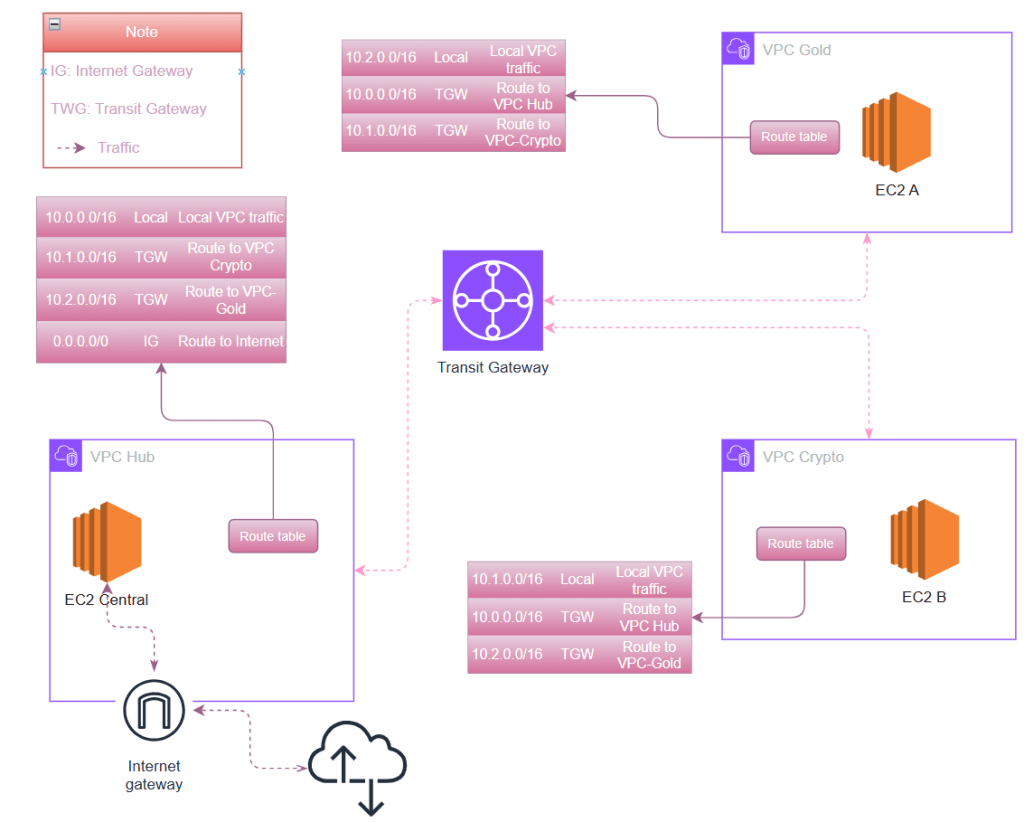
In this implementation, we’ll build:
- 1 Hub VPC (
vpc-shared): 10.0.0.0/16 – hosting shared services - 2 Spoke VPCs (make sure they are not overlap):
vpc-gold: 10.1.0.0/16 – gold environmentvpc-crypto: 10.2.0.0/16 – crypto environment
- AWS Transit Gateway: Central routing hub
- 2 Transit Gateway Route Tables:
- One for spokes (to control spoke-to-spoke and spoke-to-hub traffic)
- One for shared services (to control hub-to-spoke traffic)
Network Flow
- Spokes can communicate with the hub
- Spokes can communicate with each other
- All traffic flows through the Transit Gateway
- Production VPC has internet access via an Internet Gateway
Prerequisites
Before starting, ensure you have:
- AWS CLI configured with appropriate credentials
- Terraform (In this article, I use Terraform v1.12.2)
- An SSH key pair for EC2 instances (stored at
.ssh/aws-hub-spoke-key.pub) - Basic understanding of AWS networking concepts
Note: All commands in this post were executed in PowerShell on Windows 11, except those run directly on the EC2 instances
Implementation with Terraform
The hub-and-spoke architecture consists of several key components. Let’s focus on the most critical parts:
1. VPCs – one as Hub and two as Spokes
Add the definition of VPCs include name and cidr:
shared = {
      name        = "vpc-shared"
      cidr        = "10.0.0.0/16"
      subnet_cidr = "10.0.1.0/24"
      role        = "shared"
    }
    gold = {
      name        = "vpc-gold"
      cidr        = "10.1.0.0/16"
      subnet_cidr = "10.1.1.0/24"
      role        = "spoke"
    }
    crypto = {
      name        = "vpc-crypto"
      cidr        = "10.2.0.0/16"
      subnet_cidr = "10.2.1.0/24"
      role        = "spoke"
    }
Then create VPCs:
resource "aws_vpc" "this" {
  for_each = local.vpcs

  cidr_block           = each.value.cidr
  enable_dns_hostnames = true
  enable_dns_support   = true

  tags = {
    Name = each.value.name
  }
}
2. Transit Gateway – The Heart of Hub-and-Spoke
The Transit Gateway acts as a cloud router connecting all VPCs:
resource "aws_ec2_transit_gateway" "this" {
  description = "Hub-and-spoke Transit Gateway"
  amazon_side_asn = 64512

  # We control associations/propagations explicitly
  default_route_table_association = "disable"
  default_route_table_propagation = "disable"

  tags = {
    Name = "tgw-hub"
  }
}
Note: I disable default route tables to have explicit control over routing policies. This allows us to implement different routing for hub vs. spokes.
3. VPC Attachments
Each VPC must be attached to the Transit Gateway:
resource "aws_ec2_transit_gateway_vpc_attachment" "this" {
  for_each = local.vpcs

  transit_gateway_id = aws_ec2_transit_gateway.this.id
  vpc_id             = aws_vpc.this[each.key].id
  subnet_ids         = [aws_subnet.this[each.key].id]

  tags = {
    Name = "tgw-attach-${each.key}"
  }
}
4. Route Table Associations
We associate each VPC with the appropriate TGW route table:
- Shared VPC → Shared Route Table
- Spoke VPCs (gold, crypto) → Spokes Route Table
This segregation allows different routing policies for hub and spokes.
5. Route Propagation – The Magic
Route propagation is what actually teaches the Transit Gateway where to send traffic. Without it, the TGW is just a hollow shell with no routing intelligence.
# Shared VPC routes → Spokes RT (spokes can reach hub)
resource "aws_ec2_transit_gateway_route_table_propagation" "shared_to_spokes" {
  transit_gateway_route_table_id = aws_ec2_transit_gateway_route_table.spokes.id
  transit_gateway_attachment_id  = aws_ec2_transit_gateway_vpc_attachment.this["shared"].id
}

# Spoke VPC routes → Shared RT (hub can reach spokes)
resource "aws_ec2_transit_gateway_route_table_propagation" "spokes_to_shared" {
  for_each = { for k, v in local.vpcs : k => v if v.role == "spoke" }

  transit_gateway_route_table_id = aws_ec2_transit_gateway_route_table.shared.id
  transit_gateway_attachment_id  = aws_ec2_transit_gateway_vpc_attachment.this[each.key].id
}

# Spokes → Spokes RT (spokes can reach each other)
resource "aws_ec2_transit_gateway_route_table_propagation" "spokes_to_spokes" {
  for_each = { for k, v in local.vpcs : k => v if v.role == "spoke" }

  transit_gateway_route_table_id = aws_ec2_transit_gateway_route_table.spokes.id
  transit_gateway_attachment_id  = aws_ec2_transit_gateway_vpc_attachment.this[each.key].id
}
How it works:
- When you propagate an attachment to a route table, the VPC’s CIDR is automatically added as a route
- No manual route maintenance needed on the Transit Gateway
- Makes the architecture dynamic and scalable
6. VPC Route Tables
Important: While TGW knows how to route between VPCs, each VPC must be told to send traffic to the TGW:
resource "aws_route" "gold_to_shared" {
  route_table_id         = aws_route_table.this["gold"].id
  destination_cidr_block = "10.0.0.0/16"  # Shared VPC CIDR
  transit_gateway_id     = aws_ec2_transit_gateway.this.id
}
These routes instruct each VPC to forward traffic destined for other VPC CIDR blocks to the Transit Gateway.
6. Security and Internet Access
Key security features:
- Only shared VPC has an Internet Gateway
- EC2-central (bastion host) has a public IP for SSH access
- Spoke VPC instances are private and accessed only through the bastion
- Security groups enforce least-privilege access between VPCs
Complete Terraform Configuration
Here’s the full main.tf implementing the entire architecture:
############################################################
# Provider & basic config
############################################################
terraform {
  required_version = ">= 1.5.0"

  required_providers {
    aws = {
      source  = "hashicorp/aws"
      version = "~> 5.0"
    }
  }
}

provider "aws" {
  region = "ap-southeast-1"
}

############################################################
# VPC definitions
############################################################

# We define 3 VPCs: shared (hub), gold (spoke), crypto (spoke)
locals {
  vpcs = {
    shared = {
      name        = "vpc-shared"
      cidr        = "10.0.0.0/16"
      subnet_cidr = "10.0.1.0/24"
      role        = "shared"
    }
    gold = {
      name        = "vpc-gold"
      cidr        = "10.1.0.0/16"
      subnet_cidr = "10.1.1.0/24"
      role        = "spoke"
    }
    crypto = {
      name        = "vpc-crypto"
      cidr        = "10.2.0.0/16"
      subnet_cidr = "10.2.1.0/24"
      role        = "spoke"
    }
  }

  ami_machine = {
    ap-southeast-1 = {
      ami         = "ami-093a7f5fbae13ff67" # Amazon Linux 2023
      instance_type = "t3.micro"
    }
  }
}

# Create the VPCs
resource "aws_vpc" "this" {
  for_each = local.vpcs

  cidr_block           = each.value.cidr
  enable_dns_hostnames = true
  enable_dns_support   = true

  tags = {
    Name = each.value.name
  }
}

# One subnet per VPC (simple), all in ap-southeast-1a
resource "aws_subnet" "this" {
  for_each = local.vpcs

  vpc_id                  = aws_vpc.this[each.key].id
  cidr_block              = each.value.subnet_cidr
  availability_zone       = "ap-southeast-1a"
  map_public_ip_on_launch = false

  tags = {
    Name = "${each.value.name}-subnet-a"
  }
}

# Route table for each VPC (used by the above subnet)
resource "aws_route_table" "this" {
  for_each = local.vpcs

  vpc_id = aws_vpc.this[each.key].id

  tags = {
    Name = "${each.value.name}-rt"
  }
}

resource "aws_route_table_association" "this" {
  for_each = local.vpcs

  subnet_id      = aws_subnet.this[each.key].id
  route_table_id = aws_route_table.this[each.key].id
}

############################################################
# Transit Gateway
############################################################

resource "aws_ec2_transit_gateway" "this" {
  description = "Hub-and-spoke Transit Gateway (no on-prem)"
  amazon_side_asn = 64512

  # We will control associations/propagations explicitly
  default_route_table_association = "disable"
  default_route_table_propagation = "disable"

  tags = {
    Name = "tgw-hub"
  }
}

# TGW route tables
resource "aws_ec2_transit_gateway_route_table" "spokes" {
  transit_gateway_id = aws_ec2_transit_gateway.this.id

  tags = {
    Name = "tgw-rt-spokes"
  }
}

resource "aws_ec2_transit_gateway_route_table" "shared" {
  transit_gateway_id = aws_ec2_transit_gateway.this.id

  tags = {
    Name = "tgw-rt-shared-svcs"
  }
}

############################################################
# VPC attachments to TGW
############################################################

resource "aws_ec2_transit_gateway_vpc_attachment" "this" {
  for_each = local.vpcs

  transit_gateway_id = aws_ec2_transit_gateway.this.id
  vpc_id             = aws_vpc.this[each.key].id

  # Use the single subnet we created per VPC
  subnet_ids = [aws_subnet.this[each.key].id]

  tags = {
    Name = "tgw-attach-${each.key}"
  }
}

############################################################
# TGW Route Table Associations
############################################################

# Shared VPC attachment -> shared TGW RT
resource "aws_ec2_transit_gateway_route_table_association" "shared_assoc" {
  transit_gateway_route_table_id = aws_ec2_transit_gateway_route_table.shared.id
  transit_gateway_attachment_id  = aws_ec2_transit_gateway_vpc_attachment.this["shared"].id
}

# Spoke VPC attachments -> spokes TGW RT
resource "aws_ec2_transit_gateway_route_table_association" "spokes_assoc" {
  for_each = {
    for k, v in local.vpcs : k => v
    if v.role == "spoke"
  }

  transit_gateway_route_table_id = aws_ec2_transit_gateway_route_table.spokes.id
  transit_gateway_attachment_id  = aws_ec2_transit_gateway_vpc_attachment.this[each.key].id
}

############################################################
# TGW Route Propagation
#
#  - Shared VPC CIDR propagated into Spokes RT
#  - Spokes CIDRs propagated into Shared RT
############################################################

# Shared -> Spokes RT (so spokes see 10.0.0.0/16 via TGW)
resource "aws_ec2_transit_gateway_route_table_propagation" "shared_to_spokes" {
  transit_gateway_route_table_id = aws_ec2_transit_gateway_route_table.spokes.id
  transit_gateway_attachment_id  = aws_ec2_transit_gateway_vpc_attachment.this["shared"].id
}

# Spokes -> Shared RT (so shared sees 10.1.0.0/16, 10.2.0.0/16 via TGW)
resource "aws_ec2_transit_gateway_route_table_propagation" "spokes_to_shared" {
  for_each = {
    for k, v in local.vpcs : k => v
    if v.role == "spoke"
  }

  transit_gateway_route_table_id = aws_ec2_transit_gateway_route_table.shared.id
  transit_gateway_attachment_id  = aws_ec2_transit_gateway_vpc_attachment.this[each.key].id
}

# Spokes -> Spokes RT (so gold and crypto can see each other)
resource "aws_ec2_transit_gateway_route_table_propagation" "spokes_to_spokes" {
  for_each = {
    for k, v in local.vpcs : k => v
    if v.role == "spoke"
  }

  transit_gateway_route_table_id = aws_ec2_transit_gateway_route_table.spokes.id
  transit_gateway_attachment_id  = aws_ec2_transit_gateway_vpc_attachment.this[each.key].id
}

############################################################
# VPC Route Tables -> send "other VPC CIDRs" to TGW
#
# For simplicity, we create explicit routes:
#  - gold:   to shared & crypto via TGW
#  - crypto:  to shared & gold via TGW
#  - shared: to gold & crypto via TGW
############################################################

# locals for CIDRs
locals {
  vpc_cidrs = {
    shared = local.vpcs["shared"].cidr
    gold   = local.vpcs["gold"].cidr
    crypto = local.vpcs["crypto"].cidr
  }
}

# gold VPC routes
resource "aws_route" "gold_to_shared" {
  route_table_id         = aws_route_table.this["gold"].id
  destination_cidr_block = local.vpc_cidrs["shared"]
  transit_gateway_id     = aws_ec2_transit_gateway.this.id
}

resource "aws_route" "gold_to_crypto" {
  route_table_id         = aws_route_table.this["gold"].id
  destination_cidr_block = local.vpc_cidrs["crypto"]
  transit_gateway_id     = aws_ec2_transit_gateway.this.id
}

# crypto VPC routes
resource "aws_route" "crypto_to_shared" {
  route_table_id         = aws_route_table.this["crypto"].id
  destination_cidr_block = local.vpc_cidrs["shared"]
  transit_gateway_id     = aws_ec2_transit_gateway.this.id
}

resource "aws_route" "crypto_to_gold" {
  route_table_id         = aws_route_table.this["crypto"].id
  destination_cidr_block = local.vpc_cidrs["gold"]
  transit_gateway_id     = aws_ec2_transit_gateway.this.id
}

# shared VPC routes
resource "aws_route" "shared_to_gold" {
  route_table_id         = aws_route_table.this["shared"].id
  destination_cidr_block = local.vpc_cidrs["gold"]
  transit_gateway_id     = aws_ec2_transit_gateway.this.id
}

resource "aws_route" "shared_to_crypto" {
  route_table_id         = aws_route_table.this["shared"].id
  destination_cidr_block = local.vpc_cidrs["crypto"]
  transit_gateway_id     = aws_ec2_transit_gateway.this.id
}

# Define internet gateway for shared VPC (to allow public IP on EC2-central)
resource "aws_internet_gateway" "shared_igw" {
  vpc_id = aws_vpc.this["shared"].id

  tags = {
    Name = "shared-igw"
  }
}

# Add default route to internet gateway in shared VPC route table
resource "aws_route" "shared_default_route" {
  route_table_id         = aws_route_table.this["shared"].id
  destination_cidr_block = "0.0.0.0/0"
  gateway_id             = aws_internet_gateway.shared_igw.id
}

############################################################
# Security Groups for EC2 instances
############################################################

# Security group for central EC2 in shared VPC - allows SSH from internet
resource "aws_security_group" "ec2_central" {
  name        = "ec2-central-sg"
  description = "Allow SSH from internet and SSH to other VPCs"
  vpc_id      = aws_vpc.this["shared"].id

  # Allow SSH from anywhere (internet)
  ingress {
    from_port   = 22
    to_port     = 22
    protocol    = "tcp"
    cidr_blocks = ["0.0.0.0/0"]
    description = "SSH from internet"
  }

  # Allow ICMP from within shared VPC
  ingress {
    from_port   = -1
    to_port     = -1
    protocol    = "icmp"
    cidr_blocks = [local.vpc_cidrs["shared"]]
    description = "ICMP from shared VPC"
  }

  # Allow all outbound traffic
  egress {
    from_port   = 0
    to_port     = 0
    protocol    = "-1"
    cidr_blocks = ["0.0.0.0/0"]
    description = "Allow all outbound"
  }

  tags = {
    Name = "ec2-central-sg"
  }
}

# Security group for gold EC2 - allows ICMP from crypto VPC
resource "aws_security_group" "ec2_gold" {
  name        = "ec2-gold-sg"
  description = "Allow ICMP from crypto VPC and SSH"
  vpc_id      = aws_vpc.this["gold"].id

  # Allow ICMP (ping) from crypto VPC
  ingress {
    from_port   = -1
    to_port     = -1
    protocol    = "icmp"
    cidr_blocks = [local.vpc_cidrs["crypto"]]
    description = "ICMP from crypto VPC"
  }

  # Allow ICMP from within gold VPC
  ingress {
    from_port   = -1
    to_port     = -1
    protocol    = "icmp"
    cidr_blocks = [local.vpc_cidrs["gold"]]
    description = "ICMP from gold VPC"
  }

  # Allow SSH from crypto VPC
  ingress {
    from_port   = 22
    to_port     = 22
    protocol    = "tcp"
    cidr_blocks = [local.vpc_cidrs["crypto"]]
    description = "SSH from crypto VPC"
  }

  # Allow all outbound traffic
  egress {
    from_port   = 0
    to_port     = 0
    protocol    = "-1"
    cidr_blocks = ["0.0.0.0/0"]
    description = "Allow all outbound"
  }

  tags = {
    Name = "ec2-gold-sg"
  }
}

# Security group for crypto EC2 - allows ICMP from gold VPC
resource "aws_security_group" "ec2_crypto" {
  name        = "ec2-crypto-sg"
  description = "Allow ICMP from gold VPC and SSH"
  vpc_id      = aws_vpc.this["crypto"].id

  # Allow ICMP (ping) from gold VPC
  ingress {
    from_port   = -1
    to_port     = -1
    protocol    = "icmp"
    cidr_blocks = [local.vpc_cidrs["gold"]]
    description = "ICMP from gold VPC"
  }

  # Allow ICMP from within crypto VPC
  ingress {
    from_port   = -1
    to_port     = -1
    protocol    = "icmp"
    cidr_blocks = [local.vpc_cidrs["crypto"]]
    description = "ICMP from crypto VPC"
  }

  # Allow SSH from anywhere (for testing)
  ingress {
    from_port   = 22
    to_port     = 22
    protocol    = "tcp"
    cidr_blocks = ["0.0.0.0/0"]
    description = "SSH from anywhere"
  }

  # Allow SSH from shared VPC
  ingress {
    from_port   = 22
    to_port     = 22
    protocol    = "tcp"
    cidr_blocks = [local.vpc_cidrs["shared"]]
    description = "SSH from shared VPC"
  }

  # Allow all outbound traffic
  egress {
    from_port   = 0
    to_port     = 0
    protocol    = "-1"
    cidr_blocks = ["0.0.0.0/0"]
    description = "Allow all outbound"
  }

  tags = {
    Name = "ec2-crypto-sg"
  }
}

############################################################
# SSH Key Pair
############################################################

resource "aws_key_pair" "this" {
  key_name   = "hub-spoke-key"
  public_key = file("${path.module}/.ssh/aws-hub-spoke-key.pub")

  tags = {
    Name = "hub-spoke-key"
  }
}

############################################################
# EC2 Instances
############################################################

resource "aws_instance" "ec2_a" {
  ami           = local.ami_machine["ap-southeast-1"].ami
  instance_type = local.ami_machine["ap-southeast-1"].instance_type
  subnet_id     = aws_subnet.this["gold"].id
  vpc_security_group_ids = [aws_security_group.ec2_gold.id]
  key_name = aws_key_pair.this.key_name

  tags = {
    Name = "ec2-gold-a"
  }
}

resource "aws_instance" "ec2_b" {
  ami           = local.ami_machine["ap-southeast-1"].ami
  instance_type = local.ami_machine["ap-southeast-1"].instance_type
  subnet_id     = aws_subnet.this["crypto"].id
  vpc_security_group_ids = [aws_security_group.ec2_crypto.id]
  key_name = aws_key_pair.this.key_name

  tags = {
    Name = "ec2-crypto-b"
  }
}

resource "aws_instance" "ec2_central" {
  ami           = local.ami_machine["ap-southeast-1"].ami
  instance_type = local.ami_machine["ap-southeast-1"].instance_type
  subnet_id     = aws_subnet.this["shared"].id
  vpc_security_group_ids = [aws_security_group.ec2_central.id]
  associate_public_ip_address = true
  key_name = aws_key_pair.this.key_name

  tags = {
    Name = "ec2-central"
  }
}

############################################################
# Outputs
############################################################

output "tgw_id" {
  value = aws_ec2_transit_gateway.this.id
}

output "vpc_ids" {
  value = { for k, v in aws_vpc.this : k => v.id }
}

output "subnet_ids" {
  value = { for k, v in aws_subnet.this : k => v.id }
}

output "ec2_a_ip" {
  value = aws_instance.ec2_a.private_ip
}

output "ec2_b_ip" {
  value = [aws_instance.ec2_b.private_ip, aws_instance.ec2_b.public_ip]
}

output "ec2_central_ip" {
  value = [aws_instance.ec2_central.private_ip, aws_instance.ec2_central.public_ip]
}
These are what will be deployed after running below complete configuration implements:
- 3 VPCs with non-overlapping CIDR blocks
- Transit Gateway with explicit route table control
- Hub-and-spoke routing with spoke-to-spoke connectivity
- Centralized internet access through the hub
- Bastion host for secure access to private instances
- Security groups following least-privilege principles
- Test EC2 instances to validate connectivity
Deployment Steps
1. Prepare SSH Key Pair
# Create .ssh directory if it doesn't exist
mkdir -p .ssh

# Generate SSH key pair, leave passphrase empty for testing
ssh-keygen -t rsa -b 4096 -f .ssh/aws-hub-spoke-key
2. Initialize Terraform
terraform init
3. Review the Plan
terraform plan -out=tfplan
This will show you all resources that will be created.
4. Apply the Configuration
terraform apply tfplan
Type yes when prompted. The deployment takes approximately 5-10 minutes.
5. Verify Outputs
After successful deployment, you’ll see outputs like:
tgw_id = "tgw-0abc123def456789"
vpc_ids = {
  gold   = "vpc-0123456789abcdef0"
  crypto = "vpc-0fedcba987654321"
  shared = "vpc-0abcdef123456789"
}
ec2_a_ip = "10.1.1.45"
ec2_b_ip = ["10.2.1.78", ""]
ec2_central_ip = ["10.0.1.123", "54.251.123.45"]
Note: Only EC2-central has a public IP. The other instances are private.
Testing Connectivity
Our testing demonstrates a multi-hop connectivity path through the hub-and-spoke architecture:
Connectivity Path: Internet → EC2-central (shared VPC) → EC2-crypto-b (crypto VPC) → ping EC2-gold-a (gold VPC)
(Note: this testing is performed in Powershell)
1. SSH into Bastion Host (EC2-central)
First, connect to the bastion host in the shared VPC:
ssh -i .ssh/aws-hub-spoke-key ec2-user@<ec2_central_public_ip>
2. Copy SSH Key to Bastion
Using scp to copy private key from your local machine to bastion:
scp -i .ssh/aws-hub-spoke-key .ssh\id_rsa ec2-user@54.169.83.73:~/.ssh
3. SSH from Bastion to Crypto Instance
From EC2-central, SSH to the crypto instance using its private IP:
ssh -i ~/.ssh/aws-hub-spoke-key ec2-user@<ec2_b_private_ip>
# Example: ssh -i ~/.ssh/aws-hub-spoke-key ec2-user@10.2.1.78
This verifies connectivity from shared VPC to crypto VPC through the Transit Gateway.
4. Ping Gold Instance from Crypto Instance
From the crypto instance, ping the gold instance:
ping <ec2_a_private_ip>
# Example: ping 10.1.1.45
You should see successful ping responses, confirming that spoke-to-spoke traffic flows through the Transit Gateway!
We’ve successfully built a hub-and-spoke architecture on AWS using Transit Gateway and Terraform. This architecture provides:
✅ Scalability: Easily add new VPCs as spokes
✅ Centralized control: Manage routing from one place
✅ Flexibility: Control spoke-to-spoke communication as needed
✅ Infrastructure as Code: Reproducible and version-controlled infrastructure
The Transit Gateway simplifies VPC connectivity compared to traditional VPC peering, especially when dealing with multiple VPCs. While it comes with additional costs, the operational benefits often outweigh the expenses for organizations with complex multi-VPC environments.
Conclusion
We’ve successfully built a hub-and-spoke architecture on AWS using Transit Gateway and Terraform. This architecture provides:
✅ Scalability: Easily add new VPCs as spokes
✅ Centralized control: Manage routing from one place
✅ Flexibility: Control spoke-to-spoke communication as needed
✅ Infrastructure as Code: Reproducible and version-controlled infrastructure
The Transit Gateway simplifies VPC connectivity compared to traditional VPC peering, especially when dealing with multiple VPCs. While it comes with additional costs, the operational benefits often outweigh the expenses for organizations with complex multi-VPC environments.
References
What is AWS Transit Gateway for Amazon VPC? – Amazon VPC
AWS Transit Gateway – Building a Scalable and Secure Multi-VPC AWS Network Infrastructure