Introduction
Karmada: Open, Multi-Cloud, Multi-Cluster Kubernetes Orchestration
Karmada (Kubernetes Armada) is a Kubernetes management system that enables you to run your cloud-native applications across multiple Kubernetes clusters and clouds, with no changes to your applications. By speaking Kubernetes-native APIs and providing advanced scheduling capabilities, Karmada enables truly open, multi-cloud Kubernetes.
Karmada aims to provide turnkey automation for multi-cluster application management in multi-cloud and hybrid cloud scenarios, with key features such as centralized multi-cloud management, high availability, failure recovery, and traffic scheduling.
Karmada is an incubation project of the Cloud Native Computing Foundation (CNCF)
Why Karmada:
- K8s Native API Compatible
- Zero change upgrade, from single-cluster to multi-cluster
- Seamless integration of existing K8s tool chain
- Out of the Box
- Built-in policy sets for scenarios, including: Active-active, Remote DR, Geo Redundant, etc.
- Cross-cluster applications auto-scaling, failover and load-balancing on multi-cluster.
- Avoid Vendor Lock-in
- Integration with mainstream cloud providers
- Automatic allocation, migration across clusters
- Not tied to proprietary vendor orchestration
- Centralized Management
- Location agnostic cluster management
- Support clusters in Public cloud, on-prem or edge
- Fruitful Multi-Cluster Scheduling Policies
- Cluster Affinity, Multi Cluster Splitting/Rebalancing,
- Multi-Dimension HA: Region/AZ/Cluster/Provider
Components
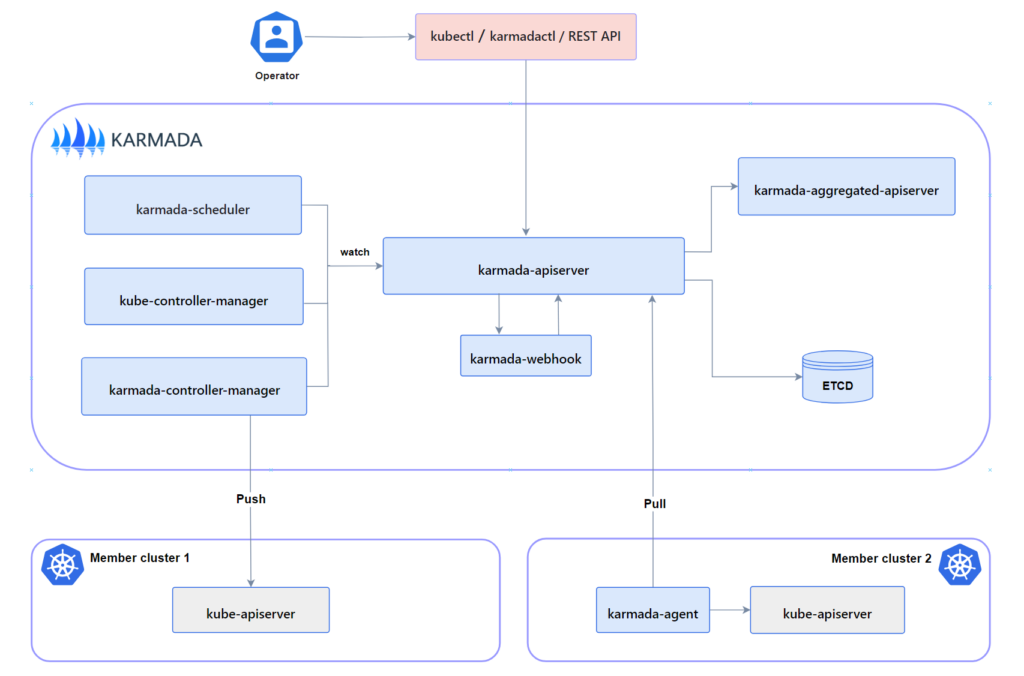
karmada-apiserver: The API server is a component of the Karmada control plane that exposes the Karmada API in addition to the Kubernetes API. The API server is the front end of the Karmada control plane.
karmada-aggregated-apiserver: The aggregate API server is an extended API server implemented using Kubernetes API Aggregation Layer technology
karmada-controller-manager: The karmada-controller-manager runs various custom controller processes.The controllers watch Karmada objects and then talk to the underlying clusters’ API servers to create regular Kubernetes resources.
karmada-scheduler: The karmada-scheduler is responsible for scheduling k8s native API resource objects (including CRD resources) to member clusters.
karmada-webhook: karmada-webhooks are HTTP callbacks that receive Karmada/Kubernetes API requests and do something with them. You can define two types of karmada-webhook, validating webhook and mutating webhook.
etcd: Consistent and highly-available key value store used as Karmada’ backing store for all Karmada/Kubernetes API objects.
karmada-agent: Karmada has two Cluster Registration Mode such as Push and Pull, karmada-agent shall be deployed on each Pull mode member cluster. It can register a specific cluster to the Karmada control plane and sync manifests from the Karmada control plane to the member cluster. In addition, it also syncs the status of member cluster and manifests to the Karmada control plane.
DEMO
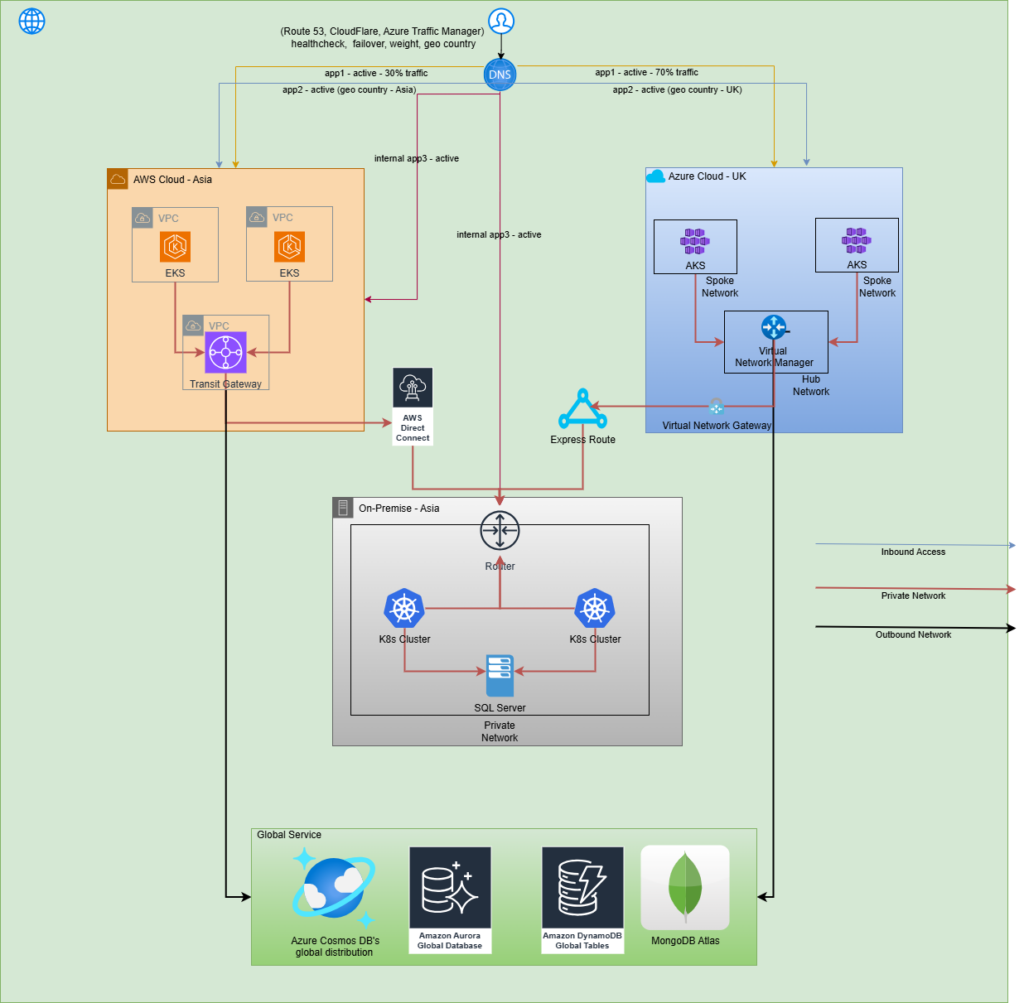
In this demo, we have 03 Kubernetes cluster deployed on EKS, AKS, and on-premises
We have one application need to deploy on multi cluster (AKS and EKS) and use Route53 geolocation routing to route users to the appropriate regional load balancer based on their geographic location. This ensures users are directed to the nearest or most relevant resource, improving performance and user experience
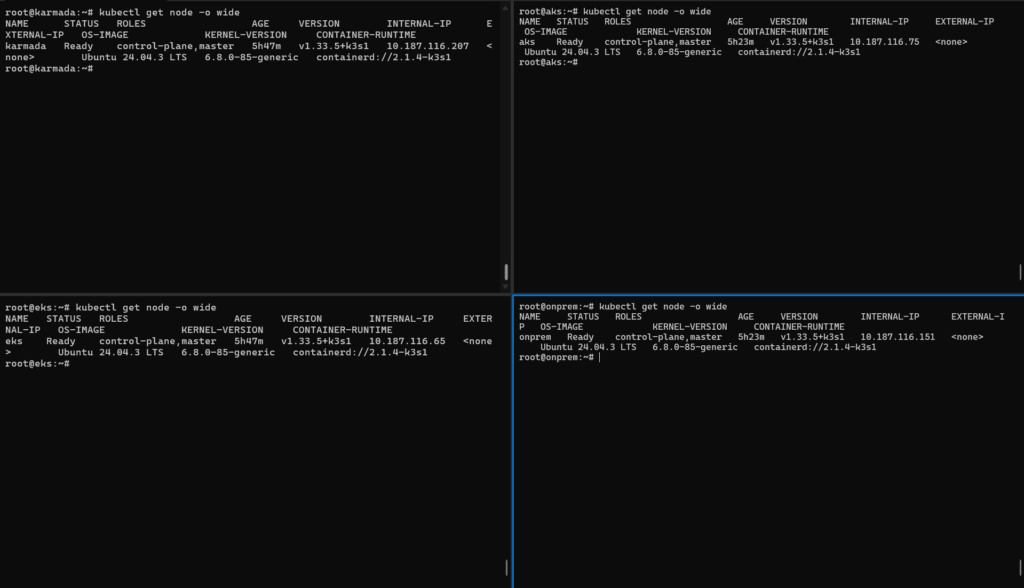
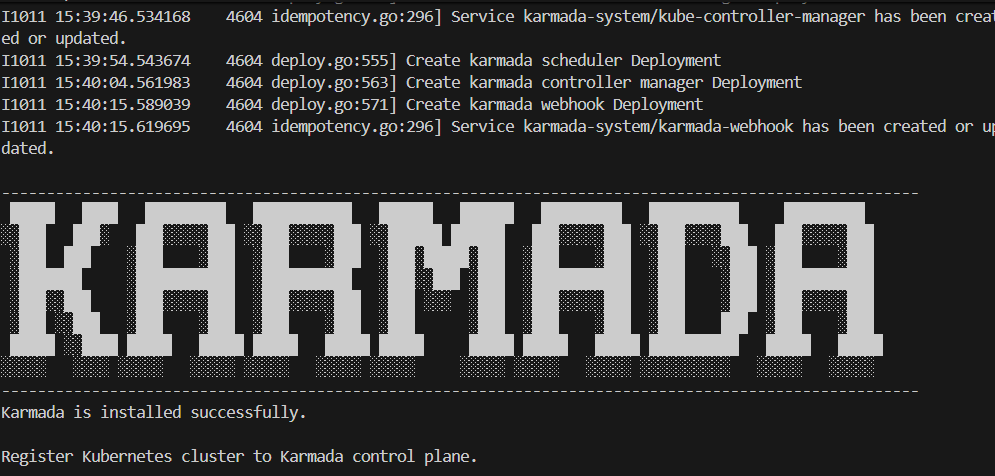
Install Karmada cluster
Install kubectl karmadacurl -s https://raw.githubusercontent.com/karmada-io/karmada/master/hack/install-cli.sh | sudo bash -s kubectl-karmada
Init karmada cluster kubectl karmada init
Register cluster managed by Karmada
Register with push modekubectl karmada --kubeconfig /etc/karmada/karmada-apiserver.config join onprem --cluster-kubeconfig=onprem.yaml

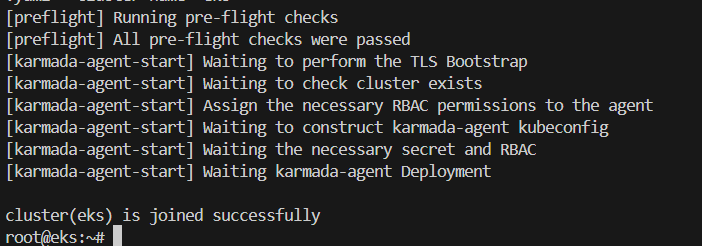
Register with pull modekubectl karmada register 10.187.116.207:32443 --token 56zp8u.2u3mrasakme96037 --discovery-token-ca-cert-hash sha256:853cbc49fd55d54101558ab0b3c8be04220bb447f03090fa9307488e245dd315 --kubeconfig=/tmp/eks-kubeconfig.yaml --cluster-name='eks'
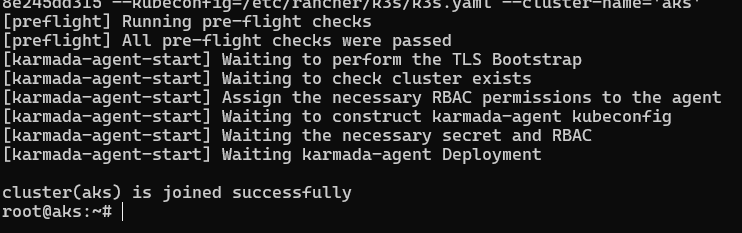
kubectl karmada register 10.187.116.207:32443 --token 56zp8u.2u3mrasakme96037 --discovery-token-ca-cert-hash sha256:853cbc49fd55d54101558ab0b3c8be04220bb447f03090fa9307488e245dd315 --kubeconfig=/tmp/aks-kubeconfig.yaml --cluster-name='aks'
Karmada list cluster

We can see onprem use mode Push, AKS and EKS cluster use mode Pull
Apply application active – active on multi-cloud Kubernetes cluster
Apply manifest for deploy nginx-service on EKS and AKS
apiVersion: apps/v1
kind: Deployment
metadata:
name: nginx-deployment
labels:
app: nginx
spec:
replicas: 3
selector:
matchLabels:
app: nginx
template:
metadata:
labels:
app: nginx
spec:
containers:
– name: nginx
image: nginx:1.14.2
ports:
– containerPort: 80
—
apiVersion: v1
kind: Service
metadata:
name: nginx-service
spec:
selector:
app: nginx
ports:
– protocol: TCP
port: 80
targetPort: 80
type: ClusterIP
—
apiVersion: networking.k8s.io/v1
kind: Ingress
metadata:
name: my-app-ingress
annotations:
nginx.ingress.kubernetes.io/rewrite-target: /
spec:
ingressClassName: nginx
rules:
– host: demo-karmada.sd4841.com
http:
paths:
– path: /
pathType: Prefix
backend:
service:
name: nginx-service
port:
number: 80
—
apiVersion: v1
kind: ConfigMap
metadata:
name: my-app-config
data:
database_url: “jdbc:mysql://my-db-service:3306/mydb”
log_level: “info”
app.properties: |
feature.enabled=true
max.connections=20
—
apiVersion: policy.karmada.io/v1alpha1
kind: PropagationPolicy
metadata:
name: nginx-policy
namespace: default
spec:
resourceSelectors:
– apiVersion: apps/v1
kind: Deployment
name: nginx-deployment
– apiVersion: v1
kind: Service
name: nginx-service
– apiVersion: networking.k8s.io/v1
kind: Ingress
name: my-app-ingress
– apiVersion: v1
kind: ConfigMap
name: my-app-config
placement:
clusterTolerations:
– effect: NoExecute
key: cluster.karmada.io/not-ready
operator: Exists
tolerationSeconds: 300
– effect: NoExecute
key: cluster.karmada.io/unreachable
operator: Exists
tolerationSeconds: 300
clusterAffinity:
clusterNames:
– aks
– eks
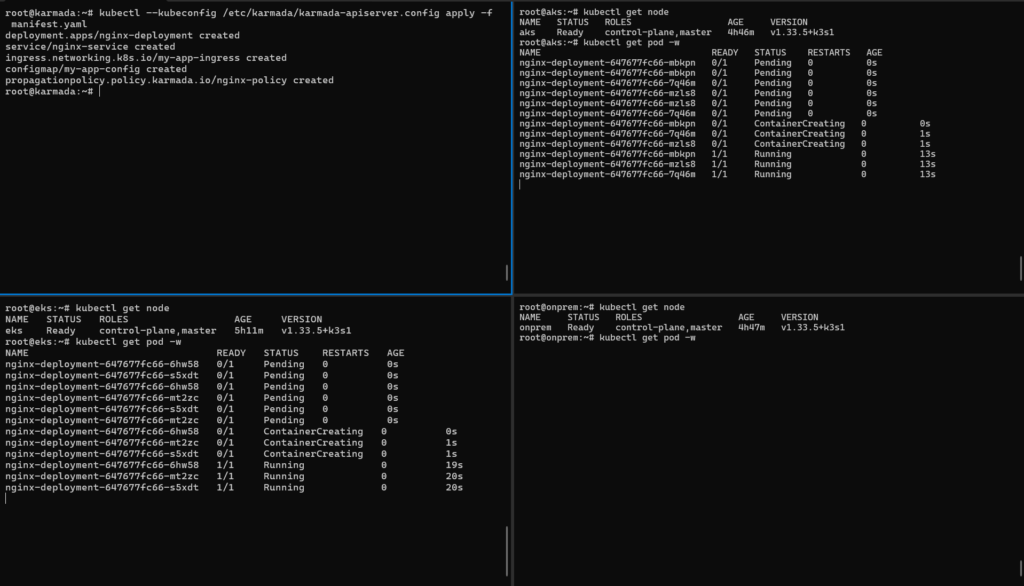
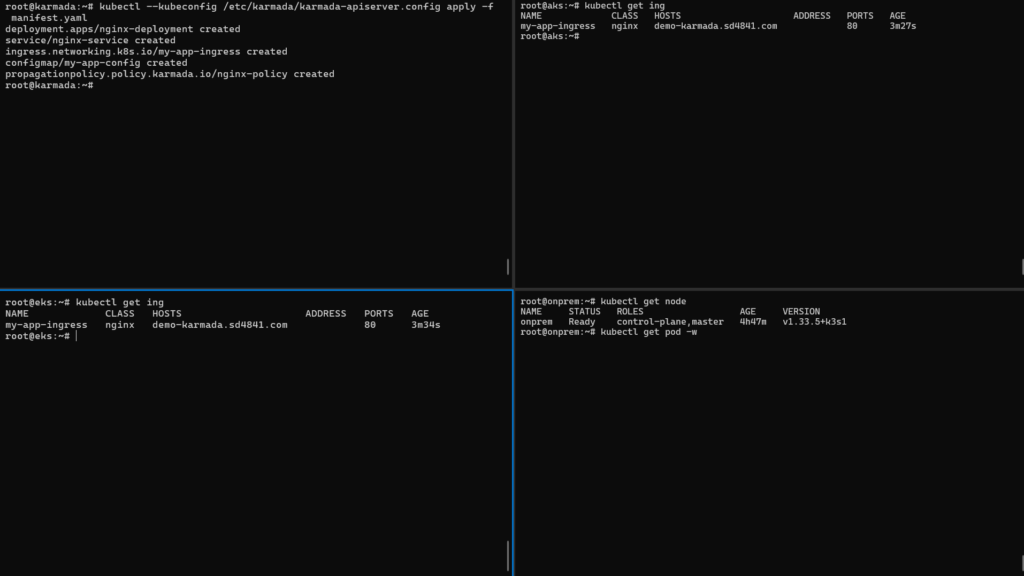
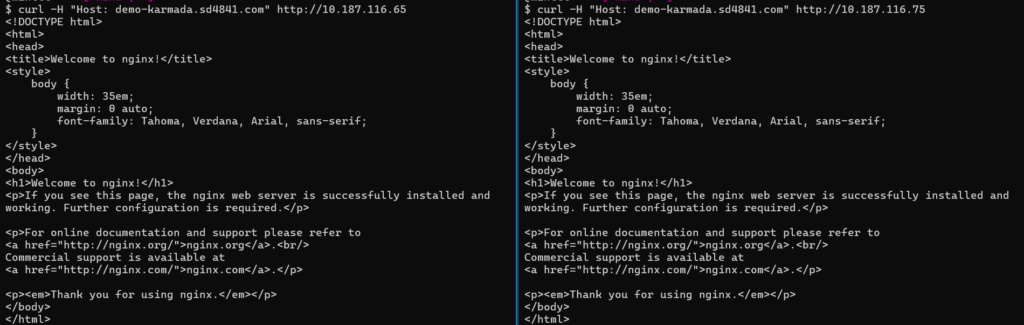
Check result
Check application accessibility via NGINX Ingress on AKS and EKS using curl