



1. Introduction
Postman is a robust platform designed for API development, testing, and teamwork, enabling efficient creation, validation, and collaboration on APIs. One of its standout features is the ability to create API collections, which group related requests for easier management. However, without proper organization and reusability, collections can quickly become messy and hard to maintain. In this blog, we’ll explore how to build organized and reusable API collections in Postman to streamline your workflow and enhance collaboration.
Why Organized API Collections Are Your Secret Weapon?
Imagine this: You’re working on a project with dozens of APIs, and every time you need to test something, you’re scrolling through a chaotic list of requests. Sounds frustrating, right? That’s where Postman collections come in. They’re like a well-organized toolbox for your APIs—keeping everything neat, accessible, and reusable. In this blog, we’ll dive into how you can build organized and reusable API collections in Postman to save time, reduce errors, and make your team’s life easier.
2. Understand API Collections in Postman
API collections in Postman serve as structured groups of related API requests, enabling efficient organization, execution, and management of APIs in one place. They help streamline workflows by keeping all relevant endpoints together.
Advantages of Using Collections
- Simplifies API testing by centralizing requests.
- Enhances collaboration by allowing teams to share and maintain collections.
- Boosts efficiency with reusable request setups and automation capabilities.
3. Planning Your API Collection Structure
Before diving into Postman, take time to first plan your collection Structure:
- Define Goals: Decide if the collection is for testing, development and documentation.
- Categorize API: Group requests by functionality (for ex. payment processing, user management etc.)
- Use Descriptive Names: Name collections, folders, and requests clearly (e.g. “Get User Details” instead of “Request 1”)
4. Key techniques for managing API Collections
Structure Requests Efficiently
A well-structured collection keeps your APIs organized, reusable and easy to navigate.
Example: Well-Structured API Request
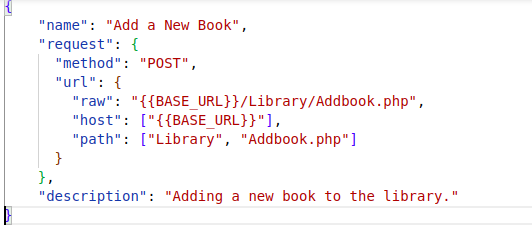
Strategies for API Optimazation
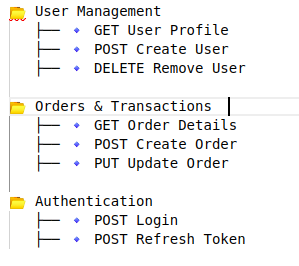
- By API Domain – Group APIs based on their category (e.g., Authentication, Orders, Payments).
- By Functionality – Separate requests based on their role, such as User Management, Inventory, or Checkout.
- By Microservices – Structure requests according to microservices in a distributed system (e.g., Auth Service, Product Service).
- By Development Stage – Maintain different collections for Development, Staging, and Production environments.
Example: Well-Structured Collection
5. Advanced Collection Features
Environment Variables for Reusability
Avoid hardcoding values instead use variables to make APIs work across different environments for e.g. Dev, QA, Staging etc.
Example: Define environment variables
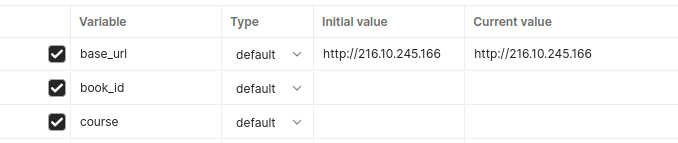
{{base_url}}/users/{{book_id}}Advantage: Easily switch between environments without updating every request.
Dynamic Variables for Automated Testing
Postman’s dynamic variables generate test data automatically, eliminating manual input and ensuring unique test cases
Example:
{
    "name": "{{$randomFirstName}}",
    "gender": "male",
    "email": "{{$randomEmail}}",
    "status": "active"
}
Advantages: Reduces manual input, ensures unique test data, and automates data generation for efficient testing.
Collection-Level Authorization
Avoid adding auth headers to every request—set authentication at the collection level for efficiency.
Example Request Using Inherited Authorization:
Headers:
{
  "Authorization": "{{auth_token}}"
  "Content-Type": "application/json"
}
Advantage: No manual auth setup for each request; update authentication in one place.
Use Pre-requests Scripts for Dynamic Requests
If an API requires dynamic values, automate them using a pre-request script.
Example: Pre-add Dynamic Variables
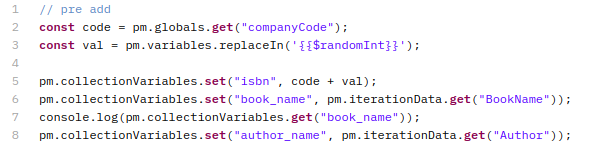
Advantage: Dynamic values before execution, automates timestamps, authentication tokens, and request signatures.
Leverage Scripts for Conditional Workflows
Use pre-request and test scripts to create conditional execution flows. This adds flexibility to your testing process by allowing decisions to be made at runtime.
Example: Using Scripts for Conditional Workflows
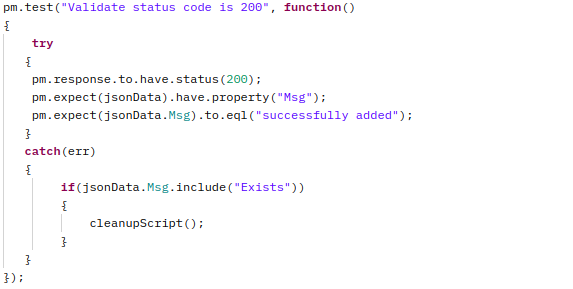
Advantage: Leverages conditional scripts to control request execution, improving efficiency and preventing unnecessary failures.
Chain API Requests Dynamically
Pass data from one request to another to simulate real-world workflows and automate end-to-end testing.
Example: Capture a book ID & Use It in the Next Request.
Step 1: Set a book Id
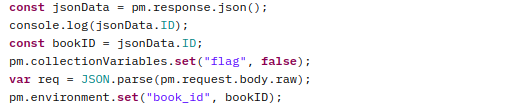
Step 2: Get book details
{{base_url}}/Library/GetBook.php?ID={{book_id}}Advantage: Automates end-to-end testing by dynamically utilizing real API responses, ensuring more realistic and efficient testing flows.
Handle Pagination Automatically
If an API returns paginated data, automate fetching all pages.
Example:
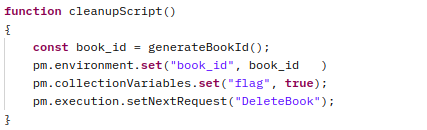
Advantage: Automates fetching all available data without manual intervention, ensuring complete and efficient data retrieval for testing.
6. Automation and Testing
- Collection Runner: Run collections in bulk with the Collection Runner to test APIs with a range of data or parameters.
- Running collections manually and scheduled: Execute collections on demand or schedule them to run at set intervals for automated testing and monitoring.
- Integration with CI/CD pipelines: Automate API tests by integrating Postman collections with CI/CD pipelines to ensure continuous testing and delivery.
7. Best Practices
- Structuring collections for reusability: Organize collections with reusable variables, requests, and tests for efficiency and easy maintenance.
- Naming conventions: Adopt clear, consistent naming to improve readability and simplify management.
- Managing authentication: Use environment variables or collection-level authorization to streamline authentication across requests.
- Response validation techniques: Ensure correct API responses with built-in validation and custom test scripts.
Conclusion
Organizing and reusing API collections in Postman enhances testing efficiency, consistency, and scalability. By grouping endpoints, using environment variables, and applying version control, teams can streamline workflows and accelerate development. With Postman, complex API testing becomes simpler, saving time and effort.
References
https://blog.postman.com/the-good-collection
https://blog.postman.com/document-your-api-like-a-pro-postman-collection-best-practices