


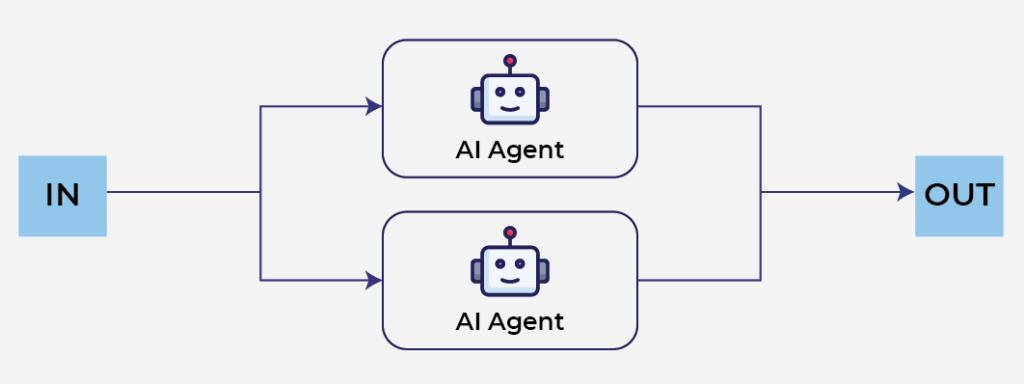
Large Language Models are excellent at reasoning, but asking a single agent to solve a complex problem often creates a bottleneck. One agent has to plan the work, gather information, analyze everything, and produce the final answer sequentially.
A better approach is to split the work into multiple independent tasks that can execute simultaneously. This is exactly the pattern implemented in the uploaded LangGraph example. Instead of one agent doing everything, a planner divides the problem into several sub-topics, multiple researcher agents investigate those topics in parallel, and a synthesizer combines all findings into a final report.
This article walks through how this architecture works, why LangGraph is a good fit for implementing it, and when this parallel-agent pattern actually makes sense.
📚 Introduce to LangGraph
LangGraph is an orchestration framework for building stateful AI applications. Instead of writing long procedural code, you model your application as a graph consisting of:
- Nodes that perform work
- Edges that determine execution flow
- Shared state that moves between nodes
- Reducers that merge data produced by multiple branches
We define a workflow using a StateGraph.
def build_graph():
    graph = StateGraph(OverallState)

    graph.add_node("planner", planner_node)
    graph.add_node("researcher", researcher_node)
    graph.add_node("synthesizer", synthesizer_node)

    graph.add_edge(START, "planner")
    graph.add_conditional_edges("planner", fan_out_to_researchers, ["researcher"])
    graph.add_edge("researcher", "synthesizer")
    graph.add_edge("synthesizer", END)

    checkpointer = MemorySaver()
    return graph.compile(checkpointer=checkpointer)
🔄Sequential Agents and Parallel Agents
⏳Sequential workflow
Sequential Agents and Parallel Agents
User Question
      │
      ▼
Planning
      │
      ▼
Research Topic A
      │
      ▼
Research Topic B
      │
      ▼
Research Topic C
      │
      ▼
Generate Report
Each step waits for the previous one to finish.
If every research task takes 10 seconds, three topics require roughly 30 seconds before report generation even begins.
This approach is simple but inefficient whenever tasks are independent.
⚡ Parallel workflow
The parallel agent implements a different execution model.
             User Question
                    │
                    ▼
               Planner Agent
                    │
      ┌─────────────┼─────────────┐
      ▼             ▼             ▼
 Researcher 1   Researcher 2   Researcher 3
      │             │             │
      └─────────────┼─────────────┘
                    ▼
             Synthesizer Agent
                    │
                    ▼
              Final Report
Instead of one researcher doing all the work, the planner creates multiple independent research tasks.
Each researcher:
- performs a web search
- summarizes its assigned topic
- returns findings
Only after every researcher finishes does the synthesizer generate the final report.
The implementation even logs timestamps and thread names to demonstrate that researchers are executing concurrently.
🏗️ The Architecture of Parallel Agents
The architecture consists of three specialized agent types.
1. Planner
The planner receives the original user question and produces a structured research plan.
Instead of returning plain text, it uses structured output:
structured_llm = llm.with_structured_output(Plan)class SubTopic(BaseModel):
"""A sub-topic generated by the Planner and assigned to a Researcher."""
title: str = Field(description="Short name for the sub-topic")
research_question: str = Field(description="The specific question the researcher must answer")
class Plan(BaseModel):
"""Structured output of the Planner node."""
sub_topics: list[SubTopic] = Field(
description="A list of 2-5 sub-topics to research in parallel, with NO overlapping content"
)The Plan model contains a list of SubTopic objects.
Each sub-topic includes:
- title
- research question
The prompt explicitly instructs the planner to create independent topics with no overlap.
This is important because duplicated work wastes both time and token cost.
2. Researcher
Every sub-topic becomes an independent researcher.
Rather than manually creating multiple nodes, LangGraph dynamically creates them using Send.
def fan_out_to_researchers(state: OverallState):
    """
    This is the core mechanism of parallel agents:
    returning a list of Send objects tells LangGraph to run N instances of
    researcher_node in parallel, each with its own separate state.
    """
    return [
        Send("researcher", {"query": state["query"], "sub_topic": st})
        for st in state["sub_topics"]
    ]
Send(
"researcher",
{
"query": state["query"],
"sub_topic": st
}
)Each researcher performs exactly the same workflow:
- Search the web using Tavily
- Build context from search results
- Ask Claude to summarize
- Return findings
- Record token usage
Because each researcher receives its own state, there is no interference between branches.
def researcher_node(state: ResearcherState) -> dict:
    sub_topic = state["sub_topic"]
    thread_name = threading.current_thread().name
    print(f"[START] {sub_topic.title:<25} thread={thread_name:<20} t={_now_str()}")

    # Step 1: search the web for this sub-topic
    response = search_tool.invoke({"query": sub_topic.research_question})
    results = response.get("results", [])
    sources = [result["url"] for result in results if "url" in result]
    context = "\n\n".join(
        f"[{result.get('url', 'unknown')}]\n{result.get('content', '')}" for result in results
    )

    # Step 2: summarize with the LLM based on the search results
    summary_msg = llm.invoke(
        f"""Based on the sources below, write a summary (150-250 words) answeringthe question:
        "{sub_topic.research_question}"

        Sources:
        {context}

        Only use information found in the sources — do not make anything up. If the sources
        don't provide enough information, say so explicitly."""
    )

    finding: Finding = {
        "title": sub_topic.title,
        "summary": summary_msg.content,
        "sources": sources,
    }
    usage = _usage_from_message(f"researcher:{sub_topic.title}", summary_msg)

    print(f"[END]   {sub_topic.title:<25} thread={thread_name:<20} t={_now_str()}")

    # Return lists because findings and token_usage both use the operator.add reducer
    return {"findings": [finding], "token_usage": [usage]}
This makes the design highly scalable.
Whether there are two researchers or ten, the graph structure remains unchanged.
3. Synthesizer
Once all researchers complete, LangGraph automatically joins every branch.
No manual synchronization logic is required.
def synthesizer_node(state: OverallState) -> dict:
    findings_text = "\n\n".join(
        f"## {finding['title']}\n{finding['summary']}\nSources: {', '.join(finding['sources'])}"
        for finding in state["findings"]
    )

    report_msg = llm.invoke(
        f"""You are a research analyst. Based on the findings below (each researchedindependently by a separate agent),
        write a coherent synthesis report answering the original question.

        Original question: {state['query']}

        Findings from the researchers:
        {findings_text}

        Requirements:
        - Write a clearly structured report (introduction, key points, conclusion)
        - Point out any contradictions between sources
        - List the sources at the end"""
    )
    usage = _usage_from_message("synthesizer", report_msg)
    return {"final_report": report_msg.content, "token_usage": [usage]}
The synthesizer simply receives:
- every finding
- every source
- the original query
It asks Claude to generate:
- an introduction
- key findings
- contradictions between sources
- a conclusion
- a source list
The synthesizer never performs additional research.
Its only responsibility is combining information already collected.
This separation of responsibilities makes each agent much simpler.
✅What This Pattern Is Actually Good For
Parallel agents work best when tasks are independent.
The uploaded project demonstrates one excellent example: research aggregation.
Other suitable scenarios include:
- Market research across multiple competitors
- News aggregation from different sources
- Technical documentation analysis by section
- Reviewing multiple PDFs independently
- Comparing product reviews from several websites
- Large codebase analysis by module
The pattern is less suitable when each step depends on the previous one.
For example:
- solving mathematical proofs
- debugging code step by step
- multi-turn planning where later decisions depend on earlier outputs
Those workflows benefit more from sequential reasoning than parallel execution.
The key question is simple:
Can this task be divided into independent pieces?
If the answer is yes, parallel agents are often a strong architectural choice.
🎯Conclusion
The architecture separates responsibilities into three clear roles:
- Planner breaks down the problem.
- Researchers solve independent sub-problems simultaneously.
- Synthesizer combines everything into a coherent answer.
If your application involves decomposing independent work—such as research, document analysis, or information aggregation—this parallel-agent pattern is a practical and scalable design that is well worth adding to your LangGraph toolkit.
Sample code: https://github.com/Chau-NH/langgraph-parallel-agents