



Introduction
High-performance computing (HPC) is an IT infrastructure strategy that combines groups of computing systems to perform simultaneous, complex calculations across trillions of data points. A single computing system is limited in its processing capacity by its hardware and is less useful in running simulations for fields like climate modeling, drug discovery, genomic research, and more. HPC technologies can use multiple computing systems in parallel to increase processing speed exponentially. HPC use of specialized hardware and software to run complex and data-intensive tasks at high speed and efficiency.
In recent years, HPC technologies have evolved from running scientific simulations to running AI models and workloads at scale.
What Is HPC Used For?
High-Performance Computing (HPC) is like a supercharged engine for solving big problems fast. It’s used in many fields where regular computers just aren’t powerful enough. Here are some real-world examples:
Media & Entertainment
HPC helps studios render complex 3D animations, process high-quality video, and stream live events smoothly. It speeds up production and reduces costs—think faster movie editing and better CGI effects.
Healthcare & Genomics
Doctors and researchers use HPC to analyze DNA, predict how proteins fold, and discover new medicines. Hospitals also use it with AI to read medical scans, personalize treatments, and manage patient records more efficiently.
Government & Defense
Governments rely on HPC for national security tasks like decoding encrypted messages, analyzing surveillance data, and running military simulations. It ensures they have the computing muscle to respond quickly and accurately.
Climate & Weather Modeling
Predicting weather and understanding climate change involves processing huge amounts of data. HPC helps simulate how air and water move across the planet, which is key for forecasting storms and tracking long-term climate trends.
Finance
Banks, insurance companies, and investment firms use HPC to run complex models that predict market trends, assess risks, and optimize portfolios. It helps them make smarter decisions faster.
Automotive Industry
Car makers use HPC to simulate crash tests, test materials, and improve designs. It’s also essential for developing self-driving cars, which rely on real-time data processing and decision-making.
Cybersecurity
HPC helps detect unusual network activity, spot threats early, and run encryption algorithms. It’s a powerful tool for keeping systems secure and responding to cyberattacks in real time.
How does HPC work?
High-performance computing aggregates the computing power of several individual servers, computers, or workstations to provide a more powerful solution. This process of many nodes working together is known as parallel computing. Each individual machine in this system is called a node, with many nodes coming together to form a cluster. Each node in the system is responsible for managing a different task, and all work in parallel to boost processing speed.
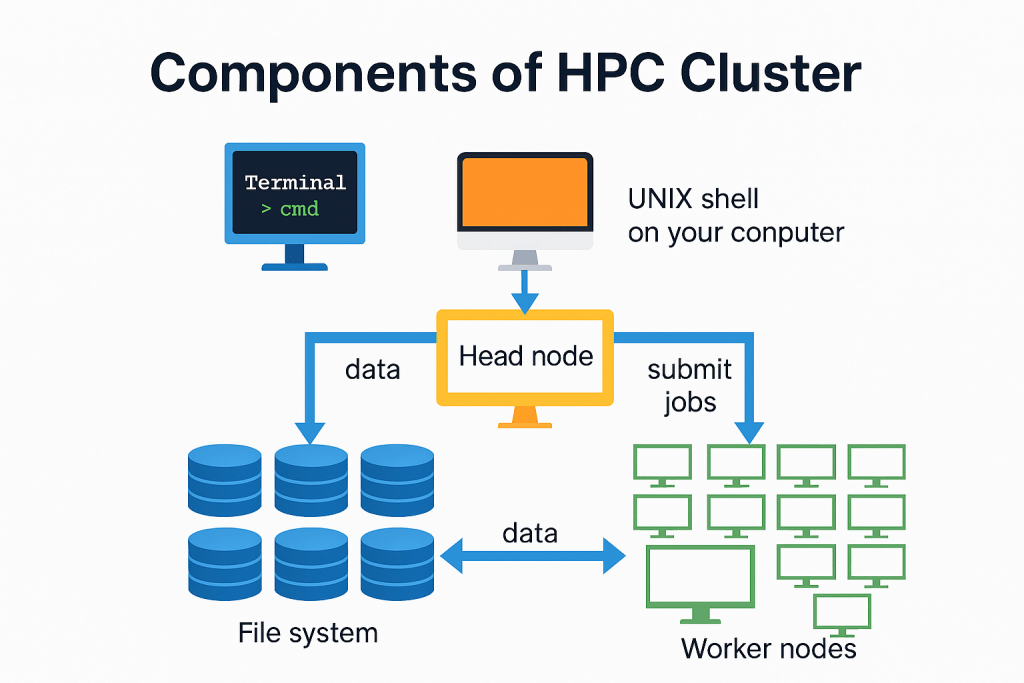
UNIX Shell (User Interface)
This is where users interact with the HPC system. Typically, they use a command-line interface (CLI) like a terminal to submit jobs, check status, and manage files. It’s the entry point for accessing the cluster remotely.
Head Node (Job Scheduler & Cluster Manager)
The head node is the brain of the HPC cluster. It:
• Receives job submissions from users.
• Schedules tasks across worker nodes.
• Manages cluster resources and monitors job progress.
• Often runs software like Slurm, or AWS ParallelCluster to handle job orchestration.
Worker Nodes (Compute Nodes)
These are the machines that actually perform the heavy computations. Once the head node assigns a job, the worker nodes:
• Run simulations, models, or data processing tasks.
• Work in parallel to speed up execution.
• Can scale up or down depending on workload (especially in cloud environments like AWS EC2).
File System (e.g., FSx for Lustre)
HPC workloads often require fast access to large datasets. The file system:
• Stores input data, intermediate results, and final outputs.
• Is shared across all nodes to ensure consistency.
• FSx for Lustre is a popular choice on AWS due to its high throughput and low latency.
Data Flow & Job Submission Paths
Here’s how everything connects:
- User submits a job via the UNIX shell.
- Head node receives the job and schedules it.
- Worker nodes execute the job, reading/writing data from/to the file system.
- Results are stored and can be retrieved by the user.
How can AWS support your HPC requirements?
AWS HPC fully managed services allow you to accelerate innovation with virtually unlimited HPC cloud infrastructure. For example
- AWS Parallel Computing Service offers a fully managed service that you can use to build complete, elastic environments that can host your high-performance computing workloads.
- AWS ParallelCluster is an all-in-one open-source cluster management tool that simplifies managing HPC clusters on AWS.
- Amazon Elastic Fabric Adapter helps users to run HPC and ML applications at the scale they need, offering the ability to scale to thousands of GPUs or CPUs.
- Amazon DCV is a remote display protocol that helps customers access a secure way to deliver remote desktops and application streaming over various network conditions.
Example: How to build and run a HPC cluster using AWS Paralellel cluster
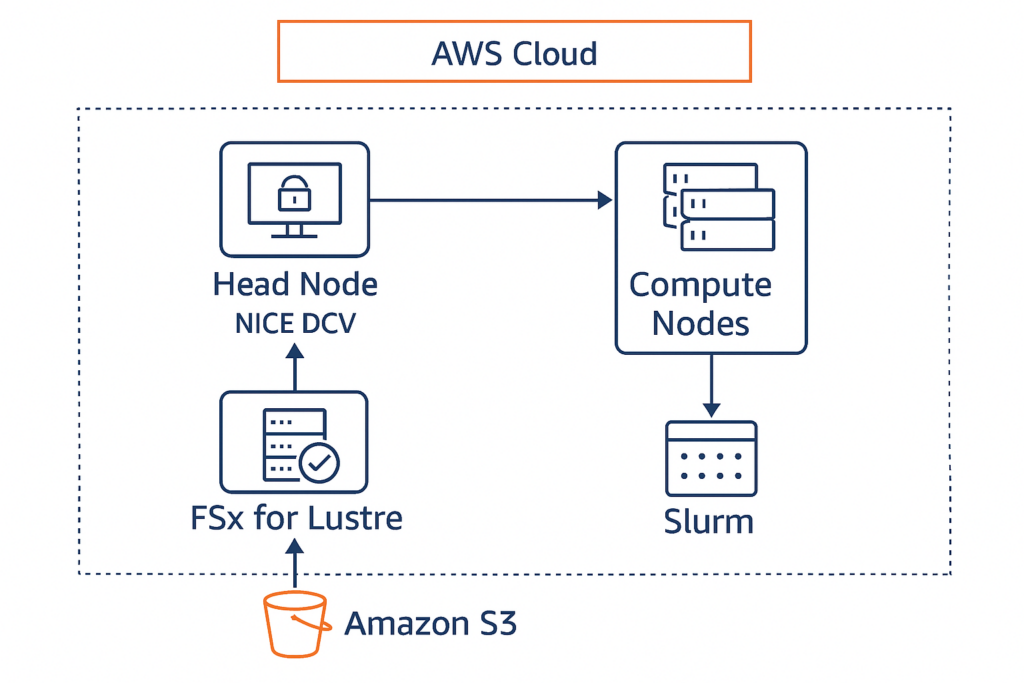
This setup includes:
- Head Node with NICE DCV enabled
- Compute Nodes for parallel workloads
- FSx for Lustre as shared storage
- S3 for data staging
- Slurm as the job scheduler
Save this as hpc-dcv-config.yaml:
Region: us-east-1
Image:
Os: alinux2

HeadNode:
InstanceType: c6i.4xlarge
Networking:
SubnetId: subnet-xxxxxxxx
Ssh:
KeyName: my-key-pair
Dcv:
Enabled: true
Port: 8443

Scheduling:
Scheduler: slurm
SlurmQueues:
- Name: compute-queue
ComputeResources:
- Name: compute-node
InstanceType: c6i.8xlarge
MinCount: 0
MaxCount: 10
Networking:
SubnetIds:
- subnet-xxxxxxxx

SharedStorage:
- MountDir: /fsx
Name: fsx-lustre
StorageType: FsxLustre
FsxLustreSettings:
StorageCapacity: 1200
DeploymentType: SCRATCH_2
ImportPath: s3://my-hpc-input-data
ExportPath: s3://my-hpc-output-data

Monitoring:
CloudWatch:
Enabled: true
Logs:
GroupName: /parallelcluster/hpc-dcv
StreamName: head-node-logs
Install ParallelCluster and Create the Cluster
pip install aws-parallelcluster
pcluster create-cluster --cluster-name hpc-dcv-cluster --cluster-configuration hpc-dcv-config.yaml --region us-east-1
Once the cluster is ready:
- Get the public IP of the head node.
pcluster describe-cluster --cluster-name hpc-dcv-cluster --region us-east-1 - SSH into the head node using:
pcluster ssh hpc-dcv-cluster --region us-east-1 - If you enabled NICE DCV in your config file (
Dcv: Enabled: true), it should be pre-installed and running. Access NICE DCV in Your Browser:https://<head-node-public-ip>:8443
Submit a Job
SSH into the head node or use DCV terminal:
sbatch my_job_script.sh
#!/bin/bash
#SBATCH --job-name=test-job
#SBATCH --output=output.txt
#SBATCH --ntasks=4
#SBATCH --time=00:10:00

echo "Running HPC job on $(hostname)"
sleep 60
What It Does:
#SBATCHdirectives: These are instructions for the Slurm scheduler:--job-name=test-job: Names the job.--output=output.txt: Saves the job’s output to a file.--ntasks=4: Requests 4 parallel tasks (can run on 4 cores or nodes).--time=00:10:00: Limits the job to 10 minutes.
echo "Running HPC job on $(hostname)": Prints the name of the machine running the job.sleep 60: Simulates a workload by pausing for 60 seconds.
The output file (output.txt) will contain something like:
Running HPC job on ip-10-0-0-123When you submit a job using Slurm on your HPC cluster, you can use the squeue command to check its status:
JOBID     PARTITION     NAME            USER   ST       TIME  NODES    NODELIST(REASON)
12345     compute       test-job        hieu   R        0:05     1      ip-10-0-0-123
Conclusion
High-Performance Computing (HPC) is no longer limited to traditional supercomputers – it’s now accessible, scalable, and cost-effective thanks to cloud platforms like AWS. By combining powerful EC2 instances, fast shared storage with FSx for Lustre, and orchestration tools like AWS ParallelCluster, organizations can run complex simulations, process massive datasets, and accelerate innovation across industries.
Adding NICE DCV to your HPC setup brings a user-friendly remote desktop experience, making it easier for researchers, engineers, and analysts to interact with their workloads visually and securely.
Whether you’re in genomics, finance, automotive, or media production, HPC on AWS empowers you to solve problems faster, collaborate more effectively, and scale as needed – all without managing physical infrastructure.